Okay, so now you have yourself a name to go by and are heading for Trench Wars. But you ask the simple question, "What do the gadjets on my screen mean?" Well, that's why we are here.
The Energy instraments.


Your ship carries a certain amout of energy with it. In trench Wars, it is usually around 1500 energy for each ship. Using thrusts and shooting depletes this energy for a certain period of time untill it recharges. The other little icons on this status box are for different things in the zone. The squiggilly blue line shows the frequency you are on. In public arenas, this is comprised of frequency 0 or frequency 1, which are public frequencies. The green flag shows the number of flags your team has, which is the left number, and how many a teamate is currently holding, the right number.
The Radar
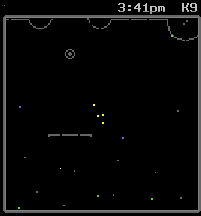
Your radar helps you see friendly and enemy ships that are around you. Yellow dots are friendly, blue dots are enemy. It also lets you see the terrain around you. Get used to looking at your radar, it becomes your best friend. The Letter and number above the upper right hand corner of the radar are the Coordinates you are located at. For example, "A1" would be the upper left hand corner of the zone. Then there's that little nifty in game clock, so you always know what time it is.
Now, basic controls. Moving your ship. Use the arrow keys on your keyboard, or the ones on your keypad to move your ship. If you use the keypad, make sure number lock (NUMLOCK) is off.
Want a burst in speed? If you press and hold down shift while pressing the forward or backward arrow key, it'll boost your speed. Beware though, this takes energy.
Time to learn how to fire bullets and bombs. To fire bullets, make sure you have a sufficient amount of energy to fire them, then press "Ctrl" which will fire your weapon.
Firing bombs is the same deal, except instead of hitting "Ctrl" you hit "Tab." Pretty easy huh?
This is about all you need to know to play. You will learn about the rest of the weapons later.
Next |
