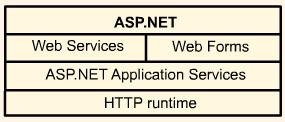
ASP.NET component of Framework environment
ASP.NET
ASP.NET is the .NET Framework's platform for building managed web applications and service solutions.
ASP.NET supports a large variety of compiled languages, including VB.NET, C# and JScript.NET. The .NET Framework Software Development Kit (SDK) provides sufficient functionality to build and deploy full featured ASP.NET applications. Deployment of ASP.NET applications on a web server is dramatically simple. Deply an application using XCOPY to copy the application and files to a location. ASP.NET web pages are compiled and considered type safe. VB.NET and C# can be used to develop ASP.NET web pages. An ASP.NET supported web page can be identified with the .ASPX suffix.
Sample ASP.NET with VB.NET
The following directives have to be imported:
The following import directives are automatically available in ASP.NET pages:
Web forms
Permit building interactive web applications using events. There are two parts - the HTML presentation template and the executable code.
Event handling
Event handling in Web Forms differs from that in traditional Windows GUI apps in that events raised by server controls are handled on the server. All server control events pass two arguments - an object representing the object that raised the event and an object containing information specific to the event.
A postback event is an event triggered by the user that sends information to the server for processing. To check whether a page has been posted back, you use the IsPostBack property - to prevent overwriting. A nonpostback event does not cause an immediate post. Such events are cached until a post occurs and pending events are then processed together. In order for a control to capture a postback event, it must implement the IPostBackEventHandler interface.
Event bubbling allows events to be passed to the event handlers that can handle them most efficiently. Some server controls act as containers for other controls. Events are passed up a container hierarchy. A parent control does not have to do anything when an event is passed to it. Alternatively, it can do some processing and let bubbling resume. Or it can stop bubbling and handle the event. The methods RaisebubbleEvent and OnBubbleEvent enable a control to participate in event bubbling.
Provided you have an event handler with the right signature, you can bind a control event to it at runtime. You can create an event handler in Web Forms at runtime by including an AddHandler VB statement, which must be executed before the event is raised.
Another sample app:
This is all I have for now on this subject -> there is much more but this learning experience has taken a back seat for some time.
This page last updated Aug 01 04 9:43pm
* complex application development support
* backward compatability
* simplified deployment
* code efficiency
* extensibility
* tool support
* fault tolerance
< %@ Page Language="vb" CodePage="1251"
       Src="WebShop.vb" ClassName="WebShop"
       Description="A simple web-based book shop"
       Trace="false" % >

< %@ Import namespace="System.Net % >
< html >
    < head >
         < title > Web Book Shop < /title >
    < /head >
    < body >
        < form id="WebShop" runat="server" >
System.drawing
System.resources
System.Web.Mail
System
System.Collections
System.Collections.Specialized
System.Configuration
System.IO
System.Text
System.Text.RegularExpressions
System.Web
System.Web.Caching
System.Web.Security
System.Web.SessionState
System.Web.UI
System.Web.UI.HtmlControls
System.Web.UI.WebControls
Using code blocks in Web Forms
< html >
   < head >
       < title > Adding Numbers < /title >
       < script language="vb" runat="server" >
       dim i as integer
       Function Add(Par1 as integer, par2 as integer) as integer
           Return(Par1 + Par2)
       End Function
       < /script >
    < /head >
    < body >
        < h1 > Adding numbers < /h1 >
        < % For i=1 to 10 % >
        < %=1% >
        +
        < %=2*1% >
        =
        < %=Add(i,2*i)% >
        < br >
        < % Next % >
   < /body >
< /html >
< html > < head >
   < title > Product delivery page < /title >
   < script language="vb" runat="server" >
   Sub btn_Click(sender As Object, btnArgs _
    As EventArgs)
      Dim days, price As String
      If del_type.Items(0).Selected Then
         days = "15"
         price = "$7"
      Else
         days = "2"
         price = "$20"
      End If
      Response.Write(days)
      Response.Write(" days and will cost ")
      Response.Write(price)
   End Sub
   < /script >
< /head > < body >
< h2 > Please select your delivery details
< /h2 >
< form runat="server" id="Form1" >
   Delivery address: < br >
   < textarea id="address" rows="5"
    runat="server" id="address" > < /textarea >
   < p > Delivery type: < br >
   < select id="del_type" runat="server" >
    name="del_type" >
      < option > Standard < /option >
      < option > Express < /option >
   < /select > < /p >
   < p > < input type="submit" id="button"
    value="Submit Data" runat="server"
    OnServerClick="btn_Click" name="button"  >
   < /p >