Preface - there is alot of information and much to learn to master database programming using .NET Framework and Visual Studio. This will be a good reference point for me to make sure I'm coding things right until I grasp this process. You are welcome to learn what I have learned - see below for my learning experience with ado.
ADO.NET
A collection of .NET classes, developed to provide the ability to access data from databases on the Web or locally without the need for a permanent connection. Using ADO.NET classes enables you to build web services and web applications. ADO.NET's data-access model is disconnected, it offers better scalability than tranditional client/server models. This object model is designed around a disconnected architecture where connections between applications and databases are maintained only long enough to retrieve or update data.
Before reading: I have purposely provided limited information on stored procedures and SqlServer in this tutorial.
Table of contents for ADO VB.NET code samples:
DB Connection
Connection open SqlException
Execute datareader - read-only fast forward
Execute datareader with read
Define new dataset
Assign datatable to a dataset
Adding new datacolumns to datatable
Adding datacolumn properties and constraints
Datacolumn expressions
Dataset, table and column example
Sample XSD/XML schema file
Load XML schema file into dataset
Fill a dataset
Adding a primary key to datatable
Adding a foreign key to datatable
Add data binding to controls
Checking datarow status
Adding new rows of data to a table
Raising a data row error
Checking for data row errors, clearing them
Handling datatable events
Handling datatable and errors
Using transactions
Update method
Merge two datasets into one
Handling update errors
Loading XML as dataset
Reading XML as document
XML text writer
ADO.NET WEB sample code
Disconnected data source: Mobile phones and the internet
Advantages are greater scalability and more suitable to the world wide web
Connected data source: Offline applications
Advantages are improved data security and data integrity
Disconnected data source includes reading data, updating data offline then merging updates into live data. XML running over HTTP allows sending structured data through firewalls and crosses platforms making XML critical for disconnected applications.
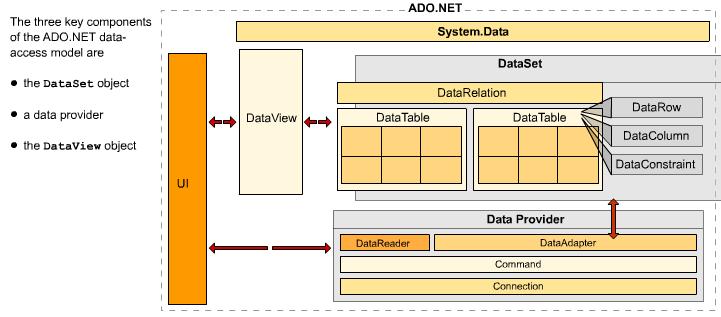
The dataset object derives from the system.data namespace. It encapsulates an in-memory cache of all the data and associated metadata that an application retrieves from a data source. The dataset is logically linked to a dataadepter object on the data provider. The object is used to query the data source and populate datasets from it. The dataset object comprises 1-n tables, with rows, columns and constraints and 0-n relations between tables.
DataRelation objects describe child/parent relations between DataTables. They belong to the Relations collection of the DataSet.
DataTable objects belong to a collection called Tables. The datatable contains a number of collections such as columns and rows, which describe and populate tables within the dataset.
DataRow objects belong to a collection called rows. They store a modifiable row of table data. To ensure changes can be tracked, a datarow also keeps a copy of the original data copied from the data source.
DataColumn objects contain metadata about columns - their names, the type of data they can contain and whether intersecting rows can be NULL rows. They are found in the Columns collection of the datatable.
DataConstraint objects ensure that data integrity is maintained when tables are changed. They're found in the Constraints collection of the Datatable.
Dataset objects are populated by the data provider's DataAdapter object. The dataadapter also handles queries to the data source and merges changes with it. You can modify DataSet objects offline, independently of any connections, commands and cursors.
XML enables the dataset object to be transported over the wire.
The DataView object allows you to sort, filter, or find data in a DataTable. It does not contain fresh data, but provides a view into existing data within a DataTable. All datatable objects contain a default view property pointing to a default dataview object. The DataView object is especially important for binding data to data-bound controls on web forms or widnow forms. Switching between differently configured DataView objects allows the user to view the same DataTable in different ways - a user could have one view of data sorted by customerid and another sorted by customername.
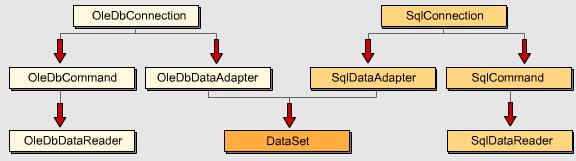
The DataSet object isn't responsible for actual messaging of data over the wire. That task belongs to the data provider, which manages the interface between and application and a data source by implementing data-access classes. Data provider classes are database dependent; ADO.NET supports
OLE DB system.data.oledb
SQL Server system.data.sqlclient
ODBDC system.data.odbc
The DataReader object lets you access data-source data in forward only, read only mode. It comes into being as the return value from the ExecuteReader method of the Command class.
Application data DataTables are members of the Dataset. Select, update, Insert and Delete statements comprise the DataAdapter. The Connection object handles interfacing between the command object and the database.
ADO.NET objects invoke methods to open or close connections and to move data between the dataset, the data provider and the data source. The Fill dataflow method invokes the Select statement, the Update dataflow method invokes the Insert and Delete statements, the Execute method runs a query against a datasource, and the Open/Close method establishes a connection to the data source.
Selecting an ADO.NET data provider
Data providers have all functionality required to interact with a data source. There are a number of providers to establish db connection. These allow connection for read, update and adding.
Top
ConnectionString
Dim Conn as oledb.oledbconnection
Conn=New oledb.oledbconnection()
try
conn = new oledb.oledbconnection("Provider=Microsoft.Jet.OLEDB.4.0;Data Source=C:\MyDb.mdb;User Id=mk;Password=testpass;Integrated Security=SSPI;Pooling=True;Connection TimeOut=30;")
catch ex as oledb.oledbexception
messagebox.show("Unable to open")
finally
' do something
end try
Try
Conn.open()
catch ex as oledb.oledbexecption(br>
messagebox.show("Connection open failed")
finally
Conn.close()
Conn.Dispose()
Conn=nothing
end try
Using Dispose and setting the connection object to nothing ensures all resources are returned back to the operating system.
Using a dataadapter objects FILL method
Try
NewAdapter=new oledbdataadapter("Select CompanyName from Company, Conn)
NewAdapter.Fill(NewDS)
catch...
finally...
If there are a series of DataAdapter objects using the same connection it is more efficient to explicitly open the connection once, call each FILL method then close the connection. The dataadapter fill method will automatically close a connection it opened.
ConnectionState
* Broken
* Closed
* Executing
* Fetching
* Open
The event StateChange can be used to handle changes in connection state. If a connection has a nonfatal error, the InfoMessage event is activated. SqlErrors have a class property that indicates the level of severity of the error returned by SQL Server. A level of 1-10 indicates information messages only with higher levels indicate more severe errors. If level is higher than 19, the connection is closed and SqlException is thrown.
Try
   Conn.open()
   catch ex as invalidoperationexception
      msgbox("Major connection error")
   catch ex as sqlclient.sqlexception
      msgbox ("SQL error opening conn" & ex.message)
      select case 17:Screenmsg="Invalid server name"
          case 18452:Screenmsg="invalid user"
          case 18456:screenmsg="invalid password"
          case 4060:screenmsg="Invalid db"
          case else:screenmsg="Unknown source of sql exception"
      end select
   finally
end try
Connection pooling
For OLE DB providers connection pooling is enabled by default and shut off by assigned -4 to the OLE DB Services= attribute on a connection.
For SQL Server providers (default pooling is enabled):
Connection Lifetime= integer (seconds elapse before a release conn removed from pool)
Pooling= boolean (true or false)
Min Pool Size=integer (num conn auto allocated to a new pool)
Connection Reset= boolean (true or false - auto reset upon app release conn)
Max Pool Size= integer (num conn in a pool before requests are queued)
Enlist= boolean (true or false - requested conn joins tran context in force)
Creating command objects
A command object is composed of:
* an sql statement string, the name of a database table, or the name of a stored procedure
* a connection object
* a set of parameters
ExecuteScalar method; returns an integer object (count of).
DataReader object with a Command object returns fast read forward access to a set of rows. One row is kept in memory at any given time. Close the DataReader promptly to release the connection. Sample datareader code:
Top
oCmd=new oledbcommand()
with oCmd
    .CommandText=strSQL
    .Connection=(new oledb.oledbconnection(Conn))
    .Connection.open()
    .CommandType=data.commandtype.text
    oDr=.ExecuteReader(CommandBehavior.SequentialAccess)
end with
CommandBehavior values:
CloseConnection - closes connection after datareader is closed
Default - no flags set
KeyInfo - returns column and primary key
SchemaOnly - returns column info only
SequentialAccess - large volumes of binary read for efficiency
SingleResult - returns a single result set only
SingleRow - returns single row
DataReader methods:
GetXXX (column) - allows you to extract column specified as type e.g. getstring or getdatetime
GetName(column) - returns name of specified column
NextResult() - moves datareader forward to next result set, returns false if there is no result set available
Read() - advances to the next row of the current result set, returns false if at end of result set or true for a valid row
GetSchemaTable() - gets a Datatable describing column metadata
GetOrdinal(colname) - returns the ordinal position of the named column
Close() - closes the datareader and releases the connection
IsDbNull(column) - indicates whether column contains null values or not
DataReader properties:
FieldCount - return number of columns in current result set or 0 if no set
RecordsAffected - number of rows affected by updates, inserts, deletes
IsClosed - queries reader to determine if closed or not
Item - returns value of a given column in its native format
Sample DataReader code:
Top
oDR=.executereader(commandbehavior.sequentialaccess)
namelist.items.clear()
Do while oDR.Read()
    oItem=new ListItemString()
    oItem.ID=oDR.getstring(ID)
    oItem.Value=oDR.getstring(LNAME) & ", " & oDR.getstring(FNAME)
    namelist.items.add(oItem)
Loop
oDR.Close()
oConn.Close()
Note: the sql select statement has already specified what column contains which data. If unknown, you need to question the datareader to discover them:
    oItem.ID=oDR.Item("ID").ToString()
    oItem.Value=oDR.Item("LNAME").ToString() & ", " & oDR.Item("FNAME").ToString()
To process multiple result sets, you can use two SELECT statements within the same string:
SSQL="Select Product from Products Select CompanyName from Company"
oDR.NextResult() would be used to advance read to the next result set.
The DataSet and disconnected access
ADO.NET has two primary access models to choose from � direct access through
Command objects combined with DataReaders, or disconnected access using
DataSets.

A DataSet is like an offline database, or a cache of Datatables in memory.
DataSets are composed of multiple DataTables and the relationships between
them. You work with a DataSet by filling it with data from DataAdapters and
then closing the connection to the database. You can then manipulate or change
the data offline and, if you want, return your changes back to the original
database. The population of the DataSet and any updates back to the data
source are the responsibility of one or more DataAdapters.

Once you close the connection to the data source, there is no longer a
relationship between the data source and the DataSet. The DataSet exists
entirely independently of the data source, even when changes to the DataSet
data are made. A DataSet allows you to work with multiple result sets from a
number of disparate sources. The DataTables can correspond to single data
source tables, but more often they correspond to a table that is the result of
a complex JOIN of many tables. If you require only a single DataTable, with no
relationships to other tables, it's more efficient to use an individual
DataTable object with a corresponding DataAdapter. This avoids the overhead
associated with supporting an entire DataSet.

There are many advantages to using the DataSet disconnected model. For
example, DataSets are ideal if you anticipate holding data for long periods,
perhaps displaying large amounts of data to a user with the likelihood of
sorting or filtering that data several times. Because connections to the
original data source are not kept open, the scalability and flexibility of
your application are enhanced. Users can also reliably work with data even
when completely disconnected from the original data source. For example, this
makes mobile applications ideally suited to being built with a DataSet model.

A DataSet allows you to integrate XML, relational, spreadsheet, and flat file
data. All data sources are treated equivalently once within the DataSet. This
allows you to use the same programming model regardless of the data source,
thereby simplifying the task of programming. ADO.NET uses XML as the format
for managing and moving data from a data source to a DataSet object and back.
This permits the transfer of the DataSet and its associated metadata across
firewalls to other applications with relative ease. Metadata is stored as an
XSD (XML Schema Description) schema. This metadata enables you to create typed
DataSets, which you can access either directly or programmatically. Visual
Studio .NET can also utilize the metadata to provide IntelliSense, which can
help you a great deal when you are programming. IntelliSense makes language
references easily accessible.

The DataSet makes it easy to transport data between logical tiers, such as the
business or presentation tiers. So data changes made in one tier can easily be
transported back to another tier with minimal programming. The DataSet
supports merging changes with the original copy of the DataSet, which
facilitates efficient updating between tiers.

A DataSet can represent quite complex parent/child relationships between
DataTables. You can therefore manipulate complex sets of data while still
applying the relevant constraints on the data. You can also bind the DataSet
to DataGrids or other sophisticated controls that allow the user to navigate
these parent/child hierarchies.

Scenarios for disconnected access
Sometimes you will have to choose between a
disconnected DataSet model and a direct approach using Command objects and
DataReaders. It is often preferable when using ASP.NET applications to use the
direct approach of Command objects and DataReaders. This is because web data
needs to be re-created each time the page is refreshed, thereby relinquishing
the need to save the data in a DataSet. However, sometimes there are
circumstances where using a DataSet can make more sense. For example, if you
are integrating data from different data sources, a DataSet might be your only
option for bringing all the data in to one manageable location before it's
displayed.

A DataSet is also useful if you need to transfer data to another application
or web service. If users need to modify data, it's often more efficient to
cache a copy of the DataSet to collect the changes, and then to update that
data source once all the changes are complete. Sending updates to the data
source in response to changes made by the user wastes resources because it
requires you to open connections too often and for too long. Generally it's
practical to use DataSets in most circumstances, but in certain circumstances,
such as doing a read-only scan through data, you will need to use Command
objects and DataReaders. In contrast, if you wish to bind data to a form using
data binding controls such as the DataGrid, you must use a DataSet.

You can build web services to utilize DataSets as input and output arguments
for methods. This can be an extremely powerful means to transfer data to and
from web services because data is transferred as XML and is self-describing.

Summary
There are two primary access models in ADO.NET � direct access using
Command objects and DataReaders or disconnected access using DataSets. The
nature of your application often dictates the choice of data access model. For
example, mobile applications are ideally suited to being built with a DataSet
model.


A DataSet allows you to work with multiple result sets from disparate sources.
The DataSet exists entirely independently of the data source, even when
changes to the DataSet data are made. Because connections to the original data
source are not kept open, the scalability and flexibility of your application
are enhanced.
DATASETS
Datasets are in memory small databases that permit work with data while disconnected from the original source. Datasets present a relational view of data regardless of its source. Datasets contain DataTables accessed with Tables and DataRelations collections. The DataTables both describe and hold data.
Each Datatable consists of DataRows, DataColumns and DataConstraints. Each DataRow contains one row of relational data. There are ways to extract column values, navigating to parent or child rows and for editing values. DataColumns contain a description of the data in each row, such as its type, maximum size and if nulls are permitted.
ADO.NET data objects are found on the vb.net toolboox (design view) by clicking the "Data" group.
To complete stored procedure Ado.net access:
Add the DataAdapter to your project
Right Click Generate Dataset
Add a datagrid to your form
Datasource properties of your datagrip control must be your datasource row
Add code behind your form (double click the form) to load the datagrid on load - Me.Adapter.fill should load your data
Programming a dataset includes: using a DataSet constructor, adding DataTables, DataRelations and Constraints as required. Example of creating a dataset:
Top
Public dsPublication as New Dataset("Books")
Friend dsAuthor as New Dataset("Authors")

Public Sub createdataset()
    Dim dsOrders as dataset
    dsOrders = New Dataset ("Orders")
end sub
The DataSetName is saved as a document element of the XSD schema for the DataSet. Default name is NewDataSet if unused. To make a DataTable belong to a dataset, you create it first then add it to the DataSet.
Top
Public sub createdataset()
   dim dsorders as dataset
   dsorders = new dataset("orders"0

   dim dtCusts as new datatable("customer")
   dsorders.tables.add(dtCusts)
   dim dtOrders as datatable = dsorders.tables.add("OrdersByRegion")
end sub
The "dim dtorders as" statement is an example of overloading.
DataSet table names are not case sensitive except when there are two exact same table names with different character cases.
DataColumns define the structure of DataTables. When creating them or through Add method of the Columns collection, you must specify the variable name in code, DataColumnName and data type.
Dim dtorders as datatable = dsorders.tables.add("Ordersbyregion")

dim dcOrderId as new DataColumn("Order ID", getType(system.data.sqltypes.sqlint32))

dim dcregion as new datacolumn("Region", type.gettype("System.string"))
dim dcamount as new datacolumn("Amount", gettype(Decimal))

dtorders.columns.add(dcorderid)
dtorders.columns.add(dcregion)
dtorders.columns.add(dcamount)

' below creates a datacolumn and adds it to a datatable with a single line of code
dtorders.columns.add("ProductName", Type.Gettype("System.String"))

Dim dcfullname as datacolumn = dtcusts.columns.add("fullname", gettype(string), "Firstname + ' ' + LastName")
Constraints
Relationship databases ensure data integrity by enforcing rules or constraints on columns. Constraints may be defined either in code or by using Visual Studio .NET tools. For any constraint to take effect, EnforceConstraints property must be set to true.
mYDS.enforceconstraints=true
Datacolumn properties:
* Unique - determines whether duplicate values can exist within a column
* ReadOnly - determines if value can be modified after addition to a table
* PrimaryKey - determines whether a column or columns define a datatable row uniquely
* AllowDbNull - determines if null values can exist in a column
Example
Top
dim dtorders as datatable = dsorders.tables.add("ordersbyregion")
dim dcorderid as new datacolumn("order id", gettype(system.data.sqltypes.sqlint32))
dim dcregion as new datacolumn("region", type.gettype("system.string"))
dim dcamount as new datacolumn("amount", gettype(decimal))

dtorders.columns.add(dcorderid)
dcorderid.readonly=true
dcorderid.unique=true

dtorders.columns.add(dcregion)
dtorders.columns.add(dcamount)

dtorders.columns.add("productname", type.gettype("system.string"))

dim ucorderregions as new uniqueconstraint ("ordersandregions", new datacolumn() {dcorderid, dcregion})

dtorders.contraints.add(ucorderregions)

dtorders.primarykey = new datacolumn() {dcorderid, dcregion}

dcorderid.readonly=true
dcorderid.autoincrement=true
dcorderid.autoincrementseed=10 ' first value assigned
dcorderid.autoincrementstep=2  ' incremented by...
Custom Datacolumn expressions
DataColumn values can depend on calculations performed on one or more other datacolumns within or outside the same datatable. This is a custom expression using the add method of the columns collection.
Top


public sub createdataset()
   dim dsorders as dataset
   dsorders = new dataset("orders")

   dim dtcusts as new datatable("Customers")
   dsorders.tables.add(dtcusts)

   dim dcfirstname as datacolumn = dtcusts.columns.add("Firstname", gettype(string))
   dim dclastname as datacolumn = dtcusts.columns.add("Lastname", gettype(string))
   dim dcfullname as datacolumn = dtcusts.columns.add("Fullname", gettype(string), "Firstname + ' ' + Lastname")


end sub
To define related columns in different tables, you can preced the column name with child or parent.
Dim dcfullname as datacolumn=dtcusts.columns.add("Fullname", gettype(string), "Child.Firstname + ' ' + Child.Lastname")
If there are multiple child tables:
Dim dcfullname as datacolumn=dtcusts.columns.add("Fullname", gettype(string), "Child(NameRelation).Firstname + ' ' + Child(NameRelation).Lastname")
With custom expressions you can specify functions such as Sum, Count and Max.
Dim dcorderamount as datacolumn=dtcusts.column.add("Orderamount", gettype(system.decimal), "Sum(Child.Amount)")
To create a new dataset using the .NET GUI; drag and drop the dataset control from the data menu of the toolbox to a form. A wizard is started.
Sample dataset vb.net code
Top
Private Sub MakingDataSets()

   Dim dsV As New DataSet("VacationSystem")
   dsV.EnforceConstraints = False

   Dim dtEmployees As New DataTable("Employees")
   dsV.Tables.Add(dtEmployees)
   Dim dtVacations As DataTable = dsV.Tables.Add("Vacations")

   'Define columns for Employees table
   Dim dcEmployeeID As New DataColumn _
      ("EmployeeID", GetType(System.Int32))
   With dcEmployeeID
      .AllowDBNull = False
      .AutoIncrement = True
      .AutoIncrementSeed = 0
      .AutoIncrementStep = 1
   End With
   Dim dcEmployeeName As New DataColumn _
      ("EmployeeName", GetType(System.String))
   Dim dcEmployeeFreeDays As New DataColumn _
      ("FreeDays", GetType(System.Int32))
   Dim dcEmployeeDaysBooked As New DataColumn _
      ("DaysBooked", GetType(System.Int32), "Sum(child.Days)")
   dtEmployees.Columns.Add(dcEmployeeID)
   dtEmployees.Columns.Add(dcEmployeeName)
   dtEmployees.Columns.Add(dcEmployeeFreeDays)

   'Define columns for Vacations table
   Dim dcVacationID As New DataColumn _
      ("VacationID", GetType(System.Int32))
   Dim dcDays As New DataColumn("Days", GetType(System.Int32))
   dcDays.DefaultValue = 5
   Dim dcEmployID As New DataColumn _
      ("EmployeeID", GetType(System.Int32))
   With dcEmployID
      .ReadOnly = False
      .Unique = False
   End With
   dtVacations.Columns.Add(dcEmployID)
   dtVacations.Columns.Add(dcVacationID)
   dtVacations.Columns.Add(dcDays)

   dtEmployees.PrimaryKey = New DataColumn() {dcEmployeeID}
   dtVacations.PrimaryKey = New DataColumn() {dcEmployID, dcVacationID}
   Dim drelMain As New DataRelation _
      ("EmployeeVacations", dtEmployees.PrimaryKey, _
      New DataColumn() {dcEmployID}, True)

   dsV.Relations.Add(drelMain)
   dtEmployees.Columns.Add(dcEmployeeDaysBooked)

End Sub
XSD Schemas
ADO.NET stores and transmits data as XML. The relational data in a dataset must map to the XML format used in tramission. XML Schema Definition Language (XSD) files serve this purpose.
To add/build an XML schema
From the Visual Studio Project menu, choose Add New Item.
Do one of the following:
* To add a schema, access the appropriate folder and double-click XML Schema. An XML Schema file (.xsd file) is added to your project.
* To add a dataset, access the appropriate folder and double-click DataSet. An XML Schema file and typed DataSet class file (.vb or .cs file) are added to your project.
SQL Server XML View Mapper 1.0
Microsoft� SQL Server View Mapper enables you to produce an XML View schema file that relates an XDR schema to a SQL Server schema. Using this tool and the documentation requires a working knowledge of both XML and database concepts and terminology. (Please note this is for server programming - search on microsoft.com)
XSD file
< xs:element name="dsnew" msdata:isdataset="true" msdata:locale="en-IE" >
  < xs:complextype >
     < xs:choice maxoccurs="unbounded" >
        < xs:element name="Customers" >
           < xs:complextype >
              < xs:sequence >
                 < xs:element name="CustomerId" type="xs:string" / >
                 < xs:element name="ContactName" type="xs:string" minoccurs="0" / >
              < /xs:sequence >
           < /xs:complextype >
        < /xs:element >
     < xs:element name="Employees" >
        < xs:complextype >
The < complexType > element usually maps to tables in a relational structure. At the bottom of the XSD schema are < unique > and < keyref > elements for unique constraints and parent/child relationships.
    < xs:unique name="Constraint1" msdata:PrimaryKey="true" >
       < xs:selector xpath=".//mstns:Customers" / >
       < xs:field xpath="mstns:CustomerId" / >
       < xs:field xpath="mstns:CustomerTypeID" / >
       < xs:field xpath="mstns:Expr1" / >
    < /xs:unique >
  < /xs:element >
< /xs:schema >
Visual Studio .NET has several tools to view and define XSL schemas. See above for instructions.
You can load an XSD schema dynamically into a Dataset using either ReadXMLSchema method or the InferXMLSchema method of the dataset object.
Example shows a schema has already been generated and stored in a file called dsNew.xsd.
sub form_load
  ' define new dataset
   dim newDs as new dataset()

  ' read schema from a file
  newDs.readxmlschema("C:\ADO\dsNew.xsd")

  ' output formatted schema information
  debug.writeline(newDs.datasetname())
  dim dtable as datatable
  for each dtable in newDs.tables
      Debug.writeline(dtable.tablename)

end sub

(Sample debug output)
newDs
Customers
   -           CustomerId
   - Unique?   False
   - Type      System.string
   -           CompanyName
   - Unique?   False
Use the WriteXMLSchema method to export a dataset's schema to an XSD Schema file using the following as arguments: a TextWriter, a stream, an XmlWriter or a string.
ADO.NET relationships
The dataadapter is a bridge between the data source and your ADO.NET Dataset. A set of Command objects are used to populate the dataset and update the data source.
DataAdapter Command Object instances of SqlCommand/OdbcCommand/OleDbCommand:
SelectCommand - select query
UpdateCommand - Update action query
InsertCommand - Insert action query
DeleteCommand - delete action query
To populate a Dataset, you create a connection object, a command object, and a dataadapter object with its selectcommand set to the command object. The dataadapter objects Fill method opens the connection, runs the query and populates the target dataset with the result set from the query. When you call the Fill method for a populated dataset, it does not clear existing rows, extra rows are appended to the datatables. To clear populated data you must first call the dataset's Clear method.
.Fill resulting in an integer of number of records filled:
Top
Dim noOfRecords as integer
noOfRecords=sqldataadpater1.fill(dsCustomer)
' fills specified dataset, creates a new database for the result set; tables adopt default names such as table, table1, etc
Additional examples of fill
sqldataadapter.fill(dsCustomer,"Customers") ' datatable is filled and named
numrecords=sqldataadapter.fill(dscustomer, 10, 50, "Customers")
' example returns only records from 10th position on and limits to max of 50
dim dtcusts as datatable = dscustomer.tables.add("Customers2")
sqldataadapter.fill(dtcusts)
' fills specified datatable with data from generated result set
You can fill a dataset even if a design time schema does not exist. The schema can be created at runtime when the structure of data is known. You can control how a dataset schema is created and modified by setting MissingSchemaAction property of the DataAdapter at runtime.
Relationships
The simplest building block for all relationships is the primary key.
Top
newDS.tables("Customers").PrimaryKey = new DataColumn() {CustColumn}
newDS.tables("Orders").PrimaryKay= new datacolumn() {.columns("OrderId"))
Foreign key constraints
Dim fkCustOrders as foreignkeyconstraint = new foreignkeyconstraint("FK_CustomerOrders", oCustColumn, oOrdersColumn)
moDS.Tables("Customers").constraints.add(fkCustOrders)

' data relation example
dsNet.relations.add("pkCustOrds", pkcust, pkords, True)
Data Binding
Data binding allows you to associate records in a data source with controls on a form for automated viewing and editing. There are two types of binding in the .NET framework: Simple (one record or column at a time) and Complex (multiple records bound to a single control - datagrid/listbox/combobox/etc). Data bindings can be accomplished by adding the binding into a control. Some situations require you bind data at runtimes:
* when you want to use information gained at runtime only
* when the data source does not exist at design time
* when you want to use an array or collection not instantiated until runtime
This code binds the text property of the salesname control to the salespersonname column of the dvsales dataview:
Top
me.txtsalesname.databindings.add("Text", dvsales, "SalesPersonName") btnprevious.enabled=false
The following example uses the BindingContext property to access the CurrencyManager associated with the custorders1 Customers table.
Dim binder as BindingManagerBase

Private Sub frmbind_load(byval sender as system.object, byval e as system.eventargs)
   Handles mybase.load
      me.sqldataadapter.fill(Custorders)
      binder=me.txtcustomername.bindingcontext(Custorders, "Customers")
End Sub

Private sub btnNext_Click(byval sender as system.object, byval e as system.eventargs)
   Handles btnNext.Click
     binder.position  += 1
     if binder.position=binder.count-1 then ' (count tells you num rows)
        btnNext.enabled=false
     end if
     if binder.position=0 then
        btnprevious.enabled=false
     end if
end sub
Data changes
When data is modified at the row level with data tables, the changes are not reflected at the original data source. Data changes first occur with a DataTable of a DataSet - the source is updated later using the DataAdapter. DataTables have many properties and methods associated with:
* accepting or rejecting row changes in bulk AcceptChanges and RejectChanges
* keeping track of row status
* maintaining multiple verions of each row so rollbank is possible
* suspending and resuming events during row changes
A RowState property is assigned with each datarow object providing current status of a row. The row state can assume one of five DataRowState enumeration values:
* Unchanged
* Modified - AcceptChanges has yet to be called
* Added - row has been added before a call has been made to AcceptChanges
* Deleted - row has been deleted and that AcceptChanges has not been called
* Detached - row has been created but is not yet part of any datarowcollection
To access a particular version of changed row data use the DataRowVersion enumeration when using the Item property.
if drnew.hasversion(datarowversion.proposed) then
   i = drnew.item("EmployeeID", datarowversion.proposed)
end if
Accessing a nonexistant version will trigger an exception system.data.versionnotfoundexception. Versions are Original, Default, Current and Proposed. Use HasVersion on the datarow passion the DataRowVersion in question to prevent the versionnotfound exception.
Top
debug.writeline("RowState=" & drnew.rowstate.tostring)
if drnew.hasversion(datarowversion.current) then
   debug.writeline("Current:" & drnew.item(0, datarowversion.current))
end if
if drnew.hasversion(datarowversion.default) then
   debug.writeline("Default:" & drnew.item(0, datarowversion.default))
end if
if drnew.hasversion(datarowversion.original) then
   debug.writeline("Original:" & drnew.item(0, datarowversion.original))
end if
if drnew.hasversion(datarowversion.proposed) then
   debug.writeline("Proposed:" & drnew.item(0, datarowversion.proposed))
end if
You can add new rows of data to a table as soon as you have created the datatable and defined appropriate columns and constraints.
Sample add row code
private sub createrows()
   ' create new row: method 1
   ' use the add method of the rows collection
   ' pass an array of objects to the add method
   dtsales.rows.add(new object() {101, "Barney Smith", "999-8888-0122"})
   dtsales.rows.add(new object() {103, "Tim Green", "777-1111-0122"})

   ' creating a new row: method 2
   ' base the row on the existing table schema
   dim drextra as datarow = dtsales.newrow()
   drextra("employeeid")=101
   drextra("salespersonname")="Barney Smith"
   drextra("ContactPhone")="999-8888-0122"
   dtsales.rows.add(drextra)

end sub
You may not be able to change values without triggering constraints of some kind. A UniqueConstraint may be violated. ADO.NET provides three methods you can use to suspend constraint checking on the row while you are editing it, these are
BeginEdit - starts an edit operation, constraint triggering are suspended and uses the proposed for data changes
EndEdit - confirms edits and reactivates the constraints, Current version of changed data entry is assigned the proposed value
CancelEdit - rolls back the edits clearing proposed values and leaving current value as it was
AcceptChanges and RejectChanges methods end an edit operation automatically. It's necessary to call AcceptChanges after calling EndEdit if you want the dataset to accept the changes permanently.
Deleting rows
There are two methods available in Visual basic to delete a row from a table:
Remove of the rows collection, complete removal and doesn't mark for deletion
Delete of the datarow object, marks row for deletion
Handling errors in the process of changing data in a datatable
The RowError property of a datarow tracks any problems with the data in a row. When updating a series of rows, you can record all errors to those rows when their values are set so they may be handled in bulk later rather than instantly.
if date.compare(drtarget.orderdate, date.today)<>0 then
   drtarget.rowerror="The order date must be set to today"
end if
if datediff(dateinterval.day, drtarget.requireddate, drtarget.orderdate)<5 then
   drtarget.rowerror="You must allow at least 5 days for delivery"
end if
By setting the RowError property, a string, to any non blank value, you set the row's HasErrors property to true. In addition the HasErrors property of the datatable and the dataset are also set to true. If your table contains errors, these should be resolved before accepting changes otherwise you might commit inaccurate information. This code reads the HasErrors property of the dataset to determine if the datatables must be checked.
private sub checkerrors()

   ' check the dataset for errors first
   if custorders1.haserrors then
      ' check each table for errors
      if custorders.customers.haserrors then
         ' handle customer errors here
      end if
      if custorders1.orders.haserrors then
         dim dr as custorders.ordersrow
         for each dr in custorders1.orders.geterrors
             ' handle the errors here....
             ' then clear the erros
             dr.clearerrors()
         next
      end if
  end if
  custorders1.acceptchanges()

end sub
When ClearErrors is called, the RowError value is changed to an empty string, also the HasErrors property resets to False. When all tables in the dataset have all their errors resolved the dataset's HasErrors property is set to false too.
Handling datatable events
The process of changing information in a datatable raises events that can optionally be handled. You may add handlers for these events using the AddHandler statement.
private sub addHandlers()
   addhandler custorders1.customers.columnchanging, new datacolumnchangeeventhandler(addressof column_changing)

   addhandler custorders1.customers.rowchanging, new datarowchangeeventhandler(addressof row_changing)

end sub
There are six standard events that may be triggered by changes made to the datatable:
* ColumnChanging
* ColumnChanged
* RowChanging
* RowChanged
* RowDeleting
* RowDeleted
private sub column_changing(byval sender as object, byval e as system.data.datacolumnchangeeventargs)
   if e.column.columnname="EmployeeID" then
      if e.proposedvalue<1000 then
         throw new system.data.exception("Invalid employee ID")
      end if
    end if
end sub
If the event handler subroutine throws an exception the proposed change is cancelled.
Logic that permits recovery of all previously deleted rows:
If currentRow.RowState = DataRowState.Deleted then
Sample code handling errors
Public Class frmEmployees
Inherits System.Windows.Forms.Form

#Region " Windows Form Designer generated code "

   'Class-level variables
   Dim WithEvents dtEmploy As Employees.EmployeesDataTable
   Dim WithEvents base As BindingManagerBase
   Dim currentRow As Employees.EmployeesRow

   Private Sub frmEmployees_Load(ByVal sender As System.Object, _
      ByVal e As System.EventArgs) Handles MyBase.Load

      'Loads data from Northwind.Employees table
      Me.SqlDataAdapter1.Fill(Me.Employees1.Employees)
      dtEmploy = Employees1.Employees
      'ReadOnly turned off for primary key so new ones can be added
      dtEmploy.EmployeeIDColumn.ReadOnly = False
      'Base is used to reference the currently bound row
      base = Me.BindingContext(Employees1, "Employees")
      'Sets row count label and Next and Previous buttons
      updateCountofRows()

   End Sub

   'Sets row count label and Next and Previous buttons
   Private Sub updateCountofRows()
      lblRowCount.Text = "Row " & base.Position + 1 & " of " & base.Count
      btnNext.Enabled = Not (base.Position = base.Count - 1)
      btnPrevious.Enabled = Not (base.Position = 0)
   End Sub

   'Position property of BindingManagerBase changes
   Private Sub base_PositionChanged _
      (ByVal sender As Object, ByVal e As System.EventArgs) _
      Handles base.PositionChanged
      updateCountofRows()
   End Sub

   Private Sub btnNext_Click(ByVal sender As System.Object, _
      ByVal e As System.EventArgs) Handles btnNext.Click
      base.Position += 1
   End Sub

   Private Sub btnPrevious_Click(ByVal sender As System.Object, _
      ByVal e As System.EventArgs) Handles btnPrevious.Click
      base.Position -= 1
   End Sub

   'Returns next available EmployeeID
   'Calculates max EmployeeID + 1
   Private Function getNextEmployeeID() As Integer
      Dim high As Integer = 0
      For Each currentRow In dtEmploy.Rows
         high = Math.Max(high, CInt(currentRow.EmployeeID))
      Next
      Return high + 1
   End Function

   Private Sub btnAdd_Click(ByVal sender As System.Object, _ ByVal e As System.EventArgs) Handles btnAdd.Click

      Dim top As Integer = base.Count 'Position of the new row
      Dim drNew As Employees.EmployeesRow

      drNew = dtEmploy.NewRow()
      'drNew is a typed DataRow
      'drNew columns directly accessible
      drNew.EmployeeID = getNextEmployeeID()
      drNew.LastName = ""
      drNew.FirstName = ""
      drNew.HomePhone = "(nnn)-nnnn-nnnn"
      'Birth date defaults to 18 years old
      drNew.BirthDate = DateAdd(DateInterval.Year, -18, Date.Today)
      drNew.HireDate = Date.Today

      dtEmploy.Rows.Add(drNew)
      base.Position = top

   End Sub

   Private Sub btnDelete_Click(ByVal sender As System.Object, _
      ByVal e As System.EventArgs) Handles btnDelete.Click
      currentRow = dtEmploy.Rows.Find(txtID.Text)
      If Not currentRow Is Nothing Then
         currentRow.Delete()
      End If
   End Sub

   Private Sub btnConfirm_Click(ByVal sender As System.Object, _
      ByVal e As System.EventArgs) Handles btnConfirm.Click
      currentRow = dtEmploy.Rows.Find(txtID.Text)
      currentRow.AcceptChanges()
   End Sub

   Private Sub btnReject_Click(ByVal sender As System.Object, _
      ByVal e As System.EventArgs) Handles btnReject.Click

      currentRow = dtEmploy.Rows.Find(txtID.Text)
      currentRow.RejectChanges()
      'Refreshes the bound controls
      base.Position += 0
   End Sub

   Private Sub btnRecover_Click(ByVal sender As System.Object, _
      ByVal e As System.EventArgs) Handles btnRecover.Click

      For Each currentRow In dtEmploy.Rows
         If currentRow.RowState = DataRowState.Deleted Then
            currentRow.RejectChanges()
         End If
      Next
      updateCountofRows()
   End Sub

   Private Sub dtEmploy_RowChanging(ByVal sender As Object, _
      ByVal e As System.Data.DataRowChangeEventArgs) Handles dtEmploy.RowChanging

      If e.Row.HasVersion(DataRowVersion.Current) Then
         Debug.WriteLine("Row " & e.Action.ToString & _
         " = " & e.Row.Item(0, DataRowVersion.Current))
      End If
   End Sub

   Private Sub dtEmploy_ColumnChanging(ByVal sender As Object, _
         ByVal e As System.Data.DataColumnChangeEventArgs) _
         Handles dtEmploy.ColumnChanging

      If e.Column.ColumnName = "BirthDate" Then
         If DateDiff(DateInterval.Year, _
            CType(e.ProposedValue, Date), Date.Today) < 18 Then
            e.Row.RowError = "Employee must be at least 18 years old"
         End If
      End If

   End Sub

   Private Sub btnExit_Click(ByVal sender As System.Object, _
   ByVal e As System.EventArgs) Handles btnExit.Click

      'Cancel means do not exit
      'No means exit without changes
      'Yes means exit with changes, but confirm errors
      Dim result As DialogResult
      result = MessageBox.Show _
      ("Do you want to confirm all changes before exiting?", _
         "Confirm", MessageBoxButtons.YesNoCancel)
      If result = DialogResult.Cancel Then
         Return
      End If
      If result = DialogResult.No Then
         dtEmploy.RejectChanges()
      Else ' Result=DialogResult.Yes
         'Check table for errors before saving
         If dtEmploy.HasErrors Then
            Dim drErr As Employees.EmployeesRow
            Dim i As Integer = 0
            While i < dtEmploy.Rows.Count
               drErr = dtEmploy.Rows(i)
               If drErr.HasErrors Then
                  result = MessageBox.Show _
                  ("Error in row " & drErr.EmployeeID & " with this message: " & _
                  drErr.RowError & ". OK to save, or Cancel save?", _
                  "Error warning", MessageBoxButtons.OKCancel)
                  If result = DialogResult.Cancel Then
                     'Don't save row with errors
                     drErr.RejectChanges()
                  Else
                     Debug.WriteLine("Row, " & drErr.EmployeeID & _
                     ", with error message saved: " & drErr.RowError)
                  End If
                  drErr.ClearErrors()
               End If
               i += 1
            End While
         End If
         dtEmploy.AcceptChanges()
      End If
      Application.Exit()

   End Sub


End Class
Update choices and strategies
When you are updating a data source with ADO.NET's disconnected-DataSet
architecture, you need to make strategic choices based on a number of issues:
there are far fewer cursor types to choose from in ADO.NET than in ADO
there are fewer locking strategies in ADO.NET
you may need to deal with data-change conflicts and referential integrity
issues
you may need to deal with optimistic concurrency violations

You should make these choices at a very early stage of the development process
when you are designing a data application that needs to update data. This is
especially true if you are designing an application for a large number of
users. The strategy you choose will have implications across all layers of
your application.

At the user-interface layer, you must arrange suitable means of handling data-
change conflicts so the user is alerted when such a conflict occurs and is
aware of the need to provide an appropriate remedy. For example, if a user
makes a series of changes to data and one of the rows cannot be updated due to
a conflict with another user's changes, you must design the user interface to
provide appropriate options to help resolve the problem.

At the business-logic layer, you must strive to maintain the integrity and
validity of the underlying data source, while meeting the needs of users. For
example, suppose you are designing a mobile, offline application for traveling
engineers who are allowed to place orders for new machinery offline, relying
on a cache of the latest products stored in a local DataSet. It is possible
that when the engineers establish a connection to the central database to try
to process their orders, products they thought were in stock could be sold out
or discontinued. You should design the application to take account of such
potential problems, while making it as easy as possible for the engineers to
find alternative products.

Updating data sources using ADO.NET's disconnected data-access model involves
a two-step process of
modifying the data in a DataSet
sending the data to the data source

Changes to a DataSet don't impact at the original data source until you
explicitly execute a SQL UPDATE, DELETE, or INSERT command against it. Data
changes in a DataSet or DataTable take place in a batch-optimistic manner �
when you have finished modifying the DataSet and wish to write the changes to
the original source, the changes are written together at one time as a batch.
No locks are held on the original data source while you are modifying it in
memory. This optimistic locking strategy contrasts with the case of ADO, which
allows pessimistic locking on data at the data source to prevent users
modifying it inadvertently.

Using ADO.NET methods and objects for updating Probably the simplest overall
strategy for updating data is to allow ADO.NET DataAdapters to handle data
updates. In order to update data successfully, your DataSets maintain multiple
versions of each row's data � current, default, original, and proposed.
Current data gets written out to the data source, and the original value is
used to locate the record in the database. Ideally, before beginning an
update, proposed rows should be closed off by using either the EndEdit or
CancelEdit method to end the internal transaction. When you call a
DataAdapter's Update method, you initiate a chain of processing. The Update
method can be called for a single row, a series of rows, a DataTable, or an
entire DataSet.

First the DataAdapter's Update method scans through each row against which it
is called. It locates modified, deleted, and new rows. The DataSet has marked
each of these with a RowState of Modified, Deleted, or Added as appropriate.
Rows with a status of Detached or Unchanged are passed over. The DataAdapter
then uses the Command object appropriate to the row's status � UpdateCommand
for Modified rows, DeleteCommand for Deleted rows and InsertCommand for Added
rows. Each change takes place individually and involves a round-trip to the
server.

The Command objects can be generated by the Data Adapter Configuration Wizard
based automatically on the SELECT statement you provide. However, the
statement must involve a single table only, and the Command object can be
generated at design time only. As an intermediate solution, you could use the
CommandBuilder class to generate the SELECT statements at runtime. More
complex SELECT statements involving multiple tables or JOIN statements must be
written manually.

At the end of the Update sequence, you can refresh the DataSet with the latest
version of the data from the data source by re-executing the original SELECT
query. Generally, you will then wish to call AcceptChanges on the DataSet to
reset the RowState and RowVersion for each row.

In more complex cases, particularly involving related parent/child tables, you
must ensure that deletes and inserts take place in the correct order. For
example, you must insert parent rows before inserting related child rows. And
you must delete records in the opposite direction, deleting child records
first, and only then deleting the parent records � the DataAdapter cannot work
these sequences out automatically. However, you can generate subsets of the
target DataSet or DataTable using the GetChanges method. This method takes a
RowState argument to specify which subset of the table or DataSet to return.
You can then process Deleted child records first, then Deleted, Updated, or
Inserted parent records. Finally, you process the Updated or Inserted child
records.

Conflict resolution During the Update process, problems such as clashes and
conflicts can occur. These will probably be the result of another user having
altered or deleted a row after you have read it and before you attempt to
update it. Alternatively, it could be that another user has a lock on the row,
or that referential integrity or a data validation rule has been broken. In
such cases, ADO.NET alerts you to the conflict and provides you with options
for how to deal with it. What is important, however, is that you plan the
design of your application so that it can take account of such problems at the
user interface. Users making changes that subsequently result in clashes
should be suitably informed and given the chance to resolve the error before
proceeding. Batches of updates can be wrapped in transactions that can be
rolled back if necessary.

Another strategy is to rely on directly writing out changes to your data
source using either stored procedures or SQL commands. You might have some
batch changes to make to your data that can be made through calling an
appropriate stored procedure, such as modifying salaries or updating tax
rates. Generally, you don't need to read data back into a DataSet in the first
place. Instead, you access the data directly using Connection objects and
Command objects. Even when you are using a DataSet, you can manually write out
changes singly as they are made, bypassing the DataAdapter's Update method
entirely. However, this requires that you handle transactions and referential
integrity issues manually.

Summary
Updating a data source in ADO.NET involves a number of strategic
decisions related to how you modify the data in a DataSet and how you send the
data to the data source.

The simplest strategy is to allow DataAdapters to handle the updates. The
Update method scans each row and looks for RowStates of Modified, Deleted, or
Added. An appropriate Command object works with the row depending on the
state.

Clashes and conflicts can occur in the Update process. ADO.NET provides you
with options for how to deal with these problems. For example, you can
implement batch updating or use stored procedures or SQL statements.
Transactions
Database applications must deal with unforeseen events such as crashes, disconnections, hardware failure and software failure. And they must also deal with contentions between different users for the same data. To begin a transaction, you invoke the BeginTransaction method of the Connection object.
private sub ordergoods()
   ' define transaction object
   dim trordermade as sqlclient.sqltransaction
   ' begin transaction and retrieve object
   cnngoods.open()
   trordermade=cnngoods.begintransaction("OrderGoods")
   Try
     'enlist command objects in the transaction
      cmdinventories.transaction=trordermade
      cmdorders.transaction=trordermade
      cmdorders.executenonquery()
      cmdinventories.executenonquery()
      trordermade.commit()
   catch ex as exception
     trodermade.rollback()
   finally
     cnngoods.close()
end sub
Isolation
When a single transaction accesses data in perfect isolation, data is read in a predictable way. Every read and query yields the same results. However, when several transactions access the same data at once the following unpredictable phenonema can occur:
* dirty reads - invalid data reads
* nonrepeatable reads - data changed by another transaction
* phantom reads - different transaction inserts new row but has not been sent to other query
Isolation levels determine the degree to which you lock data and prevent transactions from interfering with each other. Setting isolation levels for transactions helps you to determine what - if any - concurrency violations and bad reads your application is prepared to tolerate. When you declare a transaction using BeginTransaction you can specify an isolation parameter.
Isolation         Description          Lost  dirty  nonrepeatable  phantom
                                     updates reads    reads          reads
Chaos             only disallows        Yes    Yes    Yes            Yes
                  overwriting of
                  pending changes
                  for transactions
                  with a higher
                  isolation level
ReadUncommitted   Disallows reading     No      Yes    Yes            Yes
                  of corrupt data
ReadCommitted     Enforces shared       No      No     Yes            Yes
                  locks during reads
RepeatableRead    Enforces locks on     No      No     No             Yes
                  all query data,
                  preventing external
                  update
Serializable      Places a range lock   No      No     No              No
                  on the data source,
                  preventing insert
                  and update action
                  until a transaction
                  completes
Getting and merging data changes in ADO.NET with VB.NET
Updating a data source in a disconnected environment is a complex procedure, so a range of ADO.NET methods have been created to deal specifically with the issues that arise in this process. Among these are GetChanges, Update and Merge methods.
Updating an original data source using dataset is a four step process:
* populating a dataset from data source, app user makes modifications while disconnected
* generating a smaller dataset containing just the modifications that need to be made
* sending the changes to the underlying data source
* handling concurrency violations arising from the attempted update
The most efficient way of sending a dataset containing update information to data source is to use the dataset's GetChanges method. This creates a new dataset containing only the rows of the dataset that have been modified since the last AcceptChanges or initial Fill.
' getchanges
' gets all changes to dscusts and places them into dsnew
dsnew=dscusts.getchanges()

' gets only added rows and places them into dsnew
dsnew=dscusts.getchanges(datarowstate.added)

' gets added and modifed rows and puts them into dsnew
dsnew=dscusts.getchanges(datarowstate.added or datarowstate.modified)
Generally to send update information to the data source, you use a dataadapter's Update method. You use the relevant dataset's own dataadapters which were used to populate it.
' update method
' update an entire dataset
dacusts.update(dscusts)

' update a single table within a dataset
dacusts.update(dscusts, "Customers")

' update an array of datarows
dacusts.update(dtcustomers.select(nothing, nothing, dataviewrowstate.added))

' update a datatable with a dataset
dacusts.update(dscusts.tables(0))

' update changes only within a dataset
dacusts.update(dscusts.getchanges(datarowstate.modified))
Update methods should be used from within a try...catch block
'always put update within a try block
try
   'update the customers datatable
    dacusts.update(dscusts, "customers")
catch ex as exception
   msgbox("Update failed: " & ex.message
end try
Sequence to minimize data integrity errors
* Use getchanges to generate a dataset containing only deleted rows from the child datatable
* Use update to execute delete commands on the child datatable
* Use getchanges to generate a dataset containing inserted, updated and deleted rows in the parent datatable
* Use update to execute insert, update and delete commands on the parent datatable
* Use getchanges to generate a dataset containing inserted and updated rows in the child datatable
* Use update to execute insert and update commands on the child database
The overloaded Merge method enables you to merge two datasets with approximately similar schemas. You use merge primarily to merge changes made to the same dataset across different application layers before applying all the changes to the data source together. When merge is used in conjunction with getchanges, it reduces the amount of data that needs to be transferred between layers.
'merge
Dim ds1 as dataset
dim ds2 as dataset

'merge two datasets
ds1.merge(ds2)     ' the source dataset is ds2, target dataset is ds1
The Merge method's optional MissingSchemaAction parameter enables you to specify how the method will deal with schema elements that belong to the source dataset and not to the target dataset. Merge can take an optional boolean argument PreserveChanges. When preservechanges is set to true the method retains existing modifications in the target dataset. That is the contents of the current version of each relevant datarow are preserved during the merge process. Default setting of preservechanges is false. After the merge process is complete a constraintexception is thrown if there are any constaints that can't be re-enabled. In such a case you need to set the EnforceConstraints property to false.
Concurrency and locking
There are two general models for ensuring integrity of your database during update: optimistic concurrency (unlocked rows - default) and pessimistic concurrency (locked rows).
Characteristics of optimistic concurrency:
Applications don't lock data source records for long periods
Assumes records unlikely to be altered by other users
With optimistic concurrency ADO.NET programmers must be vigilant about protecting data integrity. Insert, Update and Delete commands can be customized to perform column checks before they modify data. You may also modify commands to ensure autocalculated dataset data is refreshed after every query. Optimistic inevitably raises concurrency errors that need to be fixed, error handling is critical.
One way to handle concurrency errors is to set the ContinueUpdateOnError property of the dataadapter to false. You can then make the Update method throw an exception when it first hits a row error. Alternatively, you can handle concurrency errors by setting the ContinueUpdateOnError of the dataadapter to true. When Update call completes you can attempt to resolve errors in bulk by scanning the Haserror property of datatables and datarows. DBConcurrencyException event is triggered if ContinueUpdateOnError is false, which allows handling immediately. If your update retusn a status of ErrorsOccurred you can programmatically attempt to remedy the problem then reset the Status property to one of the following values before continuing the update:
* Continue
* ErrorsOccurred
* SkipAllRemainingRows
* SkipCurrentRow
'if the error is resolved...
e.status=updatestatus.continue

'if the dbconcurrency exception should be thrown
e.status=updatestatus.errorsoccurred

'if the updates should be abandoned but no exception thrown
e.status=updatestatus.skipallremainingrows

'if the row can be skipped and processing continued
e.status=updatestatus.skipcurrentrow
The RowUpdated event returns a data provider dependent argument that you can use to retrieve information about an updated row: Command (returns sql performing the update), RecordsAffected and Status (ErrorsOccurred or Continue).
Datasets and XML
Datasets are stored internally but to serialize them you use XML. When storing or transporting Datasets as XML, ADO.NET can use the DiffGram XML format. The DiffGram is an XML document format that encapsulates its current state, its original state and errors that have affected its data. The DiffGram format allows you to reconstruct a dataset in the middle tier before subjecting it to an update at the data source.
To perform relational dataset operations on hierarchical XML based data, while maintaining the hierarchical integrity you follow these steps:
* create an empty dataset with a schema
* create an xmldatadocument and synchronize it with your dataset by specifying the dataset name as a parameter to the constructor
* load incoming data into a xmldatadocument using its load method
Private sub loadxmlasdataset()
   dim dsnew as dataset = new dataset()
   dsnew.readxmlschema("OrdersFile.xds")

   dim xddnew as xml.xmldatadocument
   xddnew=new xml.xmldatadocument(dsnew)
   xddnew.load("OrdersFile.xml")

end sub
Sometimes you may wish to use members of the hierarchical XmlDataDocument class to manipulate information residing in a relational dataset:
* create a new dataset
* populate it with both a schema and data
* create an xmldatadocument and synchronize it with your dataset, by specifying the dataset name as a parameter to the constructor
private sub viewdatasetasxmldocument()

   dim dsnew as dataset=new dataset()
   dsnew.readxml("OrdersFile.xml", xmlreadmode.readschema)

   dim xddnew as xml.xmldatadocument
   xddnew=new.xmldatadocument(dsnew)

end sub
Suppose you want to extract information from the pubs database and display it on an html page using a style sheet transformation. First create and populate a dataset with the information you intend eventually to display on the html page.
private sub transformxmldata()
   dim dsauthors as new datset()
   me.sqldataadapter.fill(dsauthors, "Authors")

   dim xddnew as new xml.xmldatadocument(dsauthors)
   dim xsltrans as new xml.xsl.xsltransform()
   xsltrans.load("AuthorsStyles.xsl")

   dim xtwauthors as new xml.xmltextwriter("Authors.html", system.text.encoding.unicode)

   xsltrans.transform(xddnew, nothing, xtwauthors)


end sub
Using ADO in .NET applications
Import ADODB into your form, in addition to system.data.oledb. On the project menu in vb.net click "project" then "add reference". Select the COM component required, in this case adodb, click "select". If you set the assembly's copy local property to true you can copy the ado dll to the applications program folder. You can now declare ado objects explicitly in your ado.net code.
imports system.data.oledb
imports adodb

public class form1
   inherits system.windows.forms.form

   windows form designer generated code

   private sub form1_load(byval sender as system.object, byval e as system.eventargs) handles mybase.load

   ' declare an ado connection, an oledb adapter and a dataset
   dim cnado as new adodb.connectioN()
   dim da as new oledbdataadapter()
   dim ds as new dataset()

   cnado.connectionstring="provider=sqloledb;server=SQLLOCAL;database=northwind; uid=sa"
   cnado.open()

   dim rsado as new adodb.recordset()
   ' set recordset properties
   with rsado
      ' server side cursors available in ado
       .cursorlocation=adodb.cursorlocationenum.aduseclient
       .cursortype=adodb.cursortypeenum.adopenkeyset
      ' pessimistic locking available in ado
       .locktype=adodb.locktypeenumadlockpessimistic
       .open("SELECT TOP 10 CustomerId, CompanyName, ContactName from CUSTOMERS", dnado)
   end with

      ' close out the connection
       rsado.activeconnection=nothing
       cnado.close()

      ' fill the dataset with the contents of the ado recordset
        da.fill(ds,rsado,"Customers")
      ' bind to the datagrid to display data
        me.datagrid1.datasource=ds.tables("Customers")

end sub
end class