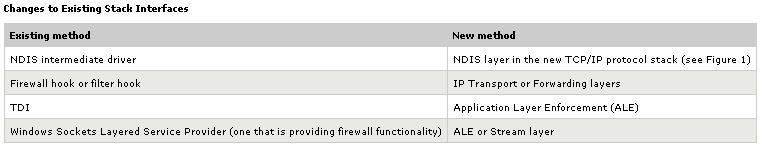
Windows Filtering Platform Updated: May 13, 2004 On This Page Introducing the Windows Filtering Platform Why Should You Convert Your Applications and Services to WFP? WFP Architecture Converting Applications to Use WFP References Introducing the Windows Filtering Platform This paper provides information about the Windows Filtering Platform (WFP) for Microsoft� Windows� codenamed �Longhorn�. WFP is a new architecture in Microsoft Windows codenamed �Longhorn� that allows unprecedented access to the TCP/IP packet processing path, wherein outgoing and incoming packets can be examined or changed before allowing them to be processed further. By tapping into the TCP/IP processing path, ISVs can create firewalls, anti-virus software, diagnostic software, and other types of applications and services. WFP provides APIs so that third-party ISVs can participate in the filtering decisions that take place at several layers in the TCP/IP protocol stack and throughout the operating system. The platform also integrates and provides support for next-generation firewall features such as authenticated communication and dynamic firewall configuration based on applications� use of the Windows Sockets API (application-based policy). WFP is not a firewall. It is a set of system services and APIs to enable firewalls to be developed by Microsoft and third parties. The Longhorn Personal Firewall, the successor to the Internet Connection Firewall and Windows Firewall in Windows XP, will be built using WFP. Top of page Why Should You Convert Your Applications and Services to WFP? Microsoft Windows codenamed �Longhorn� includes a completely new architecture for the TCP/IP protocol stack, which now is an integrated implementation of both IPv4 and IPv6, known as a dual Internet layer stack. This means that the methods of accessing the TCP/IP protocol stack for packet processing have changed significantly. These methods include the firewall hook, the filter hook, and other methods that involve custom solutions based on reverse engineering the current Windows TCP/IP protocol stack. For correct operation and to perform the equivalent function in Microsoft Windows codenamed �Longhorn�, you must change your application, service, or driver. The specific methods for changing your existing code are described in the "Converting Applications to Use WFP" section of this paper. In most cases, it is a matter of mapping the current method of hooking into the TCP/IP packet processing path for the equivalent way for Microsoft Windows codenamed �Longhorn�. For reverse-engineered solutions, you must either substantially revise the way in which your code works or take advantage of WFP to provide the equivalent functionality. Although it might be inconvenient for you to have to revise your component, the new TCP/IP protocol and WFP architecture offer new opportunities for value- added components and applications that rely on the TCP/IP packet processing path, opportunities that might not have existed prior to Microsoft Windows codenamed �Longhorn�. The benefits of using WFP are the following: � You have a fine level of access control to the TCP/IP packet processing path. � Because WFP already provides a filtering engine, you do not have to build the filtering logic. You can just tap into the WFP filtering engine and concentrate on the value added by your component. � In previous and current versions of Windows, existing hooks into TCP/IP packet processing path are poorly documented and supported. Microsoft is committed to supporting WFP in Microsoft Windows codenamed �Longhorn�. � When you use WFP instead of unconventional hooks into existing TC/IP stack, there is much less risk of breaking your component with a service pack release. � It is much easier to implement a firewall or packet filtering value-added solution because the filtering logic and hooks into the various layers of the TCP/IP protocol are already in place. � Depending on your component, it might be possible to move it out of kernel mode and into user mode, in which a component crash does not affect the entire Windows system. � Because all the applications and services use the same filtering engine, it is easier to determine if there are other applications or services performing the same function. Using WFP benefits you in the following situations: � Your component needs to examine TCP/IP traffic at a specific layer of the new TCP/IP protocol stack. � Your component works with encrypted traffic. A significant portion of the network traffic for Microsoft Windows codenamed �Longhorn� will be encrypted. For example, all RPC traffic is encrypted by default in Microsoft Windows codenamed �Longhorn�. � You want to perform packet processing after decryption. � You want to do IPv6 packet filtering, and want to take advantage of a built- in IPv6 filtering engine, rather than building one yourself. WFP Architecture Figure 1 shows the WFP architecture and where third-party applications, services, and drivers can plug in.Figure 1. Architecture of the WFP for Third-Party Components The WFP architecture consists of the following components: � Longhorn API Within the Longhorn API, there are filtering APIs that a third- party firewall or other application that performs packet filtering or processing can use to create filters within the Base Filtering Engine. An example of a WFP application is the proposed Longhorn Personal Firewall, which replaces the Internet Connection Firewall in Windows XP prior to Service Pack 2 (SP2) and the Windows Firewall in Windows XP SP2 and later. � Base Filtering Engine This user-mode component implements the filter requests made by filtering applications by plumbing filters into the Generic Filter Engine. � Generic Filter Engine This kernel mode component within the new TCP/IP protocol stack stores the filters created by filtering applications via the Base Filtering Engine and interacts with the various layers of the new TCP/IP stack and the set of installed callout drivers. For example, as a packet is being processed up the new TCP/IP stack, each layer encountered contacts the Generic Filter Engine to see whether the packet is to be permitted or dropped. The Generic Filter Engine checks the configured filters and the installed callout modules to verify whether the packet is permitted or should be dropped. � Callout Modules Callout modules are used when just filtering the packet� checking the packet against filtering criteria to see whether the packet should be permitted or dropped�is not enough. Callout modules are needed when you need to perform deep inspection of packet contents or data modification. An example is anti-virus software, which must inspect application layer data to ensure that no viruses or worms are present in the incoming data stream. There are two main ways that third-party ISVs can use the WFP architecture to build applications or service: � For applications and services that only perform filtering functions, all that is required is a user mode application or service that uses the Longhorn APIs to set filters at the appropriate layers in the new TCP/IP stack. No kernel mode callout drivers are needed. � For applications and services that perform deep packet content inspection or modification, you must create a user-mode application or service and one or more callout drivers. The user mode application or service uses the Longhorn APIs to set filters at the appropriate layers in the new TCP/IP stack, subject to further inspection by a specified callout driver. When incoming or outgoing traffic matches these filters, the Generic Filtering Engine hands the packet to the callout driver, which performs inspection or modification functions before handing the packet back to the Generic Filter Engine. Converting Applications to Use WFP The following table lists the ways in which existing third-party TCP/IP packet processing components written for the Windows XP or Windows Server 2003 TCP/IP protocol must be modified to work with the new WFP architecture. Changes to Existing Stack Interfaces
References
Call to Action

� For firewall and filtering developers: Convert your existing filtering or
packet inspection drivers to use the new callout APIs in Microsoft Windows
codenamed �Longhorn�.

� If you have questions about the new Windows Filtering Platform, send e-mail
to [email protected].


Resources


Windows Hardware and Driver Central (Cost $199 as of 8/4/04)
(includes Windows Driver Development Kits [DDK], Windows Hardware
Compatibility Test [HCT] Kits, and Windows Logo Program requirements)
Project Longhorn details