Purpose of Project
For many years, the only way for students to learn the GRE vocabularies is through the GRE textbooks. Since most of the students feel it is boring and frustrating learning vocabularies through the books, our team have decided to implement an online program that helps undergraduate students to learn GRE vocabularies in a fun, simple and easy way.
Requirements and User Interface 1
A connection to the Internet would be required in order to access the program. The user would have to log into the web site and the software would run over the web browser. Each user will have his/her own account and their learning process will be recorded in the database independently.
Functions of the software
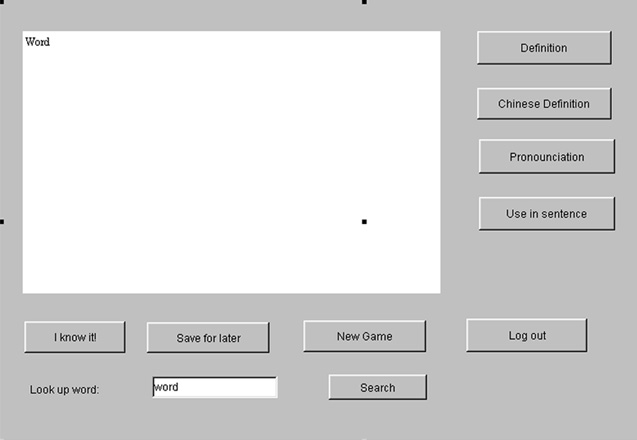
The following are the primary function of the software that we can think of now. More enhance features will be implemented later in this course.
1. Keep track of every vocabulary users has removed from their learning list.
2. When users click on the 'Definition' button, the definition of that word will show up in the designated area of the screen.
3. When users click on the 'Chinese Definition' button, the Chinese definition of that word will show up in the designated area of the screen.
4. When users click on the 'Pronunciation' button, the program will pronounce that word through the user's speaker. 2
5. When users click on the 'I know it!' button, the vocabulary will be removed from the user's learning list.
6. Also, there is a mini hangman game that can test user's knowledge about all the vocabularies in the database. (Include the word that user removed from their learning list) .
Behavior of the software
User should be prompted to log into his portion of the database so he/she can start or resume his learning. Upon a successful login the user should be presented with a front-page where he/she can start using the software. A default learning list will be loaded to the program if a new user has login. Otherwise, the program will load the specific learning list of the user. If the user want to start all over, he/she can click the 'New' button. After user answering 'yes', the user's learning list will turn back to default. When the user think he/she already know that word, he/she can remove it by pressing the 'I know it!' button. When user click the 'Next' button, the next word in the queue will show up and the pervious word will be saved for later revision. If the user want to look up for a specific word in the database, he/she can use the internal search engine to search for that word from the database. If the user want to quit using the program, he/she can click the 'Quit' button and his/her learning status will be saved.
System Issues
1. The system will be implemented using Java.
2. The system shall run in the Window 95, 98, NT, 2000, ME.