Tutorials
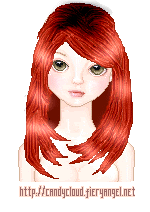
Shiny Hair
base provided by Liquid Rainbow Dolls
First and formost all of our hair is going to be done ona seperate layer, so if you havnt done so already, please make a seperate and title it hair.
Step 1:
Draw Your Outline with the darkest color of the color u plan on using.

Step2:
Fill in the outline with the color you want to use, make sure its a few shades lighter than the outline, but not too light. we want something in the middle.

Step3:
Make sure you fill in the gaps behind teh head wil the color your outline is OR a darker color. This gives the hair more depth, and makes it more 3 dimensional and realistic.

Step4:
This is wher we draw the strands. you want to use the LIGHTEN TOOL in your Graphic Program. This Tutorial was designed for Paintshop Prop 7, but should work for other programs like Adobe just as well. With the LIGHTEN tool, Please set ur settings according to the picture here:
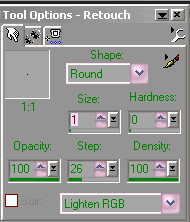
and draw strands in the hair. Try to cover the whole head, but leave some space in between for the dark strands.

Step 5:
This is where we draw the strands using the DARKEN tool. Please set your settings for the DARKEN tool as following this picture:
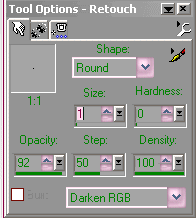
in the open spaces in between where you have drawn the light strands fill in those open spaces with strands drawn with the DARKEN tool.

Step 6:
This is where you make the roots. This also makes the hair feel more finished, and realistic rather than flat and 2 dimensional.
For this step we will again use the DARKEN tool, please adjust your setting as following:
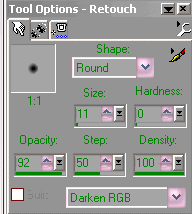
For this step, its not much harder than just blotting the top of the head until you feel you have it right. Roots and highlights are more of a preference.m A good rule of thumb is to think the root is directly above the noseline, in between the eyes.

Final Step:
Highliting. For this we will use the LIGHTEN tool, and you will need to adjust your settings as follows.
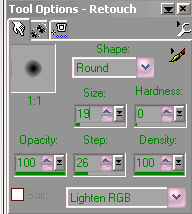
To make sure the hair is evenly highlited, I "swoop" across. one side to the next. highlighting again like the roots, is a personal preference, i cant tell you where and how much, its up to you. certain colors obviously show up brighter, and ive learned that blondes are shinier when highlighting and dont require as much lightening, whereas redheads, and brunettes might depending on the shade. You can also use the DARKEN tool and darken the spaces in between what you've highlited but that is up to you. Liek i said its a personal preference.
|


