|
|
|

|
This site will no longer be updated, please visit http://pixel-tickler.com instead. |
||||
|
|
|||||||||||||||||||
|
|||||||||||||||||||
|
Step 1: First, open up a new image 400 x 400 with your background set to transparent and set your foreground color to white. |
|||||||||||||||||||
|
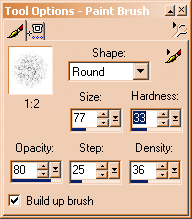
Step 2: Next, choose your paint brush tool, normal brush, round, and lower the hardness and density. These are the settings I used for this tutorial, but you don't have to be exact. |
|||||||||||||||||||
|
|
|||||||||||||||||||
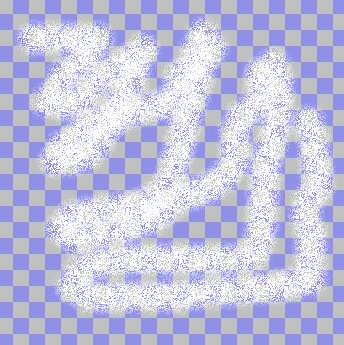
| Step 3: Paint a bunch of random lines, squiggles, but don't fill up the whole layer. You can even adjust the hardness and density and paint some more. | |||||||||||||||||||
|
|
|||||||||||||||||||
|
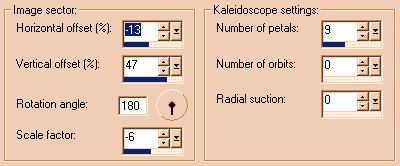
Step 4: When you are satisfied, switch to the kaleidoscope tool. PSP6 users, go to image, effects, kaleidoscope. PSP7 users, go to effects, reflection effects, kaleidoscope. |
|||||||||||||||||||
| Just like with the paint brush tool, you do not need to use exactly the same settings as I am going to post, you can adjust any of the kaleidoscope settings until you get the look that pleases you. NOTE: If you end up with an empty space in the center of your snowflake and you don't want it to be empty, increase or decrease the radial suction. | |||||||||||||||||||
|
|
|||||||||||||||||||
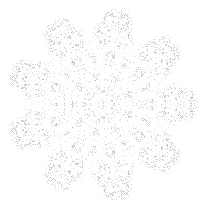
| Step 5: You may have some outer stray pixels that you don't want and now we are going to get rid of them. Use your magic wand to select the part of the snowflake that you want to keep. PSP6 users, use the all pixels setting, no feathering. PSP7 users, use the all opaque option, no feathering. Now go to selections, invert, and use the eraser tool to erase any of the stray pixels, or just hit your delete key on your keyboard. | |||||||||||||||||||
|
Select none. That's basically it. This also makes great lace and decorations for Christmas ornaments. |
|||||||||||||||||||
|
|
|||||||||||||||||||
|
Download the PDF of this
tutorial here. Download Free Acrobat Reader here. |
|||||||||||||||||||
 |
|||||||||||||||||||
| Updated 02/06/02 | |||
| Copyright ©
1999-2002 All rights reserved. All graphics on this site are property of Pixel-Tickler and are protected under US and International copyright laws and may NOT be copied, stored or offered for sale without written permission from the owner unless so stated otherwise. PSP tutorial groups may use these tutorials as part of their weekly lessons. If you have any questions regarding the content or images used on this site, drop me a note at news://news.annexcafe.com/annexcafe.psp.tutorials. I browse there regularly. |
|||