|
|
|
|
This site will no longer be updated, please visit http://pixel-tickler.com instead. |
|
|
|||||
 Should
I install the 7.02 patch and where do I get it? Should
I install the 7.02 patch and where do I get it?
|
|||||
 Absolutely!
It fixed many of the problems I was having. However, if you have
the International English version, i.e. if the word "color" is
spelled "colour," then you need to wait. You can down download
the American English patch here. Absolutely!
It fixed many of the problems I was having. However, if you have
the International English version, i.e. if the word "color" is
spelled "colour," then you need to wait. You can down download
the American English patch here.
|
|||||
|
|
|||||
|
Absolutely
not! When you do install PSP7, let it set up its own folder and do not
attempt to install it into the same folder where PSP6 is already installed
or you could have problems.
|
|||||
|
What
if I don't have the additional space on my hard drive for both versions?
|
|||||
|
Before
uninstalling PSP6, you may want to back up your PSP folders where you have
saved tubes, brushes, frames, patterns, textures, into another location so
that you don't accidentally lose them.
|
|||||
|
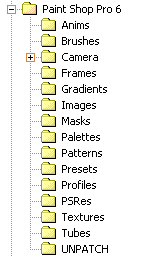
Where
do I find those folders?
|
|
||||
|
Basically,
that depends on how you have your computer set up to begin with. Most
likely, C/ Program files/Paint Shop Pro 6. If you have PSP5, c/ Program
files/Paint Shop Pro 5.
|
|||||
|
|
|||||
|
|
|||||

|
|||||
|
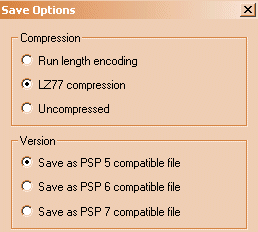
Will
I be able to share the tubes I created in PSP7 with PSP5 and 6 users?
|
|||||
|
|||||
|
Why
can't I flood fill with a pattern any more?
|
|||||
|
Oh,
yes you can. And you can even paint with multi-colored brushes instead of
using just a solid color. There's already a couple of good tutorials on how
the new color and style palettes work. Visit PSPtoybox
or Bill's
site for more info.
|
|||||
|
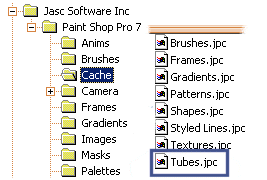
Can anyone help me out ?
When I open the tools option box and click on tube tool, I get this message : "X access denied to
C:\Program Files\PSP7\Cache\Tubes.jpc was denied" and the tubes are not listed in the tools option
box. I have the preferences set, and I am lost as to why my 7 has no tubes.
(Note: This could also happen to your frames, brushes or shapes
folder also.)
|
|||||
|
|||||
 |
|||||
| Updated 002/06/02 | |||
| Copyright ©
1999-2002 All rights reserved. All graphics on this site are property of Pixel-Tickler and are protected under US and International copyright laws and may NOT be copied, stored or offered for sale without written permission from the owner unless so stated otherwise. PSP tutorial groups may use these tutorials as part of their weekly lessons. If you have any questions regarding the content or images used on this site, drop me a note at news://news.annexcafe.com/annexcafe.psp.tutorials. I browse there regularly. |
|||