include("../Sources/phpchartPlus.php");
include("../Sources/CacheToFile_Strategy.php");
include("../Sources/PEARDBData_Strategy.php");
include("../Sources/XMLConfig_Strategy.php");

$DataParams=array("DB_Type"=>"",
                  "DB_Username"=>"",
                  "DB_Passwd"=>"",
                  "DB_Host"=>"",
                  "DB_Name"=>"",
                  "Field_GroupName"=>"",
                  "Field_ItemName"=>"",
                  "Field_ItemValue"=>"");

$ConfigParams=array("filename"=>"../Data/phpchartplus.conf.xml");

$DataStrategy=new PEARDBData_Strategy();
$ConfigStrategy=new XMLConfig_Strategy();
$CacheStrategy=new CacheToFile_Strategy();
$im=new phpchartPlus();

try
{
$im->DataParser_->strategize($DataStrategy,$DataParams);
$im->DataParser_->parse(array("Query"=>"SELECT * FROM my_table"));
}
   catch (DataParser_Exception $e)
   {
     print $e->getMessage();
     exit();
   }
   catch (DataStrategy_Exception $f)
   {
     print $f->getMessage();
     exit();
   }

try
{
$im->ConfigParser_->strategize($ConfigStrategy,$ConfigParams);
$im->ConfigParser_->parse();
}
   catch (ConfigParser_Exception $e)
   {
     print $e->getMessage();
     exit();
   }
   catch (ConfigStrategy_Exception $f)
   {
     print $f->getMessage();
     exit();
   }

try
{
$im->get_Instance();
}
   catch (ImageSupport_Exception $e)
   {
     print $e->getMessage();
     exit();
   }
   catch (FontSupport_Exception $f)
   {
     print $f->getMessage();
     exit();
   }

$im->Chart_->set_CachingStrategy($CacheStrategy,2);
//Cache for 2 minutes
$im->Chart_->draw_Chart();
|


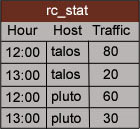 In this case to generate the chart properly you have to specify the following attributes: