The phpchartPlus generates images into a preexisting page.In this way you cannot place any text data or additional php code along with your generated image.To understand why this doesn't working we have to delve a little bit into http internals.
When your image(suppose in png format)is generated the server sends it to the client's browser as depicted in figure 1 in the following form
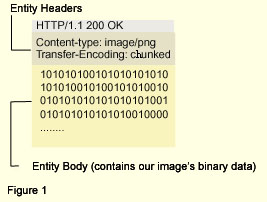 Because we have raw data the browser needs to know how to interpret that data, so the Content-Type header is provided. In our case the data represent our generated image. Because we have raw data the browser needs to know how to interpret that data, so the Content-Type header is provided. In our case the data represent our generated image.
The Transfer-Encoding header defines the way our image is transferred across the network. But before explaining this header we must explain why this header is defined.
In persistent connections (many client requests per connection) several responses may come to the client. If in those responses the http messages have incorrect or no Content-Length header the client will be unable to identify each individual message. In cases where images are dynamically generated we don't know in advance the size of our image. To cope with this problem HTTP uses the chunked option in the Transfer-Encoding header which segments the http message in small chunks. The chunked message with zero size indicates the end of the trasferred image. In this way the client knows where our image's message ends.
Obviously by placing text data in the same page with the generated image we actually append data in the http message which is marked as png image. To cope with this problem the only way is to place the generated image into another preexisting page.
we name image_generation_scirpt.php the image generation script and print_image_text.phtml the following code snippet
|
<html>
<head>
<title>Placing the generated image</title>
</head>
<body>
<img src="image_generation_scirpt.php">
<h2>Our generated image</h2>
</body>
</html>
<?php yourphpcode ?> |
Now the client's browser will receive print_image_text.phtml as depicted in figure 2 in the following form
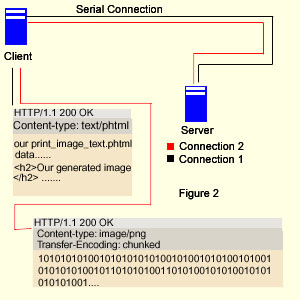
It's obvious that in this case we leave the image http message intact and add our additional text or php code in the print_image_text.phtml. Two different http messages are transferred, one for the generated image and another one for our php or html data.In this way we can achieve the combination of the generated image and preexisting php code or text data without http header errors.
|