|
|
If you know how difficult it is to track tens of hundreds (or
even hundreds of thousands) of those files you save on CD-ROMs,
you would be glad to realise that looking for them will be a
breeze with SUPER File Tracker.
Now you do not have to go through the tedious and unproductive
task of putting one CD-ROM a time into the drive to find out
where a particular file or group of files are - quickly and
effortlessly!
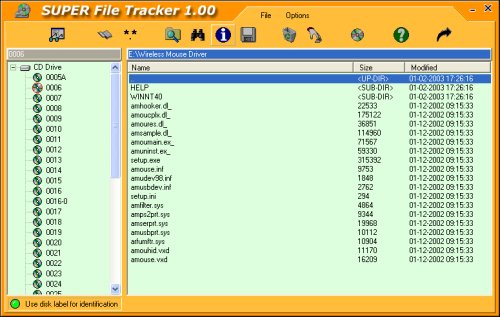
SUPER File Tracker enables you to maintain a database of files
and folders exactly the way they appear in the actual discs. And
you do it by simply getting SUPER File Tracker to scan your
CD-ROMs at a breakneck speed.
The good thing is the database itself is in the hard drive which
means that it is available to you whenever you need it. And you
are not required to insert the CD-ROM unless you want to
retrieve the files/folders it.
You can search files by specifying the wildcard character of '*'.
Or, if you have not the slightest idea of what the filename is,
you can specify the name or partial name of a folder instead, and
SUPER File Tracker will list ALL the files in it! What is more,
you can limit the search to a particular folder and its subfolder,
a particular disc or the entire database!
That is not all, SUPER File Tracker will help you optimise the
disk space in each CD-ROM by providing you with information
pertaining to the number of files and folders in it and the
size of used disk space.
To install SUPER File Tracker, please:
- Download sft.zip (400KB)
- Unzip it into a folder to extract setup.exe
- Run setup.exe
- Follow on-screen instructions
You may also have to install
ECS Components 3.11 (5MB)
in order to run SUPER File Tracker.
Disclaimer:
SUPER File Tracker is provided on an "AS IS" basis, without
warranty of any kind. The risk as to the quality and
performance of the software is borne entirely by you.
|
|
|
|
|