The Trouble with LAN-able
We recently had the "pleasure" of encountering some peer-to-peer home LAN trouble. After several weeks of headaches and sleepless nights, we got it connected and up and running! This is a set of notes on what we did.
A peer-to-peer LAN is a network that does not have a dedicated server. Each computer on the LAN has almost equal status on the network and they can all access each other's shared resources, e.g., folders, documents, printers, and even internet connection. Of course nothing is truly equal, so the main computer on the LAN is generally called a host, with the rest as clients. This is also true if you are sharing an internet connection.
1. Installing the network card
Network Interface Card, NIC for short, is the first component you need to add. Follow the instructions that came with your NIC very carefully to add the card to your computer and install the driver in Windows. Make sure it is installed properly before proceeding to the next step.
If you using 2 NICs on the host computer for the LAN and broadband internet connection, try to use 2 different brands/makes of NICs to avoid confusion during network setup.
2. Adding Windows network components
You will require the following network components on all computers:
Remove any network components you do not require. The steps for adding any of the above components are exactly like those described in Direct Cable Connection.
Note: All your computers must have their own unique Computer Name, but with the same Workgroup name.
3. Network settings
In addition to the settings in Direct Cable Connection,
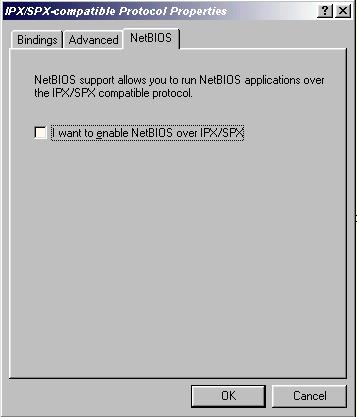
a) ensure the NetBIOS setting in IPX/SPX protocol is not select.
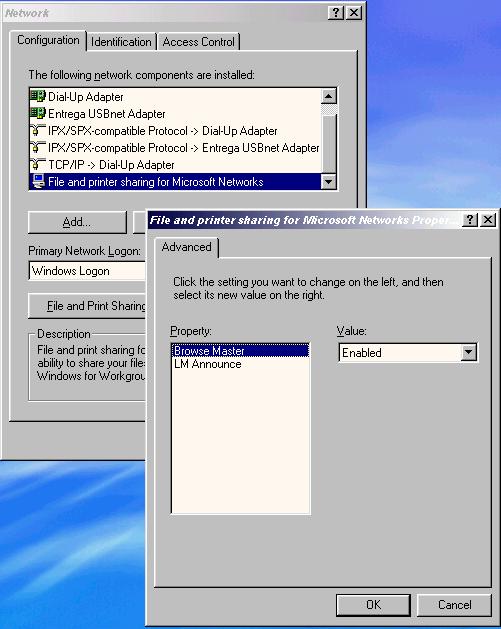
b) on the main/host computer, usually the one with the latest and highest version of Windows, set the Browse Master setting in the network component File and Printer sharing for Microsoft Networks to Enabled. The rest of the networked computers should be left at Automatic or better still set to Disabled. You can have only one computer with its Browse Master at Enabled.
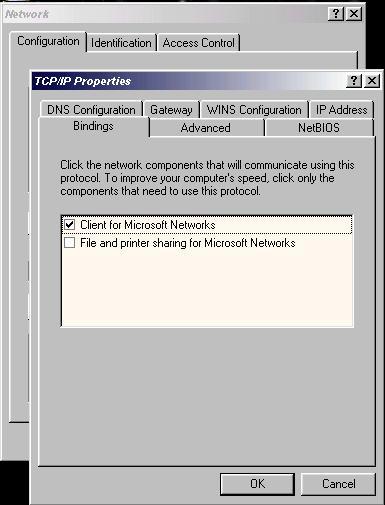
c) Similar to the TCP/IP Binding for Dial-Up Adapter in Direct Cable Connection, uncheck the setting to File and Printer sharing for Microsoft Networks in TCP/IP Bindings for all network adapters.
Note: It may take as long as 15 minutes for other computers on the LAN to become visible, so please be patient.
4. Cables
The beauty of peer-to-peer networking is that it is so simple that it is not necessary to use a hub/router between the computers. However, in this case normal network cables (some called them through cables) cannot be used. Connecting computers on a hubless peer-to-peer LAN requires the use of crossover cables. They look like normal cables except with different internal wiring, and are usually available from your local computer accessories stores.
