Wiring RJ-45 for T568B
Visual (Picture =)
RJ-45 Pin
Wire Color
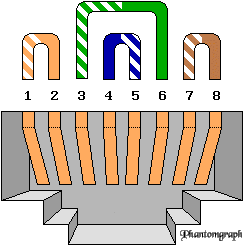
Wiring T568B |
|
This page is dedicated to helping you wire your own network or make a patch cable your self. There are a few questions I get occasionally about what type of cabling to use for this, and I'll give you the answer straight up. Use Category 5. (Usually called Cat 5) Why? Well, although you can use cat 3 or four, using cat 5 now will allow you to upgrade to 100 MHz Communication standard, use the SAME cabling for RS-232, Voice, ATM, ANSI X3T9.5 and your PBX system =) Confused? Don't worry, the extra cost of Cat 5 now will be worth it later on .. just buy it!
First thing... it's not that hard! (And you can save a bundle on pre-made cables by following the diagram below. (Patch cords and wall sockets all use the same wiring diagram =) This is the EIA/TIA 568B substandard for data applications. (Basically the world standard) The 568A substandard will not be discussed here for two reasons. 1) To prevent confusion and 2) because it's usually used to wire analog voice for two lines.
Now on to wiring the darn thing. =)
Wiring RJ-45 for T568B |
||
Visual (Picture =) |
RJ-45 Pin |
Wire Color |
|
1 | Orange White |
| 2 | Solid Orange | |
| 3 | Green White | |
| 4 | Solid Blue | |
| 5 | Blue White | |
| 6 | Solid Green | |
| 7 | Brown White | |
| 8 | Solid Brown | |
All images and content © 1998 - 2004 Phantomgraph