

How to use Webboard
in downloading mp3 and listen music online
 |
1.
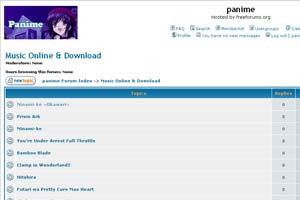
ต้องสมัครเป็นสมาชิกก่อนนะคะ แล้ว log in เข้ามาหัวข้อ music online
and download You must register and log in your username, then select topic music online and download. |
 |
2.
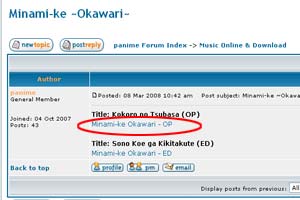
เลือกเพลงที่ต้องการจะฟังหรือดาวน์โหลด แล้วคลิกที่ลิ้งค์ Choose song that you want to listen or download and click the link. |
 |
3.
จะปรากฎหน้าต่างใหม่ขึ้นมา ถ้าต้องการฟังเพลงให้คลิกที่เครื่องหมายตามในรูปแล้วรอสักครู่ ์New pop up will be shown. If you would like to listen to music, click the button as shown in the picture and wait a minute. |
 |
4.
สามารถปรับความดังของเสียง และเลือกเล่น หยุดชั่วคราวหรือหยุดได้ You can adjust volume and choose play, pause or stop |
 |
5.
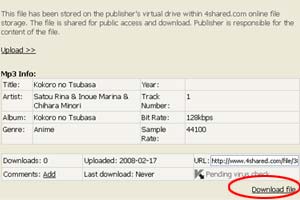
หากท่านต้องการดาวน์โหลด ให้เลื่อนลงมาข้างล่างและเลือก Download file If you want to download this music, scroll down and click Download file. |