 |
|
|
|
|
|
|
|
|
|
|
|
|
|
|
Principle of ArcView 3.1 |
|
|
|
1. Introduction |
|
|
|
�������In this assignment is designed as further introduction to the capabilities PC Arc/Info and as introduction to ArcView GIS.which will be showed the processes for advanced database building within Arc/Info and ArcView programs which begin from the re-create coverage step, combines adjacent map sheets into study area, merges two database data files or add database into feature attribute table until create the output report. You can compare the some processes of advanced database building step and the result dataset that can run in the both of program to notice which one easier or user-friendlier to process and understand. |
|
|
|
2. Background and Theory |
|
|
|
Presenting your results and ideas is easy with ArcView GIS. You can make great-looking publication-quality maps and create interactive displays by linking charts, tables, drawings, photographs, and other files. You will find that communicating geographically is a powerful way to inform and motivate others. |
|
|
|
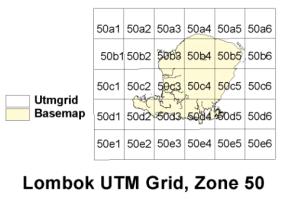
3. Choose 4 UTM tiles from the lombok grid provided (50b4, 50b5, 50c4, and 50c5) |
|
|
|
ArcView GIS is the world's most popular desktop mapping and GIS software. It puts hundreds of mapping and spatial analysis capabilities at your fingertips. ArcView GIS makes it easy to create maps and add your own data to them. Using ArcView GIS software's powerful visualization tools, you can access records from existing databases and display them on maps. And for integrate data from all over your organization and work with the data geographically. Get more from your investment in data by using the data in new ways. |
|
|
|
 |
|
|
|
Previous |
|
Next |
|