easy to use true keyboard for direct data entry. You can actually
do two-finger-typing with some speed and accuracy. Here is a
photo I found somewhere on the internet:
 Marshall's Amazing, Colossal and
EBookMan 911 Review Page Four
This is a "user's viewpoint" review,
and comparison to Wizard OZ-770 and OZ-800,
of the EBookMan 911 by Marshall St. John
Data entry is more important to some people than it is to others.
Do you want to enter information directly into your PDA? If so, the
Wizard OZ-770 is far easier and better than the EBookMan.
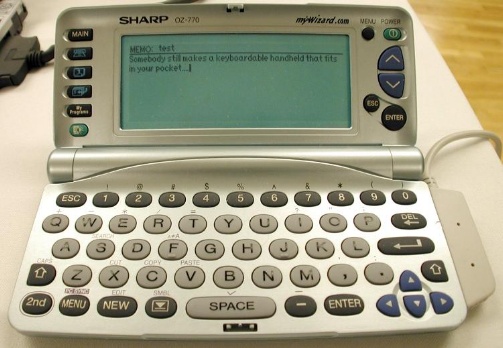
The Sharp Wizard Organizer OZ-770 features a wonderfully
easy to use true keyboard for direct data entry. You can actually
do two-finger-typing with some speed and accuracy. Here is a
photo I
found somewhere on the internet:
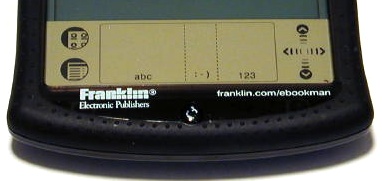 On the other hand, direct data entry into the EBookMan 911 is something of a pain in the neck! There are two ways to enter data. The first is with the stylus and handwriting recognition. There is an area just below the screen which is divided into three sections. The first is for alphbetical characters, the second for punctuation, and the third for numbers. This mode of data entry is unreliable. Many times the EBookMan will not correctly recognize the letter you draw. It takes a long time to enter a memo this way.
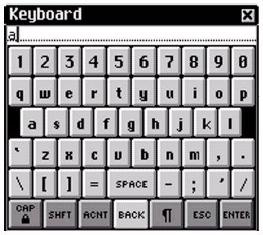 The second method of data entry is via an onscreen "keyboard" that you can bring up. You use your stylus to tap on letters and numbers. This method is somewhat faster and more accurate, but it is still awkward and slow. You won't get many memos, or any other sort of data entered in this way. The only good way to get names, addresses, memos, scheduling and so on entered is by synching with MS Outlook, and this capability is included with your EBookMan Desktop Manager software. If you don't have Outlook, there is some software you can buy from Franklin to enable synching with Outlook Express, Act, Lotus and so on.
As far as data entry is concerned, the OZ-770 wins by a landslide! The OZ-770 is very much like a "mini-laptop."