 Marshall's Amazing, Colossal and
Sharp Wizard OZ-800 Review
This is the final page of a review
of the Wizard Organizer OZ-800 by
Marshall St. John
Finished on June 3, 2003
PAGE FIVE OF MARSHALL'S OZ-800 REVIEW
FINAL OBSERVATIONS AND CONCLUSIONS,
COMPARING THE OZ-800 TO THE OZ-770
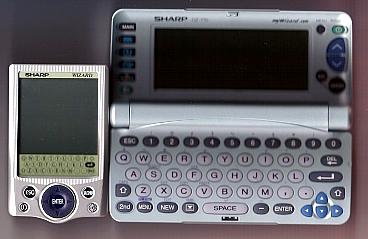
One good value of the OZ-800 is its very small size, which makes it convenient to carry. It has the ability to synchronize with Outlook or Outlook Express, and to thereby receive your email and attachments. You can also write email on the OZ-800, and later upload the email to your PC, from which you may then actually send the email.
The downside to this email capability is that attachments must be less than 30 KB in size. Also, I get so much junk mail (spam) that I would have to take the time to weed out all the spam before synchronizing with the OZ-800. I would rather just take care of my email directly on my PC. Personally, I don't care to carry my email around in my pocket, so this function does not seem too valuable to me.
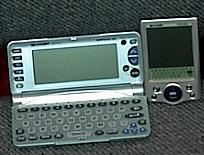 When the Wizard Organizer enthusiast first reads of the OZ-800 his/her reaction is probably: "Good! They have finally boosted the 3MB up to 10MB!" But this figure is deceiving. The entire 3MB on the OZ-770 is flash memory, and kept permanently safe and saved. On the OZ-800, only 2MB is flash, and the remaining 8MB are SDRAM. In other words, if you ever change out your batteries on the OZ-800, you lose whatever you have stored in those 8MB of memory.
Furthermore, the 8MB of SDRAM is reserved for email messages and attachments, and is not used for storing add-on programs. A person could send files to himself via email, and store the information in this memory, but then he would need to repeat the process every few months when changing batteries. This seems very inconvenient to me.
The OZ-770 beats the OZ-800 on two other points: First, the screen on the OZ-800 is smaller and more difficult to read. The contrast is not as good as on the OZ-770. Not only that, but the backlight on the OZ-800 is very dim. Second, the keyboard entry system of the OZ-770 is superior to the stylus-tap-on-tiny-letters system of the OZ-800. The stylus is tiny and hard to hold, unless you have small hands. Also, it is easy to miss a letter by a tiny margin, and not have it enter correctly. Furthermore, I could not find out how to advance through text a full screen at a time, which is very easy to do on the OZ-770.
The OZ-800 does not come with anything comparable to the excellent Daytimer software that comes with the OZ-770, as the user is expected to be using Outlook as his/her personal information manager. The OZ-800 software enables you to very simply enter information, but does a bad job of displaying your full and final results when you get finished. It is basically a way to get information into the OZ-800 through synchronizing, and that's about it.
The add-on software for the OZ-800 is very sparse. There are a handful of games and an application or two on the accompanying CD, and I believe there are two programs available on the internet, but that's about it. By contrast, there are a large number of applications and games for the OZ-770, and some really nice internet websites devoted to it. See my links page.
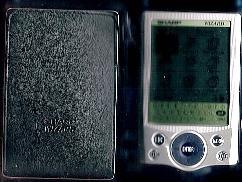 SUMMARIZE AND CONCLUDE: The OZ-800 is very small and light to carry. It comes with a nice leather wallet. If you are looking for a unit for carrying your email around with you, and working on your email throughout the day, then you may find the OZ-800 of interest. Otherwise, I believe the OZ-770 is a superior and a more useful Organizer. What would be really great, would be an OZ-770 with a separate memory for its operating system, and then a slot to accept whatever size compact flash the user wants to add.