
In this page you will find out what is needed and instructions to view the
PC ADDICT DEMOS
First of all you need to join the
PC DEMO ADDICT YAHOO GROUP
If you're not a member go to the following page and join.
PC DEMOHOLICS YAHOO GROUP
Next, you must have Yahoo Messenger downloaded and installed.
I'm still learning how to use MSN, and when I do we can use it at times to.
To download Yahoo Messenger click on the link below and go to:
YAHOO MESSENGER DOWNLOAD
Click the "Get It Now" button and follow the instructions on your screen.
O.K....
You've downloaded Yahoo Messenger and it's installed.
You must add me to your Friends list.
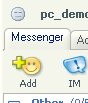
At the top left of Yahoo Messenger is a little smiley face with a plus sign.
Click it.
See the picture below:
A box will pop up (see picture below)
Click it and add my yahoo id which is:
pc_demo_addict
(dont forget the little underscores between the sections of the name)
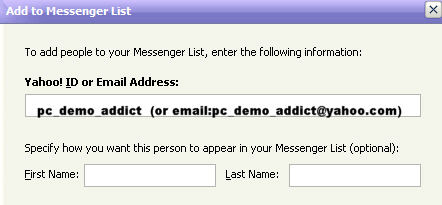
(You can give me a name like, Super Woman, Her Majesty , the Great One, etc if you like, but not mandatory.....lol)
Click the next button on the bottom of the box.
Now you have a screen in front of you like the one below:
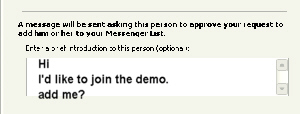
It will ask you to insert a message telling me why you want me to add you.
As in the picture above I used the example, "Hi! I'd like to join the demo. Add me?"
Something like that will be fine.
So now, you have Yahoo Messenger installed on your computer, and you've added me to your buddy list and I've added you to mine.
The hard part is over.
At the time for the demo, have your Yahoo Messenger open and running.
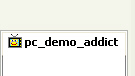
You will see my id which is of course: pc_demo_addict.
There will be little green t.v beside my id which means my web cam is on.
See below:
When I see your online I will send you a conference invite.
When I send you the invite, you accept (hopefully).
If I dont notice that your online, send me a message and I'll send you an invite.
When you accept, you should be taken into my conference room.
If you don't know how to send an instant message read below:
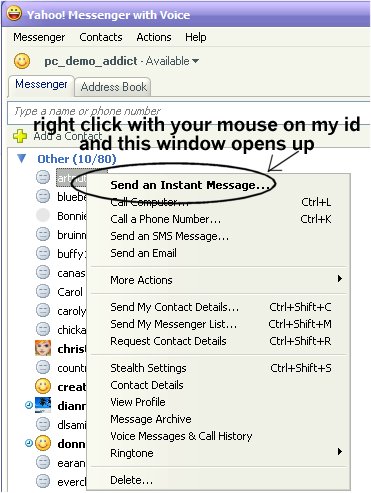
As it shows in the picture above, with your mouse right click on my id which is pc_demo_addict.
A little drop down menu will appear. Click on "Send An Instant Message"
A chat box will appear.
See below:
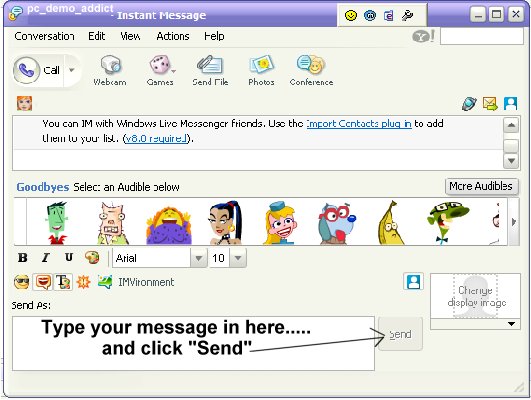
I will send you an invite to conference.
If I don't send an invite right away, please be patient and give me a couple of minutes. The first few minutes of a demo are busy ones, inviting people and getting everyone into the conference and making sure everyone sees the webcam.
If some time goes by and you still dont get a response, send me another instant message.
Please note that there is no sound in the demos. To see what people are saying read your chat screen.
It can take a couple of minutes trying to figure out how to watch the demo and chat, but once you figure it out its easy and its nice to chat and watch at the same time.
Another point to note is this: Sometimes Yahoo for some reason boots people out of the conference.
I have not given you the boot (unless your bieng rude and disorderly, which I know you would'nt do....).
Just send me, or someone who is in the demo a message and they or I will give you an invite back in.
Hope this all helps.
God Bless and hope to meet you in chat and demo real soon!
Karen :aka pc_demo_addict