MODULE 6
PROGRAM CONTROLS
My Training Period: hours
Abilities:
Able to understand and use:
▪ The basic of the flow chart.
▪ if, if – else and their variation.
▪ The switch-case-break statement.
▪ The for statement.
▪ The while statement.
▪ The nested statements.
▪ The do…while loop.
▪ The nested loop.
▪ Other program controls.
6.1 Flowchart
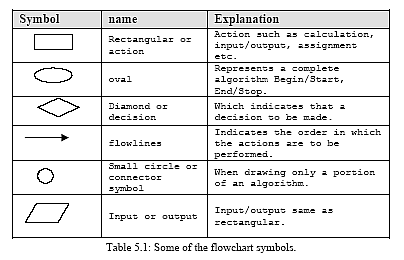
- A flowchart is a graphical representation of an algorithm or a portion of an algorithm.
- It is drawn using certain special-purpose symbols such as rectangles, diamonds, ovals, and small circles.
- These symbols are connected by arrows called flowlines.
- Flowcharts can clearly show how control structures operate.
- The partial list some of the symbols used in this Module is shown in Table 5.1. We will use flow charts to assist our study of the program controls.
6.2 Program Execution
- Program begins execution at the main() function.
- Statements within the main() function are then executed from top to down style.
- The first statement, then the second and so forth, until the end of the main() function is reached.
- However, this order is rarely encountered in real C/C++ program.
- The order of the execution of the statements within the main() body may be redirected, not in sequence anymore.
- This concept of changing the order in which statements are executed is called program control and is accomplished by using program control statements. This is how we can control the program flows.
6.3 Program Control Types
- There are three types of program controls:
1. Sequence control structure.
2. Selection structures such as if, if-else, nested if, if-if else, if–else if and switch...case...break.
3. Repetition such as for, while and do…while.
6.3.1 Sequence Control Structure
- Let take a look at the following example, a portion of C/C++ program,
rate = 5.0 ------------------------S1
hours = 25 ------------------------S2
pay = (float) hours * rate --------S3
printf("\n Pay = $ ", pay); -------S4
- There is one entry point and one exit point, graphically is depicted below.

- The flow just one way, starting from the Entry and end at Exit. In C/C++ programs theoretically, a control structure like this means sequence execution (line by line), no code is skipped.
6.3.2 Selection Control Structure
- This is non-sequential type program control using the C/C++ instructions such as if, if-else, nested if-else, if-if else and if-else if.
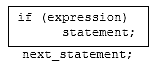
- General form of the if statement:
- Explanation:
1. (expression) is evaluated.
2. If TRUE (non-zero) the statement is executed.
3. If FALSE (zero) the next_statement following the if statement block is executed.
4. So, during the execution based on some condition, some codes not executed (skipped).
- For example:
if (hours > 70)
hours = hours + (hours - 70);
printf("…");
- Here, if hours is less than or equal to 70, its value will remain unchanged and the printf() will be executed. If it exceeds 70, its value will be increased by (hour-70).
- Example:
if(job_code == '1')
{
car_allowance = 200.00;
housing_allowance = 800.00;
entertainment_allowance = 500.00;
}
printf("…");
- The three statements enclosed in the curly braces {} will only be executed if job_code is equal to '1', else the printf() will be executed.
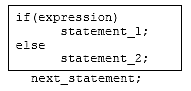
- The if-else construct has the following form:
- Explanation:
1. The (expression) is evaluated.
2. If it evaluates to non-zero (TRUE), statement_1 is executed, otherwise, if it evaluates to zero (FALSE), statement_2 is executed.
3. They are mutually exclusive, meaning, either statement_1 is executed or statement_2, but not both.
4. The statements_ 1 and statements_ 2 can take the form of block and must be put in curly braces.
- if-else code segment example:
if(job_code == '1')
rate = 7.00;
else
rate = 10.00;
printf("…");
- If the job_code is equal to '1', the rate is 7.00 else, if the job_code is not equal to '1' the rate is 10.00.
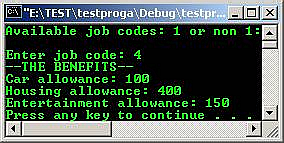
- Program example:
#include <iostream.h>
#include <stdlib.h>
int main()
{
int job_code;
double housing_allowance, entertainment_allowance, car_allowance;
cout<<"Available job codes: 1 or non 1:\n"<<endl;
cout<<"Enter job code: ";
cin>>job_code;
if(job_code==1)
{
car_allowance = 200.00;
housing_allowance = 800.00;
entertainment_allowance = 250.00;
cout<<"--THE BENEFITS--\n";
cout<<"Car allowance: "<<car_allowance<<endl;
cout<<"Housing allowance: "<<housing_allowance<<endl;
cout<<"Entertainment allowance: "<<entertainment_allowance<<endl;
}
else
{
car_allowance = 100.00;
housing_allowance = 400.00;
entertainment_allowance = 150.00;
cout<<"--THE BENEFITS--\n";
cout<<"Car allowance: "<<car_allowance<<endl;
cout<<"Housing allowance: "<<housing_allowance<<endl;
cout<<"Entertainment allowance: "<<entertainment_allowance<<endl;
}
system("pause");
return 0;
}
Output:
- The if-else constructs can be nested (placed one within another) to any depth. If nested, they generally take the forms: if-if else and if-else if.
- The if-if else constructs has the form:
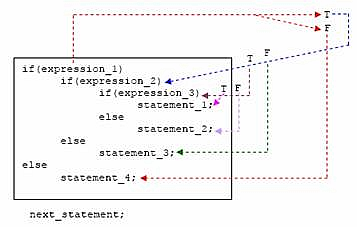
- In this nested form, expression_1 is evaluated. If it is zero (FALSE-F), statement_4 is executed and the entire nested if statement is terminated; if not (TRUE-T), control goes to the second if (within the first if) and expression_2 is evaluated. If it is zero, statement_3 is executed; if not, control goes to the third if (within the second if) and expression_3 is evaluated. If it is zero, statement_2 is executed; if not, statement_1 is executed. The statement_1 (inner most) will only be executed if all the if statement is true.
- Quite tricky huh? Just follow the dashed arrow, T for TRUE and F for FALSE.
- Again, only one of the statements is executed other will be skipped.
- Always match an else with the nearest if before the else.
- Program example:
#include <iostream.h>
#include <stdlib.h>
int main()
{
char job_title;
int years_served, no_of_pub;
cout<<"Enter data \n";
cout<<"Current job (tutor-T, lecturer-L or assoc-A): ";
cin>>job_title;
cout<<"Years served: ";
cin>>years_served;
cout<<"No of publication: ";
cin>>no_of_pub;
if(job_title == 'A')
if(years_served > 5)
if(no_of_pub > 7)
cout<<"\nPromote to professor";
else
cout<<"\nMore publications required: ";
else
cout<<"\nMore service required";
else
cout<<"\nMust become associate professor first";
cout<<"\n";
system("pause");
}
Output:
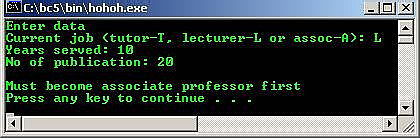
- The above statements_n could also be a block statement and must be put in curly braces.
- The if-else if statement has the following form:
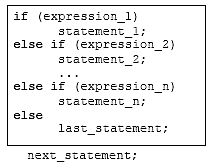
- expression_1 is first evaluated. If it is not zero (TRUE), statement_1 is executed and the whole statement terminated and the next_statement is executed. On the other hand, if expression_1 is zero, control passes to the else if part and expression_2 is evaluated.
- If it is not zero, statement_2 is executed and the whole system is terminated. If it is zero, other else if parts (if any) are tested in a similar way.
- Finally, if expression_n is not zero, statement_n is executed; if not, last_statement is executed. Note that only one of the statements will be executed other will be skipped.
- Program example:
#include <iostream.h>
#include <stdlib.h>
main()
{
int mark;
cout<<"Enter student's mark: ";
cin>>mark;
if (mark < 40)
cout<<"Student grade = F";
else if (mark < 50)
cout<<"Student grade = E";
else if (mark < 60)
cout<<"Student grade = D";
else if (mark < 70)
cout<<"Student grade = C";
else if (mark < 80)
cout<<"Student grade = B";
else
cout<<"Student grade = A";
cout<<"\n";
system("pause");
}
Output:
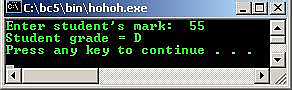
- If mark is less than 40 then grade ‘F’ will be displayed; if it is greater than or equal to 40 but less than 50, then grade ‘E’ is displayed. The test continues for grades ‘D’, ‘C’, and ‘B’.
- Finally, if mark is greater than or equal to 80, then grade ‘A’ is displayed.
- Let see another if–else statement program example, study the program and the output.
//Program example of if-else statement. This program
//is to test whether a banking transaction is a deposit,
//withdrawal, transfer or an invalid transaction,
//and to take the necessary action.
#include <iostream.h>
#include <stdlib.h>
main()
{
float amount;
char transaction_code;
cout<<"D - Cash Deposit, W - Cash Withdrawal, T - Cash Transfer\n";
cout<<"\nEnter the transaction code(D, W, T); ";
cin>>transaction_code;
if (transaction_code == 'D')
{
cout<<"\nDeposit transaction";
cout<<"\nEnter amount: ";
cin>>amount;
cout<<"\nPROCESSING....Please Wait";
cout<<"\nAmount deposited: "<<amount;
cout<<"\n---THANK YOU!/TERIMA KASIH!---";
}
else
if (transaction_code == 'W')
{
cout<<"\nWithdrawal transaction";
cout<<"\nEnter amount: ";
cin>>amount;
cout<<"\nPROCESSING....Please Wait";
cout<<"\nAmount withdrawn: "<<amount;
cout<<"\n---THANK YOU!/TERIMA KASIH!---";
}
else
if (transaction_code == 'T')
{
cout<<"\nTransfer transaction";
cout<<"\nEnter amount: ";
cin>>amount;
cout<<"\nPROCESSING....Please Wait";
cout<<"\nAmount transferred: "<<amount;
cout<<"\n---THANK YOU!/TERIMA KASIH!---";
}
else {
cout<<"\nInvalid transaction!!";
cout<<"D = Deposit, W = Withdrawal, T = Transfer";
cout<<"\nPlease enters the correct transaction code: ";
}
cout<<"\n";
system("pause");
return 0;
}
Output:
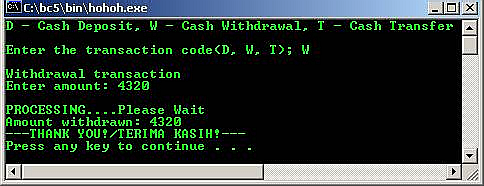
- Rerun the program; try input other than D, W and T. See the output difference.
6.3.3 Selection-The switch-case-break Statement
- The most flexible program control statement in selection structure of program control.
- Enables the program to execute different statements based on an expression that can have more than two values. Also called multiple choice statements.
- Before this, such as if statement, were limited to evaluating an expression that could have only two values: TRUE or FALSE.
- If more than two values, have to use nested if statements.
- The switch statement makes such nesting unnecessary.
- Used together with case and break.
- The switch constructs has the following form:
switch(expression)
{
case template_1 : statement(s);
break;
case template_2 : statement(s);
break;
...
...
...
case template_n : statement(s);
break;
default : statement(s);
}
next_statement;
- Evaluates the (expression) and compares its value with the templates following each case label.
1. If a match is found between (expression) and one of the templates, execution is transferred to the statement(s) that follows the case label.
2. If no match is found, execution is transferred to the statement(s) following the optional default label.
3. If no match is found and there is no default label, execution passes to the first statement following the switch statement closing brace, the next_statement.
4. To ensure that only the statements associated with the matching template are executed, include a break statement where needed, which terminates the entire switch statement.
- Program example:
//Sample program, Menu selection
#include <iostream.h>
#include <stdlib.h>
int main()
{
char selection;
cout<<"\n Menu";
cout<<"\n========";
cout<<"\n A - Append";
cout<<"\n M - Modify";
cout<<"\n D - Delete";
cout<<"\n X - Exit";
cout<<"\n Enter selection: ";
cin>>selection;
switch(selection)
{
case 'A' : {cout<<"\n To append a record\n";}
break;
case 'M' : {cout<<"\n To modify a record";}
break;
case 'D' : {cout<<"\n To delete a record";}
break;
case 'X' : {cout<<"\n To exit the menu";}
break;
//Other than A, M, D and X...
default : cout<<"\n Invalid selection";
//No break in the default case
}
cout<<"\n";
system("pause");
return 0;
}
Output:
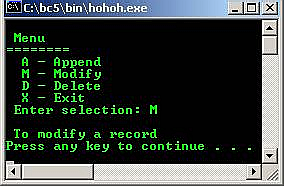
- The statement sequence for case may also be NULL or empty. For example:
switch(selection)
{
case 'A' :
case 'M' :
case 'D' : cout<<"\n To Update a file";
break;
case 'X' : cout<<"\n To exit the menu";
break;
default : cout<<"\n Invalid selection";
}
- The above program portion would display "To update a file" if the value entered at the prompt is A, M or D; "To exit menu" if the value is X; and "Invalid selection" if the value is some other character.
- It is useful for multiple cases that need the same processing sequence.
- The break statement may be omitted to allow the execution to continue to other cases.
- Consider the following program segment:
cin>>choice;
switch(choice)
{
case 1 : cout<<"\n Value of choice = 1";
break;
case 2 : cout<<"\n Value of choice = 2";
case 3 : cout<<"\n Value of choice = 3";
break;
default : cout<<"\n Wrong choice";
}
printf("...");
- It will display the message "Value of choice = 1" if choice has the value 1. It will display both the messages "Value of choice = 2" and "Value of choice = 3" if choice has the value 2.
- It will display the message "Value of choice = 3" if choice has the value 3 and the message "Wrong choice" if it has any other value.
- The switch structure can also be nested.
- The different between nested if and switch.
1. The switch permits the execution of more than one alternative (by not placing break statements) whereas the if statement does not. In other words, alternatives in an if statement are mutually exclusive whereas they may or may not be in the case of a switch.
2. A switch can only perform equality tests involving integer (or character) constants, whereas the if statement allows more general comparison involving other data types as well.
- When there are more than 3 or 4 conditions, use the switch-case-break statement rather than a long nested if statement and when there are several option to choose from and when testing for them involves only integer (or character) constants.
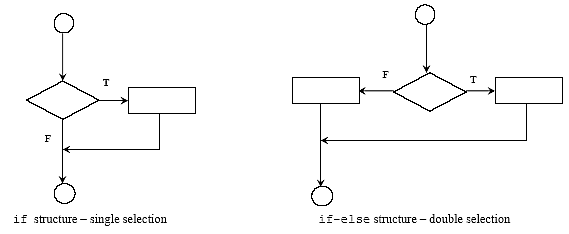
- The following are the flow charts for selection structure program control.

6.3.4 The for Statement – Repetition Control Structure, Iteration
- Is a C/C++ programming construct that executes a code block, a certain number of times.
- The block may contain no statement, one statement or more than one statement.
- The for statement causes a for loop to be executed a fixed number of times.
- The following is the for statement structure:

- initial_value1, condition and increment are all C/C++ expressions.
- The subsequent statement(s) may be a single or compound C/C++ statement (a block of code).
- When a for statement is encountered during program execution, the following events occurs:
1. The expression initial_value1 is evaluated, usually an assignment statement that sets a variable to a particular value.
2. The expression condition is evaluated. It is typically a relational expression.
3. If condition evaluates as false (zero), the for statement terminates and execution passes to the first statement following the for statement that is the next_statement.
4. If condition evaluates as true (non zero), the subsequent C/C++ statements are executed.
5. The expression increment is executed, and execution returns to step no. 2.
- Schematically, the for statement operation is shown in the following flow chart.

- The following is for statement program example followed by a flowchart:
//A simple for statement
#include <stdio.h>
#include <stdlib.h>
void main()
{
int count;
//display the numbers 1 through 10
for(count = 1; count <= 10; count++)
printf("%d ", count);
printf("\n");
system("pause");
}
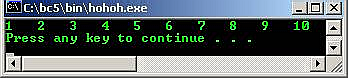
Output:
- And the flowchart:

- We also can use the count down, decrementing the counter variable instead of incrementing.
- For example:
for(count = 100; count > 0; count--)
- We can use counter other than 1, for example 3:
for(count = 0; count < 1000; count += 3)
- The initialization expression can be omitted if the test variable has been initialized previously in the program. However the semicolon must still be used in the statement.
- For example:
count=1;
for( ; count < 1000; count++)
- The initialization expression need not be an actual initialization, it can be any valid C/C++ expression, the expression is executed once when the for statement is first reached.
- For example:
count=1;
for(printf("Now sorting the array…"); count < 1000; count++)
- The incremented expression can be omitted as long as the counter variable is updated within the body of the for statement. The semicolon still must be included.
- For example,
for(counter=0; counter < 100; )
printf("%d", counter++);
- The test expression that terminates the loop can be any C/C++ expression. As long as it evaluates as true (non zero), the for statement continues to execute.
- Logical operators can be used to construct complex test expressions.
- For example:
for(count =0; count < 1000 && name[count] != 0; count++)
printf("%d", name[count]);
for(count = 0; count < 1000 && list[count];)
printf("%d", list[count++]);
- The for statement and arrays are closely related, so it is difficult to define one without explaining the other. We will learn an array in another Module.
- The for statement can be followed with a null statement, so that work is done in the for statement itself. Null statement consists of a semicolon alone on a line.
- For example:
for(count = 0; count < 20000; count++)
;
- This statement provides the pause (or time-delay) of 20000 milliseconds.
- An expression can be created by separating two sub expressions with the comma operator, and are evaluated (in left-to-right order), and the entire expression evaluates to the value of the right sub expression.
- Each part of the for statement can be made to perform multiple duties.
- For example:
We have two 1000 element arrays, named a[] and b[]. Then we want to copy the contents of a[] to b[] in reverse order, so, after the copy operation, the array content should be,
b[0], b[1], b[2],… and a[999], a[998], a[997],… and so on, the coding is
for(i = 0, j = 999; i < 1000; i++, j--)
b[j] = a[i];
- Another examples of the for statements:
sum = 0;
for(i = 1; i <=20; i++)
sum = sum + i;
cout<<"\n Sum of the first 20 natural numbers = ";
cout<<sum;
- The above program segment will compute and display the sum of the first 20 natural numbers.
- The above example can be rewritten as:
for(i = 1, sum = 0; i <= 20; i++)
sum = sum + i;
cout<<"\nSum of the first 20 natural numbers = "<<sum;
- Note that the initialization part has two statements separated by a comma (,).
- For example:
for(i = 2, sum=0, sum2 = 0; i <= 20; i = i + 2)
{
sum = sum + i;
sum2 = sum2 + i*i;
}
cout<<"\nSum of the first 20 even natural numbers=";
cout<<sum<<"\n";
cout<<"sum of the squares of first 20 even natural numbers=";
cout<<sum2;
- In this example, the for statement is a compound or block statement. Note that, the initial value in the initialization part doesn’t have to be zero and the increment value in the incrementation part doesn’t have to be 1.
- We can also create an infinite or never-ending loop by omitting the second expression or by using a non-zero constants in the following two code segments examples:
for( ; ; )
cout<<"\n This is an infinite loop";
- And
for( ; 1 ; )
cout<<"\n This is an infinite loop";
- In both cases, the message "This is an infinite loop" will be displayed repeatedly that is indefinitely.
- All of the repetition constructs discussed so far can also be nested to any degree. The nesting of loops provides power and versatility required in some applications.
- Program example:
//program to show the nested loops
#include <iostream.h>
#include <stdlib.h>
main()
{
//variables for counter…
int i, j;
//outer loop, execute this first...
for(i=1; i<11; i++)
{
cout<<"\n"<<i;
//then...execute inner loop with loop index j
//the initial value of j is i + 1
for(j=i+1; j<11; j++)
//Display result…
cout<<j;
//increment counter by 1 for inner loop…
}
//increment counter by 1 for outer loop…
cout<<"\n";
system("pause");
return 0;
}
Output:
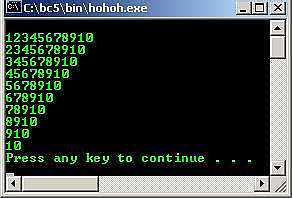
- The program has two for loops. The loop index i for the outer (first) loop runs from 1 to 4 and for each value of i, the loop index j for the inner loop runs from i + 1 to 4.
- Note that for the last value of i (i.e. 4), the inner loop is not executed at all because the starting value of j is 5 and the expression j < 5 yields the value false.
- Another nested example, study the program and the output.
/*Nesting two for statements*/
#include <stdio.h>
#include <stdlib.h>
//function prototype
void DrawBox(int, int);
void main()
{
//row = 10, column = 25...
DrawBox(10, 25);
}
void DrawBox(int row, int column)
{
int col;
//row, execute outer for loop...
//start with the preset value and decrement
//until 1
for( ; row > 0; row--)
{
//column, execute inner loop...
//start with preset col, decrement until 1
for(col = column; col > 0; col--)
//print #....
printf("#");
//decrement by 1 for inner loop...
//go to new line for new row...
printf("\n");
}
//decrement by 1 for outer loop...repeats
system("pause");
}
Output:
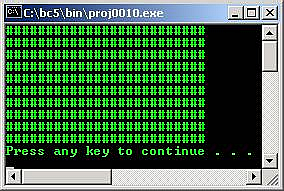
- In the first for loop, the initialization is skipped because the initial value of row was passed to the function; this for loop is executed until the row is 0.
6.5 The while Statement – Repetition Control Structure, Iteration
- Also called the while loop, executes a block of statements as long as a specified condition is true.
- The general form:
|
while(condition) statement(s); |
|
next_statement; |
- The (condition) may be any C/C++ valid expression.
- The statement(s) may be either a single or a compound (a block) C/C++ statement.
- When program execution reaches a while statement, the following events occur:
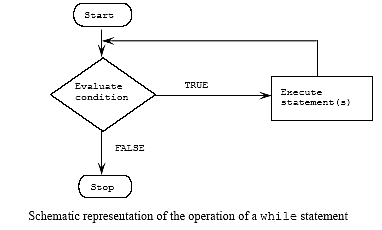
1. The (condition) is evaluated.
2. If (condition) evaluates as false (that is zero), the while statement terminates and execution passes to the first statement following statement(s) that is the next_statement.
3. If (condition) evaluates as true (that is non zero), the C/C++ statement(s) are executed.
4. Then, the execution returns to step number 1.
- The while statement flow chart is shown below.
- Program example:
//Demonstrates a simple while statement
#include <stdio.h>
#include <stdlib.h>
int main()
{
int calculate;
//print the numbers 1 through 12
//set the initial value...
calculate = 1;
//set the while condition...
while(calculate <= 12)
{
//display...
printf("%d ", calculate);
//increment by 1...repeats
calculate++;
}
printf("\n");
system("pause");
return 0;
}
Output:
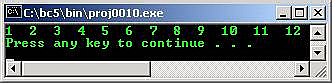
- Actually, the same task that can be performed by for statement that we have discussed.
- But, while statement does not contain an initialization section, the program must explicitly initialize any variables before executing the while expression.
- As conclusion, while statement is essentially a for statement without the initialization and increment components.
- The comparison between for and while:
for( ; condition; ) vs while(condition)
- The tasks that can be accomplished with a for statement can also be done with a while statement.
- If for statement is used, the initialization, test and increment expressions are located together and are easy to find and modify.
- Just like for and if statements, while statements can also be nested. For example:
//Nested while statements
#include <stdio.h>
#include <stdlib.h>
//this program have some array
//that you will learn in another module...
void main()
{
//array variable...
int arrange[5];
int count = 0,
number = 0;
printf("\Prompting you for 5 numbers\n");
printf("Each number should be from 1 to 10\n");
//while condition...
while(count<5)
{
//set the initial condition...
number = 0;
//another while condition...
while((number < 1) || (number > 10))
{
printf("Enter number %d of 5: ", count + 1);
scanf("%d", &number);
}
//inner while loop stop here...
arrange[count] = number;
count++;
}
//outer while loop stop here...
//start for loop for printing the result...
for (count = 0; count < 5; count++)
printf("\nValue %d is %d", count + 1, arrange[count]);
printf("\n");
system("pause");
}
Output:
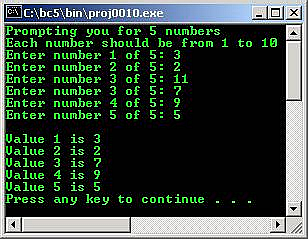
- In the program example, the number less 1 or more than 10 will not be accepted and displayed.
- Nested loop refers to a loop that is contained within another loop. C/C++ places no limitations on the nesting of loops, except that each inner loop must be enclosed completely in the outer loop.
6.6 Repetition-The do…while Loop, Iteration
- Executes a block of statements as long as a specified condition is true.
- Test the condition at the end of the loop rather than at the beginning, as is done by the for loop and the while loop.
- The do…while loop construct is:
|
do statement(s); while(condition); |
|
next_statement; |
- (condition) may be any C/C++ valid expression.
- statement(s) may be either a single or compound (a block) C/C++ statement.
- When the program execution reaches the do…while statement, the following events occur:
1. The statement(s) are executed.
2. The condition is evaluated. If it is true, execution returns to step number 1. If it is false, the loop terminates and the next_statement is executed.
- This means the statement in the do…while will be executed at least once.
- The following is a flow chart for the do…while loop:
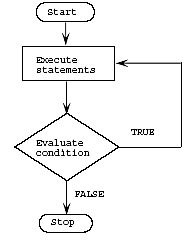
- You can see that the execute statements are always executed at least once.
- for and while loops evaluate the test condition at the start of the loop, so the associated statements are not executed if the test condition is initially false.
- do…while is used less frequently than while and for loops, however a do…while loop probably would be more straight forward.
- Program example:
//program to illustrate a do…while loop
#include <iostream.h>
#include <stdlib.h>
main()
{
int selection;
do
{
cout<<"\n Menu"<<"\n";
cout<<"\n 0. Exit";
cout<<"\n 1. Append";
cout<<"\n 2. Delete";
cout<<"\n 3. Modify";
cout<<"\n\n Enter selection: ";
cin>>selection;
}while((selection > 0) && (selection < 4));
//true for 1, 2 and 3 ONLY, then repeat
//false for other numbers including 0, then stop...
//the do loop is repeated if the while expression is true.
system("pause");
return 0;
}
Output:
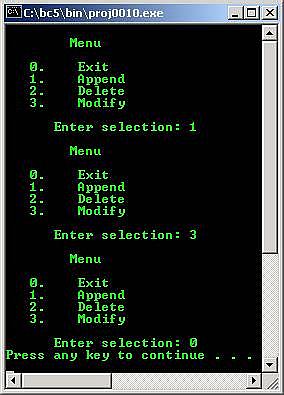
- Study the program source code and the output.
- The program displays the menu and then requests a selection. If the selection is 1, 2, or 3, the menu is displayed again; otherwise, the loop is terminated. Note that the loop is repeatedly executed as long as the selection is 1, 2, or 3.
- Another program example:
//another do…while statement example
#include <stdio.h>
#include <stdlib.h>
int get_menu_choice(void);
void main()
{
int choice;
choice = get_menu_choice();
printf("You have chosen Menu #%d\n", choice);
printf("\n");
system("pause");
}
int get_menu_choice(void)
{
int selection = 0;
do
{
printf("1 - Add a record");
printf("\n2 - Change a record");
printf("\n3 - Delete a record");
printf("\n4 - Quit");
printf("\nEnter a selection: ");
scanf("%d", &selection );
} while ((selection < 1) || (selection > 4));
return selection;
}
Output:
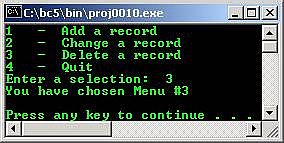
6.7 Other Program Controls
- The continue statement can only be used inside a loop (for, do…while and while) and not inside a switch. When executed, it transfers control to the test condition (the expression part) in a while or do…while loop, and to the increment expression in a for loop.
- It forces the next iteration to take place immediately, skipping any instructions that may follow it.
- Unlike the break statement, continue does not force the termination of a loop, it merely transfers control to the next iteration.
- Let consider the following example:
for(i=1, sum=0; i<100; i++)
{
if (i%2) // test value, 0 or non-zero
continue; //executed if the test value is non-zero…
//and repeat the for statement
sum = sum + i; //executed if the test value is zero…
//and then, also repeat the for
//statement
}
- This loop sums up the even numbers 2, 4, 6, ... , 98 and stores the value in the variable sum. If the expression i % 2 (the remainder when i is divided by 2) yields a non-zero value (i.e., if i is odd), the continue statement is executed and the iteration repeated (i incremented and tested).
- If it yields a zero value (i.e., if i is even), the statement sum = sum + i; is executed and the iteration continued.
- When a continue statement executes, the next iteration of the enclosing loop begins. The enclosing loop means the statements between the continue statement and the end of the loop are not executed.
- Another program example:
//example of the continue
#include <stdio.h>
#include <stdlib.h>
void main()
{
//declare storage for input, an array
//and counter variable
char buffer[81];
int ctr;
//input and read a line of text using
//puts() and gets() are pre defined functions
//in stdio.h
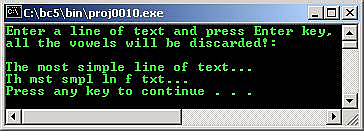
puts("Enter a line of text and press Enter key,");
puts("all the vowels will be discarded!:\n");
gets(buffer);
//go through the string, displaying only those
//characters that are not lowercase vowels
for(ctr=0; buffer[ctr] != '\0'; ctr++)
{
//If the character is a lowercase vowel, loop back
//without displaying it
//this if statement must be in one line if((buffer[ctr]=='a')||(buffer[ctr]=='e')||
(buffer[ctr]=='i')||(buffer[ctr]=='o')||(buffer[ctr]=='u'))
continue;
//If not a vowel, display it
putchar(buffer[ctr]);
}
printf("\n");
system("pause");
}
Output:
- The goto statement is one of C/C++ unconditional jump, or branching, statements and quite popular in Basic programming language.
- When program execution reaches a goto statement, execution immediately jumps, or branches, to the location specified by the goto statement.
- The statement is unconditional because execution always branches when a goto statement is encountered, the branch does not depend on any program condition.
- A goto statement and its target label must be located in the same function, although they can be in different blocks. For example:
//demonstrate the goto statement
#include <stdio.h>
#include <stdlib.h>
void main()
{
int n;
start: ;
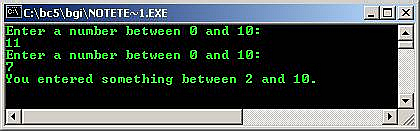
puts("Enter a number between 0 and 10: ");
scanf("%d", &n);
if ((n < 0) || (n > 10))
goto start;
else if (n == 0)
goto location0;
else if (n == 1)
goto location1;
else
goto location2;
location0: ;
{
puts("You entered 0.");
}
goto end;
location1: ;
{
puts("You entered 1.");
}
goto end;
location2: ;
{
puts("You entered something between 2 and 10.");
}
end: ;
system("pause");
}
Output:
- Programmer can use goto to transfer execution both into and out of loops, such as a for statement.
- But, it is strongly recommended that a goto statement not be used anywhere in a program. It isn’t needed. Always use other C/C++ branching statements. Furthermore when program execution branches with a goto statement, no record is kept of where the execution came from.
- The exit() function, normally used when the program want to terminates at any time by calling the library function exit(). Other similar functions that you will find in the program examples in this tutorial includes:
|
Function |
Description |
|
abort() |
Abort current process and return error code defined in stdlib.h |
|
terminate() |
Used when a handler for an exception cannot be found. The default action by terminate is to call abort() and causes immediate program termination. It is defined in except.h. |
|
Table 6.2: Termination functions. |
|
- The exit() function terminates program execution and returns control to the Operating System.
- The syntax of the exit() function is:
exit(status);
|
Status |
Description |
|
0 |
The program terminated normally. |
|
1 |
Indicates that the program terminated with some sort of error. The return value is usually ignored. Other implementation may use other than 1 (non-zero) for termination with error. |
|
Table 6.3: exit() status |
|
- We must include the header file stdlib.h.
- This header file also defines two symbolic constants for use as arguments to the exit() function, such as:
#define EXIT_SUCCESS 0
#define EXIT_FAILURE 1
- Then we can call the function like this:
exit(EXIT_SUCCESS);
Or
exit(EXIT_FAILURE);
- The atexit() function, used to specify, or register, one or more functions that are automatically executed when the program terminates.
- May not be available on non-DOS based system and as many as 32 functions can be registered for execution of the program.
- These functions are executed on a last-in, first-out basis, the last function registered is the first function executed.
- When all functions registered by atexit() have been executed, the program terminates and returns control to the OS.
- The prototype of the atexit() function is located in the stdlib.h and the construct is:
int atexit(void(*)(void));
- atexit() function takes a function pointer as its argument and functions with atexit() must have a return type of void. Pointer will be explained in other Module.
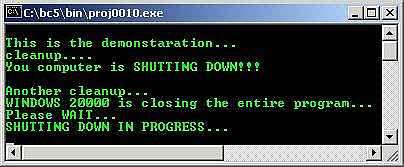
- The following is a program example that shows how to execute the functions cleanup1() and cleanup2(), in that order, on termination. Study the following program example and the output.
#include <stdlib.h>
#include <stdio.h>
//function prototypes...
void cleanup1(void);
void cleanup2(void);
void main()
{
atexit(cleanup2);
atexit(cleanup1);
//end of main
}
void cleanup1(void)
{
//dummy cleanup.....
printf("\nThis is the demonstration...\n");
printf("cleanup....\n");
printf("You computer is SHUTTING DOWN!!!");
getchar();
}
void cleanup2(void)
{
//another dummy cleanup...
printf("\nAnother cleanup...");
printf("\nWINDOWS 20000 is closing the entire program...");
printf("\nPlease WAIT...");
printf("\nSHUTTING DOWN IN PROGRESS...\n");
getchar();
}
Output:
- Another example, using exit() and atexit() functions.
//Demonstrate the exit() and atexit() functions
#include <stdio.h>
#include <stdlib.h>
#include <time.h>
#define DELAY 1500000
//function prototypes
void cleanup(void);
void delay(void);
void main()
{
int reply;
//register the function to be called at exit
atexit(cleanup);
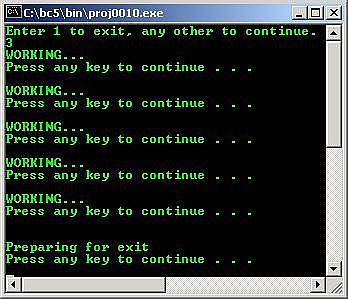
puts("Enter 1 to exit, any other to continue.");
scanf("%d", &reply);
if(reply == 1)
exit(EXIT_SUCCESS);
//pretend to do some work
for(reply = 0; reply < 5; reply++)
{
puts("WORKING...");
delay();
}
}//end of main
//function definition...
void cleanup(void)
{
puts("\nPreparing for exit");
delay();
}
//function definition
void delay(void)
{
long x;
for(x = 0; x < DELAY; x++)
;
system("pause");
}
Output if user presses other than 1:
- The system() function, enables the execution of OS command in a running C/C++ program.
- Can be quite useful, for example, enabling the program to read a disk’s directory listing or format a disk without exiting the program.
- Must include the header file stdlib.h.
- The syntax is:
system("command");
- The command can be either a string constant or a pointer to a string.
- For example, using an argument with the system() function,
char *command = "dir";
system(command);
- After the OS command is executed, the program continues at the location immediately following the system() call.
- If the command passed to the system() function is not a valid OS command, a bad command or file name error message is displayed before returning to the program.
- The command can also be any executable or batch file to be run.
- Program example:
//Demonstrate the system() function
#include <stdio.h>
#include <stdlib.h>
void main()
{
//Declare a buffer to hold input
char input[40];
while (1)
{
//get the user command
puts("\nInput the desired DOS command, blank to exit");
gets(input);
//Exit if a blank line was entered
if(input[0] == '\0')
exit(0);
//execute the command
system(input);
}
}
Output when DOS command mem is typed:
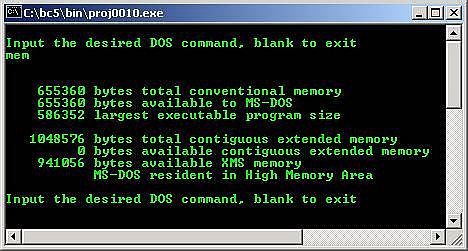
- You should notice that in the program examples used throughout this tutorial, we have used the system("pause"), to pause the program execution temporarily. This pause command is for Borland and I am not sure for other compilers.
- The return statement has a form:
return expression;
- The action is to terminate execution of the current function and pass the value contained in the expression (if any) to the function that invoked it.
- The value returned must be of the same type or convertible to the same type as the function (type casting).
- More than one return statement may be placed in a function. The execution of the first return statement in the function automatically terminates the function.
- If a function calls another function before it is defined, then a prototype for it must be included in the calling function. This gives information to the compiler to look for the called function (callee).
- The main() function has a default type int since it returns the value 0 (an integer) to the environment.
- A function of type void will not have the expression part following the keyword return. Instead, in this case, we may drop the entire return statement altogether.
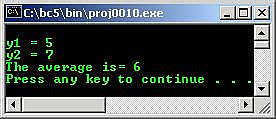
- Study the following program example and the output.
//program showing function definition, declaration, call and
//the use of the return statement
#include <iostream.h>
#include <stdlib.h>
main()
{
float y1, y2, avgy;
float avg(float, float);
//A prototype for the function avg()
//that main() is going to call
y1=5.0;
y2=7.0;
avgy = avg(y1, y2);
//calling the function avg() i.e. control passes
//to avg() and the return value is assigned to avgy
cout<<"\ny1 = "<<y1<<"\ny2 = "<<y2;
cout<<"\nThe average is= "<<avgy<<endl;
system("pause");
return 0;
}
//Definition of the function avg(), avg() is
//of type float main() calls this function
float avg(float x1, float x2)
{
//avgx is a local variable
float avgx;
//Computes average and stores it in avgx.
avgx = (x1+x2)/2;
//returns the value in avgx to main() and
//control reverts to main().
return avgx;
}
Output:
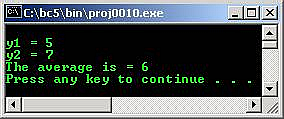
- Compare with the following program example:
//program showing a function of type void
//It has return statement
#include <iostream.h>
#include <stdlib.h>
main()
{
float y1, y2, avgy;
//function prototype...
//display-avg() is declared to be of type void
void display_avg(float);
y1 = 5.0;
y2 = 7.0;
cout<<"\ny1 = "<<y1<<"\ny2 = "<<y2;
avgy = (y1 + y2)/2; //compute average
display_avg(avgy); //call function display_avg()
cout<<endl;
system("pause");
return 0; //return the value 0 to the environment
}
//display_avg() is of type void
void display_avg(float avgx)
{
cout<<"\nThe average is = "<<avgx;
return;
//No value is returned to main()
//and control reverts to main().
//or just excludes the return word…
}
Output:
--------------------------------------------------Notes--------------------------------------------------
Program Examples
Example #1
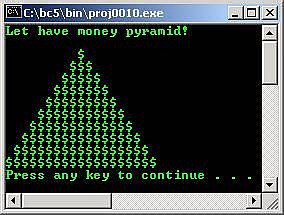
//A pyramid of $ using nested loops
#include <iostream.h>
#include <stdlib.h>
#define VIEW '$'
//replace any occurrences of VIEW with character $
main()
{
int i, j;
cout<<"Let have money pyramid!\n"<<endl;
//first for loop, set the rows...
for(i=1; i<=10; i++)
{
//second for loop, set the space...
for(j=1; j<=10-i; j++)
cout<<" ";
//third for loop, print the $ characters...
for(j=1; j<=2*i-1; j++)
//print character...
cout<<VIEW;
//go to new line...
cout<<"\n";
}
system("pause");
return 0;
}
Output:
Example #2
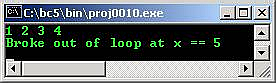
//using break statement in a for structure
#include <stdio.h>
main()
{
int x;
for(x = 1; x <= 10; x++)
{
//break loop only if x == 5
if (x == 5)
break;
printf("%d ", x);
}
printf("\nBroke out of loop at x == %d\n", x);
getchar();
return 0;
}
Output:
Example #3
//using the continue statement in a for structure
#include <stdio.h>
#include <stdlib.h>
main()
{
int x;
for(x = 1; x <= 10; x++)
{
//skip remaining code in loop only if x == 5
if(x == 5)
continue;
printf("%d ", x);
}
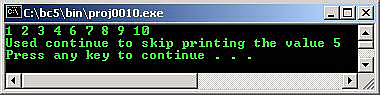
printf("\nUsed continue to skip printing the value 5\n");
system("pause");
return 0;
}
Output:
Example #4
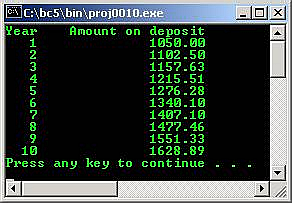
//using for statement to calculate compound interest
#include <stdio.h>
#include <stdlib.h>
#include <math.h> //for pow() function
main()
{
int year;
double amount, principal = 1000.0, rate = 0.05;
printf("%4s%21s\n", "Year", "Amount on deposit");
for(year = 1; year <= 10; year++)
{
amount = principal * pow(1.0 + rate, year);
printf("%4d%21.2f\n", year, amount);
}
system("pause");
return 0;
}
Output:
Example #5
//Counting letter grades using while, switch
//and multiple case
#include <stdio.h>
#include <stdlib.h>
main()
{
int grade;
int aCount=0,bCount=0,cCount=0,dCount=0,eCount=0,fCount = 0;
printf("Enter the letter grades. \n");
printf("Enter the EOF character, ctrl-c or\n");
printf("ctrl-z, etc to end input.\n");
while((grade = getchar()) != EOF)
{
//switch nested in while
switch(grade)
{
//grade was uppercase A or lowercase a
case 'A': case 'a':
++aCount;
break;
//grade was uppercase B or lowercase b
case 'B': case 'b':
++bCount;
break;
//grade was uppercase C or lowercase c
case 'C': case 'c':
++cCount;
break;
//grade was uppercase D or lowercase d
case 'D': case 'd':
++dCount;
break;
//grade was uppercase E or lowercase e
case 'E': case 'e':
++eCount;
break;
//grade was uppercase F or lowercase f
case 'F': case 'f':
++fCount;
break;
//ignore these input
case '\n': case ' ':
break;
//catch all other characters
default:
{printf("Incorrect letter grade entered.\n");
printf("Enter a new grade.\n");}
break;
}
}
//Do the counting...
printf("\nTotals for each letter grade are:\n");
printf("\A: %d\n", aCount);
printf("\B: %d\n", bCount);
printf("\C: %d\n", cCount);
printf("\D: %d\n", dCount);
printf("\E: %d\n", eCount);
printf("\F: %d\n", fCount);
system("pause");
return 0;
}
Output:
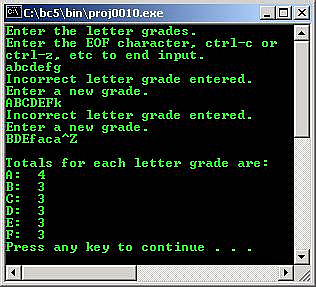
- Here we use EOF (acronym, stands for End Of File), normally has the value –1, as the sentinel value. The user types a system-dependent keystroke combination to mean end of file that means ‘I have no more data to enter’.
- EOF is a symbolic integer constant defined in the <stdio.h> header file. If the value assigned to grade is equal to EOF, the program terminates.
- The keystroke combinations for entering EOF are system dependent.
- On UNIX systems and many others, the EOF is <return key> or ctrl-z or ctrl-d.
- On other system such as DEC VAX VMS® or Microsoft Corp MS-DOS®, the EOF is ctrl-z.
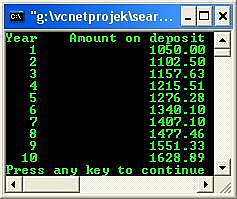
- Finally, program example compiled using VC++/VC++ .Net.
//using for statement to calculate compound interest
#include <cstdio>
#include <cmath> //for pow() function
using namespace std;
main()
{
int year;
double amount, principal = 1000.0, rate = 0.05;
printf("%4s%21s\n", "Year", "Amount on deposit");
for(year = 1; year <= 10; year++)
{
amount = principal * pow(1.0 + rate, year);
printf("%4d%21.2f\n", year, amount);
}
return 0;
}
Output:
- The following is a program example compiled using gcc.
#include <stdio.h>
int main()
{
char job_title;
int years_served, no_of_pub;
printf(" ---Enter data---\n");
printf("Your current job (Tutor-T, Lecturer-L or Assoc. Prof-A): ");
scanf("%s", &job_title);
printf("Years served: ");
scanf("%d", &years_served);
printf("No of publication: ");
scanf("%d", &no_of_pub);
if(job_title == 'A')
if(years_served > 5)
if(no_of_pub > 7)
printf("\nCan be promoted to Professor\n");
else
printf("\nMore publications required lol! \n");
else
printf("\nMore service required lol\n");
else
printf("\nMust become Associate Professor first\n");
return 0;
}
[bodo@bakawali ~]$ gcc ifelse.c -o ifelse
[bodo@bakawali ~]$ ./ifelse
---Enter data---
Your current job (Tutor-T, Lecturer-L or Assoc. Prof-A): A
Years served: 12
No of publication: 14
Can be promoted to Professor
/*-----forloop.c-----------*/
/*-----First triangle-------*/
#include <stdio.h>
int main()
{
int i, j, k, l;
printf("Triangle lol!\n");
/*first for loop, set the rows...*/
for(i=15; i>=0; i--)
{
/*second for loop, set the space...*/
for(j=15; j>=1+i; j--)
printf(" ");
/*third for loop, print the characters...*/
for(j=1; j<=2*i+1; j++)
/*print the character...*/
printf("H");
/*go to new line...*/
printf("\n");
}
/*Another inverse triangle*/
for(k=1; k <= 16; k++)
{
for(l=1; l<=16-k; l++)
printf(" ");
for(l=1; l<=2*k-1; l++)
printf("T");
printf("\n");
}
return 0;
}
[bodo@bakawali ~]$ gcc forloop.c -o forloop
[bodo@bakawali ~]$ ./forloop
Triangle lol!
HHHHHHHHHHHHHHHHHHHHHHHHHHHHHHH
HHHHHHHHHHHHHHHHHHHHHHHHHHHHH
HHHHHHHHHHHHHHHHHHHHHHHHHHH
HHHHHHHHHHHHHHHHHHHHHHHHH
HHHHHHHHHHHHHHHHHHHHHHH
HHHHHHHHHHHHHHHHHHHHH
HHHHHHHHHHHHHHHHHHH
HHHHHHHHHHHHHHHHH
HHHHHHHHHHHHHHH
HHHHHHHHHHHHH
HHHHHHHHHHH
HHHHHHHHH
HHHHHHH
HHHHH
HHH
H
T
TTT
TTTTT
TTTTTTT
TTTTTTTTT
TTTTTTTTTTT
TTTTTTTTTTTTT
TTTTTTTTTTTTTTT
TTTTTTTTTTTTTTTTT
TTTTTTTTTTTTTTTTTTT
TTTTTTTTTTTTTTTTTTTTT
TTTTTTTTTTTTTTTTTTTTTTT
TTTTTTTTTTTTTTTTTTTTTTTTT
TTTTTTTTTTTTTTTTTTTTTTTTTTT
TTTTTTTTTTTTTTTTTTTTTTTTTTTTT
TTTTTTTTTTTTTTTTTTTTTTTTTTTTTTT
/*-----------whilelol.c---------------*/
/*Demonstrates a simple while statement*/
#include <stdio.h>
int main()
{
int calculate, sum = 0;
/*print the numbers 1 through 12*/
/*set the initial value...*/
calculate = 1;
/*set the while condition...*/
while(calculate <= 10)
{
/*display...*/
printf("%d -->Sum = %d\n", calculate, sum);
sum = sum + calculate;
/*increment by 1...repeats*/
calculate++;
}
printf("\n");
return 0;
}
[bodo@bakawali ~]$ gcc whilelol.c -o whilelol
[bodo@bakawali ~]$ ./whilelol
1 -->Sum = 0
2 -->Sum = 1
3 -->Sum = 3
4 -->Sum = 6
5 -->Sum = 10
6 -->Sum = 15
7 -->Sum = 21
8 -->Sum = 28
9 -->Sum = 36
10 -->Sum = 45
/*--------systemcall.c-------------*/
/*Demonstrate the system() function*/
#include <stdio.h>
#include <stdlib.h>
int main()
{
//Declare a buffer to hold input
char input[40];
while (1)
{
//get the user command
puts("\nInput the command, blank to exit");
gets(input);
//Exit if a blank line was entered
if(input[0] == '\0')
exit(0);
//execute the command
system(input);
}
return 0;
}
[bodo@bakawali ~]$ gcc systemcall.c -o hehehe
/tmp/cc23DhgK.o(.text+0x34): In function `main':
: warning: the `gets' function is dangerous and should not be used.
[bodo@bakawali ~]$ ./hehehe
Input the command, blank to exit
ls -F -l
total 1908
-rwxrwxr-x 1 bodo bodo 34243 Apr 23 10:49 algo*
-rwxrwxr-x 1 bodo bodo 17566 Apr 23 10:53 algocopy*
-rw-rw-r-- 1 bodo bodo 1014 Apr 23 10:53 algocopy.cpp
-rw-rw-r-- 1 bodo bodo 1191 Apr 23 10:48 algo.cpp
-rwxrwxr-x 1 bodo bodo 23033 Apr 23 11:23 algofindfirstof*
-rw-rw-r-- 1 bodo bodo 1751 Apr 23 11:22 algofindfirstof.cpp
-rwxrwxr-x 1 bodo bodo 37395 Apr 23 11:28 algoiterswap*
...
Input the command, blank to exit
[bodo@bakawali ~]$
------------------------------------------------------o0o------------------------------------------------------