MODULE 4
FUNCTIONS
Receive nothing, return nothing-receive nothing, return something-
receive something, return something-receive something, return nothing
And they do something. That is a function!
My Training Period: hours
Note: Function is one of the important topics in C and C++.
Abilities
▪ Able to understand and use function.
▪ Able to create user defined functions.
▪ Able to understand Structured Programming.
▪ Able to understand and use macro.
▪ Able to appreciate the recursive function.
▪ Able to find predefined/built-in standard and non-standard functions resources.
▪ Able to understand and use predefined/built-in standard and non-standard functions.
▪ Able to understand and use the variadic functions.
4.1 Some Definition
- Most computer programs that solve real-world problem are large, containing thousand to million lines of codes and developed by a team of programmers.
- The best way to develop and maintain large programs is to construct them from smaller pieces or modules, each of which is more manageable than the original program.
- These smaller pieces are called functions. In C++ you will be introduced to Class, another type smaller pieces construct.
- The function and class are reusable. So in C/C++ programs you will encounter and use a lot of functions. There are standard (normally called library) such as maintained by ANSI C/ANSI C++, ISO/IEC C, ISO/IEC C++ and GNU’s glibc or other non-standard functions (user defined or vendors specific or implementations or platforms specific).
- If you have noticed, in the previous Modules, you have been introduced with many functions, including the main(). main() itself is a function but with a program execution point.
- Functions are very important construct that marks the structured or procedural programming approach.
- In general terms or in other programming languages, functions may be called procedures or routines and in object oriented programming, methods may be used interchangeably with functions.
- Some definition: A function is a named, independent section of C/C++ code that performs a specific task and optionally returns a value to the calling program.
- So, in a program, there are many calling function codes and called functions (normally called callee).
- There are basically two categories of function:
1. Predefined functions - available in the C/C++ standard library such as stdio.h, math.h, string.h etc. These predefined functions also depend on the standard that you use such as ANSI C, ANSI C++, ISO/IEC C, Single UNIX Specification, glibc (GNU), Microsoft C etc. but the functions name and their functionalities typically similar. You have to check your compilers documentation which standard that they comply to.
2. User-defined functions – functions that the programmers create for specialized tasks such as graphic and multimedia libraries, implementation extensions etc. This is non-standard functions normally provided in the non-standard libraries.
- We will concentrate on the user-defined functions, which basically having the following characteristics:
1. A function is named with unique name.
By using the name, the program can execute the statements contained in the function, a process known as calling the function. A function can be called from within another function.
2. A function performs a specific task.
Task is a discrete job that the program must perform as part of its overall operation, such as sending a line of text to the printer, sorting an array into numerical order, or calculating a cube root, etc.
3. A function is independent.
A function can perform its task without interference from or interfering with other parts of the program. The main program, main() also a function but with an execution point.
4. A function may receive values from the calling program.
Calling program can pass values to function for processing whether directly or indirectly (by reference).
5. A function may return a value to the calling program.
When the program calls a function, the statements it contains are executed. These statements may pass something back to the calling program.
- Let try a simple program example that using a simple user defined function:
//Demonstrate a simple function
#include <stdio.h>
#include <stdlib.h>
//calling predefined functions needed in
//this program such as printf()
long cube(long);
//function prototype, explained later
void main()
{
long input, answer;
printf("\n--Calculating cube volume--\n");
printf("Enter a positive integer, for cube side (meter): ");
scanf("%d", &input);
answer = cube (input); //calling cube function
//%ld is the conversion specifier for a long
//integer, more on this in another module
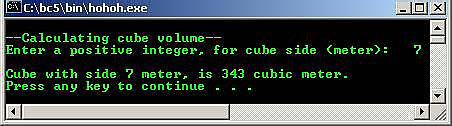
printf("\nCube with side %ld meter, is %ld cubic meter.\n", input, answer);
system("pause");
}
//function definition
long cube(long x)
{
//local scope (to this function) variable
long x_cubed;
//do some calculation
x_cubed = x * x * x;
//return a result to calling program
return x_cubed;
}
Output:
- The following statement is calling cube() function, bringing along the value assigned at input variable.
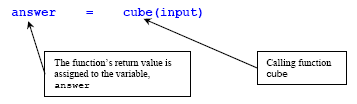
- When this statement is executed, program jump to the cube() function definition:
-

- After finished the execution, the cube() function returns to the calling code, where in this case, assign the return value, x_cubed to an answer variable.
- main(), scanf(), print() are examples of the standard predefined functions.
4.2 How A Function Works
- A C/C++ program does not execute the statements in a function until the function is called by another part of the program.
- When C/C++ function is called, the program can send information to the function in the form of one or more what is called arguments although it is not a mandatory.
- Argument is a program data needed by the function to perform its task.
- When the function finished its processing, program returns to the same location that called the function.
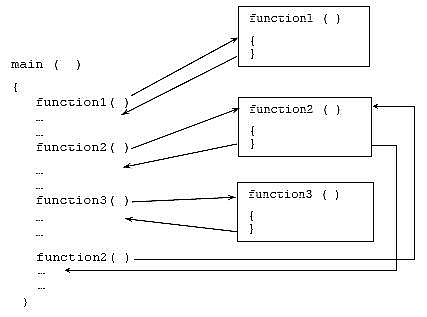
|
Arrow |
Means |
|
→ |
Calling function with data (argument) if any |
|
← |
Return to the next statement or execution with data if any |
- When a program calls a function, executions passed to the function and then back to the calling program’s code.
- Function can be called as many times as needed (as shown for function2()), and can be called in any order provided that it has been declared and defined.
4.3 A Function Definition
- Is the actual function body, which contains the code that will be executed as shown below:
long cube(long x)
{
//local scope (to this function) variable
long x_cubed;
//do some calculation
x_cubed = x * x * x;
//return a result to calling program
return x_cubed;
}
- First line of a function definition is called the function header, should be identical to the function prototype, except the semicolon.
- Although the argument variable names (x in this case) were optional in the prototype, they must be included in the function header.
- Function body, containing the statements, which the function will perform, should begin with an opening brace and end with a closing brace.
- If the function returns data type is anything other than void (nothing to be returned), a return statement should be included, returning a value matching the return data type (long in this case).
4.4 Structured Programming
- Functions and structured programming are closely related.
- Structured programming definition: In which individual program tasks are performed by independent sections of program code.
- Normally, the reasons for using structured programming may be:
1. Easier to write a structured program.
Complex programming problems or program are broken into a number of smaller, simpler tasks. Every task can be assigned to a different programmer and/or function.
2. It’s easier to debug a structured program.
If the program has a bug (something that causes it to work improperly), a structured design makes it easier to isolate the problem to a specific section of code.
3. Reusability.
Repeated tasks or routines can be accomplished using functions. This can overcome the redundancy of code writing, for same tasks or routines, it can be reused, no need to rewrite the code, or at least only need a little modification.
- Advantages: Can save programmers’ time and a function written can be reused (reusability).
- Structured program requires planning, before we start writing a single line of code.
- The plan should be a list of the specific tasks that the program performs.
Simple Example:
- Imagine that you are planning to create a program to manage a name and address list of students.
Planning: Roughly the algorithm might be (not in order):
1. Enter new names and address.
2. Modify existing entries.
3. Sort entries by last name.
4. Printing mailing labels.
- So, the program is divided into 4 main tasks, each of which can be assigned to a function.
- Next, if needed, we still can divide these tasks into smaller tasks called subtasks.
- For example, as a common sense, for the "Enter new names and addresses" we can divide to the following subtasks:
1. Read the existing address list from disk.
2. Prompt the user for one or more new entries.
3. Add the new data to the list.
4. Save the updated list to disk.
- Then if needed, "Modify existing entries" task still can be subdivided to the following subtasks:
1. Read the existing address list from disk.
2. Modify one or more entries.
3. Save the updated list to disk.
- Finally we can see that there are two common subtasks – "Reading from disk and saving to disk"
- So, one function can be called by both the "Enter new names and address" function and the "Modify existing entries" function. No redundancy or repetition and the functions created and tested can be reused later on by programs that need the same tasks.
- Same for the subtask "Save the updated list to disk".
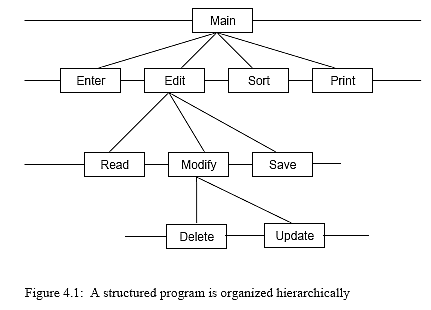
- Structured programming method results in a hierarchical or layered program structure, as depicted in figure 4.1:
4.4.1 A Top-down Approach
- Using structured programming, C/C++ programmers take the top-down approach as in the previous figure. So, program’s structure resembles an inverted tree, from the root then to the trunk then to the branch and finally to the leafs.
- From the main() program, subdivide the task to smaller tasks (subtasks). Then these smaller subtasks are divided again if needed, to smaller subtasks and so on.
- Every subtask then assigned to the specific functions.
- You can see that most of the real work of the program is performed by the functions at the “tip of the branches”.
- The functions closer to the trunk primarily are direct program execution among these functions.
- So, main body of the program has a small amount of code and every function acts independently. To see how this approach been implemented, check Example #13 at the end of this Module.
4.5 Writing A Function
- The first step is to know what task the function should perform. Then, detail the function declaration and definition.
- When you create functions or use the pre-defined functions, for debugging and testing, you may convert each function to main() program, to test it individually, because function cannot be run individually.
- Next, when you have satisfied with the execution of each separate main() program, re convert these separate main() programs to the respective functions and call the functions from within one main() program. Keep in mind that main() is also a function but with execution point. Let discussed the details how to write a function.
4.5.1 The Function header
- The first line of every function is called function header. It has 3 components, as shown below:

1. Function return type
Specifies the data type that the function should returns to the calling program. Can be any of C/C++ data types: char, float, int, long, double etc. If there is no return value, specify a return type of void. For example,
int calculate_yield(…) //returns a type int
float mark(…) //returns a type float
void calculate_interest(…) //returns nothing
2. Function name
Can have any name as long as the rules for C/C++ variable names are followed and must be unique.
3. Parameter list
Many functions use arguments, the value passed to the function when it is called. A function needs to know what kinds of arguments to expect, that is, the data type of each argument. A function can accept any of C/C++ basic data types. Argument type information is provided in the function header by the parameter list. This parameter list just acts as a placeholder.
- For each argument that is passed to the function, the parameter list must contain one entry, which specifies the data type and the name of the parameter.
- For example:
void myfunction(int x, float y, char z)
void yourfunction(int, float, char)
int ourfunction(long, char)
- The first line specifies a function with three arguments: a type int named x, a type float named y and a type char named z.
- Some functions take no arguments, so the parameter list should be void such as:
long thefunction(void)
- Parameter is an entry in a function header. It serves as a placeholder for an argument. It is fixed, that is, do not change during execution.
- The argument is an actual value passed to the function by the calling program. Each time a function is called, it can be passed with different arguments through the parameters.
- A function must be passed with the same number and type of arguments each time it is called, but the argument values can be different.
- In function, using the corresponding parameter name accesses the argument.
- Program example:
//Demonstration the difference between
//arguments and parameters
#include <stdio.h>
#include <stdlib.h>
//using predefined functions in the
//standard library
//main() function
void main()
{
float x = 3.5, y = 65.11, z;
float half_of (float);
//In this call, x is the argument to half_of().
z = half_of(x);
printf("The function call statement is z = half_of(x)\n");
printf("where x = 3.5 and y = 65.11...\n\n");
printf("Passing argument x\n");
printf("The value of z = %f \n", z);
//In this call, y is the argument to half_of()
z = half_of(y);
printf("\nPassing argument y\n");
printf("The value of z = %f \n\n", z);
//using predefined function system() in stdlib.h
system("pause");
}
//function definition
float half_of(float k)
{
//k is the parameter. Each time half_of() is called,
//k has the value that was passed as an argument.
return (k/2);
}
Output:
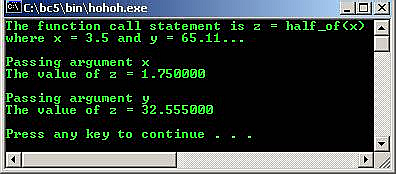
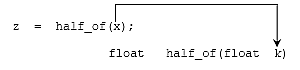
- For the first function call:
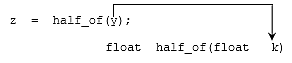
- Then, the second function call:
- Each time a function is called, the different arguments are passed to the function’s parameter.
- z = half_of(y) and z = half_of(x), each send a different argument to half_of() through the k parameter.
- The first call send x, contain a value of 3.5, then the second call send y, contain a value of 65.11.
- The value of x and y are passed into the parameter k of half_of().
- Same effect as copying the values from x to k, and then y to k.
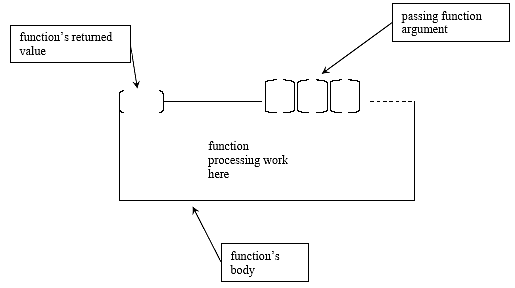
- half_of() then returns this value after dividing it by 2.
- We can depict this process graphically as follows,
4.5.2 The Function Body
- Enclosed in curly braces, immediately follows the function header.
- Real work in the program is done here.
- When a function is called execution begins at the start of the function body and terminates (returns to the calling program) when a return statement is encountered or when execution reaches the closing braces (}).
- Variable declaration can be made within the body of a function.
- Variables declared in a function, are called local variables. The scope, that is the visibility and validity of the variables are local.
- Local variables are the variables apply only to that particular function, are distinct from other variables of the same name (if any) declared elsewhere in the program outside the function.
- It is declared like any other variable and can also be initialized. Outside of any functions, those variables are called global variables.
- Example of declaring local variables:
int function1(int y)
{
int a, b=10; //local variable
float rate; //local variable
double cost=12.55; //local variable, been initialized
}
- Program example:
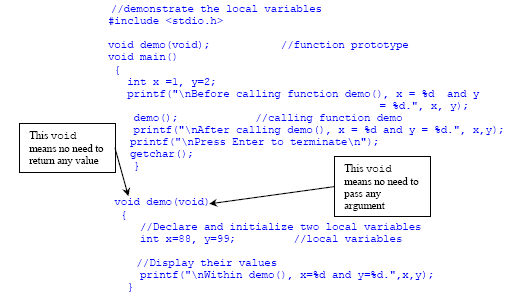
Output:
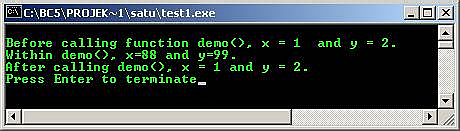
- The function parameters are considered to be variable declaration, so, the variables found in the functions parameter list are also available.
- Function prototype normally placed before main() and your function definition after main() as shown below. For C++, the standard said that we must include the prototype but not for C.
|
#include …
/*function prototype;*/ int funct1(int);
int main() { /*function call*/ int y = funct1(3); … }
/*Function definition*/ int funct1(int x) {…} |
- But it is OK if we directly declare and define the function before main() as shown below. This becomes an inline function.
|
#include …
/*declare and define*/ int funct1(int x) { … }
int main() { /*function call*/ int y = funct1(3); … } |
- Or you will find later that we can declare, define and implement the functions in other files.
- Three rules govern the use of variables in functions:
1. To use a variable in a function, the programmer must declare it in the function header or the function body.
2. For a function to obtain a value from the calling program, the value must be passed as an argument (the actual value).
3. For a calling program to obtain a value from function, the value must be explicitly returned from the function.
4.5.3 The Function Statements
- Any statements can be included within a function, with one exception: a function may not contain the definition of another function.
- For examples: if statements, loop, assignments etc are valid statements.
4.5.4 Returning A Value
- A function may or may not return a value.
- If function does not return a value, then the function return type is said to be of type void.
- To return a value from a function, use return keyword, followed by C/C++ expression.
- The value is passed back to the calling program.
- Example of returning a value from a function:
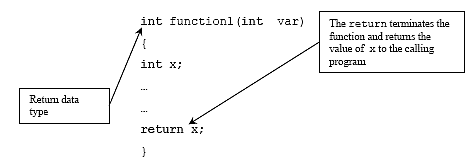
- The return value must match the return data type. For the above code segment, x must be an integer.
- A function can contain multiple return statements. The first return executed is the only one that has any effect.
- An efficient way to return different values from a function may be the example below.
//Using multiple return statements in a function
#include <stdio.h>
#include <stdlib.h>
//Function prototype
int larger_of(int, int);
void main()
{
int x, y, z;
puts("Enter two different integer values,");
puts("separated by space. Then press Enter key: ");
scanf("%d%d", &x, &y);
z=larger_of(x, y);
printf("\nThe larger value is %d.", z);
printf("\n");
system("pause");
}
//Function definition
int larger_of(int a, int b)
{
//return a or b
if(a > b)
return a;
else
return b;
}
Output:
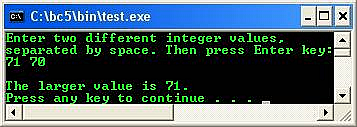
4.5.5 The Function Prototype
- Must be included for each function that it uses, (required by Standards for C++ but not for C) if not directly declare and define before main().
- In most cases it is recommended to include a function prototype in your C program to avoid ambiguity.
- Identical to the function header, with semicolon (;) added at the end.
- Function prototype includes information about the function’s return type, name and parameters’ type.
- The general form of the function prototype is shown below,
function_return_type function_name(type parameter1, type parameter2,…, type parameterN)
- Example of function prototype:
long cube(long);
- Provides the C/C++ compiler with the name and arguments of the functions contained in the program and must appear before the function is used or defined. It is a model for a function that will appear later in the program.
- So for the above prototype, the function is named cube, it requires a variable of the type long, and it will return a value of type long.
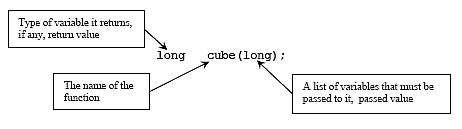
- So, the compiler can check every time the source code calls the function, verify that the correct number and type of arguments are being passed to the function and check that the return value is returned correctly.
- If mismatch occurs, the compiler generates an error message enabling programmers to trap errors.
- A function prototype need not exactly match the function header.
- Parameter names can be different, as long as they are the same data type, number and in the same order.
- But, having the name identical for prototype and the function header makes source code easier to understand.
- Normally placed before the start of main() but must be before the function definition.
- Provides the compiler with the description of a function that will be defined at a later point in the program.
- Includes a return type which indicates the type of variable that the function will return.
- And function name, which normally describes what the function does.
- Also contains the variable types of the arguments that will be passed to the function.
- Optionally, it can contain the names of the variables that will be returned by the function.
- A prototype should always end with a semicolon ( ; )
- For example (can’t be executed):
//Function prototype example
//This example cannot be compiled and run
double squared (double); //function prototype
void print_report (int); //function prototype
double squared(double number) //function header
{ //opening bracket
return (number * number); //function body
} //closing bracket
void print_report(int report_number)
{
if(report_number == 1)
printf("Printing Report 1");
else
printf("Not printing Report 1");
}
4.6 Passing Arguments To A Function
- In order function to interact with another functions or codes, the function passes arguments.
- The called function receives the values passed to it and stores them in its parameters.
- List them in parentheses following the function name.
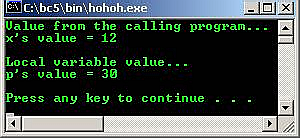
- Program example:
#include <iostream.h>
#include <stdlib.h>
//function prototype
void prt(int);
//the main function definition
int main()
{
//declare an integer variable
int x=12;
//calls prt() and passes it x
prt(x);
cout<<endl;
system("pause");
}
//the prt() function definition
void prt(int y)
{
//local variable…
int p = 30;
//value from calling program
cout<<"Value from the calling program..."<<endl;
cout<<"x's value = "<<y<<endl;
//local variable value
cout<<"\nLocal variable value..."<<endl;
cout<<"p's value = "<<p<<endl;
}
Output:
- The number of arguments and the type of each argument must match the parameters in the function header and prototype.
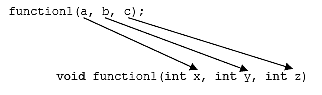
- If the function takes multiple arguments, the arguments listed in the function call are assigned to the function parameters in order.
- The first argument to the first parameter, the second argument to the second parameter and so on as illustrated below.
- Basically, there are three ways how we can pass something to function parameters:
1. Passing by value – you learn in this Module.
2. Passing by (memory) address – you will learn in Array and Pointer Modules.
3. Passing by reference (C++ only) – also in Array and Pointer Modules.
4.7 Macros and Inline Functions
- If the same sequence of steps or instructions is required in several different places in a program, you will normally write a function for the steps and call the function whenever these steps are required. But this involves time overhead.
- Also can place the actual sequence of steps wherever they are needed in the program, but this increase the program size and memory required to store the program. Also need retyping process or copying a block of program.
- Use function if the sequence of steps is long. If small, use macros or inline function, to eliminate the need for retyping and time overhead.
4.7.1 Macros
- Need #define compiler directive. For example, to obtain just the area of a triangle, we could use the directive:

- When we have defined the above macro, you can use it anywhere in the program as shown below:
cout<<"\nArea = "<<area(4.0, 6.0);
- Example for finding an average of 4 numbers ( a, b, c and d):
#define avg(x, y) (x + y)/2.0
avg1 = avg(avg(a, b), avg(c, d))
- Substitution:
avg4 = ((a + b)/2.0 + (c + d)/2.0) /2.0
- The drawback: nesting of macros may result in code that difficult to read.
4.7.2 Inline Function
- Is preferred alternative to the macro since it provides most of the features of the macro without its disadvantages.
- Same as macro, the compiler will substitute the code for the inline function wherever the function is called in the program.
- Inline function is a true function whereas a macro is not.
- Includes the keyword inline placed before the function.
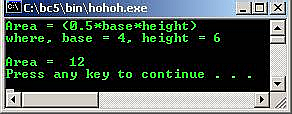
- Program example:
//Area of triangle using inline function
#include <iostream.h>
#include <stdlib.h>
//inline function, no need prototype…
inline float triangle_area(float base, float height)
{
float area;
area = (0.5 * base * height);
return area;
}
int main()
{
float b, h, a;
b = 4;
h = 6;
a = triangle_area(b, h);
cout<<"Area = (0.5*base*height)"<<endl;
cout<<"where, base = 4, height = 6"<<endl;
//compiler will substitute
//the inline function code.
cout<<"\nArea = "<<a<<endl;
system("pause");
return 0;
}
Output:
4.8 Header Files and Functions
- Header files contain numerous frequently used functions that programmers can use without having to write codes for them.
- Programmers can also write their own declarations and functions and store them in header files which they can include in any program that may require them (these are called user-defined header file that contains user defined functions).
4.8.1 Standard Header File
- To simplify and reduce program development time and cycle, C/C++ provides numerous predefined functions. These functions are normally defined for most frequently used routines.
- These functions are stored in what are known as standard library (such as ANSI C (ISO/IEC C), ANSI C++ (ISO/IEC C++) and GNU glibc header files etc.) or not so standard (implementation dependent) header files (with extension .h, .hh etc) and some just called this collection as C/C++ libraries.
- In the wider scope, each header file stores functions, macros, structures (struct) and types that are related to a particular application or task.
- This is one of the skills that you need to acquire, learning how to use these readily available functions in the header files and in most C/C++ books, courses or training, this part is not so emphasized. So, you have to learn it by yourself, check your compiler documentation where normally, they also contain program examples.
- You have to know which functions you are going to use, how to write the syntax to call the functions and which header files to be included in your program.
- Before any function contained in a header file can be used, you have to include the header file in your program. You do this by including the:
#include <header_filename.h>
- This is called preprocessor directive, normally placed before the main() function of your program.
- You should be familiar with these preprocessor directives, encountered many times in the program examples presented in the previous and next Modules such as:
#include <stdio.h>
#include <iostream.h>
main()
{ }
- Every C/C++ compiler comes with many standard and non-standard header files. Header files, also called include files; provide function prototype declarations for functions library, macros and types. Data types and symbolic constants used with the library functions are also defined in them.
- Companies that sold compilers or third party vendors, normally provide the standard function libraries such as ISO/IEC C, their own extension or other special header files, normally for specific applications such as for graphics manipulation, engineering applications and databases. These non standard headers are implementation dependent.
- For example, the following table is a partial list of an ANSI C, ANSI C++ and non-standard header files.
- There may be new header files introduced from time to time by Standard and Non-standard bodies and there may be obsoletes header files.
- Some may be implementation dependant so check your compiler documentation.
Note: The middle column indicates C++ header files, header files defined by ANSI C or non-standard header files (-).
|
Header file |
ANSI C? |
Purpose |
|
alloc.h |
- |
Declares memory-management functions (allocation, deallocation, and so on). Example: calloc(), malloc(), farfree(). |
|
assert.h |
ANSI C |
Defines the assert debugging macro. |
|
bcd.h |
C++ |
Declares the C++ class bcd (binary coded decimal) and the overloaded operators for bcd and bcd math functions. |
|
bios.h |
- |
Declares various functions used in calling IBM®-PC ROM BIOS routines. Example: biosequip(), bioskey(), biosprint(). |
|
checks.h |
C++ |
Defines the class diagnostic macros. |
|
complex.h |
C++ |
Declares the C++ complex math functions. |
|
conio.h |
- |
Declares various functions used in calling the operating system console I/O routines. Example: getch(), gotoxy(), putch(), outport(). |
|
constrea.h |
C++ |
Defines the conbuf and constream classes. |
|
cstring.h |
C++ |
Defines the string classes. |
|
ctype.h |
ANSI C |
Contains information used by the character classification and character conversion macros (such as isalpha and toascii). Example: isalnum(), isupper(), isspace(). |
|
date.h |
C++ |
Defines the date class. |
|
dir.h |
- |
Contains structures, macros, and functions for working with directories and path names. Example: chdir(), getcurdir(), mkdir(), rmdir(). |
|
direct.h |
- |
Defines structures, macros, and functions for dealing with directories and path names. |
|
dirent.h |
- |
Declares functions and structures for POSIX directory operations. Example: closedir(), opendir(), readdir(). |
|
dos.h |
- |
Defines various constants and gives declarations needed for DOS and 8086-specific calls. Example: bdos(), _chmod(), getdate(), gettime(). |
|
errno.h |
ANSI C |
Defines constant mnemonics for the error codes. |
|
except.h |
C++ |
Declares the exception-handling classes and functions. |
|
excpt.h |
- |
Declares C structured exception support. |
|
fcntl.h |
- |
Defines symbolic constants used in connection with the library routine open. Example: _fmode(), _pipe(). |
|
file.h |
C++ |
Defines the file class. |
|
float.h |
ANSI C |
Contains parameters for floating-point routines.
|
|
fstream.h |
C++ |
Declares the C++ stream classes that support file input and output. |
|
generic.h |
C++ |
Contains macros for generic class declarations. |
|
io.h |
- |
Contains structures and declarations for low-level input/output routines. Example: access(), create(), close(), lseek(), read(), remove(). |
|
iomanip.h |
C++ |
Declares the C++ streams I/O manipulators and contains templates for creating parameterized manipulators. |
|
iostream.h |
C++ |
Declares the basic C++ streams (I/O) routines. |
|
limits.h |
ANSI C |
Contains environmental parameters, information about compile-time limitations, and ranges of integral quantities. |
|
locale.h |
ANSI C |
Declares functions that provide country- and language-specific information. Example: localeconv(), setlocale(). |
|
malloc.h |
- |
Declares memory-management functions and variables. |
|
math.h |
ANSI C |
Declares prototypes for the math functions and math error handlers. Example: abs(), cos(), log(), pow(), sin(), tan(). |
|
mem.h |
- |
Declares the memory-manipulation functions. (Many of these are also defined in string.h.). Example: memccpy(), movedata(), memset(), _fmemmove(), memchr(). |
|
memory.h |
|
Contains memory-manipulation functions. |
|
new.h |
C++ |
Access to _new_handler, and set_new_handler. |
|
process.h |
- |
Contains structures and declarations for the spawn... and exec... functions. Example: abort(), exit(), getpid(), wait(). |
|
search.h |
- |
Declares functions for searching and sorting. Example: bsearch(), lfind(), qsort(). |
|
setjmp.h |
ANSI C |
Declares the functions longjmp and setjmp and defines a type jmp_buf that these functions use. Example: longjmp(), setjmp(). |
|
share.h |
- |
Defines parameters used in functions that make use of file-sharing. |
|
signal.h |
ANSI C |
Defines constants and declarations for use by the signal and raise functions. Example: raise(), signal(). |
|
stdarg.h |
ANSI C |
Defines macros used for reading the argument list in functions declared to accept a variable number of arguments (such as vprintf, vscanf, and so on). |
|
stddef.h |
ANSI C |
Defines several common data types and macros. |
|
stdio.h |
ANSI C |
Defines types and macros needed for the standard I/O package defined in Kernighan and Ritchie and extended under UNIX System V. Defines the standard I/O predefined streams stdin, stdout, stdprn, and stderr and declares stream-level I/O routines. Example: printf(), scanf(), fgets(), getchar(), fread(). |
|
stdiostr.h |
C++ |
Declares the C++ (version 2.0) stream classes for use with stdio FILE structures. You should use iostream.h for new code. |
|
stdlib.h |
ANSI C |
Declares several commonly used routines such as conversion routines and search/sort routines. Example: system(), time(), rand(), atof(), atol(), putenv(). |
|
string.h |
ANSI C |
Declares several string-manipulation and memory-manipulation routines. Example: strcmp(), setmem(), _fstrcpy(), strlen(). |
|
strstrea.h |
C++ |
Declares the C++ stream classes for use with byte arrays in memory. |
|
sys\locking.h |
- |
Contains definitions for mode parameter of locking function. |
|
sys\stat.h |
- |
Defines symbolic constants used for opening and creating files. |
|
sys\timeb.h |
- |
Declares the function ftime and the structure timeb that ftime returns. |
|
sys\types.h |
- |
Declares the type time_t used with time functions. |
|
thread.h |
C++ |
Defines the thread classes. |
|
time.h |
ANSI C |
Defines a structure filled in by the time-conversion routines asctime, localtime, and gmtime, and a type used by the routines ctime, difftime, gmtime, localtime, and stime. It also provides prototypes for these routines. |
|
typeinfo.h |
C++ |
Declares the run-time type information classes. |
|
utime.h |
- |
Declares the utime function and the utimbuf struct that it returns. |
|
values.h |
- |
Defines important constants, including machine dependencies; provided for UNIX System V compatibility. |
|
varargs.h |
- |
Definitions for accessing parameters in functions that accept a variable number of arguments. Provided for UNIX compatibility; you should use stdarg.h for new code. |
|
Table 4.1: List of the standard and non standard header files |
||
4.8.2 Using Predefined Functions in Header File
- Many of the functions in the standard (ANSI, ISO/IEC, Single UNIX Specification, GNU glibc etc.) header files were used throughout this tutorial. You have to learn how to use these readily available functions in the specific header file and must know how to write the syntax to call these functions. Do not reinvent the wheels☺.
- Complete information about the functions and the header file normally provided by the compiler documentation. They also may have program examples that you can try.
- Don’t forget also there are also tons of the non standard predefined header files available from the compiler vendors, for specific machine/platform or third party.
- For Borland, Microsoft and other implementations, the functions contained in the non standard header files normally begin with underscore ( _ ) such as _chmod() but using the same standard function name.
- If you use wrongly or the included header files not in the system/memory or wrong include path, normally the compiler will generates error mentioning the file cannot be found/opened or can’t recognize the function names used in your program.
- Another error normally done by programmers is using wrong types, number and order of the parameters.
4.8.3 User-defined Header Files
- We can define program segments (including functions) and store them in files. Then, we can include these files just like any standard header file in our programs.
- For example:
#include "myfile.h"
//enclosed with " ", instead of < >
//because it is located in the same folder/directory
//as the main() program
main()
{…}
- Here, myfile.h is a user-defined header file, located in the same folder as the main() program.
- All the program segments contained in myfile.h are accessible to the function main().
- An example is given at the end of this Module how to create and use the user-defined function.
- This is the concept that is quite similar to the Object Oriented Programming using the classes that contain methods which you will learn in Part II.
4.8.4 Variadic Functions
- ANSI C (ISO/IEC C) defines syntax for declaring a function to take a variable number or type of arguments. Such functions are referred to as varargs functions or variadic functions.
- However, the language itself provides no mechanism for such functions to access their non-required arguments; instead, you use the variable arguments macros defined in stdarg.h.
- The example of variadic function used in Standard ANSI C is printf() function. If you have noticed, printf() can accept variable number or type of arguments.
- Many older C dialects provide a similar, but incompatible, mechanism for defining functions with variable numbers of arguments, using varargs.h header file.
4.8.4.1 The Usage
- Ordinary C functions take a fixed number of arguments. When you define a function, you specify the data type for each argument.
- Every call to the function should supply the expected number of arguments in order, with types that can be converted to the specified ones. Thus, if a function named let say testfunc() is declared like the following:
int
testfunc(int, char *);
- Then you must call it with two arguments, an integer number (int) and a string pointer (char *).
- But some functions perform operations that can meaningfully accept an unlimited number of arguments.
- In some cases a function can handle any number of values by operating on all of them as a block. For example, consider a function that allocates a one-dimensional array with malloc() to hold a specified set of values.
- This operation makes sense for any number of values, as long as the length of the array corresponds to that number. Without facilities for variable arguments, you would have to define a separate function for each possible array size.
- The library function printf() is an example of another class of function where variable arguments are useful. This function prints its arguments (which can vary in type as well as number) under the control of a format template string.
- These are good reasons to define a variadic function which can handle as many arguments as the caller chooses to pass.
4.8.4.2 Definition
- Defining and using a variadic function involves three steps:
1. Define the function as variadic, using an ellipsis ('...') in the argument list, and using special macros to access the variable arguments.
2. Declare the function as variadic, using a prototype with an ellipsis ('...'), in all the files which call it.
3. Call the function by writing the fixed arguments followed by the additional variable arguments.
4.8.4.3 The Syntax for Variable Arguments
- A prototype of a function that accepts a variable number of arguments must be declared with that indication. You write the fixed arguments as usual, and then add an '...' to indicate the possibility of additional arguments.
- The syntax of ANSI C requires at least one fixed argument before the '...'. For example:
int varfunc(const char *a, int b, ...)
{...}
- Outlines a definition of a function varfunc which returns an int and takes two required arguments, a const char * and an int. These are followed by any number of anonymous arguments.
4.8.4.4 Receiving the Argument Values
- Ordinary fixed arguments have individual names, and you can use these names to access their values. But optional arguments have no names that are nothing but '...'. How can you access them?
- The only way to access them is sequentially, in the order they were written, and you must use special macros from stdarg.h in the following three step process:
1.
You initialize an argument pointer variable of type va_list
using va_start. The argument pointer when initialized points to
the first optional argument.
2.
You access the optional arguments by successive calls to
va_arg. The first call to va_arg gives you the first
optional argument; the next call gives you the second, and so on. You can stop
at any time if you wish to ignore any remaining optional arguments. It is
perfectly all right for a function to access fewer arguments than were supplied
in the call, but you will get garbage values if you try to access too many
arguments.
3.
You indicate that you are finished with the argument pointer
variable by calling va_end.
- Steps 1 and 3 must be performed in the function that accepts the optional arguments. However, you can pass the va_list variable as an argument to another function and perform all or part of step 2 there.
- You can perform the entire sequence of the three steps multiple times within a single function invocation. If you want to ignore the optional arguments, you can do these steps zero times.
- You can have more than one argument pointer variable if you like. You can initialize each variable with va_start when you wish, and then you can fetch arguments with each argument pointer as you wish.
- Each argument pointer variable will sequence through the same set of argument values, but at its own pace.
4.8.4.5 How Many Arguments Were Supplied
- There is no general way for a function to determine the number and type of the optional arguments it was called with. So whoever designs the function typically designs a convention for the caller to tell it how many arguments it has, and what kind.
- It is up to you to define an appropriate calling convention for each variadic function, and write all calls accordingly.
- One kind of calling convention is to pass the number of optional arguments as one of the fixed arguments. This convention works provided all of the optional arguments are of the same type.
- A similar alternative is to have one of the required arguments be a bit mask, with a bit for each possible purpose for which an optional argument might be supplied. You would test the bits in a predefined sequence; if the bit is set, fetch the value of the next argument, and otherwise use a default value.
- A required argument can be used as a pattern to specify both the number and types of the optional arguments. The format string argument to printf() is one example of this.
4.8.4.6 Calling Variadic Functions
- You don't have to write anything special when you call a variadic function. Just write the arguments (required arguments, followed by optional ones) inside parentheses, separated by commas, as usual.
- But you should prepare by declaring the function with a prototype, and you must know how the argument values are converted.
- In principle, functions that are defined to be variadic must also be declared to be variadic using a function prototype whenever you call them. This is because some C compilers use a different calling convention to pass the same set of argument values to a function depending on whether that function takes variable arguments or fixed arguments.
- Conversion of the required arguments is controlled by the function prototype in the usual way: the argument expression is converted to the declared argument type as if it were being assigned to a variable of that type.
4.8.4.7 Argument Access Macros
- The following Table list the descriptions of the macros used to retrieve variable arguments. These macros are defined in the stdarg.h header file.
|
Data Type: va_list |
|
The type |
|
|
|
Macro: void va_start (va_list ap, last-required) |
|
This macro initializes the argument pointer variable ap to point to the first of the optional arguments of the current function; last-required must be the last required argument to the function. |
|
|
|
Macro: type va_arg (va_list ap, type) |
|
The
The type of the value returned by |
|
|
|
Macro: void va_end (va_list ap) |
|
This ends the use of
ap. After a |
4.8.4.8 Program Example of a Variadic Function
- The following is an example of a function that accepts a variable number of arguments. The first argument to the function is the count of remaining arguments, which are added up and the result returned.
- This example just to illustrate how to use the variable arguments facility.
/*variadic function*/
#include <stdarg.h>
#include <stdio.h>
/*variadic function's prototype, count variable
is the number of arguments*/
int sum_up(int count,...)
{
va_list ap;
int i, sum;
/*Initialize the argument list.*/
va_start (ap, count);
sum = 0;
for (i = 0; i < count; i++)
/*Get the next argument value.*/
sum += va_arg (ap, int);
/*Clean up.*/
va_end (ap);
return sum;
}
int main(void)
{
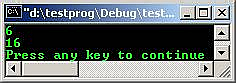
/*This call prints 6.*/
printf("%d\n", sum_up(2, 2, 4));
/*This call prints 16.*/
printf("%d\n", sum_up(4, 1, 3, 5, 7));
return 0;
}
Output:
Program Examples And Experiments
Example #1
//function skeleton example
#include <iostream.h>
#include <stdlib.h>
//function prototypes and their variations...
//notice and remember these variations...
void FunctOne(void);
double FunctTwo();
int FunctThree(int);
void FunctFour(int);
//main program...
void main()
{
cout<<"I'm in main()..."<<endl;
//function call, go to FunctOne without
//any argument...
FunctOne();
cout<<"\nBack in main()..."<<endl;
//function call, go to FunctTwo
//without any argument...
double q = FunctTwo();
//display the returned value...
cout<<"The returned value = "<<q<<endl;
//function call, go to FunctThree
//with an argument...
int y = 100;
int x = FunctThree(y);
cout<<"Back in main()..."<<endl;
//display the returned value...
cout<<"Display the returned value = "<<x<<endl;
int r = 50;
FunctFour(r);
system("pause");
return;
}
void FunctOne()
{
//do nothing here just display the
//following text...
cout<<"\nNow I'm in FunctOne()!..."<<endl;
cout<<"Receives nothing, return nothing..."<<endl;
//return to main, without any returned value
}
double FunctTwo()
{
//receive nothing but do some work here...
double p = 10.123;
cout<<"\nNow I'm in FunctTwo()!\nmay do some work here..."
<<"\nReceives nothing but return something"
<<"\nto the calling function..."<<endl;
//and return something...
return p;
}
int FunctThree(int z)
{
//receive something...do some work...
//and return the something...
int a = z + 100;
cout<<"\nThen, in FunctThree()!..."<<endl;
cout<<"Receive something from calling function\ndo some work here and"
<<"\nreturn something to the calling function...\n"<<endl;
//then return to main, with return value
return a;
}
void FunctFour(int s)
{
//received something but return nothing...
int r = s - 20;
cout<<"\nNow, in FunctFour()..."<<endl;
cout<<"Received something, but return nothing..."<<endl;
cout<<"The value processed = "<<r<<endl;
}
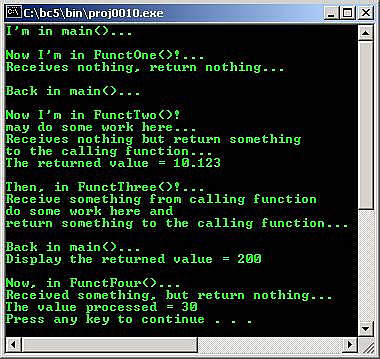
Output:
Example #2
//demonstrates the use of function prototypes
#include <iostream.h>
#include <stdlib.h>
typedef unsigned short USHORT;
//another method simplifying type identifier using typedef
//the words unsigned short is simplified to USHORT
USHORT FindTheArea(USHORT length, USHORT width);
//function prototype
int main()
{
USHORT lengthOfYard;
USHORT widthOfYard;
USHORT areaOfYard;
cout<< "\nThe wide of your yard(meter)? ";
cin>> widthOfYard;
cout<< "\nThe long of your yard(meter)? ";
cin>> lengthOfYard;
areaOfYard = FindTheArea(lengthOfYard, widthOfYard);
cout<< "\nYour yard is ";
cout<< areaOfYard;
cout<< " square meter\n\n";
system("pause");
return 0;
}
USHORT FindTheArea(USHORT l, USHORT w)
{
return (l * w);
}
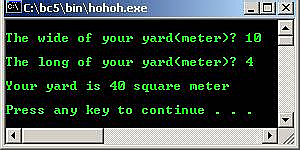
Output:
Example #3 Function Prototype (cannot be run)
long FindArea(long length, long width); // returns long, has two parameters
void PrintMessage(int messageNumber); // returns void, has one parameter
int GetChoice(); // returns int, has no parameters
char BadFunction(); // returns char, has no parameters
Example #4 Function Definition (cannot be run)
long Area(long l, long w)
{
return (l * w);
}
void PrintMessage(int whichMsg)
{
if (whichMsg == 0)
cout << "Hello.\n";
if (whichMsg == 1)
cout << "Goodbye.\n";
if (whichMsg > 1)
cout << "I'm confused.\n";
}
Example #5 The use of local variable and parameters
#include <iostream.h>
#include <stdlib.h>
//function prototype
float Convert(float);
int main()
{
float TempFer;
float TempCel;
cout<<"Please enter the temperature in Fahrenheit: ";
cin>>TempFer;
TempCel = Convert(TempFer);
cout<<"\n";
cout<<TempFer<<" Fahrenheit = "<<TempCel<<" Celcius"<<endl;
system("pause");
return 0;
}
//function definition
float Convert(float TempFer)
{
//local variable....
float TempCel;
TempCel = ((TempFer - 32) * 5) / 9;
//return the result to the calling program
return TempCel;
}
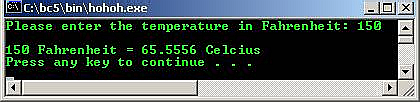
Output:
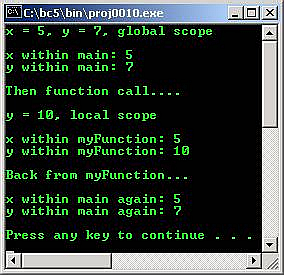
Example #6 Demonstrating local and global variable
#include <iostream.h>
#include <stdlib.h>
//function prototype
void myFunction();
//global scope variables
int x = 5, y = 7;
int main()
{
cout<<"x = 5, y = 7, global scope\n";
cout<<"\nx within main: "<<x<<"\n";
cout<<"y within main: "<<y<<"\n\n";
cout<<"Then function call....\n";
myFunction();
cout<< "Back from myFunction...\n\n";
cout<< "x within main again: "<<x<<"\n";
cout<< "y within main again: "<<y<<"\n\n";
system("pause");
return 0;
}
void myFunction()
{
//local scope variable
int y = 10;
cout<<"\ny = 10, local scope\n"<<"\n";
cout<<"x within myFunction: "<<x<<"\n";
cout<<"y within myFunction: "<<y<<"\n\n";
}
Output:
Example #7 Variable scope within a block
//demonstrates variables
//scope within a block
#include <iostream.h>
#include <stdlib.h>
//function prototype
void myFunc();
int main()
{
int x = 5;
cout<<"\nIn main x is: "<<x;
myFunc();
cout<<"\nBack in main, x is: "<<x<<endl;
system("pause");
return 0;
}
void myFunc()
{
//local scope variable
int x = 8;
cout<<"\nWithin myFunc, local x: "<<x<<endl;
{
cout<<"\nWithin block in myFunc, x is: "<<x;
//Another local variable, within block
int x = 9;
cout<<"\nVery local x: "<<x;
}
cout<<"\nOut of block, in myFunc, x: "<<x<<endl;
}
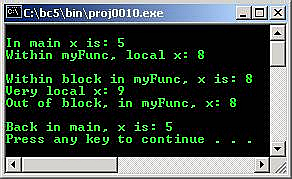
Output:
Example #8
//demonstrates passing by value
//to function
#include <iostream.h>
#include <stdlib.h>
//function prototype
void swap(int x, int y);
int main()
{
int x = 5, y = 10;
cout<<"In main. Before swap, x: "<<x<<" y: "<<y<<"\n";
cout<<"\nThen calling function swap(x, y)...\n";
swap(x, y);
cout<<"\n...back to main. After swap, x: "<<x<<" y: "<<y<<"\n";
system("pause");
return 0;
}
void swap(int x, int y)
{
int temp;
cout<<"\nIn swap function, confirm before swapping, x: "<<x<<" y: "<< y << "\n";
temp = x;
x = y;
y = temp;
cout<<"In swap function. After swapping, x: "<<x<<" y: "<<y<<"\n";
}
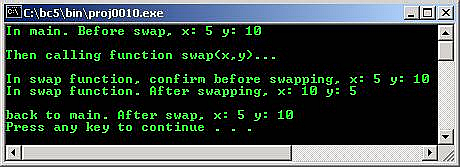
Output:
Example #9
//Demonstrates multiple return
//statements
#include <iostream.h>
#include <stdlib.h>
//function prototype
long int Doubler(long int AmountToDouble);
long int main()
{
long int result = 0;
long int input;
cout<<"Enter a number to be doubled: ";
cin>>input;
cout<<"\nBefore Doubler() is called... ";
cout<<"\ninput: "<<input<<" doubled: "<<result<<"\n";
result = Doubler(input);
cout<<"\nBack from Doubler()...\n";
cout<<"\ninput: " <<input<< " doubled: "<<result<<"\n";
cout<<"Re run this program, input > 10000, see the output...\n";
system("pause");
return 0;
}
long int Doubler(long int original)
{
if (original <= 10000)
return (original * 2);
else
{
cout<<"Key in less than 10000 please!\n";
return -1;
}
}
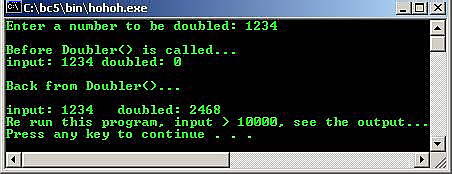
Output:
Example #10
//Demonstrates the use of
//default parameter values
#include <iostream.h>
#include <stdlib.h>
//function prototype
//width = 25 and height = 1, are default values
int AreaOfCube(int length, int width = 25, int height = 1);
int main()
{
//Assigning new values
int length = 100;
int width = 50;
int height = 2;
int area;
area = AreaOfCube(length, width, height);
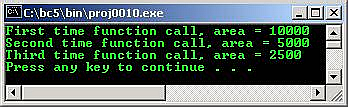
cout<<"First time function call, area = "<<area<<"\n";
area = AreaOfCube(length, width);
//height = 1, default value
cout<<"Second time function call, area = "<<area<<"\n";
area = AreaOfCube(length);
//width = 25, height = 1, default values
cout<<"Third time function call, area = "<<area<<"\n";
system("pause");
return 0;
}
AreaOfCube(int length, int width, int height)
{
return (length * width * height);
}
Output:
Example #11
//Demonstrates inline functions
#include <iostream.h>
#include <stdlib.h>
//inline function, no need prototype here
//directly declares and defines the function
inline int Doubler(int target)
{return (2*target);}
int main()
{
int target;
cout<<"Enter a number to work with: ";
cin>>target;
cout<<"\n";
target = Doubler(target);
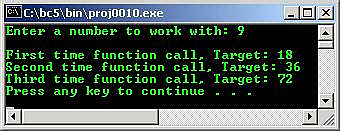
cout<<"First time function call, Target: "<<target<<endl;
target = Doubler(target);
cout<<"Second time function call, Target: "<<target<<endl;
target = Doubler(target);
cout<<"Third time function call, Target: "<<target<<endl;
system("pause");
return 0;
}
Output:
Example #12
//simple random number function generator...
#include <iostream.h>
#include <stdlib.h>
#include <dos.h>
int main()
{
int i;
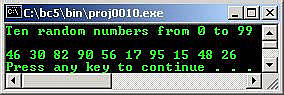
cout<<"Ten random numbers from 0 to 99\n\n";
for(i=0; i<10; i++)
{
//random number function generator
cout<<rand()%100<<" ";
//let have 2 seconds delay...
sleep(2);
}
cout<<endl;
system("pause");
return 0;
}
Output:
Example #13 – Using Functions In User Defined Header file
- This part will show you the process of defining function, storing in header files and using this function and header file.
- Assume that we want to create simple functions that do the basic calculation: addition, subtraction, division and multiplication of two operands.
- Firstly, we create the main() program, then we create header file named arithmet.h to store these frequently used function.
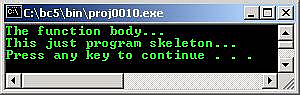
- Note the steps of this simple program development. Firstly we create a simple program skeleton. Compile and run. Make sure there is no error; warning is OK because this just as an exercise.
//user defined function and header file
//Simple arithmetic functions
#include <iostream.h>
#include <stdlib.h>
//function prototype
float AddNum(float, float);
//main program
void main(void)
{
cout<<"The function body..."<<endl;
cout<<"This just program skeleton..."<<endl;
system("pause");
}
//Function definition
float AddNum(float , float)
{
float x = 0;
return x;
}
Output:
- Next, add other functionalities.
//user defined function and header file
//Simple arithmetic functions
#include <iostream.h>
#include <stdlib.h>
//function prototype
float AddNum(float, float);
void main(void)
{
//global (to this file) scope variables
float p, q, r;
//Prompt for user input
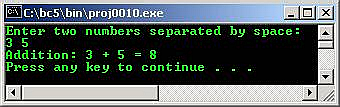
cout<<"Enter two numbers separated by space: "<<endl;
cin>>p>>q;
//function call
r = AddNum(p, q);
//Display the result
cout<<"Addition: "<<p <<" + "<<q<<" = "<<r<<endl;
system("pause");
}
//Function definition
float AddNum(float p, float q)
{
return (p + q);
}
- Then, compile and run this program.
- Next, if there is no error, we add other functionalities to complete our program.
//user defined function and header file
//Simple arithmetic functions
#include <iostream.h>
#include <stdlib.h>
//function prototypes
float AddNum(float, float);
float SubtractNum(float, float);
float DivideNum(float, float);
float MultiplyNum(float, float);
void main(void)
{
//local (to this file) scope variables
float p, q, r, s, t, u;
//Prompt for user input
cout<<"Enter two numbers separated by space: "<<endl;
cin>>p>>q;
//Function call
r = AddNum(p, q);
s = SubtractNum(p, q);
t = DivideNum(p, q);
u = MultiplyNum(p, q);
//Display the result and quit
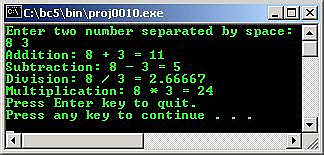
cout<<"Addition: "<<p <<" + "<<q<<" = "<<r<<endl;
cout<<"Subtraction: "<<p <<" - "<<q<<" = "<<s<<endl;
cout<<"Division: "<<p <<" / "<<q<<" = "<<t<<endl;
cout<<"Multiplication: "<<p <<" * "<<q<<" = "<<u<<endl;
cout<<"Press Enter key to quit."<<endl;
system("pause");
}
//Function definition
float AddNum(float p, float q)
{
return (p + q);
}
float SubtractNum(float p, float q)
{
return (p - q);
}
float DivideNum(float p, float q)
{
//do some checking here to avoid divide by 0
if (q == 0)
return 0;
else
return (p / q);
}
float MultiplyNum(float p, float q)
{
return (p * q);
}
- Re compile and re run.
- Our next task is to create header file, let named it arithmet.h and put all the function declaration and definition in this file and save it in same folder as the main program. No need to compile or run this file, just make sure no error here.
//user defined function and header file
//Simple arithmetic functions
//arithmet.h header file, no need to compile or run.
//The variable also has been change to x and y respectively.
//The important one are parameter type, number and return type must
//be matched
#include <iostream.h>
#include <stdlib.h>
float x, y;
//Function prototypes
float AddNum(float, float);
float SubtractNum(float, float);
float DivideNum(float, float);
float MultiplyNum(float, float);
float AddNum(float x, float y)
{
return (x + y);
}
float SubtractNum(float x, float y)
{
return (x - y);
}
float DivideNum(float x, float y)
{
//Divide by 0 check
if(y==0)
return 0;
else
return (x / y);
}
float MultiplyNum(float x, float y)
{
return (x * y);
}
- Now, our new main() program becomes:
//user defined function and header file
//Simple arithmetic functions
//New main program
#include <iostream.h>
#include <stdlib.h>
#include "arithmet.h" //notice this!
//global variables, need external access
float p, q;
void main(void)
{
//local scope (to this file) variables…
int r, s, t, u;
cout<<"Enter two numbers separated by space: "<<endl;
cin>>p>>q;
r = AddNum(p, q);
s = SubtractNum(p, q);
t = DivideNum(p, q);
u = MultiplyNum(p, q);
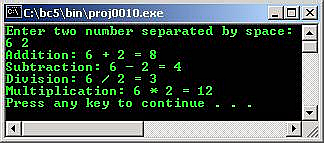
cout<<"Addition: "<<p <<" + "<<q<<" = "<<r<<endl;
cout<<"Subtraction: "<<p <<" - "<<q<<" = "<<s<<endl;
cout<<"Division: "<<p <<" / "<<q<<" = "<<t<<endl;
cout<<"Multiplication: "<<p <<" * "<<q<<" = "<<u<<endl;
system("pause");
}
- Compile and run this main program, you will get the same output but this main() program is simpler and our header file arithmet.h can be reusable.
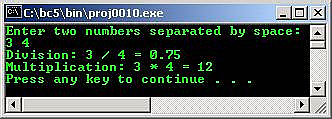
- The following program example is a partial function call.
//user defined function and header file
//Simple arithmetic functions
//New main program with partial function call
#include <iostream.h>
#include <stdlib.h>
#include "arithmet.h"
//global variable need access from external
float p, q;
void main(void)
{
//local scope (to this file) variables…
int t, u;
cout<<"Enter two numbers separated by space: "<<endl;
cin>>p>>q;
//r = AddNum(p, q);
//s = SubtractNum(p, q);
t = DivideNum(p, q);
u = MultiplyNum(p, q);
//cout<<"Addition: "<<p <<" + "<<q<<" = "<<r<<endl;
//cout<<"Subtraction: "<<p <<" - "<<q<<" = "<<s<<endl;
cout<<"Division: "<<p <<" / "<<q<<" = "<<t<<endl;
cout<<"Multiplication: "<<p <<" * "<<q<<" = "<<u<<endl;
system("pause");
}
Output:
- By storing the preprocessor directive #include "arithmet.h" under the C:\BC5\INCLUDE (Borland® C++ - the default INCLUDE folder or subfolder – you have to check your compiler documentation), you can enclose the header file in the normal angle brackets < >.
//user defined function and header file
//Simple arithmetic functions
//New main program
#include <iostream.h>
#include <stdlib.h>
#include <arithmet.h>
//using <arithmet.h> instead of "arithmet.h"
//global variables need access from external
float p, q;
void main(void)
{
//local scope (to this file) variable
int t, u;
cout<<"Enter two numbers separated by space: "<<endl;
cin>>p>>q;
//r = AddNum(p, q);
//s = SubtractNum(p, q);
t = DivideNum(p, q);
u = MultiplyNum(p, q);
//cout<<"Addition: "<<p <<" + "<<q<<" = "<<r<<endl;
//cout<<"Subtraction: "<<p <<" - "<<q<<" = "<<s<<endl;
cout<<"Division: "<<p <<" / "<<q<<" = "<<t<<endl;
cout<<"Multiplication: "<<p <<" * "<<q<<" = "<<u<<endl;
system("pause");
}
Output:
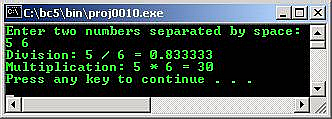
- If we want to add functionalities, add them in header file once and then, it is reusable.
- How to debug the functions if you have to create many independent functions stored in many header files other than directly include the functions in our main program?
- Firstly create the function with their own specific task independently as main() program, compile and run the main() function independently.
- Then, when you have satisfied with the result of the independent main() program, convert each main() program to respective function and call all the functions from one main() program.
- The main problems encountered here normally related to the passing the improper arguments, returning the improper value, mismatch types and variables scope.
- Remember that the main() program just a normal function but with execution point.
Example #14 – Recursive function
- We cannot define function within function, but we can call the same function within that function. A recursive function is a function that calls itself either directly or indirectly through another function.
- Classic example for recursive function is factorial, used in mathematics.
- For example:
//Demonstrates recursive function
//recursive factorial function
//the formula, n! = n*(n-1)!
#include <iostream.h>
#include <stdlib.h>
//function prototype, receive long type
//return also long type
long factor(long);
int main()
{
int p;
cout<<"Calculating factorial using recursive function"<<endl;
cout<<"----------------------------------------------\n"<<endl;
//Let do some looping for 10 numbers
for(p = 1; p<10; p++)
cout<<p<<"! = "<<p<<"*("<<(p-1)<<")!"<<" = "<<factor(p)<<"\n";
system("pause");
return 0;
}
//Recursive function definition
long factor(long number)
{
//For starting number, that <= 1, factorial = 1
if(number<=1)
return 1;
//number > 1
else
//return and call itself
return (number * factor(number-1));
}
Output:
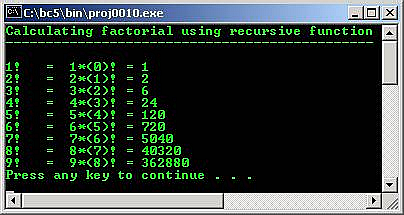
Example #15 – Another recursive function
- Another example using recursive function, Fibonacci.
//Demonstrates recursive Fibonacci function
//the formula, fibonacci(n) = fibonacci(n-1)+fibonacci(n-2)
#include <iostream.h>
#include <stdlib.h>
long fibonacci(long);
int main()
{
int p;
cout<<"Simple fibonacci using recursive function"<<endl;
cout<<"-----------------------------------------\n"<<endl;
//looping for 15 numbers
for(p = 0; p<30; p=p+2)
cout<<"Fibonacci("<<p<<") = "<<fibonacci(p)<<"\n";
system("pause");
return 0;
}
//Recursive fibonacci function definition
long fibonacci(long number)
{
//For starting number, 0, 1, fibonacci = number
if(number == 0 || number == 1)
return number;
//other number...
else
//return and call itself
return (fibonacci(number-1) + fibonacci(number-2));
}
Output:
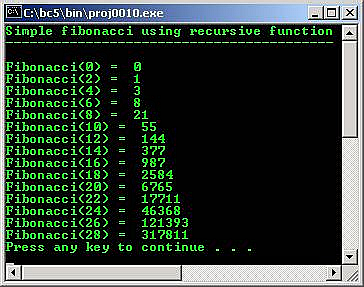
Example #16 – Using predefined function
//rand()and random() from stdlib.h
#include <stdio.h>
#include <stdlib.h>
main()
{
int c;
//generating random number
printf("10 random numbers:\n");
for(c = 0; c <10; c++)
printf("%d ", rand());
printf("\n");
//num has a value between 0 and 99
int num = random(100);
printf("\nRandom number less than 100 = %d\n", num);
//using lower bound and upper bound
int num1 = 200 + random(700-200);
printf("\nRandom number between 200 700 = %d\n", num1);
//floating-point random numbers...
float num3 = rand()/33000.0;
printf("\nfloating-point random number = %f\n", num3);
//floating-point random numbers...
printf("\nAnother floating-point random numbers:\n");
for(c = 0; c <10; c++)
printf("%f\n", rand()/33000.0);
printf("\n");
system("pause");
return 0;
}
Output:
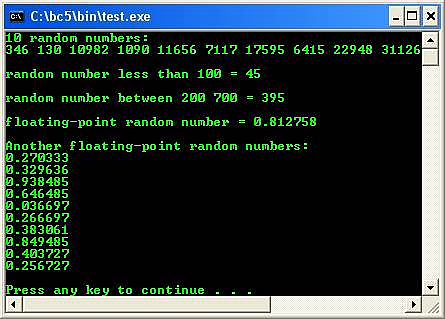
Example #17 – Using predefined function
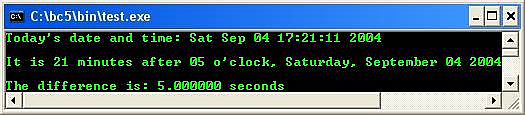
//Simple time and date…
#include <stdio.h>
//for time and date
#include <time.h>
//for sleep()
#include <dos.h>
int main(void)
{
struct tm *time_now;
time_t secs_now;
time_t t;
char str[80];
time(&t);
//dispaly current time and date...
//using ctime()
printf("Today's date and time: %s", ctime(&t));
//Formating time for output...
//using strftime()
tzset();
time(&secs_now);
time_now = localtime(&secs_now);
strftime(str, 80,"It is %M minutes after %I o'clock, %A, %B %d 20%y", time_now);
printf("%s\n", str);
//Computes the difference between two times...
//using difftime()
time_t first, second;
//Gets system time
first = time(NULL);
//Waits 5 secs
sleep(5);
//Gets system time again
second = time(NULL);
printf("The difference is: %f seconds\n", difftime(second, first));
//wait for 10 seconds...
sleep(10);
return 0;
}
Output:
Example #18 – Using predefined function
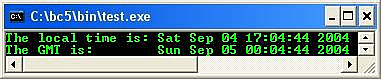
//Converts the date and time to Greenwich Mean Time (GMT)
#include <stdio.h>
#include <stdlib.h>
#include <time.h>
#include <dos.h>
//Pacific Standard Time & Daylight Savings
char *tzstr = "TZ=PST8PDT";
int main(void)
{
time_t t;
struct tm *gmt, *area;
putenv(tzstr);
tzset();
t = time(NULL);
area = localtime(&t);
printf("The local time is: %s", asctime(area));
gmt = gmtime(&t);
printf("The GMT is: %s", asctime(gmt));
//wait 10 seconds...
sleep(10);
return 0;
}
Output:
Example #19 – Using predefined function
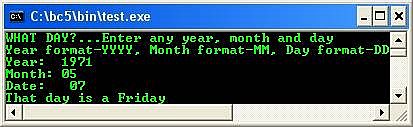
//Converting time to calendar format...
//checking the day...
#include <stdio.h>
#include <time.h>
//for sleep()
#include <dos.h>
char *wday[] = {"Sunday", "Monday", "Tuesday", "Wednesday",
"Thursday", "Friday", "Saturday", "Unknown"};
int main()
{
struct tm time_check;
int year, month, day;
printf("WHAT DAY?...Enter any year, month and day\n");
printf("Year format-YYYY, Month format-MM, Day format-DD\n");
//Input a year, month and day to find the weekday for...
printf("Year: ");
scanf("%d", &year);
printf("Month: ");
scanf("%d", &month);
printf("Date: ");
scanf("%d", &day);
//load the time_check structure with the data
time_check.tm_year = year - 1900;
time_check.tm_mon = month - 1;
time_check.tm_mday = day;
time_check.tm_hour = 0;
time_check.tm_min = 0;
time_check.tm_sec = 1;
time_check.tm_isdst = -1;
//call mktime to fill in the weekday field of the structure...
if(mktime(&time_check) == -1)
time_check.tm_wday = 7;
//print out the day of the week...
printf("That day is a %s\n", wday[time_check.tm_wday]);
sleep(10);
return 0;
}
Output:
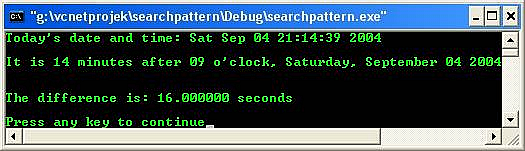
- Using VC++ and VC++ .Net compiler.
#include <cstdio>
#include <ctime>
using namespace std;
int main(void)
{
struct tm *time_now;
time_t secs_now;
time_t t;
char str[80];
time(&t);
//dispaly current time and date...
//using ctime()
printf("Today's date and time: %s\n", ctime(&t));
//Formating time for output...
//using strftime()
tzset();
time(&secs_now);
time_now = localtime(&secs_now);
strftime(str, 80,"It is %M minutes after %I o'clock, %A, %B %d 20%y\n", time_now);
printf("%s\n", str);
//Computes the difference between two times...
//using difftime()
time_t first, second;
//Gets system time
first = time(NULL);
//Waits 5 secs
getchar();
//Gets system time again
second = time(NULL);
printf("The difference is: %f seconds\n", difftime(second, first));
//wait for 10 seconds...
getchar();
return 0;
}
Output:
- ModuleZ, Section Z.5 discusses the relationship between function call and memory allocation (stack frame).
- The following is a program example compiled using gcc.
/***function skeleton example, function.c***/
#include <stdio.h>
/*function prototypes and their variations...*/
/*IN C++ it is required by standard*/
/*notice and remember these variations...*/
void FunctOne(void);
double FunctTwo();
int FunctThree(int);
void FunctFour(int);
/*main program...*/
int main()
{
printf("-----PLAYING WITH A FUNCTION-----\n");
printf("All call by value ONLY!!!\n");
printf("Starting: I'm in main()...\n");
/*function call, go to FunctOne without*/
/*any argument...*/
FunctOne();
printf("\nBack in main()...\n");
/*function call, go to FunctTwo()*/
/*without any argument...*/
double q = FunctTwo();
printf("Back in main()...\n");
/*display the returned value...*/
printf("The returned value = %.4f\n", q);
/*function call, go to FunctThree*/
/*with an argument...*/
int y = 100;
int x = FunctThree(y);
printf("Back in main()...\n");
/*display the returned value...*/
printf("Display the returned value from FunctThree = %d\n", x);
int r = 50;
FunctFour(r);
printf("Finally back in main()...\n");
return 0;
}
void FunctOne()
{
/*do nothing here just display the*/
/*following text...*/
printf("\nNow I'm in FunctOne()!...\n");
printf("Receives nothing, return nothing...\n");
/*return to main, without any returned value*/
}
double FunctTwo()
{
/*receive nothing but do some work here...*/
double p = 10.123;
printf("\nNow I'm in FunctTwo()!\nmay do some work here..."
"\nReceives nothing but returns something"
"\nto the calling function...\n");
/*and return something...*/
return p;
}
int FunctThree(int z)
{
/*receive something...do some work...*/
/*and return the something...*/
int a = z + 100;
printf("\nThen, in FunctThree()!...\n");
printf("Receives something from calling function\ndo some work here and"
"\nreturn something to the calling function...\n");
/*then return to main, with return value*/
return a;
}
void FunctFour(int s)
{
/*received something but return nothing...*/
int r = s - 20;
printf("\nNow, in FunctFour()...\n");
printf("Received something, but return nothing...\n");
printf("The value processed here = %d\n", r);
printf("Then within FunctFour, call FunctOne()...\n");
FunctOne();
printf("Back in FunctFour()....\n");
}
[bodo@bakawali ~]$ gcc function.c -o function
[bodo@bakawali ~]$ ./function
-----PLAYING WITH A FUNCTION-----
All call by value ONLY!!!
Starting: I'm in main()...
Now I'm in FunctOne()!...
Receives nothing, return nothing...
Back in main()...
Now I'm in FunctTwo()!
may do some work here...
Receives nothing but returns something
to the calling function...
Back in main()...
The returned value = 10.1230
Then, in FunctThree()!...
Receives something from calling function
do some work here and
return something to the calling function...
Back in main()...
Display the returned value from FunctThree = 200
Now, in FunctFour()...
Received something, but return nothing...
The value processed here = 30
Then within FunctFour, call FunctOne()...
Now I'm in FunctOne()!...
Receives nothing, return nothing...
Back in FunctFour()....
Finally back in main()...
-------------------------------------------------------o0o ----------------------------------------------------
For this Module purpose, you can check the standard libraries of these various standards of C/C++. Explore and compare the standard functions and their variation if any in the libraries. You can download or read online the specification at the following links. (ISO/IEC is covering ANSI and is more general):
- http://www.open-std.org/JTC1/SC22/WG14/ - ISO/IEC 9899 (ISO/IEC 9899:1999) - Programming languages – C.
- http://www.open-std.org/JTC1/SC22/WG15/ - ISO/IEC 9945:2002 POSIX standard.
- http://www.open-std.org/JTC1/SC22/WG21/ - ISO/IEC 14882:1998 on the programming language C++.
- http://www.unix.org/version3/ - ISO/IEC 9945:2003, The Single UNIX Specification, Version 3.
- http://www.gnu.org/software/libc/manual/ - Get the GNU C library information here.
- http://www.gnu.org/software/libc/manual/html_mono/libc.html - Read online the GNU C library here.