MODULE 2
PROGRAM STRUCTURE
AND BASIC DATA TYPES
My Training Period: hours
Note:
ANSI C refers to ISO/IEC C.
Abilities
▪ Able to understand the basic structure of the C/C++ program.
▪ Able to understand and use the basic data types.
▪ Able to recognize and use the keywords and variables.
▪ Able to understand and use the constant, character and escape sequence.
▪ Able to understand and use the C typecasting/promotion.
2.1 A Program
- C/C++ programs consist of functions, one of which must be main(). Every C/C++ program begins execution at the main() function.
2.2 Program Keywords / Reserved Words
- The keywords used in C/C++ have special meaning to the compiler. The programmer can’t use these words for identifiers such as variable names.
- The following table is a list of keywords used in ANSI C.
|
Keyword |
Description |
|
auto |
An automatic storage class for automatic variable. Normally not explicitly used. |
|
break |
Used to force an immediate exit from while, for, do loops and switch-case statement. |
|
case |
A label used together with switch statement for selection. |
|
char |
A single byte data type, capable holding one character in the character set. |
|
const |
A qualifier used to declare variable to specify that its value will not be changed. |
|
continue |
Related to break statement, causes the next iteration of the enclosing for, while or do loop to begin. Applies only to loops, not to switch statement. |
|
default |
An optional label used together with case label. When there is no case expression matched, default label expression will be executed. |
|
do |
Used in do-while loop, repetition where the test condition is at the end of the loop body. |
|
double |
A double-precision floating point. |
|
elif |
#elif. Preprocessor statement for else-if. |
|
else |
Used together with if (if-else) for conditional execution. |
|
endif |
#endif. Preprocessor statement for end-if. |
|
enum |
Used in declaring enumeration constant. Enumeration is a list of constant integer values. |
|
extern |
External storage class. External to all function or globally accessible variable. Variable declared with extern can be accessed by name by any function. |
|
float |
Used when declaring floating-point data type. |
|
for |
Used in the repetition loop. |
|
goto |
A program control statement for branching/jumping to. |
|
if |
Used for conditional execution, standalone or with else. #if used for conditional inclusion of the preprocessor directive. |
|
ifdef |
#ifdef, if defined; test whether a name is defined. |
|
ifndef |
#ifndef, if not defined; test whether a name is not defined. |
|
int |
An integer data type, the size of normal integers. |
|
long |
A qualifier (long and short) applied to basic data types. short – 16 bits, long-32 bits, int either 16 or 32 bits. |
|
register |
Another storage class specifier. Used to advise the compiler to place the variables in machine’s processor register instead of machine’s memory but it is not a mandatory for the compiler. |
|
return |
Used to return a value from the called function to its caller. Any expression can follow return. The calling function is free to ignore the returned value and can be no expression after return (no value is returned). For main(), return will pass to system environment, operating system if there is no error. |
|
short |
A qualifier (long and short) applied to basic data types. short – 16 bits, long-32 bits, int either 16 or 32 bits. |
|
signed |
A qualifier may be applied to char or any integer. For example, signed int. Including the positive and negative integers. For example, integer equivalent range for signed char is -128 and 127 (2’s complement machine). |
|
sizeof |
An operator. Shows the number of bytes (occupied or) required to store an object of the type of its operand. The operand is either an expression or a parenthesized type name. |
|
static |
A storage class specifier. Local variables (internal variables) that retain their values throughout the lifetime of the program. Also can be applied to external variables as well as functions. Functions declared as static, its name is invisible outside of the file in which it is declared. For an external variables or functions, static will limit the scope of that objects to the rest of the source file being compiled. |
|
struct |
A structure specifier for an object that consist a sequence of named members of various types. |
|
switch |
Used in a selection program control. Used together with case label to test whether an expression matches one of a member of case’s constant integer and branches accordingly. |
|
typedef |
Used to create new data type name. |
|
union |
A variable that may hold (at different time) objects of different types and sizes. If at the same time, use struct. |
|
unsigned |
A qualifier may be applied to char or any integer. For example, unsigned int. Including the positive integers or zero. For example, integer equivalent range for unsigned char is 0 and 255. |
|
void |
Data type that specifies an empty set of values or nonexistence value but pointers (pointers to void) may be assigned to and from pointers of type void *. |
|
volatile |
A qualifier used to force an implementation to suppress optimization that could otherwise occur. |
|
while |
Used for conditional loop execution. Normally together with the do. |
|
Table 2.1: ANSI C Keywords |
|
- The following table is a list of C++ keywords; most of the keywords will be used in part II and III of this Tutorial.
|
Keywords |
Brief descriptions |
|
asm |
Using or inserting assembly language in C++, refer to your compiler documentation support. |
|
catch |
Exception handling generated by a throw keyword. |
|
bool |
To declare Boolean logic variables; that is, variables which can be either true or false. |
|
class |
Define a new class then objects of this class can be instantiated. |
|
const_cast |
To add or remove the const or volatile modifier from a type. |
|
delete |
Destroy an object in memory dynamically, created by using keyword new. |
|
dynamic_cast |
Convert a pointer or reference to one class into a pointer or reference to another class using run time type information (rtti). (Converts a pointer to a desired type. |
|
explicit |
Used to avoid a single argument constructor from defining an automatic type conversion in class declaration. |
|
false |
The Boolean value of "false". |
|
friend |
Declare a function or class to be a friend of another class providing the access of all the data members and member function of a class. |
|
inline |
Asking the compiler that certain function should be generated or executed inline instead of function call. |
|
mutable |
The mutable keyword overrides any enclosing const statement. A mutable member of a const object can be modified. |
|
namespace |
Keyword used to create a new scope. |
|
new |
Dynamically allocate a memory object on a free store, that is an extra memory that available to the program at execution time and automatically determine the object's size in term of byte. |
|
operator |
Declare an overloaded operator. |
|
private |
A class member accessible to member functions and friend functions of the private member's class. |
|
protected |
protected members may be accessed by member functions of derived classes and friends of derived classes. |
|
public |
A class member accessible to any function. |
|
reinterpret_cast |
Replaces casts for conversions that are unsafe or implementation dependent. |
|
Converts types between related types. |
|
|
template |
Declare how to construct class or function using variety of types. |
|
this |
A pointer implicitly declared in every non-static member function of a class. It points to the object for which this member function has been invoked. |
|
throw |
Transfer control to an exception handler or terminate program execution if appropriate handler cannot be located. |
|
true |
The Boolean value of "true". |
|
try |
Creates a block that containing a set of statements that may generate exceptions, and enables exception handling for any exceptions generated (normally used together with throw and catch). |
|
typeid |
Gets run-time identification of types and expressions. |
|
typename |
Used to qualify an identifier of a template as being a type instead of a value. |
|
using |
Used to import a namespace into the current scope. |
|
virtual |
Declare a virtual function. |
|
wchar_t |
Used to declare wide character variables. |
|
Table 2.2: C++ Keywords |
|
- One way to master C/C++ programming is to master the keywords and usages☺.
2.3 Identifiers
- Simply references to memory locations, which can hold values (data).
- Are formed by combining letters (both upper and lowercase), digits (0–9) and underscore ( _ ).
- Rules for identifier naming are:
1. The first character of an identifier must be a letter, an underscore ( _ ) also counts as a letter.
2. The blank or white space character is not permitted in an identifier.
3. Can be any length. Internal identifier (do not have the external linkage) such as preprocessor macro names at least the first 31 characters are significant, also implementation dependent.
4. Reserved words/keywords and characters such as main and # also cannot be used.
2.4 Variables
- Identifier that value may change during the program execution.
- Every variable stored in the computer’s memory has a name, a value and a type.
- All variable in a C/C++ program must be declared before they can be used in the program.
- A variable name in C/C++ is any valid identifier, and must obey the rules mentioned above.
- Initializing a variable means, give a value to the variable, that is the variable’s initial value and can be changed later on.
- Variable name are said to be lvalue (left value) because they can be used on the left side of an assignment operator.
- Constant are said to be rvalue (right value) because they only can be used on the right side of an assignment operator. For example:
x = 20;
x is lvalue, 20 is rvalue.
- Note that lvalue can also be used as rvalue, but not vice versa.
Example of the variable declaration
int x, y, z;
short number_one;
long Type0fCar;
unsigned int positive_number;
char Title;
float commission, yield;
|
General form:
data_type variable_list;
Note the blank space.
|
Declaring and initializing variables examples:
int m, n = 10;
char * ptr = "TESTING";
float total, rate = 0.5;
char user_response = ‘n’;
char color[7] = "green";
Or declare and then initialize:
int m, n;
float total, rate;
char user_response;
char color[7];
n = 20;
rate = 4.5;
user_response = ‘n’;
color = "green";
2.5 Basic Data types
- Why we need to learn data types? Every variable used in program hold data, and every data must have their own type. It is the way how we can ‘measure’ the variable’s data value as exist in the real world. Further more by knowing the data range, we can use data efficiently in our program in term of memory management (storage allocation) aspects.
- For example, no need for us to reserve a lot of storage space such as a long data type if we just want to store a small amount of data, let say, int data type.
- Every data in C/C++ has their own type. There are basic data type and derived data type. This Module deals with basic data type.
- There are two kinds of basic data type: integral (integer value) and floating (real number). char data type classified in integral type.
- Derived data types will be presented in another Module. Derived data type including the aggregate data type is constructed from basic data type such as arrays, functions, pointers, structures, unions and other user defined data types. Basic data type and their variation are shown in Table 2.3. 2.4 and 2.5.
|
Data type |
Keyword |
Bits |
Range |
|
integer |
int |
16 |
-32768 to 32767 |
|
long integer |
long |
32 |
-4294967296 to 4294967295 |
|
short integer |
short |
8 |
-128 to 127 |
|
unsigned integer |
unsigned |
16 |
0 to 65535 |
|
character |
char |
8 |
0 to 255 |
|
floating point |
float |
32 |
approximately 6 digits of precision |
|
double floating point |
double |
64 |
approximately 12 digits of precision |
|
Table 2.3: Basic data type |
|||
- The following tables list the sizes and resulting ranges of the data types based on IBM PC compatible system. For 64 bits, the size and range may not valid anymore☺.
|
Type |
Size (bits) |
Range |
Sample applications |
|
unsigned char |
8 |
0 to 255 |
Small numbers and full PC character set |
|
char |
8 |
-128 to 127 |
Very small numbers and ASCII characters |
|
enum |
16 |
-32,768 to 32,767 |
Ordered sets of values |
|
unsigned int |
16 |
0 to 65,535 |
Larger numbers and loops |
|
short int |
16 |
-32,768 to 32,767 |
Counting, small numbers, loop control |
|
int |
16 |
-32,768 to 32,767 |
Counting, small numbers, loop control |
|
unsigned long |
32 |
0 to 4,294,967,295 |
Astronomical distances |
|
long |
32 |
-2,147,483,648 to 2,147,483,647 |
Large numbers, populations |
|
float |
32 |
3.4-1038 to 3.41038 |
Scientific (7-digit precision) |
|
double |
64 |
1.7-10308 to 1.710308 |
Scientific (15-digit precision) |
|
long double |
80 |
3.4-104932 to 1.1104932 |
Financial (18-digit precision) |
|
near pointer |
16 |
Not applicable |
Manipulating memory addresses |
|
far pointer |
32 |
Not applicable |
Manipulating addresses outside current segment |
|
Table 2.4: C++ 16-bit data types, sizes, and ranges |
|||
|
Type |
Size (bits) |
Range |
Sample applications |
|
unsigned char |
8 |
0 to 255 |
Small numbers and full PC character set |
|
char |
8 |
-128 to 127 |
Very small numbers and ASCII characters |
|
short int |
16 |
-32,768 to 32,767 |
Counting, small numbers, loop control |
|
unsigned int |
32 |
0 to 4,294,967,295 |
Large numbers and loops |
|
int |
32 |
-2,147,483,648 to 2,147,483,647 |
Counting, small numbers, loop control |
|
unsigned long |
32 |
0 to 4,294,967,295 |
Astronomical distances |
|
enum |
32 |
-2,147,483,648 to 2,147,483,647 |
Ordered sets of values |
|
long |
32 |
-2,147,483,648 to 2,147,483,647 |
Large numbers, populations |
|
float |
32 |
3.4 -1038 to 1.71038 |
Scientific (7-digit) precision) |
|
double |
64 |
1.7 -10308 to 3.410308 |
Scientific (15-digit precision) |
|
long double |
80 |
3.4 -104932 to 1.1104932 |
Financial (18-digit precision) |
|
Table 2.5: C++ 32-bit data types, sizes, and ranges |
|||
- We are very familiar with integer constants that are the base 10 numbers, 0 – 9. There are other bases such as 16, 8 and 2 numbers that we will encounter when learning programming.
- Octal integer constants must start with 0 followed by any combination of digits taken from 0 through 7. For examples:
0 07 0713 ←represent octal numbers
- Hexadecimal integer constants must start with 0x or 0X (capital hexadecimal) followed by any combination of digits taken from 0 through 9 and uppercase letters A through F. For examples:
0x 0x8 0XADC 0X2FD ←represent hexadecimal numbers
- The literal data-type qualifiers bring different means for same constant data. For example:
§ 75 mean the integer 75, but 75L represents the long integer 75.
§ 75U means the unsigned integer 75.
§ 75UL means the unsigned long integer 75.
§ 4.12345 mean the double value 4.12345, but 4.12345F represents the float value 4.12345.
2.6 Escape Sequence
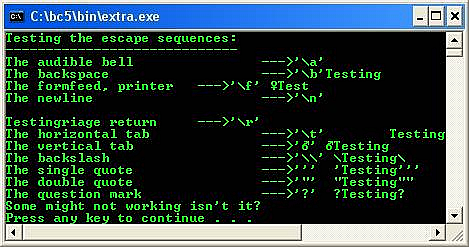
- The backslash (\) is called an escape character. When the backslash is encountered, function such as printf() for example, will look ahead at the next character and combines it with the backslash to form an escape sequence, used in functions printf() and scanf().
- Table 2.6 is the list of the escape sequence.
|
Code |
Code Meaning |
|
\a |
Audible bell |
|
\t |
Horizontal tab |
|
\b |
Backspace |
|
\\ |
Backslash character |
|
\f |
Formfeed |
|
\’ |
Single quote character |
|
\n |
Newline |
|
\" |
Double quote character |
|
\r |
Carriage return |
|
\0 |
NULL, ASCII 0 |
|
Table 2.6: Escape sequence |
|
- For general C++ escape sequences are given in the following table. Besides using the sequence, we also can use their value representation (in hexadecimal) for example \0x0A for newline.
|
Sequence |
Value (hex) |
Char |
What it does |
|
\a |
0x07 |
BEL |
Audible bell |
|
\b |
0x08 |
BS |
Backspace |
|
\f |
0x0C |
FF |
Formfeed |
|
\n |
0x0A |
LF |
Newline (linefeed) |
|
\r |
0x0D |
CR |
Carriage return |
|
\t |
0x09 |
HT |
Tab (horizontal) |
|
\v |
0x0B |
VT |
Vertical tab |
|
\\ |
0x5c |
\ |
Backslash |
|
\' |
0x27 |
' |
Single quote (apostrophe) |
|
\" |
0x22 |
" |
Double quote |
|
\? |
0x3F |
? |
Question mark |
|
\o |
|
any |
o=a string of up to three octal digits |
|
\xH |
|
any |
H=a string of hex digits |
|
\XH |
|
any |
H=a string of hex digits |
|
Table 2.7: Example of Borland C++ escape sequence |
|||
2.7 Constants
- Values that do not change during program execution.
- Can be integer, character or floating point type.
- To declare a constant, use keyword const as shown in the following variable declaration example:
const int day_in_week = 7;
const float total_loan = 1100000.35;
2.8 Character and String Constants
- A character constant is any character enclosed between two single quotation marks (' and ').
- When several characters are enclosed between two double quotation marks (" and "), it is called a string.
- Examples:
Character constants:
'$' '*' ' ' 'z' 'P'
String constants, note that the blank space(s) considered as string:
"Name: "
"Type of Fruit"
"Day: "
" "
- You will learn other aggregate or derived data type specifiers such as struct, union, enum and typedef in other Modules or in the program examples.
2.9 C Typecasting and Type Promotion
- During the program development, you may encounter the situations where you need to convert to the different data type from previously declared variables, as well as having mixed data type in one expression.
- For example, let say you have declared the following variables:
int total, number;
float average;
- But in the middle of your program you encountered the following expression:
average = total / number;
- This expression has mixed data type, int and float. The value of the average will be truncated, and it is not accurate anymore. Many compilers will generate warning and some do not, but the output will be inaccurate.
- C provides the unary (take one operand only) typecast operator to accomplish this task. The previous expression can be re written as
average = (float) total / number;
- This (float) is called type cast operator, which create temporary floating-point copy of the total operand. The construct for this typecast operator is formed by placing parentheses around a data type name as:
(type) such as (int), (float) and (char).
- In an expression containing the data types int and float for example, the ANSI C standard specifies that copies of int operands are made and promoted to float.
- The cast operator normally used together with the conversion specifiers heavily used with printf() and scanf(). C’s type promotion rules specify how types can be converted to other types without losing the data accuracy.
- The promotion rules automatically apply to expressions containing values of two or more different data type in mixed type expression. The type of each value in a mixed-type expression is automatically promoted to the highest type in the expression.
- Implicitly, actually, only a temporary version of each new value (type) is created and used for the mixed-type expression, the original value with original type still remain unchanged.
- Table 2.8 list the data types in order from highest to lowest type with printf and scanf conversion specifications for type promotion
- From the same table, type demotion, the reverse of type promotion is from lowest to highest. Type demotion will result inaccurate value such as truncated value. Program examples for this section are presented in formatted file input/output Module.
- This issue is very important aspect to be taken care when developing program that use mathematical expressions as well as when passing argument values to functions.
- C++ has some more advanced features for typecasting and will be discussed in Typecasting Module.
|
Data type |
printf conversion specification |
scanf conversion specification |
|
long double |
%Lf |
%Lf |
|
double |
%f |
%lf |
|
float |
%f |
%f |
|
unsigned long int |
%lu |
%lu |
|
long int |
%ld |
%ld |
|
unsigned int |
%u |
%u |
|
int |
%d |
%d |
|
short |
%hd |
%hd |
|
char |
%c |
%c |
|
Table 2.8: type promotion precedence, top = highest |
||
- A length modifier is listed in the following table.
|
Modifier |
Description |
|
l (letter ell) |
Indicates that the argument is a long or unsigned long. |
|
L |
Indicates that the argument is a long double. |
|
h |
Indicates that the corresponding argument is to be printed as a short or unsigned short. |
|
Table 2.9: Length modifier |
|
- The following table is a list of the ANSI C formatted output conversion of the printf() function, used with %. The program examples are presented in Module 5.
|
Character |
Argument type |
Converted to |
|
c |
int |
single character, after conversion to unsigned char. |
|
d, i |
int |
Signed decimal notation. |
|
e, E |
double |
Decimal notation of the form [-]m.de±xx or [-]m.dE±xx, where the number of d is specified by the precision. 6 is the default precision, 0 suppresses the decimal point. Example: -123.434E-256. |
|
f |
double |
Decimal notation of the form [-]m.d, where the d is specified by the precision. 6 is the default precision, 0 suppresses the decimal point. Example: 234.123456. |
|
g, G |
double |
%e or %E is used if the exponent is less than -4 or greater than or equal to the precision; otherwise %f is used. Trailing zeros or a trailing decimal point is not printed. |
|
n |
int * |
The number of characters written so far by this call to printf() is written into the argument. No argument is converted. |
|
o |
int |
Unsigned octal notation (without a leading zero). |
|
p |
void |
Print as a pointer (implementation dependent). |
|
s |
char * |
Characters from the string are printed until ‘\0’ is reached or until the number of characters indicated by the precision has been printed. |
|
u |
int |
Unsigned decimal notation. |
|
x, X |
int |
Unsigned hexadecimal notation (without a leading 0x or 0X), use abcd for 0x or ABCD for 0X. |
|
% |
- |
No argument is converted; just print a %. |
|
Table 2.10: printf() formatted output conversion |
||
- The following table is a list of ANSI C formatted input conversion of the scanf() function.
|
Character |
Input Data |
Argument Type |
|
c |
Characters. |
char *. The next input characters are placed in the indicated array, up to the number given by the width field; 1 is the default. No ‘\0’ is added. The normal skip over white space characters is suppressed in this case; use %1s to read the next non-white space character. |
|
d |
Decimal integer. |
int * |
|
i |
Integer. |
int *. The integer may be in octal (with leading 0) or hexadecimal (with leading 0x or 0X). |
|
n |
Writes into the argument the number of characters read so far by this call. |
int *. No input is read. The converted item count is not incremented. |
|
o |
Octal integer, with or without leading zero. |
int *. |
|
p |
Pointer value as printed by printf("%p"). |
void *. |
|
s |
String of non-white space characters, not quoted. |
char *. Pointing to an array of characters large enough to hold the string and a terminating ‘\0’ that will be appended. |
|
u |
Unsigned decimal integer. |
unsigned int * |
|
x |
Hexadecimal integer, with or without leading 0x or 0X. |
int *. |
|
e, f, g |
Floating-point number. |
float *. The input format for float’s is an optional sign, a string of numbers possibly containing a decimal point, and an optional exponent field containing an E or e followed by a possibly signed integer. |
|
[…] |
Matches the longest non-empty string of input characters from the set between brackets. |
char *. A ‘\0’ is appended. []…] will include ] in the set. |
|
[^…] |
Matches the longest non-empty string of input characters not from the set between brackets. |
char *. A ‘\0’ is appended. [^]…] will include ] in the set. |
|
% |
Literal %. |
No assignment is made. |
|
Table 2.11: scanf() formatted input conversion |
||
Program Examples And Experiments
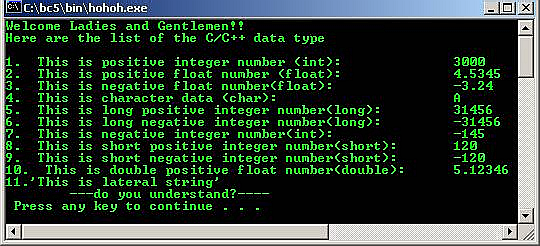
Example #1
//Data types program example
#include <iostream.h>
#include <stdlib.h>
int main() //main( ) function
{
int a = 3000; //positive integer data type
float b = 4.5345; //float data type
char c = 'A'; //char data type
long d = 31456; //long positive integer data type
long e = -31456; //long -ve integer data type
int f = -145; //-ve integer data type
short g = 120; //short +ve integer data type
short h = -120; //short -ve integer data type
double i = 5.1234567890; //double float data type
float j = -3.24; //float data type
cout<<"Welcome Ladies and Gentlemen!!\n";
cout<<"Here are the list of the C/C++ data type\n";
cout<<"\n1. This is positive integer number (int):\t\t"<<a;
cout<<"\n2. This is positive float number (float):\t\t"<<b;
cout<<"\n3. This is negative float number(float):\t\t"<<j;
cout<<"\n4. This is character data (char):\t\t\t"<<c;
cout<<"\n5. This is long positive integer number(long):\t\t"<<d;
cout<<"\n6. This is long negative integer number(long):\t\t"<<e;
cout<<"\n7. This is negative integer number(int):\t\t"<<f;
cout<<"\n8. This is short positive integer number(short):\t"<<g;
cout<<"\n9. This is short negative integer number(short):\t"<<h;
cout<<"\n10. This is double positive float number(double):\t"<<i;
cout<<"\n11.\'This is lateral string\'";
cout<<"\n\t---do you understand?----\n ";
system("pause");
return 0;
}
Output:
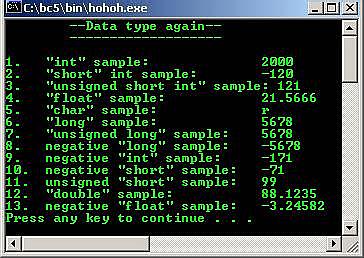
Example #2
//Another data type program example
#include <iostream.h>
#include <stdlib.h>
void main() //main( ) function
{
int p = 2000; //positive integer data type
short int q = -120; //variation
unsigned short int r = 121; //variation
float s = 21.566578; //float data type
char t = 'r'; //char data type
long u = 5678; //long positive integer data type
unsigned long v = 5678; //variation
long w = -5678; //-ve long integer data type
int x = -171; //-ve integer data type
short y = -71; //short -ve integer data type
unsigned short z = 99; //variation
double a = 88.12345; //double float data type
float b = -3.245823; //float data type
cout<<"\t--Data type again--\n";
cout<<"\t-------------------\n";
cout<<"\n1. \"int\" sample: \t\t"<<p;
cout<<"\n2. \"short\" int sample: \t"<<q;
cout<<"\n3. \"unsigned short int\" sample: "<<r;
cout<<"\n4. \"float\" sample: \t\t"<<s;
cout<<"\n5. \"char\" sample: \t\t"<<t;
cout<<"\n6. \"long\" sample: \t\t"<<u;
cout<<"\n7. \"unsigned long\" sample: \t"<<v;
cout<<"\n8. negative \"long\" sample: \t"<<w;
cout<<"\n9. negative \"int\" sample: \t"<<x;
cout<<"\n10. negative \"short\" sample: \t"<<y;
cout<<"\n11. unsigned \"short\" sample: \t"<<z;
cout<<"\n12. \"double\" sample: \t\t"<<a;
cout<<"\n13. negative \"float\" sample: \t"<<b<<endl;
system("pause");
}
Output:
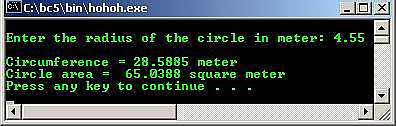
Example#3
//Program to calculate the circumference and area of circle
#include <iostream.h>
#include <stdlib.h>
//define identifier PI with constant
#define PI 3.14159
//define identifier TWO with constant
#define TWO 2.0
int main( )
{
float area, circumference, radius;
cout<<"\nEnter the radius of the circle in meter: ";
cin>>radius;
area = PI * radius * radius;
//circle area = PI*radius*radius
circumference = TWO * PI * radius;
//circumference = 2*PI*radius
cout<<"\nCircumference = "<<circumference<<" meter";
//circle circumference
cout<<"\nCircle area = "<<area<<" square meter"<<endl;
//circle area
system("pause");
return 0;
}
Output:
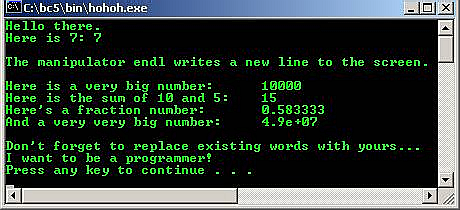
Example #4
//Using cout from iostream.h header file
#include <iostream.h>
#include <stdlib.h>
int main()
{
cout<<"Hello there.\n";
cout<<"Here is 7: "<<7<<"\n";
//other than escape sequence \n used for new line, endl...
cout<<"\nThe manipulator endl writes a new line to the screen.\n"<<endl;
cout<<"Here is a very big number:\t" << 10000 << endl;
cout<<"Here is the sum of 10 and 5:\t" << (10+5) << endl;
cout<<"Here's a fraction number:\t" << (float) 7/12 << endl;
//simple type casting, from int to float
cout<<"And a very very big number:\t" << (double) 7000 * 7000<< endl;
//another type casting, from int to double
cout<<"\nDon't forget to replace existing words with yours...\n";
cout<<"I want to be a programmer!\n";
system("pause");
return 0;
}
Output:
Example #5
//Comment in C/C++, using /* */ or //
//the // only for C++ compiler
#include <iostream.h>
#include <stdlib.h>
int main()
{
/* this is a comment
and it extends until the closing
star-slash comment mark */
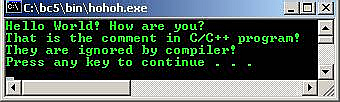
cout<<"Hello World! How are you?\n";
//this comment ends at the end of the line
//so, new comment line need new double forward slash
cout<<"That is the comment in C/C++ program!\n";
cout<<"They are ignored by compiler!\n";
//double slash comments can be alone on a line
/* so can slash-star comments */
/********************************/
system("pause");
return 0;
}
Output:
Example #6
//By using predefined sizeof() function,
//displaying the data type size, 1 byte = 8 bits
#include <iostream.h>
#include <stdlib.h>
int main()
{
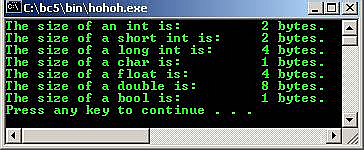
cout<<"The size of an int is:\t\t"<<sizeof(int)<<" bytes.\n";
cout<<"The size of a short int is:\t"<<sizeof(short)<<" bytes.\n";
cout<<"The size of a long int is:\t"<<sizeof(long)<<" bytes.\n";
cout<<"The size of a char is:\t\t"<<sizeof(char)<<" bytes.\n";
cout<<"The size of a float is:\t\t"<<sizeof(float)<<" bytes.\n";
cout<<"The size of a double is:\t"<<sizeof(double)<<" bytes.\n";
cout<<"The size of a bool is:\t\t"<<sizeof(bool)<<" bytes.\n";
system("pause");
return 0;
}
Output:
Example #7
//Demonstration the use of variables
#include <iostream.h>
#include <stdlib.h>
int main()
{
unsigned short int Width = 7, Length;
Length = 10;
//create an unsigned short and initialize with result
//of multiplying Width by Length
unsigned short int Area = Width * Length;
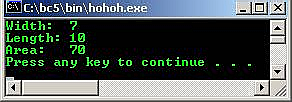
cout<<"Width:\t"<<Width<<"\n";
cout<<"Length: "<<Length<<endl;
cout<<"Area: \t"<<Area<<endl;
system("pause");
return 0;
}
Output:
Example #8
//To calculate the total amount of money earned in n days
#include <iostream.h>
#include <stdlib.h>
int main( )
{
int n;
int total, rate= 20;
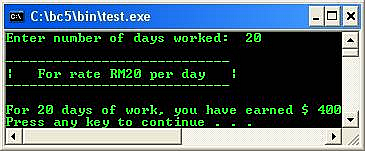
cout<<"Enter number of days worked: ";
cin>>n;
total = n * rate;
cout<<"\n----------------------------";
cout<<"\n| For rate RM20 per day |";
cout<<"\n----------------------------";
cout<<"\n";
cout<<"\nFor "<<n<<" days of work, you have earned $ ";
cout<<total<<endl;
system("pause");
return 0;
}
Output:
Example #9
//Printing characters base on their
//respective integer numbers
#include <iostream.h>
#include <stdlib.h>
int main()
{
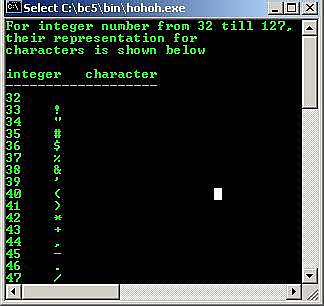
cout<<"For integer number from 32 till 127,\n";
cout<<"their representation for\n";
cout<<"characters is shown below\n\n";
cout<<"integer character\n";
cout<<"-------------------\n";
for (int i = 32; i<128; i++)
//display up to 127...
cout<<i<<" "<<(char) i<<"\n";
//simple typecasting, from int to char
system("pause");
return 0;
}
Output:
- Boolean, bool is a lateral true or false. Use bool and the literals false and true to make Boolean logic tests.
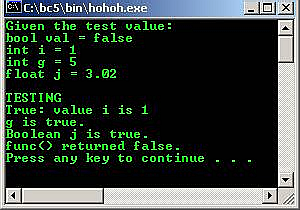
- The bool keyword represents a type that can take only the value false or true. The keywords false and true are Boolean literals with predefined values. false is numerically zero and true is numerically one. These Boolean literals are rvalues (right value); you cannot make an assignment to them.
- Program example:
/*Sample Boolean tests with bool, true, and false.*/
#include <iostream.h>
#include <stdlib.h>
//non main function
bool func()
{
//Function returns a bool type
return NULL;
//NULL is converted to Boolean false, same
//as statement 'return false;'
}
int main()
{
bool val = false; // Boolean variable
int i = 1; // i is neither Boolean-true nor Boolean-false
int g = 5;
float j = 3.02; // j is neither Boolean-true nor Boolean-false
cout<<"Given the test value: "<<endl;
cout<<"bool val = false "<<endl;
cout<<"int i = 1 "<<endl;
cout<<"int g = 5 "<<endl;
cout<<"float j = 3.02 "<<endl;
cout<<"\nTESTING\n";
//Tests on integers
if(i == true)
cout<<"True: value i is 1"<<endl;
if(i == false)
cout<<"False: value i is 0"<<endl;
if(g)
cout << "g is true."<<endl;
else
cout << "g is false."<<endl;
//To test j's truth value, cast it to bool type.
if(bool(j) == true)
cout<<"Boolean j is true."<<endl;
//Test Boolean function returns value
val = func();
if(val == false)
cout<<"func() returned false."<<endl;
if(val == true)
cout<<"func() returned true."<<endl;
system("pause");
return false;
//false is converted to 0
}
Output:
Example #10
//Testing the escape sequences
#include <stdio.h>
#include <stdlib.h>
int main()
{
printf("Testing the escape sequences:\n");
printf("-----------------------------\n");
printf("The audible bell --->\'\\a\' \a\a\a\n");
printf("The backspace --->\'\\b\' \bTesting\n");
printf("The formfeed, printer --->\'\\f\' \fTest\n");
printf("The newline --->\'\\n\' \n\n");
printf("The carriage return --->\'\\r\' \rTesting\n");
printf("The horizontal tab --->\'\\t\' \tTesting\t\n");
printf("The vertical tab --->\'\v\' \vTesting\n");
printf("The backslash --->\'\\\\' \\Testing\\\n");
printf("The single quote --->\'\'\' \'Testing\'\'\'\n");
printf("The double quote --->\'\"\' \"Testing\"\"\n");
printf("The question mark --->\'\?\' \?Testing\?\n");
printf("Some might not working isn't it?\n");
system("pause");
return 0;
}
Output:
Example #11
#include <stdio.h>
#include <stdlib.h>
int main()
{
int num;
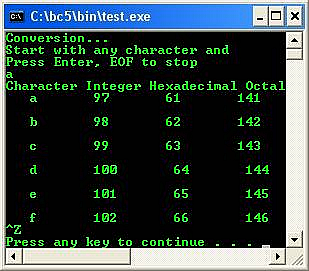
printf("Conversion...\n");
printf("Start with any character and\n");
printf("Press Enter, EOF to stop\n");
num = getchar();
printf("Character Integer Hexadecimal Octal\n");
while(getchar() != EOF)
{
printf(" %c %d %x %o\n", num, num, num, num);
++num;
}
system("pause");
return 0;
}
Output:
Example #12
#include <stdio.h>
#include <stdlib.h>
/*convert decimal to binary function*/
void dectobin();
int main()
{
char chs = 'Y';
do
{
dectobin();
printf("Again? Y, others to exit: ");
chs = getchar();
scanf("%c", &chs);
}while ((chs == 'Y') || (chs == 'y'));
return 0;
}
void dectobin()
{
int input;
printf("Enter decimal number: ");
scanf("%d", &input);
if (input < 0)
printf("Enter unsigned decimal!\n");
/*for the mod result*/
int i;
/*count the binary digits*/
int count = 0;
/*storage*/
int binbuff[64];
do
{
/* Modulus 2 to get the remainder of 1 or 0*/
i = input%2;
/* store the element into the array */
binbuff[count] = i;
/* Divide the input by 2 for binary decrement*/
input = input/2;
/* Count the number of binary digit*/
count++;
/*repeat*/
}while (input > 0);
/*prints the binary digits*/
printf ("The binary representation is: ");
do
{
printf("%d", binbuff[count - 1]);
count--;
if(count == 8)
printf(" ");
} while (count > 0);
printf ("\n");
}
Output:
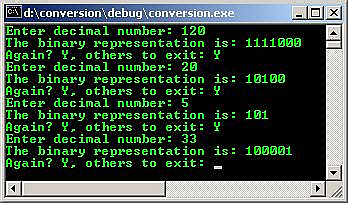
Example #13
#include <stdio.h>
#include <stdlib.h>
/*for strlen*/
#include <string.h>
/*convert bin to decimal*/
void bintodec()
{
char buffbin[100];
char *bin;
int i=0;
int dec = 0;
int bcount;
printf("Please enter the binary digits, 0 or/and 1.\n");
printf("Your binary digits: ");
bin = gets(buffbin);
i=strlen(bin);
for (bcount=0; bcount<i; ++bcount)
/*if bin[bcount] is equal to 1, then 1 else 0 */
dec=dec*2+(bin[bcount]=='1'? 1:0);
printf("\n");
printf("The decimal value of %s is %d\n", bin, dec);
}
int main(void)
{
bintodec();
return 0;
}
Output:
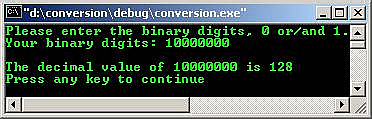
Example #14
/*Playing with binary, decimal, hexadecimal
and octal conversion*/
#include <stdio.h>
#include <stdlib.h>
/*strlen*/
#include <string.h>
/*octal conversion function*/
void octal(char *octa, int *octares);
/*hexadecimal conversion function */
void hexadecimal(char *hexa, int *hexares);
/*decimal conversion function */
void decimal(char *deci, int *decires);
/*convert binary to decimal*/
void bintodec(void);
/* convert decimal to binary*/
void decnumtobin (int *dec);
int main()
{
/* Yes or No value to continue with program */
char go;
/* Yes or No value to proceed to Binary to Decimal function */
char binY;
char choice1;
char choice2;
/* numtest, value to test with, and pass to functions*/
int numtest;
/* value to convert to binary, and call decnumtobin function*/
int bintest;
int flag;
flag = 0;
go = 'y';
do
{
printf("Enter the base of ur input(d=dec, h=hex, o=octal): ");
scanf("%c", &choice1);
getchar();
printf("\n");
printf("The entered Number: ");
/*If decimal number*/
if ((choice1 == 'd') || (choice1 == 'D'))
{
scanf("%d", &numtest);
getchar();
}
/*If hexadecimal number*/
else if ((choice1 == 'h') || (choice1 == 'H'))
{
scanf("%x", &numtest);
getchar();
}
/*If octal number*/
else if ((choice1 == 'o') || (choice1 == 'O'))
{
scanf("%o", &numtest);
getchar();
}
/*If no match*/
else
{
flag = 1;
printf("Only d, h or o options!\n");
printf("Program exit...\n");
exit(0);
}
/*Firstly convert the input 'number' to binary*/
bintest = numtest;
decnumtobin(&bintest);
/*output the hex, decimal or octal*/
printf("\n");
printf("Next, enter the base of ur output (d=dec, h=hex, o=octal): ");
scanf("%c", &choice2);
getchar();
/*If decimal number*/
if ((choice2 == 'd') || (choice2 == 'D'))
decimal (&choice1, &numtest);
/*If hexadecimal number*/
else if ((choice2 == 'h') || (choice2 == 'H'))
hexadecimal (&choice1, &numtest);
/*If octal number*/
else if ((choice2 == 'o') || (choice2 == 'O'))
octal (&choice1, &numtest);
/*if nothing matched*/
else
{
flag = 1;
system("cls");
printf("Only d, h or o options!");
printf("\nProgram exit...");
exit(0);
}
printf("\n\nAn OPTION\n");
printf("=========\n");
printf("Do you wish to do the binary to decimal conversion?");
printf("\n Y for Yes, and N for no : ");
scanf("%c", &binY);
getchar();
/*If Yes...*/
if ((binY == 'Y') || (binY == 'y'))
/*Do the binary to decimal conversion*/
bintodec();
/*If not, just exit*/
else if ((binY != 'y') || (binY != 'Y'))
{
flag = 1;
printf("\nProgram exit...\n");
exit(0);
}
printf("\n\n");
printf("The program is ready to exit...\n");
printf("Start again? (Y for Yes) : ");
scanf("%c", &go);
getchar();
/*initialize to NULL*/
numtest = '\0';
choice1 = '\0';
choice2 = '\0';
}
while ((go == 'y') || (go == 'Y'));
printf("-----FINISH-----\n");
return 0;
}
/*===================================================*/
void decimal(char *deci, int *decires)
{
int ans = *decires;
char ch = *deci;
if ((ch == 'd') || (ch == 'D'))
printf("\nThe number \"%d\" in decimal is equivalent to \"%d\" in decimal.\n", ans, ans);
else if ((ch == 'h') || (ch == 'H'))
printf("\nThe number \"%X\" in hex is equivalent to \"%d\" in decimal.\n", ans, ans);
else if ((ch == 'o') || (ch == 'O'))
printf("\nThe number \"%o\" in octal is equivalent to \"%d\" in decimal.\n", ans, ans);
}
/*======================================================*/
void hexadecimal(char *hexa, int *hexares)
{
int ans = *hexares;
char ch = *hexa;
if ((ch == 'd') || (ch == 'D'))
printf("\nThe number \"%d\" in decimal is equivalent to \"%X\" in hexadecimal.\n", ans, ans);
else if ((ch == 'h') || (ch == 'H'))
printf("\nThe number \"%X\" in hex is equivalent to \"%X\" in hexadecimal.\n", ans, ans);
else if ((ch == 'o') || (ch == 'O'))
printf("\nThe number \"%o\" in octal is equivalent to \"%X\" in hexadecimal.\n", ans, ans);
}
/*========================================================*/
void octal(char *octa, int *octares)
{
int ans = *octares;
char ch = *octa;
if ((ch == 'd') || (ch == 'D'))
printf ("\nThe number \"%d\" in decimal is equivalent to \"%o\" in octal.\n", ans, ans);
else if ((ch == 'h') || (ch == 'H'))
printf("\nThe number \"%X\" in hex is equivalent to \"%o\" in octal. \n", ans, ans);
else if ((ch == 'o') || (ch == 'O'))
printf("\nThe number \"%o\" in octal is equivalent to \"%o\" in octal.\n", ans, ans);
}
void bintodec(void)
{
char buffbin[1024];
char *binary;
int i=0;
int dec = 0;
int z;
printf("Please enter the binary digits, 0 or 1.\n");
printf("Your binary digits: ");
binary = gets(buffbin);
i=strlen(binary);
for(z=0; z<i; ++z)
/*if Binary[z] is equal to 1, then 1 else 0 */
dec=dec*2+(binary[z]=='1'? 1:0);
printf("\n");
printf("The decimal value of %s is %d", binary, dec);
printf("\n");
}
void decnumtobin (int *dec)
{
int input = *dec;
int i;
int count = 0;
int binary[64];
do
{
/* Modulus 2 to get 1 or a 0*/
i = input%2;
/* Load Elements into the Binary Array */
binary[count] = i;
/* Divide input by 2 for binary decrement */
input = input/2;
/* Count the binary digits*/
count++;
}while (input > 0);
/* Reverse and output binary digits */
printf ("The binary representation is: ");
do
{
printf ("%d", binary[count - 1]);
count--;
} while (count > 0);
printf ("\n");
}
Output:
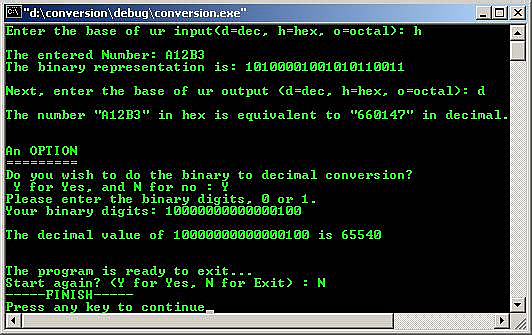
Example #15
/*Playing with binary, decimal, hexadecimal
and octal conversion*/
#include <stdio.h>
#include <stdlib.h>
/*strlen*/
#include <string.h>
/*decimal conversion function */
void decimal(char *deci, int *decires);
/* convert decimal to binary*/
void decnumtobin (int *dec);
int main()
{
/* Yes or No value to continue with program */
char go;
char choice1;
char choice2;
/*numtest, value to test with, and pass to functions*/
int numtest;
/*value to convert to binary, and call decnumtobin function*/
int bintest;
int flag;
flag = 0;
go = 'y';
do
{
printf ("Enter the h for hex input: ");
scanf("%c", &choice1);
getchar();
printf ("\n");
printf ("Enter your hex number lor!: ");
/*If hexadecimal number*/
if ((choice1 == 'h') || (choice1 == 'H'))
{
scanf ("%x", &numtest);
getchar();
}
else
{
flag = 1;
printf ("Only h!\n");
printf("Program exit...\n");
exit(0);
}
/*Firstly convert the input 'number' to binary*/
bintest = numtest;
decnumtobin(&bintest);
/*output the hex, decimal or octal*/
printf ("\n");
printf ("Enter the d for decimal output: ");
scanf ("%c", &choice2);
getchar();
/*If decimal number*/
if ((choice2 == 'd') || (choice2 == 'D'))
decimal(&choice1, &numtest);
/*else...*/
else
{
flag = 1;
printf("Only d!");
printf("\nProgram exit...");
exit(0);
}
printf ("\n\n");
printf ("The program is ready to exit...\n");
printf ("Start again? (Y for Yes) : ");
scanf ("%c", &go);
getchar();
/*initialize to NULL*/
numtest = '\0';
choice1 = '\0';
choice2 = '\0';
}
while ((go == 'y') || (go == 'Y'));
printf ("-----FINISH-----\n");
return 0;
}
/*===================================================*/
void decimal(char *deci, int *decires)
{
int ans = *decires;
char ch = *deci;
if ((ch == 'h') || (ch == 'H'))
printf ("\nThe number \"%X\" in hex is equivalent to \"%d\" in decimal.\n", ans, ans);
}
void decnumtobin (int *dec)
{
int input = *dec;
int i;
int count = 0;
int binary[128];
do
{
/* Modulus 2 to get 1 or a 0*/
i = input%2;
/* Load Elements into the Binary Array */
binary[count] = i;
/* Divide input by 2 for binary decrement */
input = input/2;
/* Count the binary digits*/
count++;
}while (input > 0);
/* Reverse and output binary digits */
printf ("The binary representation is: ");
do
{
printf ("%d", binary[count - 1]);
count--;
if(count == 4)
printf(" ");
} while (count > 0);
printf ("\n");
}
Output:
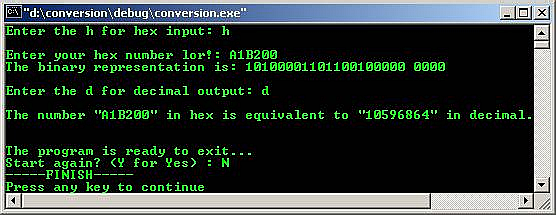
Example #16
/*Playing with hexadecimal and ascii*/
#include <stdio.h>
#include <stdlib.h>
/*strlen*/
#include <string.h>
/*decimal conversion function */
void decimal(int *decires);
/*convert decimal to binary*/
void decnumtobin (int *dec);
int main()
{
/*Program continuation...*/
char go;
/* numtest, value to test with, and pass to functions*/
int numtest;
/* value to convert to binary, and call decnumtobin function*/
int bintest;
int flag = 0;
go = 'y';
do
{
printf("Playing with hex and ASCII\n");
printf("==========================\n");
printf("For hex, 0(0) - 1F(32) are non printable/control characters!\n");
printf("For hex > 7F(127) they are extended ASCII characters that are\n");
printf("platform dependent!\n\n");
printf("Enter the hex input: ");
scanf("%x", &numtest);
getchar();
/*Firstly convert the input 'number' to binary*/
bintest = numtest;
decnumtobin(&bintest);
decimal (&numtest);
printf("\nStart again? (Y for Yes) : ");
scanf ("%c", &go);
getchar();
/*initialize to NULL*/
numtest = '\0';
}
while ((go == 'y') || (go == 'Y'));
printf("-----FINISH-----\n");
return 0;
}
/*===================================================*/
void decimal(int *decires)
{
int ans = *decires;
/*If < decimal 32...*/
if(ans < 32)
{
printf("hex < 20(32) equivalent to non printable/control ascii characters\n");
switch(ans)
{
case 0:{printf("hex 0 is NULL ascii");}break;
case 1:{printf("hex 1 is SOH-start of heading ascii");}break;
case 2:{printf("hex 2 is STX-start of text ascii");}break;
case 3:{printf("hex 3 is ETX-end of text ascii");}break;
case 4:{printf("hex 4 is EOT-end of transmission ascii");}break;
case 5:{printf("hex 5 is ENQ-enquiry ascii");}break;
case 6:{printf("hex 6 is ACK-acknowledge ascii");}break;
case 7:{printf("hex 7 is BEL-bell ascii");}break;
case 8:{printf("hex 8 is BS-backspace ascii");}break;
case 9:{printf("hex 9 is TAB-horizontal tab ascii");}break;
case 10:{printf("hex A is LF-NL line feed, new line ascii");}break;
case 11:{printf("hex B is VT-vertical tab ascii");}break;
case 12:{printf("hex C is FF-NP form feed, new page ascii");}break;
case 13:{printf("hex D is CR-carriage return ascii");}break;
case 14:{printf("hex E is SO-shift out ascii");}break;
case 15:{printf("hex F is SI-shift in ascii");}break;
case 16:{printf("hex 10 is DLE-data link escape ascii");}break;
case 17:{printf("hex 11 is DC1-device control 1 ascii");}break;
case 18:{printf("hex 12 is DC2-device control 2 ascii");}break;
case 19:{printf("hex 13 is DC3-device control 3 ascii");}break;
case 20:{printf("hex 14 is DC4-device control 4 ascii");}break;
case 21:{printf("hex 15 is NAK-negative acknowledge ascii");}break;
case 22:{printf("hex 16 is SYN-synchronous idle ascii");}break;
case 23:{printf("hex 17 is ETB-end of trans. block ascii");}break;
case 24:{printf("hex 18 is CAN-cancel ascii");}break;
case 25:{printf("hex 19 is EM-end of medium ascii");}break;
case 26:{printf("hex 1A is SUB-substitute ascii");}break;
case 27:{printf("hex 1B is ESC-escape ascii");}break;
case 28:{printf("hex 1C is FS-file separator ascii");}break;
case 29:{printf("hex 1D is GS-group separator ascii");}break;
case 30:{printf("hex 1E is RS-record separator ascii");}break;
case 31:{printf("hex 1F is US-unit separator ascii");}break;
}
}
else
printf ("\nThe number \"%X\" in hex is equivalent to \"%c\" ascii character.\n", ans, ans);
}
void decnumtobin (int *dec)
{
int input = *dec;
int i;
int count = 0;
int binary[128];
do
{
/* Modulus 2 to get 1 or a 0*/
i = input%2;
/* Load Elements into the Binary Array */
binary[count] = i;
/* Divide input by 2 for binary decrement */
input = input/2;
/* Count the binary digits*/
count++;
}while (input > 0);
/* Reverse and output binary digits */
printf("The binary representation is: ");
do
{
printf("%d", binary[count - 1]);
count--;
if(count == 4)
printf(" ");
} while (count > 0);
printf("\n");
}
Output:
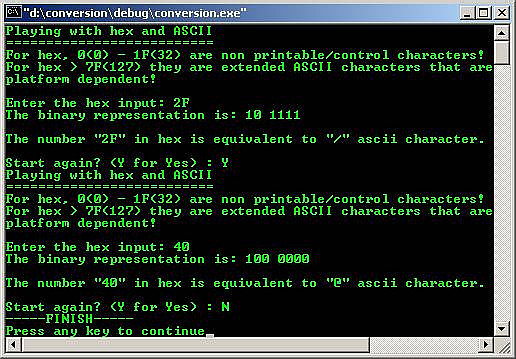
Example #17
- Compiled using VC++/VC++ .Net.
#include <cstdio>
using namespace std;
int main()
{
int num;
printf("Conversion...\n");
printf("Start with any character and\n");
printf("Press Enter, EOF to stop\n");
num = getchar();
printf("Character Integer Hexadecimal Octal\n");
while(getchar() != EOF)
{
printf(" %c %d %x %o\n", num, num, num, num);
++num;
}
return 0;
}
Output:
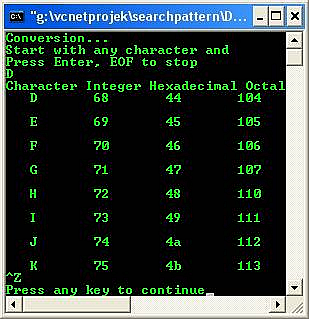
- Program example compiled using gcc.
/*Another data type program example*/
#include <stdio.h>
/*main function*/
int main()
{
int p = 2000; /*positive integer data type*/
short int q = -120; /*variation*/
unsigned short int r = 121; /*variation*/
float s = 21.566578; /*float data type*/
char t = 'r'; /*char data type*/
long u = 5678; /*long positive integer data type*/
unsigned long v = 5678; /*variation*/
long w = -5678; /*-ve long integer data type*/
int x = -171; /*-ve integer data type*/
short y = -71; /*short -ve integer data type*/
unsigned short z = 99; /*variation*/
double a = 88.12345; /*double float data type*/
float b = -3.245823; /*float data type*/
printf("\t--Data type again--\n");
printf("\t-------------------\n");
printf("\n1. \"int\" sample: \t\t %d, the data size: %d bytes", p, sizeof(p));
printf("\n2. \"short\" int sample: \t %d, the data size: %d bytes", q, sizeof(q));
printf("\n3. \"unsigned short int\" sample: %d, the data size: %d bytes", r, sizeof(r));
printf("\n4. \"float\" sample: \t\t %.7f, the data size: %d bytes", s, sizeof(s));
printf("\n5. \"char\" sample: \t\t %c, the data size: %d byte", t, sizeof(t));
printf("\n6. \"long\" sample: \t\t %d, the data size: %d bytes", u, sizeof(u));
printf("\n7. \"unsigned long\" sample: \t %d, the data size: %d bytes", v, sizeof(v));
printf("\n8. negative \"long\" sample: \t %d, the data size: %d bytes", w, sizeof(w));
printf("\n9. negative \"int\" sample: \t %d, the data size: %d bytes", x, sizeof(x));
printf("\n10. negative \"short\" sample: \t %d, the data size: %d bytes", y, sizeof(y));
printf("\n11. unsigned \"short\" sample: \t %d, the data size: %d bytes", z, sizeof(z));
printf("\n12. \"double\" sample: \t\t %.4f, the data size: %d bytes", a, sizeof(a));
printf("\n13. negative \"float\" sample: \t %.5f, the data size: %d bytes\n", b, sizeof(b));
return 0;
}
[bodo@bakawali ~]$ gcc datatype.c -o datatype
[bodo@bakawali ~]$ ./datatype
--Data type again--
-------------------
1. "int" sample: 2000, the data size: 4 bytes
2. "short" int sample: -120, the data size: 2 bytes
3. "unsigned short int" sample: 121, the data size: 2 bytes
4. "float" sample: 21.5665779, the data size: 4 bytes
5. "char" sample: r, the data size: 1 byte
6. "long" sample: 5678, the data size: 4 bytes
7. "unsigned long" sample: 5678, the data size: 4 bytes
8. negative "long" sample: -5678, the data size: 4 bytes
9. negative "int" sample: -171, the data size: 4 bytes
10. negative "short" sample: -71, the data size: 2 bytes
11. unsigned "short" sample: 99, the data size: 2 bytes
12. "double" sample: 88.1235, the data size: 8 bytes
13. negative "float" sample: -3.24582, the data size: 4 bytes
#include <stdio.h>
#include <stdlib.h>
/*convert decimal to binary function*/
void dectobin();
int main()
{
char chs = 'Y';
do
{
dectobin();
printf("Again? Y, others to exit: ");
chs = getchar();
scanf("%c", &chs);
}while ((chs == 'Y') || (chs == 'y'));
return 0;
}
void dectobin()
{
int input;
printf("Enter decimal number: ");
scanf("%d", &input);
if (input < 0)
printf("Enter unsigned decimal!\n");
/*for the mod result*/
int i;
/*count the binary digits*/
int count = 0;
/*storage*/
int binbuff[64];
do
{
/* Modulus 2 to get the remainder of 1 or 0*/
i = input%2;
/* store the element into the array */
binbuff[count] = i;
/* Divide the input by 2 for binary decrement*/
input = input/2;
/* Count the number of binary digit*/
count++;
/*repeat*/
}while (input > 0);
/*prints the binary digits*/
printf("The binary representation is: ");
do
{
printf("%d", binbuff[count - 1]);
count--;
if(count == 8)
printf(" ");
} while (count > 0);
printf ("\n");
}
[bodo@bakawali ~]$ gcc binary.c -o binary
[bodo@bakawali ~]$ ./binary
Enter decimal number: 64
The binary representation is: 1000000
Again? Y, others to exit: Y
Enter decimal number: 128
The binary representation is: 10000000
Again? Y, others to exit: Y
Enter decimal number: 32
The binary representation is: 100000
Again? Y, others to exit: Y
Enter decimal number: 100
The binary representation is: 1100100
Again? Y, others to exit: N
[bodo@bakawali ~]$ cat binary.c
----------------------------------------------------o0o---------------------------------------------------
Notes:
The ASCII, EBCDIC and UNICODE character sets reference Table can be found here: http://www.lookuptables.com/