The Normal Curve and Galton's Board
by Paul Trow
|
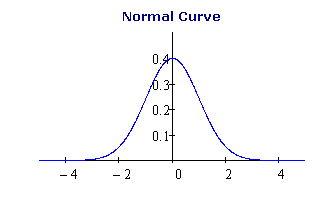
The normal curve models the
distribution of many common variables in the physical and social
sciences. The graph below shows the standard normal curve with mean 0
and standard deviation 1. |
|
In the nineteenth century, Sir Francis
Galton, one of the pioneers of statistical theory, invented a
mechanical device that illustrates how the normal distribution arises
from the contributions of many independent random events. |
|
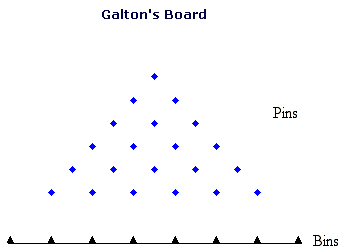
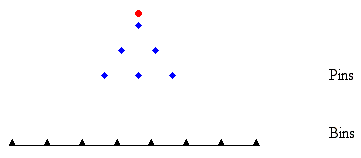
Galton's device consists of an array
of pins mounted on a vertical board, as shown by the blue markers in
the diagram below. |
|
The diagram has 6 horizontal rows
of pins, or levels. Galton's real board, which still exists in
University College, London, has many more levels. When the board is
operated, a sequence of balls drops onto the pin at the top of the
array. When a ball hits a pin, it bounces to the left or right with
equal probability, and then falls down one level, where it hits one of
the two closest pins. After the ball reaches the last level, it falls
into one of the bins below the bottom row.
|
|
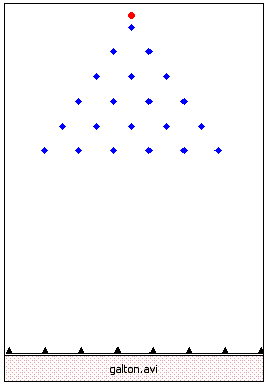
Click here to see an animation of Galton's board. If you have Mathcad 14 installed on your computer, you can download a Mathcad 14 file, in which you can run simulations of Galton's board with more levels of pins. |
|
Note that this is a recorded
animation that doesn't change when you replay it. The last section of
this article shows how to use Mathcad to create different random
simulations of Galton's board.
|
|
As more and more balls stack up in the
bins, the stacks start to take on a predictable shape - that of a
normal curve. It is a remarkable fact that, as you increase the number
of levels of pins and the number of balls that drop, the distribution
of balls (suitably rescaled) approximates a normal distribution. |
|
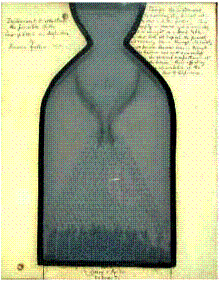
Here is a picture of Galton's actual board, built in 1873. The "balls" dropped in the board were actually lead shot. |
|
There is a working model based on Galton's board on display at the Boston Museum of Science. |
|
The Binomial Distribution |
|
You can use Mathcad's rbinom function to simulate Galton's board. rbinom(m, n, p)
returns a vector of length m, whose entries are random integers between
0 and n having a binomial distribution. Think of each entry as the
result of tossing a coin n times and recording how many heads
appear, assuming that each toss has probability p of coming up heads. |
|
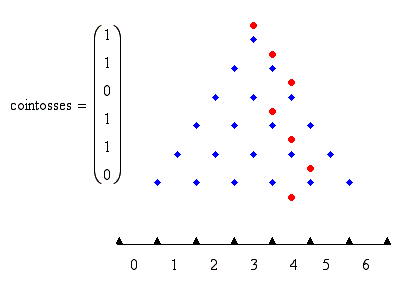
In the special case when p = 1/2 and n = 1- that is, a fair coin is tossed just once - the entries of rbinom(m, 1, 0.5)
are 0 or 1 with probability 1/2. If m is the number of levels in
Galton's board, this vector defines a random path for a ball. The ball
bounces to the left for each 0 and to the right for each 1. |
|
Number of levels in the board |
|
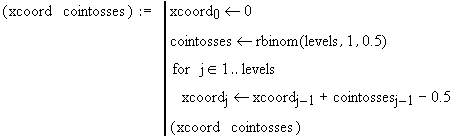
The following program generates a
random path and computes the position of the ball at each level. Since
the ball bounces a distance 0.5 to the left or the right, the change in
the x-coordinate is cointosses - 0.5. |
|
In Mathcad, you can generate different
random paths by clicking the program for (xcoord cointosses) above the
graph and selecting Tools > Calculate > Calculate Now or press [F9] on the program. |
|
Suppose you want to simulate the
results of dropping many balls in Galton's board. You could repeatedly
generate random paths, using rbinom as above, and count
the numbers of balls that land in each bin. But if you don't care what
paths the balls take, there's a faster way to simulate the numbers of
balls in the bins. |
|
Notice that if you number the bins as
shown above, a ball lands in bin k if the random vector that
generates its path contains exactly k ones. So the bin number of a
random ball has a binomial distribution with parameters n = levels and
p = 0.5. This is exactly the distribution of the entries of the random
vector |
|
So this vector simulates the results of dropping m balls and recording the numbers of the bins in which they fall. |
|
As an example, use this vector to simulate the results of dropping 1000 balls in a board with 10 levels. |
|
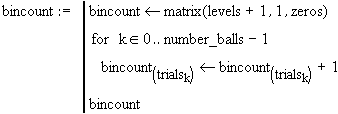
The following Mathcad program counts the
number of balls in each bin. Note that the number of bins is one more
than the number of levels. |
|
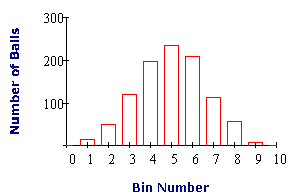
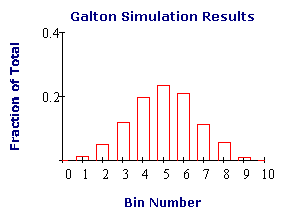
Here is a bar graph of the results.
|
|
If you divide these results by the
total number of balls dropped, the resulting fractions approximate a
binomial distribution, by the Law of Large Numbers.
|
|
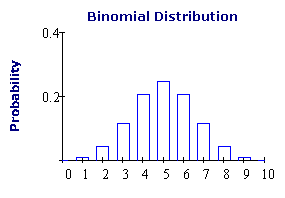
Compare this graph with the
probability density function of the binomial distribution, which is
computed by the Mathcad function
|
|
The Normal Approximation to the Binomial Distribution
|
|
The examples above show why the balls
in Galton's board have the shape of a binomial distribution. But what
does this have to do with the normal curve? The answer is that,
for large n, the distribution of a binomial random variable X, with
parameters n and p = 0.5, is approximated by a normal
distribution having the same mean and standard deviation as X.
This is a special case of a famous result called the Central Limit
Theorem.
|
|
A binomial random variable X with parameters n and p = 0.5 has mean n/2 and standard deviation  . .
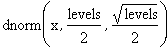
The Mathcad command
|
|
computes the probability density function of a normal distribution with this mean and standard deviation, for n = levels.
|
|
The following graph shows this normal distribution, together with the corresponding binomial distribution.
|
|
This explains why the balls in
Galton's board stack up in the shape of a normal curve. The bin numbers
of the balls have a binomial distribution, and this in turn is
approximated by a normal distribution.
|
|
Creating Random Simulations of Galton's Board
|
|
This section explains how to create random simulations of Galton's board using Mathcad.
|
|
First, define the number of levels of
pins in the board by the variable "levels." Define the number of balls
that are dropped by the variable "number_balls." You can change these
values to create different simulations.
|
|
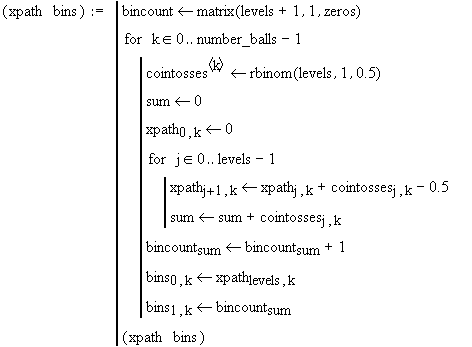
The following program creates the
paths of the balls and and records the numbers of balls in each bin.
After recording an animation of the simulation, you can generate a new
random simulation by clicking the program below and pressing [F9] to
recalculate.
|
|
The following code creates
functions that compute the positions of the balls and the number of
balls in the bins at each time step t. FRAME is a system variable used
to create the animation.
|
|
To record an animation of a simulation:
|
|
1. On the Tools menu, select Animation > Record.
2. In the Record Animation dialog, set the To: field to the number of frames you want to record. This number should be less than levels + 1 times the number of balls. The At Frames/Sec: field controls the speed of the animation.
3. In the
worksheet, select a region containing the graphs below by clicking
above and to the left of the pins, and then dragging the mouse below
and to the right of the bins.
4. Click Animate.
|
|
After you have recorded the animation, you can play it by clicking the play button in the Play Animation window. To save it as an avi file, click Save As.
|
|
Try creating different animations by
changing the values of "levels" and "number_balls" at the beginning of
this section. Also, you can generate new random simulations by clicking
the program for (xpath bins) and pressing [F9].
|
Download the Mathcad 14 file for this article.
Math and Science Articles
| | | |