| Home |
| Programming Languages |
| Networking |
| Web Technology |
| Testing |
| OS |
| Database |
| Search Engine Optimization |
| Interview FAQs |
| Free eBooks |
|
Address |
Interface |
Time |
|
62-FE-F7-11-89-A3 |
1 |
9:32 |
|
7C-BA-B2-B4-91-10 |
3 |
9:36 |
|
... |
... |
... |
Figure 3: Portion of a bridge table for the LAN in Figure 2
To understand how bridge filtering and forwarding works, suppose a frame with destination address DD-DD-DD-DD-DD-DD arrives to the bridge on interface x. The bridge indexes its table with the LAN address DD-DD-DD-DD-DD-DD and finds the corresponding interface y.
-
If x equals y, then the frame is coming from a LAN segment that contains adapter DD-DD-DD-DD-DD-DD. There being no need to forward the frame to any of the other interfaces, the bridge performs the filtering function by discarding the frame.
-
If x does not equal y, then the frame needs to be routed to the LAN segment attached to interface y. The bridge performs its forwarding function by putting the frame in an output buffer that precedes interface y.
These simple rules allow a bridge to preserve separate collision domains for each of the different LAN segments connected to its interfaces. The rules also allow the nodes on different LAN segments to communicate.
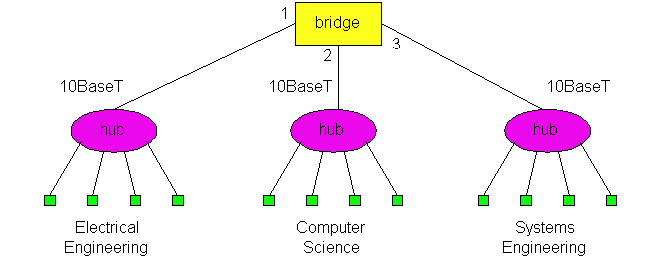
Let's walk through these rules for the network in Figures 2 and its bridge table in Figure 3. Suppose that a frame with destination address 62-FE-F7-11-89-A3 arrives to the bridge from interface 1. The bridge examines its table and sees that the destination is on the LAN segment connected to interface 1 (i.e., the Electrical Engineering LAN). This means that the frame has already been broadcast on the LAN segment that contains the destination. The bridge therefore filters (i.e., discards) the frame. Now suppose a frame with the same destination address arrives from interface 2. The bridge again examines its table and sees that the destination is the direction of interface 1; it therefore forwards the frame to the output buffer preceding interface 1. It should be clear from this example that as long as the bridge table is complete and accurate, the bridge isolates the departmental collision domains while permitting the departments to communicate.
Recall that when a hub (or a repeater) forwards a frame onto a link, it just sends the bits onto the link without bothering to sense whether another transmission is currently taking place on the link. In contrast, when a bridge wants to forward a frame onto a link, it runs the CSMA/CD algorithm. In particular, the bridge refrains from transmitting if it senses that some other node on the LAN segment is transmitting; furthermore, the bridge uses exponential backoff when one of its transmissions results in a collision. Thus bridge interfaces behave very much like node adapters. But technically speaking, they are not node adapters because neither a bridge nor its interfaces have LAN addresses. Recall that a node adapter always inserts its LAN address into the source address of every frame it transmits. This statement is true for router adapters as well as host adapters. A bridge, on the other hand, does not change the source address of the frame.
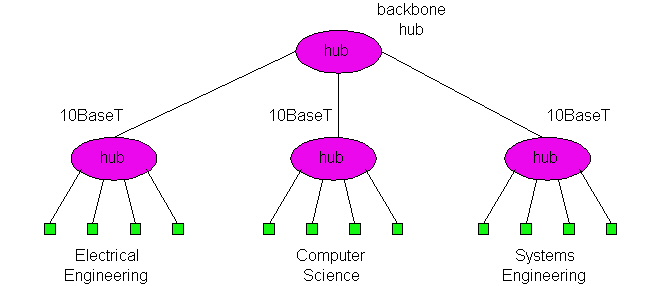
One significant feature of bridges is that they can be used to combine Ethernet segments using different Ethernet technologies. For example, if in Figure 2, Electrical Engineering has a 10Base2 Ethernet, Computer Science has a 100BaseT Ethernet, and Electrical Engineering has a 10BaseT Ethernet, then a bridge can be purchased that can interconnect the three LANs. With Gigabit Ethernet bridges, it is possible to have an additional 1 Gbps connection to a router, which in turn connects to a larger university network. As we mentioned earlier, this feature of being able to interconnect different link rates is not available with hubs.
Also, when bridges are used as interconnection devices, there is no theoretical limit to the geographical reach of a LAN. In theory, we can build a LAN that spans the globe by interconnecting hubs in a long, linear topology, with each pair of neighboring hubs interconnected by a bridge. Because in this design each of the hubs has its own collision domain, there is no limit on how long the LAN can be. We shall see shortly, however, that it is undesirable to build very large networks exclusively using bridges as interconnection devices -- large networks need routers as well.
Self-Learning
A bridge has the very cool property of building its table automatically, dynamically and autonomously -- without any intervention from a network administrator or from a configuration protocol. In other words, bridges are self-learning. This is accomplished as follows.
-
The bridge table is initially empty.
-
When a frame arrives on one of the interfaces and the frame's destination address is not in the table, then the bridge forwards copies of the frame to the output buffers of all of the other interfaces. (At each of these other interfaces, the frame accesses the LAN segment using CSMA/CD.)
-
For each frame received, the bridge stores in its table (1) the LAN address in the frame's source address field, (2) the interface from which the frame arrived, (3) the current time. In this manner the bridge records in its table the LAN segment on which the sending node resides. If every node in the LAN eventually sends a frame, then every node will eventually get recorded in the table.
-
When a frame arrives on one of the interfaces and the frame's destination address is in the table, then the bridge forwards the frame to the appropriate interface.
-
The bridge deletes an address in the table if no frames are received with that address as the source address after a period of time (the aging time). In this manner, if a PC is replaced by another PC (with a different adapter), the LAN address of the original PC will eventually be purged from the bridge table.
Let's walk through the self-learning property for the network in Figures 2
and its corresponding bridge table in Figure 3. Suppose at time 9:39 a frame
with source address 01-12-23-34-45-56 arrives from interface 2. Suppose
that this address is not in the bridge table. Then the bridge appends a new
entry in the table, as shown in Figure 4.
|
Address |
Interface |
Time |
|
01-12-23-34-45-56 |
2 |
9:39 |
|
62-FE-F7-11-89-A3 |
1 |
9:32 |
|
7C-BA-B2-B4-91-10 |
3 |
9:36 |
|
..... |
..... |
..... |
Figure 4: Bridge learns about the location of adapter with address 01-12-23-34-45-56.
Continuing with this same example, suppose that the aging time for this bridge is 60 minutes and no frames with source address 62-FE-F7-11-89-A3 arrive to the bridge between 9:32 and 10:32. Then at time 10:32 the bridge removes this address from its table.
Bridges are plug and play devices because they require absolutely no intervention from a network administrator or user. When a network administrator wants to install a bridge, it does no more than connect the LAN segments to the bridge interfaces. The administrator does not have to configure the bridge tables at the time of installation or when a host is removed from one of the LAN segments. Because bridges are plug and play, they are also referred as transparent bridges.
Spanning Tree
One of the problems with a pure hierarchical design for interconnected LAN segments is that if a hub or a bridge near the top of the hierarchy fails, then much (if not all) of the interconnected LAN will go down. For this reason it is desirable to build networks with multiple paths between LAN segments. An example of such a network is shown in Figure 5.
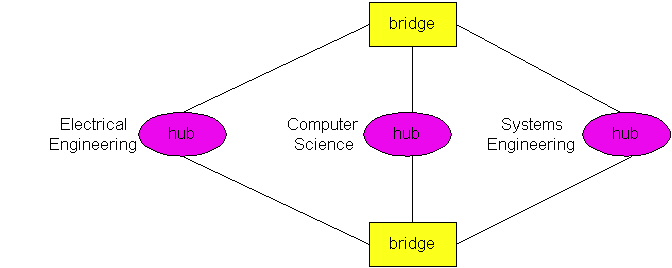
Figure 5: Interconnected LAN segments with redundant paths.
Multiple redundant paths between LAN segments (such as departmental LANs) can greatly improve fault tolerance. But, unfortunately, multiple paths have a serious side effect -- frames cycle and multiply within the interconnected LAN, thereby crashing the entire network. To see this, suppose that the bridge tables in Figure 5 are empty, and a host in Electrical Engineering sends a frame to a host in Computer Science. When the frame arrives to the Electrical Engineering hub, the hub will generate two copies of the frame and send one copy to each of the two bridges. When a bridge receives the frame, it will generate two copies, send one copy to the Computer Science hub and the other copy to the Systems Engineering hub. Since both bridges do this, there will be four identical frames in the LAN. This multiplying of copies will continue indefinitely since the bridges do not know where the destination host resides. (To route the frame to the destination host in Computer Science, the destination host has to first generate a frame so that its address can be recorded in the bridge tables.) The number of copies of the original frame grows exponentially fast, crashing the entire network.
To prevent the cycling and multiplying of frames, bridges use a spanning tree protocol. In the spanning tree protocol, bridges communicate with each other over the LANs in order to determine a spanning tree, that is, a subset of the original topology that has no loops. Once the bridges determine a spanning tree, the bridges disconnect appropriate interfaces in order to create the spanning tree out of the original topology. For example, in Figure 5, a spanning tree is created by having the top bridge disconnect its interface to Electrical Engineering and the bottom bridge disconnect its interface to Systems Engineering. With the interfaces disconnected and the loops removed, frames will no longer cycle and multiply. If, at some later time, one of links in the spanning tree fails, the bridges can reconnect the interfaces, run the spanning tree algorithm again, and determine a new set of interfaces that should be disconnected.
Bridges versus Routers
Routers are store-and-forward packet switches that forward packets using IP addresses. Although a bridge is also a store-and-forward packet switch, it is fundamentally different from a router in that it forwards packets using LAN addresses. Whereas a router is layer-3 packet switch, a bridge is a layer-2 packet switch.
Even though bridges and routers are fundamentally different, network
administrators must often choose between them when installing an interconnection
device. For example, for the network in Figure 2, the network administrator
could have just as easily used a router instead of a bridge. Indeed, a router
would have also kept the three collision domains separate while permitting
interdepartmental communication. Given that both bridges and routers are
candidates for interconnection devices, what are the pros and cons of the two
approaches? 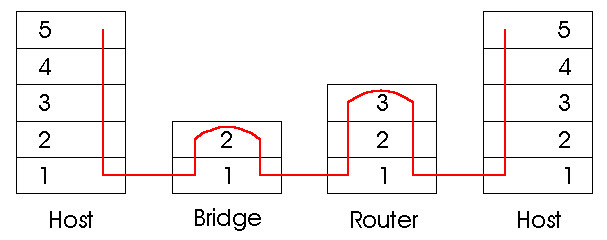
Figure 5.6-6: Packet processing and bridges, routers and hosts.
First consider the pros and cons of bridges. As mentioned above, bridges are plug and play, a property that is cherished by all the over-worked network administrators of the world. Bridges can also have relatively high packet filtering and forwarding rates -- as shown in Figure 6, bridges only have to process packets up through layer 2, whereas routers have to process frames up through layer 3. On the other hand, the spanning tree protocol restricts the effective topology of a bridged network to a spanning tree. This means that all frames most flow along the spanning tree, even when there are more direct (but disconnected) paths between source and destination. The spanning tree restriction also concentrates the traffic on the spanning tree links when it could have otherwise been spread through all the links of the original topology. Furthermore, bridges do not offer any protection against broadcast storms -- if one host goes haywire and transmits an endless stream of Ethernet broadcast packets, the bridges will forward all of the packets and the entire network will collapse.
Now consider the pros and cons of routers. Because IP addressing is hierarchical (and not flat as is LAN addressing), packets do not normally cycle through routers even when the network has redundant paths. (Actually, packets can cycle when router tables are misconfigured; IP uses a special datagram header field to limit the cycling.) Thus, packets are not restricted to a spanning tree and can use the best path between source and destination. Because routers do not have the spanning tree restriction, routers have allowed the Internet to be built with a rich topology which includes, for example, multiple active links between Europe and North America. Another feature of routers is that they provide firewall protection against layer-2 broadcast storms. Perhaps the most significant drawback of routers is that they are not plug and play -- they and the hosts that connect to them need their IP addresses to be configured. Also, routers often have a larger prepackage processing time than bridges, because they have to process up through the layer-3 fields.
Given that both bridges and routers have their pros and cons, when should an institutional network (e.g., university campus network or a corporate campus network) use bridges, and when should it use bridges? Typically, small networks consisting of a few hundred hosts have a few LAN segments. Bridges suffice for these small networks, as they localize traffic and increase aggregate throughput without requiring any configuration of IP addresses. But larger networks consisting of thousands of hosts typically include routers within the network (in addition to bridges). The routers provide a more robust isolation of traffic, control broadcast storms, and use more "intelligent" routes among the hosts in the network.
Connecting LAN Segments with Backbones
Consider once again the problem of interconnecting with bridges the Ethernets in the three departments in Figure 2. An alternative design is shown in Figure 7. This alternative design uses two two-interface bridges (i.e., bridges with two interfaces), with one bridge connecting Electrical Engineering to Computer Science, and the other bridge connecting Computer Science to Systems Engineering. Although two-interface bridges are very popular due to their low cost and simplicity, the design in Figure 7 is not recommended for two reasons. First, if the Computer Science hub were to fail, then Electrical Engineering and Systems Engineering would no longer be able to communicate. Second, and more important, all the inter-departmental traffic between Electrical and Systems Engineering has to pass through Computer Science, which may overly burden the Computer Science LAN segment.
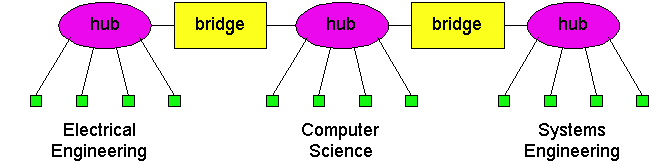
Figure 5.6-7: An example of an institutional LAN without a
backbone.
One important principle when designing an interconnected LAN is that the various LAN segments should be interconnected with a backbone. A backbone is a network that has direct connections to all the LAN segments. When a LAN has a backbone, then each pair of LAN segments can communicate without passing through a third-party LAN segment. The design shown if Figure 2 uses a three-interface bridge for a backbone.
5.6.2 Switches
Up until the mid 1990s, three types of LAN interconnection devices were essentially available: hubs (and their cousins, repeaters), bridges and routers. More recently yet another interconnection device became widely available, namely, Ethernet switches. Ethernet switches, often trumpeted by network equipment manufacturers with great fanfare, are in essence high-performance multi-interface bridges. As do bridges, they forward and filter frames using LAN destination addresses, and they automatically build routing tables using the source addresses in the traversing frames. The most important difference between a bridge and switch is that bridges usually have a small number of interfaces (i.e., 2-4), whereas switches may have dozens of interfaces. A large number interfaces generates a high aggregate forwarding rate through the switch fabric, therefore necessitating a high-performance design (especially for 100 Mbps and 1 Gbps interfaces).
Switches can be purchased with various combinations of 10 Mbps, 100 Mbps and
1 Gbps interfaces. For example, you can purchase switches with four 100 Mbps
interfaces and twenty 10 Mbps interfaces; or switches with four 100 Mbps
interfaces and one 1 Gbps interface. Of course, the more the interfaces and the
higher transmission rates of the various interfaces, the more you pay. Many
switches also operate in a full-duplex mode; that is, they can send and
receive frames at the same time over the same interface. With a full duplex
switch (and corresponding full duplex Ethernet adapters in the hosts), host A
can send a file to host B while that host B simultaneously sends to host A. 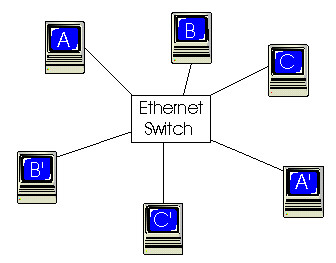
Figure 8: An Ethernet switch providing dedicated Ethernet access to
six hosts.
One of the advantages of having a switch with a large number of interfaces is that it creates direct connections between hosts and the switch. When a host has a full-duplex direct connection to a switch, it can transmit (and receive) frames at the full transmission rate of its adapter; in particular, the host adapter always senses an idle channel and never experiences a collision. When a host has a direct connection to a switch (rather than a shared LAN connection), the host is said to have dedicated access. In Figure 8, an Ethernet switch provides dedicated access to six hosts. This dedicated access allows A to send a file to A' while that B is sending a file to B' and C is sending a file to C'. If each host has a 10Mbps adapter card, then the aggregate throughput during the three simultaneous file transfers is 30 Mbps. If A and A' have 100 Mbps adapters and the remaining hosts have 10 Mbps adapters, then the aggregate throughput during the three simultaneous file transfers is 120 Mbps.
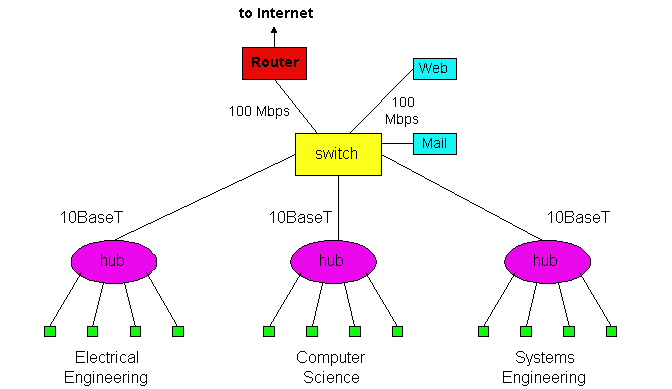
Figure 9: An institutional network using a combination of hubs,
Ethernet switches and a router.
Figure 9 shows how an institution with several departments and several critical servers might deploy a combination of hubs, Ethernet switches and routers. In Figure 9, each of the three departments has its own 10 Mbps Ethernet segment with its own hub. Because each departmental hub has a connection to the switch, all intra-departmental traffic is confined to the Ethernet segment of the department (assuming the routing tables in the Ethernet switch are complete). The Web and mail servers each have dedicated 100 Mbps access to the switch. Finally, a router, leading to the Internet, has dedicated 100 Mbps access to the switch. Note that this switch has at least three 10 Mbps interfaces and three100 Mbps interfaces.
Cut-Through Switching
In addition to large numbers of interfaces, support for multitudes of physical media types and transmission rates, and enticing network management features, Ethernet switch manufacturers often tout that their switches use cut-through switching rather than store-and-forward packet switching, used by routers and bridges. The difference between store-and-forward and cut-through switching is subtle. To understand this difference consider a packet that is being forwarded through a packet switch (i.e., a router, a bridge, or an Ethernet switch). The packet arrives to the switch on a inbound link and leaves the switch on a outbound link. When the packet arrives, there may or may not be other packets in the outbound link's output buffer. When there are packets in the output buffer, there is absolutely no difference between store-and-forward and cut-through switching. The two switching techniques only differ when the output buffer is empty.
When a packet is forwarded through a store-and-forward packet switch, the packet is first gathered and stored in its entirety before the switch begins to transmit it on the outbound link. In the case when the output buffer becomes empty before the whole packet has arrived to the switch, this gathering generates a store-and-forward delay at the switch, a delay which contributes to the total end-to-end delay. An upper bound on this delay is L/R, where L is the length of the packet and R is transmission rate of the inbound link. Note that a packet only incurs a store-and-forward delay if the output buffer becomes empty before the entire packet arrives to the switch.
With cut-through switching, if the buffer becomes empty before the entire packet has arrived, the switch can start to transmit the front of the packet while the back of the packet continues to arrive. Of course, before transmitting the packet on the outbound link, the portion of the packet that contains the destination address must first arrive. (This small delay is inevitable for all types of switching, as the switch must determine the appropriate outbound link.) In summary, with cut-through switching a packet does not have to be fully "stored" before it is forwarded; instead the packet is forwarded through the switch when the output link is free. If the output link is shared with other hosts (e.g., the output link connects to a hub), then the switch must also sense the link as idle before it can "cut-through" a packet.
To shed some insight on the difference between store-and-forward and cut-through switching, let us recall the caravan analogy. In this analogy, there is a highway with occasional toll booths, with each toll booth having a single attendant. On the highway there is a caravan of 10 cars traveling together, each at the same constant speed. The cars in the caravan are the only cars on the highway. Each toll booth services the cars at a constant rate, so that when the cars leave the toll booth they are equally spaced apart. As before, we can think of the caravan as being a packet, each car in the caravan as being a bit, and the toll booth service rate as the transmission rate of a link. Consider now what the cars in the caravan do when they arrive to a toll booth. If each car proceeds directly to the toll booth upon arrival, then the toll booth is a "cut-through toll booth". If, on the other hand, each car waits at the entrance until all the remaining cars in the caravan arrive, then the toll booth is "store-and-forward toll booth". The store-and-forward toll booth clearly delays the caravan more than the cut-through toll booth.
A cut-through switch can reduce a packet's end-to-end delay, but by how much? As we mentioned above, the maximum store-and-forward delay is L/R, where L is the packet size and R is the rate of the inbound link. The maximum delay is approximately 1.2 msec for 10 Mbps Ethernet and .12 msec for 100 Mbps Ethernet (corresponding to a maximum size Ethernet packet). Thus, a cut-through switch only reduces the delay by .12 to .2 msec, and this reduction only occurs when the outbound link is lightly loaded. How significant is this delay? Probably not very much in most practical applications, so you may want to think second about selling the family house before investing in the cut-through feature.
Although bridges and switches share most relevant attributes, several distinctions differentiate these technologies. Bridges are generally used to segment a LAN into a couple of smaller segments. Switches are generally used to segment a large LAN into many smaller segments. Bridges generally have only a few ports for LAN connectivity, whereas switches generally have many. Small switches such as the Cisco Catalyst 2924XL have 24 ports capable of creating 24 different network segments for a LAN. Larger switches such as the Cisco Catalyst 6500 can have hundreds of ports. Switches can also be used to connect LANs with different media�for example, a 10-Mbps Ethernet LAN and a 100-Mbps Ethernet LAN can be connected using a switch. Some switches support cut-through switching, which reduces latency and delays in the network, while bridges support only store-and-forward traffic switching. Finally, switches reduce collisions on network segments because they provide dedicated bandwidth to each network segment.
|
|
hubs |
bridges |
routers |
Ethernet switches |
|
traffic isolation |
no |
yes |
yes |
yes |
|
plug and play |
yes |
yes |
no |
yes |
|
optimal routing |
no |
no |
yes |
no |
|
cut-through |
yes |
no |
no |
yes |
Figure 10: Comparison of the typical features of popular interconnection devices.
We have learned in this section that hubs, bridges, routers and switches can all be used as an interconnection device for hosts and LAN segments. Figure 10 provides a summary of the features of each of these interconnection devices.
References