Networking


Networking Links

 *CLICK HERE*For An Educators Guide to School Networks
*This site contains the following information:
*What is a Network?
*Protocol
*Hardware
*Cabling
*Topology
*Software
*Glossary
*References
*Networking Game
 

  *CLICK HERE*   For A Guide for Networking a K-12 School District
*This sitecontains the following information:
*Advantages to networking
*Changes to curriculum
*Long term planning
*Planning a network
*Implementing a network
*Developing a technology plan
*Implementing the plan
*Challenges to overcome
 

  *CLICK HERE* To Enter the Consortium for School Networking
*The Consortium is a national K-12 association whose goal is to promote how the Internet and telecommunications improve learning.  Click on the hottest issues under "What's New" to explore what is currently happening in the educational technology world.
 

  *CLICK HERE* For A Guide to Networking K-12 Schools
*This is a project set forth by the Washington State Office of the Superintendent of Public Instruction
*This site includes the following information:
*Why network K-12 schools?
*Initial steps
*The OSI seven layer model
*Snapshots of school networks
*Common components and practices
*Network implementations and management
 

 *CLICK HERE* For School Networking Resources
*Come explore Montana's future developments impacting school networking.  The extension of Summit Net i s an exciting and upcoming event.
 

Resources

 *CLICK HERE* For a Further Resource Guidance
*Resources for school networking can be found at the local level from parents and students, universities or community colleges, at the federal level through many different federal agencies, or online from other school districts for example.
 

Important Networking Terms

1.  Peer-to-peer networks and Client/server networks:

*Peer-to-peer:  This is the simplest type of network.  Each client has his or her own storage area which is shared with other clients.  There is no central storage in this type of network.  This is often used in small computer classrooms.

*Client/server network:  This is the more commonly seen type of network.  This method contains storage devices that hold data for people to share called a file server.  The client can use the network to connect to the storage area and obtain documents to edit.

2.  LAN and WAN:

*Computer networks come in all sizes.  They are usually referred to by their size and scope.

*LAN- A network in which all clients have a common infrastructure (wires) and are usually in the same building or group or buildings.

*WAN- A network that spans a much larger geographical area.  For instance, a network that links two or more LANs that are separated by some distance.

3.  Topology

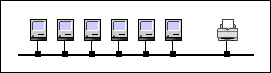
*Topology defines the shape of a network.  Some networks are shaped like rings with all the client stations connected in a logical circle; others are shaped like a star with the stations connected at a central point.  A network could also be designed in the shape of a bus, just a simple long row.


This is an example of a bus shaped topology.
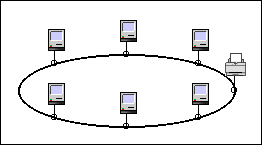


This is an example of a ring shaped topology.
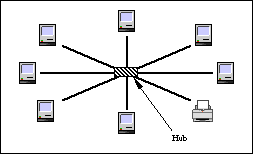


This is an example of a star shaped topology.

*These images are courtesy of http://devius.cs.uiuc.edu/schools/bl-thesis/toc.doc.html


Protocol

Definition: A protocol is a standard for how devices communicate with one another.  There are different types of protocols which can be broken down into layers.
Example: Physical protocols- These protocols specify things like voltage wires or other physical aspects.
 

Fast Ethernet:  This new enhancement of Ethernet runs at speeds of 100 Mbps, which is ten times the rate of regular Ethernet.  It requires that the wiring that it runs be a category five wiring, a higher quality than the category three wiring used in regular Ethernet.



A comparison of the different LAN technologies.
Protocol Wiring Maximum bandwidth Maximum

length


Topology Cost
Ethernet Cat 5 twisted pair 10 Mbps 100 meters Star Low
Thick 10 Mbps 500 meters Bus High
Coaxial cable 10 Mbps 200 meters Bus Low
Fiber 10 Mbps 1000 meters Star Very high
Fast Ethernet Cat 5 twisted pair 100 Mbps 100 meters Star High
Token Ring Coaxial cable 16 Mbps 100 meters Ring High
FDDI Fiber 100 Mbps 1000 meters Star Very high
CDDI Cat 5 twisted pair 100 Mbps 100 meters Star Very high
LocalTalk Cat 3 twisted pair 230 Kbps 300 meters Bus Very low
ATM Fiber 1 Gbps 100 meters Star Very high


A Few Technologies for Networking WAN


POTS-Plain Old Telephone Services
This WAN technology relies on standard telephone lines to connect schools.
Leased Lines
The district buys a permanent connection from the phone company, either to another school or to an ISP.  The district sets up a router and a Channel Service Unit/Digital Service Unit (CSU/DSU) at each school that will connect to the leased line.
Integrated Services Digital Network (ISDN)
This is a digital connection that offers connections at either 64 or 128 Kbps in both directions.  The basic type service contains two 64 Kbps data lines which are called B-Channels and a control line called a D-Channel.
 Wireless
This method uses lasers or microwaves for its method of communication.  It offers very high speeds, but much shorter ranges of only a few hundred feet.
Satellite
For districts in remote areas where other options may not be feasible, this is an alternative.  This option requires the use of a satellite dish along with other necessary equipment to connect to the network.  The building then has a 56 Kbps downlink connection.


Network Equipment


Repeater
This is the most basic type of active network equipment.  They only operate on the physical layer receiving a signal on a port or connection and then reflecting it on to its other parts.  They can extend a network beyond the limits imposed by the wiring by boosting the signal level.
Hub
A device that is the central unit of a star shaped topography network.  It is also called a concentrator.
Bridge
This device operates on a higher level than a repeater.  It works on the data link layer and look at actual packets that are in the network.  They receive a packet, and store the entire packet in their memory.  At this point the bridge verifies it's correctness and retransmits it on the correct port. 
Router 
This device operates at the network level.  It receives a packet; views its contents and determines where the package should go.
NICs
This device is an add-on that serves as a connection between the client computer and the network infrastructure.  In other words, to hook up all the computers together a special electronic unit called a NIC goes inside each computer.
Cables
Unshielded twisted pair-  This optionhas four twisted wire pairs within an outer sheath.  It is not only used or voice applications but data network applications as well.
Fiber Optic-  Fiber optic cables use light instead of electricity to carry data.  Data can move at extremely high speeds.
Coaxial-  Coaxial cables have several layers of material surrounding a common axis.  This cable is commonly used in video distribution.
Wireless-  Wireless cables have radio or microwave transmission for data.  They have special applications for inter building communications. *This option would be the best for a district or campus network although the cost would be a bit higher.   However, most schools use UTP due to cost.


Wazza's School Computer Network Info

Visit Wazza's school computer web page!

Networking and intranet explanations and suggestions for schools.


Computer Networking in Schools

The most popular network that is now used in schools is Ethernet.  New computers given to NSW DET schools now have an Ethernet port so the Ethernet can be simply installed by plugging it into the computer.


Network Cabling in Schools
 

Currently, schools are using Unshielded Twisted Pair or (UTP) cabling for school networks.  The cable is used in "category 5" installations which is the recommended standard for schools.  This cable contains pairs of copper wire and operates comfortably at 10 Mb/sec.  This provides some degree of "future proofing" meaning that you are able to upgrade other components such as the hubs, servers etc.  These components can be upgraded without having to replace your cable.

Wireless cabling:  This is not actually a cable but a method of connecting one site to another using "radio transmission."  It is still fairly pricey, but could be an alternative for schools located on sites that would be difficult to cable.  This method, in my opinion, would be a great alternative to the current method because there would be no messy cables to deal with and it would also be much faster.


School Intranet Resources
 

A school Intranet is an "internal" computer network which uses tools and protocols normally associated with the Internet.  In other words, students are using the Intranet to feel like they are using the Internet.  The content which the students experience using an Intranet cam be completely controlled with in the environment of the schools.


Networking Design and Research Center

 *CLICK HERE

This site provides the reader with information regarding,,,,,,,,

*Networking Terms
*Networking Category listings
*Search other networking resources
*Descriptive networking links

Hosted by www.Geocities.ws

1