 |
 |
 |
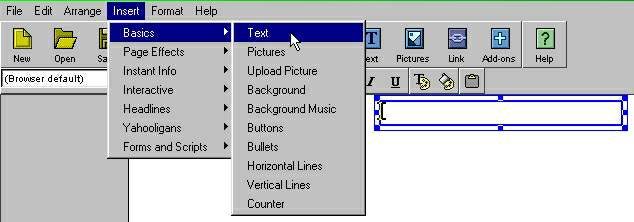
| 1- OPEN A TEXT BOX in PageBuilder in your new website by using Insert>Basics>Text, like this: |
| | A box like this will pop into the middle of your page, ready for your text input. You can drag the box around and change its size, and format text size/style/color, too. |
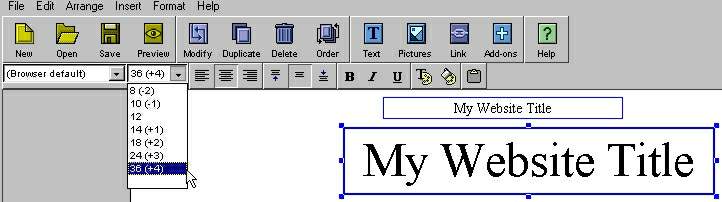
| My Website Title |
| My Website Title |
| / CHANGE FONT COLOR |
| \ FILL BOX WITH BACK COLOR |
| | JUSTIFY TEXT |
| 2- TYPE IN THE BOX;choose a size, font color, and transparent or back-filled style (USE DEFAULT FONT) |
| | Stay with "Browser default" Other fonts are problematic, and a common mistake of page designers. |
| The "Add-ons"PLUS SIGN is usually CENTER OF PAGE. | |
| After you size and color your title, drag it to where you want it. |
| PageBuilder (PB) Basics |
| INSERT TEXT |
| IN 3 STEPS |
| 1- OPEN A TEXT BOX 2- TYPE IN THE BOX 3- POSITION THE TEXT BOX |
| 3- POSITION THE BOX; if you want to center a title or other text, use the "+" as a guide-- it works! |
| __This "T" button works, too! |