acm
[email protected]
ACM
===================================
What is ACM?
-----------------------------------
 Automated Configuration Management.

===================================
ACM commands
-----------------------------------
md95testacm
compare md90_swtest_work md90_cert1_swtest/out=dif.txt
create scr
create ele/scr=#  "comment"
reserve/noout  "comment"
replace/scr=#  "comment"
sho gen/scr /gen=#
fetch
sho history
sho gen/mem /gen=#/desc
reserve/noconfig/gen=1/noout
replace/scr=#/variant=A  "comment"
exit

===================================
What is an SCR?
-----------------------------------
 Software Change Request.
 All of our work is tracked on an SCR in ACM.
 We should always know what SCR we are working on.
 During Initial Development, we work on a Init.Dev.SCR.

 When we find a problem, and write an FPCODE or FPDOCS SCR,
 we usually get a TEST COPY or a TEST SPLIT.
 Sometimes an FPCODE SCR gets SPLIT off into many other SCRs.
 These SCRs could be copied to others.
 This "SCR TREE" can get large, and each SCR in the tree
 needs to be looked at because ANY of them could COPY or
 SPLIT into a code change that will affect our tests.
 The COPIED TO and COPIED FROM is easy to see,
 but the "No. Split SCRs:" is easy to miss.

 FPTEST SCRs included in the Baseline load:
     In the solution field, state that the testing was
     done on Init.Dev.SCR #. Sign off the scr as 'non_problem'.

 FPTEST SCRs NOT included in the Baseline load:
     To be done AFTER Init.Dev., in the SCR REWORK PHASE.

 SCRs discovered by us (the Test Team): are investigated
   by the Test Team Lead in Phoenix, the SCR is written, and
   the failing testcases are left that way. The test is
   inspected to ensure that the failing testcases are truly
   the result of the new SCR and not some other problem.
   An EXC file is created, and put in ACM along with the TDF
   and the results files. If you get > 90% TCA coverage,
   this test is considered done with its initial development.

 Reuse SCR: When an independent section of the code did not
     change, we can create a split off an Init Dev SCR and
     put an INS file listing the TDFs into the CONFIG,
     with no work done at all except for a REUSE INSPECTION.

 Note: Signing off scrs early gets alot of positive
     upper management attention here because:
     When we are all done, all FPTEST SCRs will be signed.
     That is the ultimate reference for our progress.
     They are well aware of this.
     Keeping up with our Initial Development metrics is good,
     but they have more faith in the absolute: SCRs signed in ACM.

scr stages:
open
rfr ready for SRB review
rev getting fixed
sec signed by assignee
ver signed by verifier
clo signed by originator

useful logical:
scrs4me

========================
UPDATE, RERUN and REUSE
------------------------
Update: When a DSS section or corresponding code has
        substantially changed, we will need to Update the
        test that covers that section and code. The TDF,
        and any BD,CT,INC,driver files that changed must be
        put in ACM. All results go in ACM.

Rerun:  When a DSS section has NOT changed, but the
        corresponding code is different, The test must
        be Rerun to make sure everything is ok.
        if NOT ok: it becomes an Update.
        if ok: the TDF is INSERTed into the new CONFIG.
               All results go in ACM.

Reuse:  When a DSS section has NOT changed, and the
        corresponding code is the same.
        The test does NOT have to be Rerun.
        An INS file will be created to document all Reused TDFs.
        Put the INS file in ACM using the Reuse SCR.

        If you identify a DSS section (using ILEAF DIF) that
        has little or no changes, then you have found a
        Rerun or Reuse section. To find out if it should be
        Rerun or not, do a VAX DIF on the ada code that
        implements that section. If there is NO difference,
        you don't have to Rerun the test: It is Reuse.


how to write an SCR

1. docs scrs are written on the S node
   rlogin to the S node
   fpdocsacm

   code scrs are written on the V node
   rlogin to the V node
   fpcodeacm

2. create scr
   control-a will abort
   control-z will create the SCR and exit.

3. select honeywell problem report

4. find and select your name for originator
   you cannot modify the name in parens()

5. select affected area (PFD)

6. downkey past customer no. (leave blank)

7. select assignee (who will fix it?)
   you can only modify the name in parens().
   if you don't know, choose at random.
   it will get corrected in SRB.

8. priority : TBD

9. verification assignee (who will verify?)
   it can be you. it can be anybody.
   you can only modify the name in parens().

10. select the Found In Configuration.
    it doesn't matter too much.
    select the load you are using.

11. hardcopy attatchment: none

12. target configuration: TBD
    it's down the list a ways.

13. project:
    select your project

14. prob found during:
    select SW TEST

15. affected projects: type in your project
    (like MD10)

16. fix in:
    select DSS/SRD or CODE

17. downkey past the 4 SCR fields down to the Title field.
    if you hit return and get stuck in a text field,
    hit control-Z to get out. it won't exit the SCR.
    control-Z will only exit the SCR when you are outside
    a text field.

18. title: type in a short descriptive title

19. description:
    type in a clear description of the problem.
    the description does not have to be short.
    start with the date : 18 FEB 99
    you will kill ACM if you try and paste more
    than one line. include TDF names and
    your complete name at the end.
    control-z to exit the field.

20. put an X in the next field
    Ready for SRB Review.
    This is important!!!
    you want the SRB to look at it!

21. control-Z to create and exit the SCR.
    control-A to abort.


email:

> 1.      If the TDF name is new ( say PPD_DI0600.tdf) and since it
> doesn't exist
> in the earlier MD90 or any of the configurations then what has been
> followed is
> just create the element with name PPD_DI0600.TDF . Then there would be a
> TDF in the B717 configuration without a variant D . i.e. the generation
> of the
> TDF PPD_DI600.tdf would be 1.

simple.

> 2.      If the TDF already exists in the MD90 configuration (say
> PPD_DI0010.TDF )
> and if it's latest generation is 1A7 then we would insert the TDF with
> same name in B717 config
> with the variant D making the generation of the TDF to be 1A7D1 .

yes.
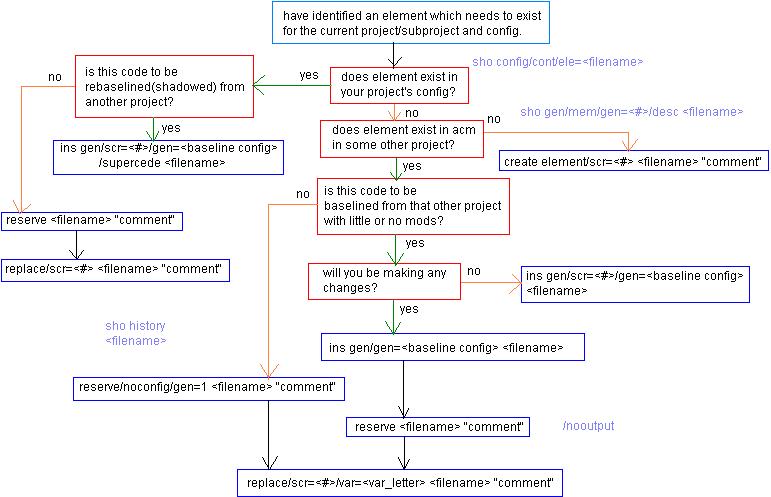
if a TDF exists in ANY previous GEN:
1. md95testacm
2. determine which GEN is closest to what you want for B717.
3. reserve/noconfig/GEN= the gen you want, of the file you want
4. fix it. get it working.
5. replace/scr=#/var=D
6. inspect it.

> By looking at a generation of a TDF one
> cannot identify whether the
> TDF is of 600,700,  MD90 or B717 configuration .

that's not how we check configs.

you want to check the latest files in the config?
  ACM> set def md95test

you want to know where a file came from?
  ACM> sho his

you want to know what config a file is in?
  ACM> sho gen/mem filename/desc/gen=

you want to insert unchanged TDFs into the new config?
  ACM> set config NEW_CONFIG
  ACM> ins/gen/gen=

contents of the config?
  ACM> sho c/c
back

