The PERFECT  Pinewood Performance

How does yours stack up?

This page allows Scouts to find out the fastest possible speed that a car could run the Pinewood Derby (according to the laws of physics).  They can then compare their car's performance to that perfect car.  Comparing the real car's time to the fastest possible time is called the car's "efficiency", and will always be between 0 and 100%.  Just like grades in school, the higher the number the better.

Hint:  You don't have to wait until the actual derby to estimate (and improve!) your car's efficiency.  Make a ramp at home, take its measurements (as described below), time your car down that ramp, and plug-in the results to the computer program on this page.


The Science Behind the
PERFECT
  Pinewood Performance

 

According to the laws of physics, the minimum time to race down a track is affected ONLY by the shape of the track.  Simply speaking, even perfect cars race faster down steeper tracks.  Oddly enough, things such as: weight, size, wheelbase, shape, balance, and so on do NOT affect the best possible race time.

You don't believe it?
Then, click here or on the mad scientist above to find out more about the physics upon which the perfect performance is based.


How to Use This Web Page
It's "easy as 1, 2, 3":

  1. Measure your track

  2. Type in the Measurements

  3. Tell the computer "Go"

Be sure to completely read and follow the more-detailed directions below.


1. Measure Your Track
Your track is either a simple ramp or a more complex shape.  Read the following and take the measurements according to which type of track you have. 


The Simplest Derby Track
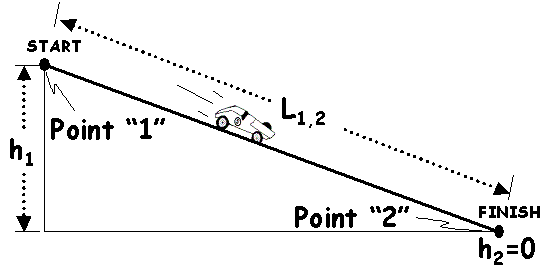
The most basic track is a constant slope from the starting gate to the finish line.  In this case, you need only measure the length of the track (labeled "L1,2" in the diagram) and the height of the track (the vertical difference between the start and finish line; labeled "h1" in the diagram).   Assuming the finish line is at ground-level, the vertical height of the finish line ("h2") is zero.


More Complex Derby Tracks

If your track is more complicated than a simple ramp, you can still compute the best-possible performance of a Derby car...you'll just need to take a few more measurements.  Refer to the diagram above as I explain:

Starting at the top of the track, pick out convenient points on the track (such as the joints between sections) and label them "1, 2, 3" and so on until you get to the finish line.   Don't go any higher than 9 points though...that's all the computer program can handle for now.

Measure the length of the track between each set of points.  For instance, the length of the 1st track segment (labeled "L1,2" above) is the  distance between points 1 and 2.  After you have recorded the length of each track section, measure the height of each point (1, 2, 3, ...) above the finish line.  If your finish line is on the floor, then the height of each point is simply the height above the ground.


2. Type In the Measurements

When you've measured your Pinewood Derby track, type those measurements into the yellow table below. 

Restrictions/Reminders for the Inputs:

  • You must measure/input at least 2 points (start & finish lines), and no more than 9.

  • Point "1" is the starting line and is the highest portion of the track.

  • Subsequent points are arranged in ascending order to the finish line (i.e., 1, 2, 3, 4 ...).

  • The 1st track segment must have a downward slope (otherwise, your car won't go anywhere anyway!).

  • Looking down from the starting line, no segments of the track can turn uphill (level is ok though).

  • Leave all un-used inputs set to a value of zero (i.e., points after the finish line).

L1,2= inches h1= inches
L2,3= inches h2= inches
L3,4= inches h3= inches
L4,5= inches h4= inches
L5,6= inches h5= inches
L6,7= inches h6= inches
L7,8= inches h7= inches
L8,9= inches h8= inches
h9= inches

If you've raced down this track before, enter the time (from start to finish) your real car achieved.

My REAL car's race time was seconds on this track.


3. Tell the Computer "Go"

Now, left-click on the "compute" button below.  The computer will then calculate the "best possible" performance for that track. If you provided a time for your real car, it will also compare your car's performance to "perfection".

NOTE:  DO NOT FILL-IN VALUES IN THE FIELDS BELOW.  Instead, they will be computed for you when you click the COMPUTE button.

Were there any errors? ...  

Total Race Track Length = inches

Perfect Car Your Car Difference
Race Time (seconds)
Speed at Finish Line (mph)
Average Speed (mph)
Efficiency (%) 100

More Information (coming soon)

What makes a car "imperfect"?

Interesting facts about the perfect and imperfect cars?

The Computer Program Implementation:


Developed by

Ahwatukee Village
Phoenix, AZ 85048 US

Click here to vist our home site.


Hosted by www.Geocities.ws

1