Database Administrator's Guide to Utilizing Oracle
Designer 2.x
ABSTRACT:
The new release of Designer provides many new features that will provide the
database administrator an easy way to manage multiple systems. Using actual experiences, I will cover how
one can capture existing database applications and manage multiple systems,
schemas and instances using Designer.
We will also discuss ways that the database administrator can use the
tool to discover areas were application data may currently be overlapped or
duplicated. We will discuss the how
output can be generated and maintained. And finally, we will discuss how all of
this can be best integrated with development efforts.
Overview
Since the advent of the Oracle database, the database administrator (DBA) has looked for more effective ways in which to manage to systems that the software developers create. Many database administrators choose to have complete control of all databases, including the development systems. Unfortunately, this normally just causes friction between the two groups. Many reasons can be pointed to, but probably two of the biggest are the database administrator's lack of understanding and involvement in the tools being used and also the lack of freedom that developers may need or want when developing applications. We will discuss the tool and ways it can be used by a database administrator. While discussing the many uses, we will also discuss ways that the database administrators can use the tool to maintain some control on the applications that will use their databases.
Introduction To The Tool
Oracle Designerä, as you know, is a CASE tool. It is actually one of the most complete CASE tools that exist. It can be used for modeling, designing, building and documenting almost any business, process or application. The diagramming tools are one of the most popular parts of Oracle Designerä, but the capabilities of the tool go far beyond the diagrammers. You can also access the entire CASE repository in several ways. The Repository Object Navigator (a.k.a. RON) provides a tree like view of all of the information in the repository, with detailed access via a property sheet. In release 2.x, the Design Editor also includes a customized navigator that is very similar to that in RON, along with its built-in capabilities for diagramming database and application objects. Repository reports provide an easy way to print out system/application documentation using pre-defined formats. These reports can be modified to meet your needs, since the .RDF files are provided. And finally, views and API calls are published to allow for customized interface with the CASE repository when the tool just does not meet your needs.
However, application developers are still the primary users of the tool. This is simply because the tool focuses on making their lives easier via the diagrammers and generators. The entire tool is built around the development process. The average DBA spends the majority of their time managing the system long after development is completed. So lets take a look at ways that the average DBA can utilize the efforts of application developers and development DBAs in their daily lives.
Designer Application Planning
· Parent Application
· Enterprise Application
· Sharing
· Splitting Data and Functional
Planning ahead is a key part of my methodology. My method includes the segmentation of the entire enterprise to allow for better control by the proper personnel. Oracle Designerä provides for the ability to link applications together under an umbrella or parent application. The parent application does not, and cannot contain any definitions in it beyond the properties for the application itself. This restriction however does prevent you from building a tree of applications more than one level deep.
Normally I suggest using the business or organization name or acronym to define the parent application. It is important that you start at this high a level, as you will come to understand. For our example, the parent application will be named "COMPANY".
From here, applications are split out based on the data that they contain. Consider your organization's information systems. There are three things that make up your world. The enterprise frameworks, the application data and the application code. This is how I recommend that your applications be divided also. It seems to be a logical method to follow since many organizations actually split their information systems departments into similar groupings. For our example, we will have two applications that will be maintained. Thus, we would end up with five applications to define information systems into. They include two for data (APP1_DATA, APP2_DATA), two for functions (APP1_FUNC, APP2_FUNC) and one for the enterprise, hardware and network definitions (ENTERPRISE).
In the past, this may not have worked out as a workable solution for Designer. With release 2.x, the sharing of elements between applications has become more stable and easier to utilize. But there are some other new features that make this even better for administrators and developers.
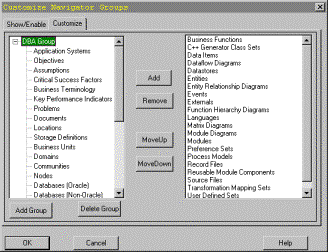
Furthermore, the RON has some additional features that allow you to focus only on the primary access elements that you care about. If you modify the navigator group definitions under the options menu item, you can control what is displayed. As a database administrator, you are most likely not interested in creating, modifying or even viewing Form and Report definitions, Business Process items, Entities or Business Functions. However, you are interested in Database, Table, View and Sequence definitions…along with many other database / server definitions.
Defining Your Enterprise
Business Units
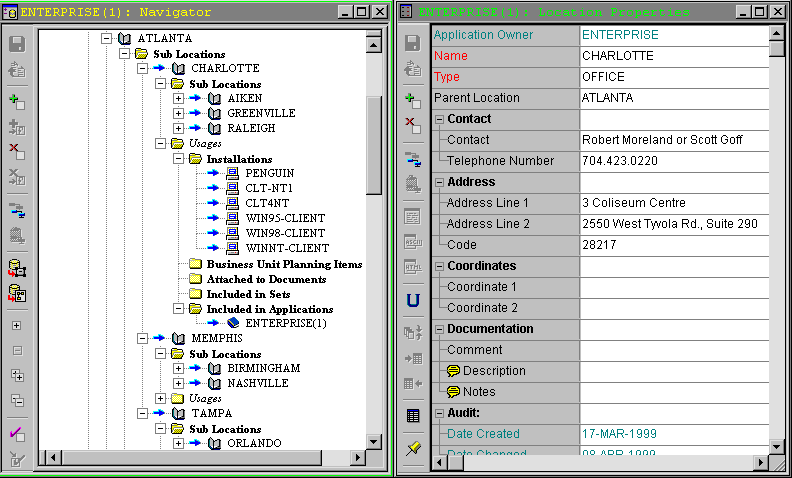
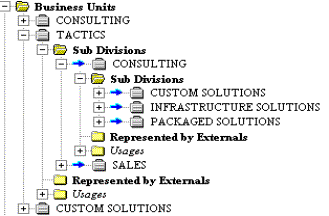
You will need to define the underlying enterprise architecture. Unfortunately, there is no diagramming tool available to document this information with. To do this you will need to use the Repository Object Navigator (RON). The first piece of this is the business units that make up the organization or company. This section can get as detailed as you need it, just don't make it more work than is necessary. And don't waste your time defining enough details for the development staff to use, only get the high-level specifics that make your job easier. Analysts and developers should continue to define business units and roles within each application as needed.
Locations
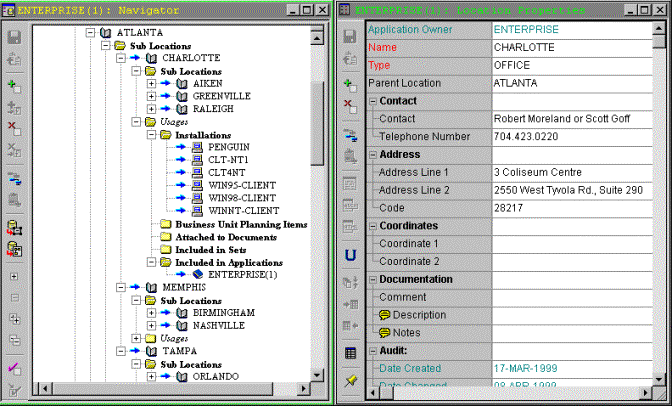
Second, you will want to define all of the locations in which you have systems to maintain. Since locations can be stored as a hierarchy, you have lots of flexibility here. This would allow you to define regional areas, their regional office buildings and even rooms within a building. Furthermore, the properties here allow you to define detailed information for contact purposes, such as the primary contact person, phone number, address and even mapping coordinates of the location (which could represent cubicle areas).
Network Communities
Third, you need to define the network communities. These are not virtual locations to specify were your hardware exist within your enterprise from a networking perspective. Rather, it is primarily used for showing the network protocols that information can travel on for particular databases or pieces of hardware. This can be useful if you have databases or hardware that communicate over multiple protocols (TCP, IPX, etc.) This information can be essential for SQL*NET setup and maintenance. This portion is not as flexible or robust as the location or business unit hierarchies.
Nodes
Forth, you need to define the actual system nodes within your enterprise. At a minimum you will want to define all of the servers that you manage. If required, you can define each individual client workstation, or you can do as I have done and define types of workstations that are managed and comment on the known quantity that exist. The advantage of defining individual workstations is that you can easily document how many systems the creation or modification of an application will affect. And if you have defined your locations down to the office work-area or network address, then you can map your node to these locations and utilize this information to plan installations, upgrades and/or maintenance. Locations also provide for an easy method of tracking network connections and usage's as well as physical database location.
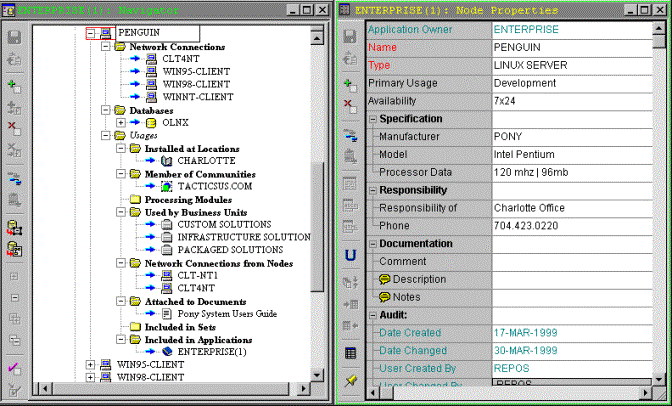
Database Objects
Finally, you can define your database itself. But as you know, a database definition is more than just the "SID" or an "Instance". Now you can define your all of the physical pieces that make up your database, including tablespaces, datafiles, rollback segments, control files, log files, replication groups, etc. This can be done in the Repository Object Navigator "RON" as everything else we have discussed. It can also be done within the Design Editor. The Design Editor is were you will want to be when you start generating your database objects, for this is the only place you can generate objects from.
The objects we have discussed to this point are considered "Database Administration Objects". To generate these objects, you will want to go to the Generate®Generate Database Administration Objects menu item and pick the objects that you need to create your database. You can be selective, depending on your needs at the time.
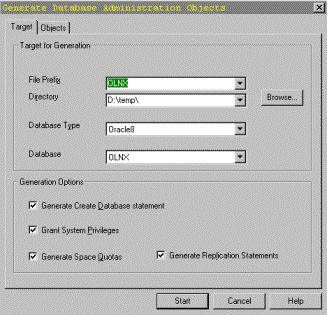
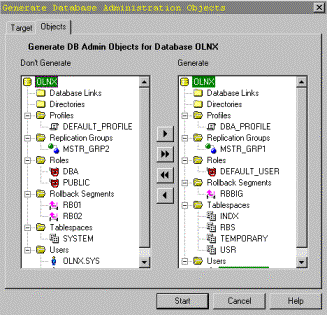
The generated output will create a set of DDL scripts to create to objects selected. A driving SQL statement will call each script, in the proper order. Note that the scripts are built based on the type of object being created, one of which is the database itself. The following example of a database creation was generated from the objects in the previous diagrams.
-- D:\temp\OLNX.db
--
-- Generated for Oracle 8 on Mon Apr 12 22:52:54 1999 by Server Generator 2.1.24.3.0
CREATE DATABASE OLNX
LOGFILE 'log1olnx.ora' SIZE 1024K,
'log2olnx.ora' SIZE 1024K
MAXLOGFILES 32
MAXLOGMEMBERS 2
DATAFILE '&PATH_FILE1' SIZE 4M,
'&PATH_FILE2' SIZE 4M
MAXDATAFILES 254
MAXINSTANCES 8
CHARACTER SET WE8ISO8859P1
Notice in the example that Designer allows you to be flexible in naming items. For example, the data files will be created via lexical variables that can be filled in at run-time. This can also be done for log files, tablespaces and other objects.
Interaction With Developers
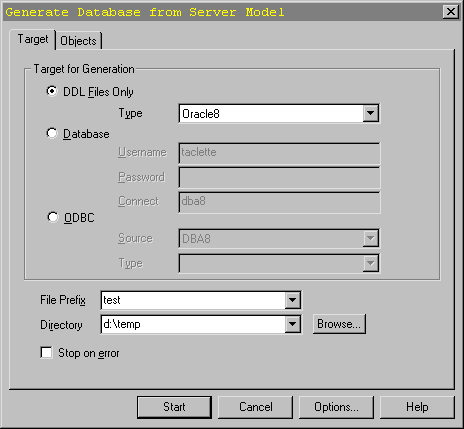
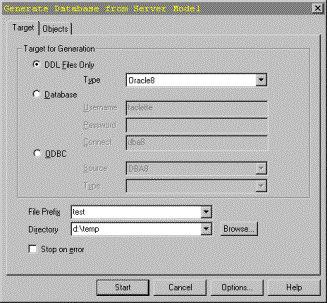
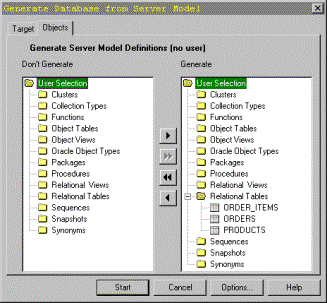
Now we enter the portion of the paper where we are ready to talk about interfacing with the analysts and developers of the application. So far we have defined our enterprise and its entire infrastructure, now we can start adding tables, views, PLSQL and other database objects. My approach follows the similar path of normal procedures. The analysts and developers design their application. However, they are no longer held up by the implementation details of sizing definitions, tablespace definitions, etc. Nor are they restricted to a single database instance definition. This is probably the best feature of Designer 2.x that has come about for the DBA. And to provide for some control of these implementations onto your systems, they must also submit them to you within Designer. This is due to the approach we have described so far. All database objects will be shared into your enterprise application and assigned to the appropriate node / database / tablespace / schema by you (the DBA). You will also have the ability to assign the appropriate user access and sizing information based on the database you assign it to. This capability allows for a development or test instance to be sized and contain completely different objects, as needed. It also puts the responsibility for DDL generation in your hands. This is very similar to how you generated database administration objects. From the Design editor, you will want to go to the Generate®Generate Database from Server Model menu item. Here you will pick the needed and the target for generation (i.e. Files, Database or ODBC).
Defining Database Defaults
Another feature you will want to consider is the creation of domains. Here you can work with your lead analyst to define common datatype definitions. For example, you may want to ensure that all generated keys are of the same type, i.e. NUMBER(15). The reason, as you may already know, is that you can then better calculate sizing requirements and improve performance. Other defaults include common storage definitions. Once again, you can then put some standardization to the shape of your tables. For example, your code tables can be made all the same size and thus fit more perfectly into a tablespace for codes and other look-up tables.
Searching For Overlaps
Overlaps, what is meant by this term? What I mean is that you will want to utilize the repository's ability to hold all of your database definitions to look for inconsistencies and duplicates. Where domains are not used, you may find instances in which similar columns across multiple tables are defined differently. For example, I have seen cases in which columns like phone_number are different sizes across applications. Furthermore, the duplicated data can be a even worse problem. But by using Designer, you will find the multiple address tables, employee or person tables and be able to work out better solutions. Thus, decreasing the cost of disk space to hold the data and processing time to keep it in synch.
Capturing Definitions For Existing Applications
Finally, if you have a new Designer instance or existing database applications, you will want to get their definitions into Designer. Release 2 has provide three ways in which to do this. First, you can capture definitions directly from an Oracle instance. Second, you can capture definitions from any database (even non-Oracle databases) via ODBC connection. And third, it is simple enough to even point the design capture utility at existing DDL scripts to capture definitions. The last two options do have the potential for problems when Designer finds non-standard SQL, type definitions and so on. But fortunately, it will also give you the chance to make corrections prior to attempting to commit the data. Thus, avoiding errors and a rollback.
Conclusions
All of the methods that I have mentioned above I have used in the past. It does require discipline and cooperation by both the DBA and Development staff. However, the commonality of the tool should provide for an easy way to interact. The tool's robustness also allows you to have one place in which to store all of your information. This is truly the key. I admit now that it may not fit your situation, but I do think the arguments for using Designer are well worth your time to investigate it further.
About The Author
Chester "CHET" West is a senior Oracle developer Chet has more than 12 years of computing experience; has been published several times; and has spoken at previous ODTUG, IOUG and SEOUC conferences and user groups.