Designer/2000ä for Project Managers
Chester R. West II
A CASE tool for Project Managers?
That’s right,
OracleÒ has
been gracious enough to provide some facilities and information within their
CASE tool to even help the project manager.
I have had the unique advantage of being a developer and analyst prior
to doing any project management. But
many of today’s project managers have
not worked their way up as developers first.
They then rely heavily on scheduling tools and have little idea how the
development tools of the project work or if their developers work. Too many project managers today also depend
heavily on their developers to tell them where they are in the project, thus
making the project manager just a well paid record keeper and in turn
fulfilling the CASE acronym ‘Computer Assisted Salary Enhancement’. Well, it is high time you take the step into
the world of the CASE tool and I will show you how to get started. Many of the things I try to show are not
only for productive reasons, but also political reasons. What I mean by this is that I will try to
show you ways to use the tool to show your upper management results throughout
the project life cycle. I will mention
up front that I try to follow the teachings of Richard Barker’s book
“Case*Method: Tasks and Deliverables”, which fit nicely with the OracleÒ CASE
tool Designer/2000ä.
What
to know about CASE setup.
Designer/2000ä, as
you probably already know, is the OracleÒ CASE tool for designing a
complete application system. And as a
project manager, you are usually the person that is assigning roles to the
different people on a project. Thus, a
project manager should have an idea of who has access to what within the
tool. So, you and your trusted CASE
administrator should work together to ensure that all personnel working on the
project have the proper rights within the CASE tool itself. If you do not have a CASE administrator,
assign one! And I would not make it
your DBA, nothing against DBAs, but they usually have more important stuff to
worry about. I recommend that this be
one team member that is assigned now even though most team members may not be
known until the Design and Build phases of your project. Your CASE
administrator will be responsible for creating ALL applications in the system
as well as managing the security rights for the system and the
applications. This person may also be
responsible for doing application and repository backups.
From a project
manager’s viewpoint, every team member should have their own user-id with
appropriate access to the application.
This will facilitate some of the tracking methods I will explain later.
I recommend that there be one userid that is the owner and administrator of the
CASE repository and applications (i.e. CASE_OWNER). This gives you one userid/password to keep track of for all
applications. The tool provides two
levels of access within itself. First,
the user must be granted rights to even use the tools. This is done in the repository
administration tool. But it does not
end there, each user must then be granted access to the different applications
being worked on within the tool. This
is done in the Repository Object Navigator, affectionately know as RON.
Now
that the tool is setup…
Now the fun
begins, it is time to create your application.
You may be wondering why to
create your application now, since you are only in the Strategy stage of your
project, rather than wait until Analysis.
First, your company probably paid a lot of money for the tool, so you
need to put it to work right away to show the upper management some early
results from the tool. Second,
Designer/2000ä
tool set is made for full life cycle development and you cannot have a good end
if you don not have a good beginning.
So, what can you
do at this point? First, it is very,
very important that you fill in the basic application properties. This will be
where your design, development and maintenance staff can look and see just what
this application is supposed to do. An
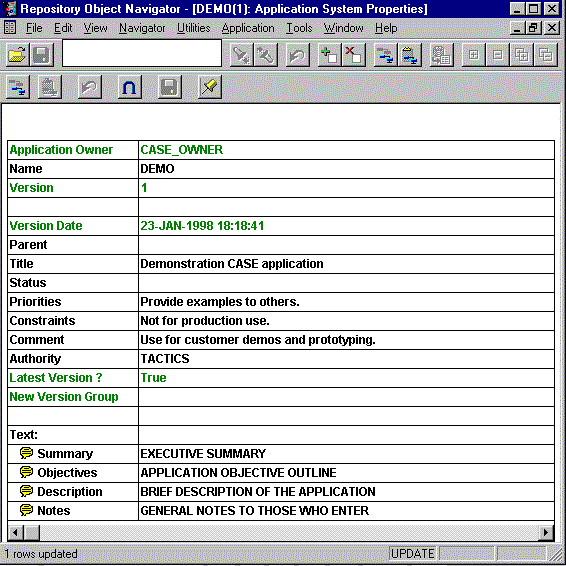
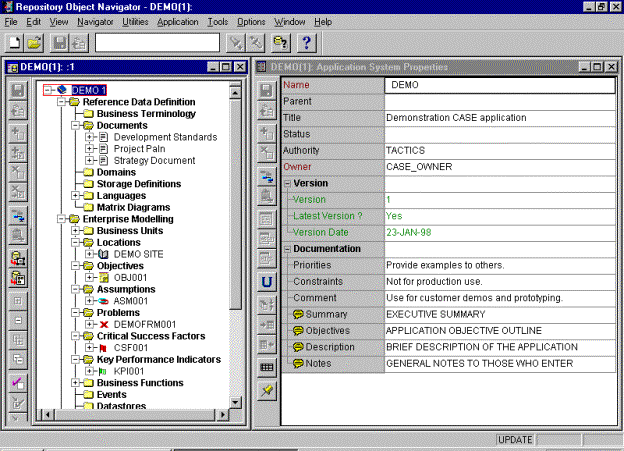
example of the application property sheet can be seen
in Figure 1. This can be gotten to via the Repository
Object Navigator by highlighting the application name at the top of the
navigator window. You will notice that
there is a place to put multi-line, very descriptive and short single-line
information about the application. The
multi-line text is identified by the bubble icon on the left. It has been my experience that if this
information is accurate, then any new project staff should be able to read
through this information and have a basic idea of what is to be
accomplished. This also gives some
initial scope to your project, even if scope has not been fully determined yet.
Figure 1
Lets review
what I put into the some of the
elements. The single line items are
important in that you have one sentence in which to give concise information. For example, in the constraints
property, you may want to note that complete installation of Oracle Financials
is necessary for the project to go over correctly. Also, your priorities property may state that the
application must be completed prior to a specified time. The authority property is where you
note who gave permission to do the project. Most of us cannot just start projects without some type of
corporate backing. The real comments
and text should be put into the Text: areas found at the bottom of the
property sheet. You may want to use the
first line of the text entry to be the title or description of the information
contained. For example, I decided to
put the executive summary into the Summary text item. Paraphrasing the definition given by Dr.
Paul Dorsey and Peter Koletzke in their book “Oracle Designer/2000 Handbook”,
this is a short summary of what the project and/or application is composed of
and should accomplish. Let me state now
that the ideas I have mentioned are only examples. The most important thing that project managers should understand
is that the tool is for documenting anything and everything in some way or
fashion in one place. There is no
‘Right’ way to document only a ‘Wrong’ way, and that is not doing it.
Documenting
anything and everything.
Now lets say that you are the type of project manager that wants to document
anything and everything or possibly, you are performing some type of government
work that requires at least two pages of documentation for every dollar spent
on the project, minimum one million pages.
You could find places to key all of that into the CASE repository, but
lets now understand something else about the tool, everything that you put into
the tool takes up space in your OracleÒ database. This may or may not be what you want. Also, most project managers like to build
quality documentation for presentation to executives, customers and users. The Designer/2000ä tool only stores plain
text which is not always the prettiest way to present documentation. This, will now lead us to another place in
the Navigator window. You will notice
that there is a category for documents.
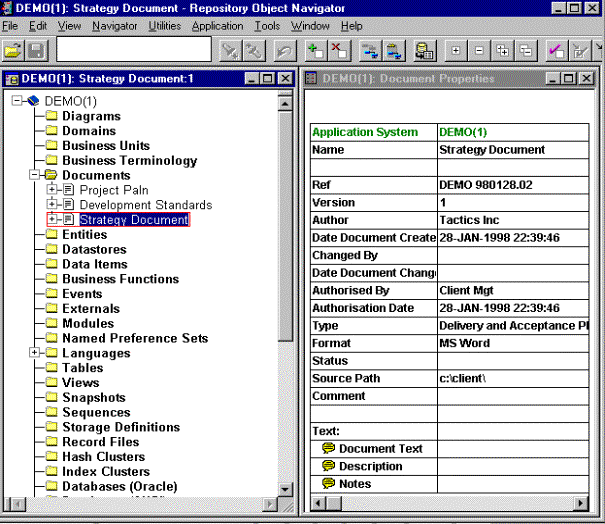
If you create an entry here, then you will be able to do one of two
things. One, create your document and
actually key the text into the Document Text property or you can simply
reference where the document is (Source Path) and what tool was used to
create it (Format). See Figure 2.
Figure 2
Another reason why I point out this section is because you can use the
information in her to your advantage.
Many of you may know that Oracle Forms, under Microsoft Windowä,
supports Object Linking and Embedding (OLE) 2.0 and Dynamic Data Exchange (DDE)
via the forms built-in packages OLE2 and DDE.
As a matter of fact, it comes with some example forms using OLE and
DDE. If you or one of your developers
were to apply a little ingenuity, you could build a form to display all the
documents that are defined in an application within the CASE repository. Then, based on the document you select, you
could have a button that runs some OLE or DDE code to open the document. If you want to get fancy, you could actually
set some standards like, what to put in
the Format item of the document property. I personally have used this to identify what application was used
to create the document. This allows
everyone to know the appropriate word processor, spreadsheet or project
management tool to use.
Other Ways to Document
Now
you may want to have some of your project’s high level issues, requirements,
etc. linked to something real so that you can show that you are truly being
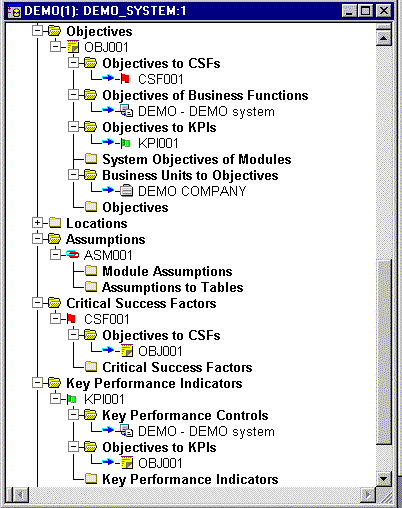
successful with the project and meeting your goals. This would require linking such things as Assumptions, Objectives,
and Key Performance Indicators to
such things as Modules, Functions and Business Units.
Figure 3
As
you can see in figure 3, your different project items can be directly linked to
other objects within the tool. For
instance, lets say that you created an objective stating that the system would
provide a report for use by managers for productivity measurements. Once a business function has been created to
fulfill this, you can link them together.
And once the module itself is created you can link them together
also. You may also have objectives that
are linked to business units. If you look in the property sheets of these
entries, you can put date requirements, measurements and comments. This will allow you to fully document your
requirements, assign responsibilities and ensure completion.
I
want to manage too!
Enough about
documenting. I think with a little bit
of looking around, you can see more places to document your application than
you can think of things to say about it.
What real project managers are interested in is, “How do I manage the
project and people on it.” Let’s break
this up a bit. Back during your
planning and scoping, you probably got a good idea of who would be on your
design, development and test teams. And
you most likely know their skill sets.
So it would be nice to be able to figure out how long it will take your
developers to complete the project. Well,
there is a way to find this out, but it requires a little work up front by
you. Look a little further down the
list on the Repository Object Navigator.
You will notice a section entitled Languages. This is not a place to indicate what
language to display (i.e. Spanish, English, etc.) If you open it up, you will see a list of programming
languages. The first thing you should
do here is define your project’s directory structure. Then, under each language that may be used in the production of
this application, document where the source and runtime directories will
be. This will help enforce some
standards and is something you can establish at the very beginning of the
project. If you expand one of the
language types you will see a section called module weighting factors. This is where you can identify some basic
time measurements for development. For
example, if you do not have any strong Oracle Reports developers on staff, you
may want to allow longer amounts of time for their development. The categories of the weighting factors are
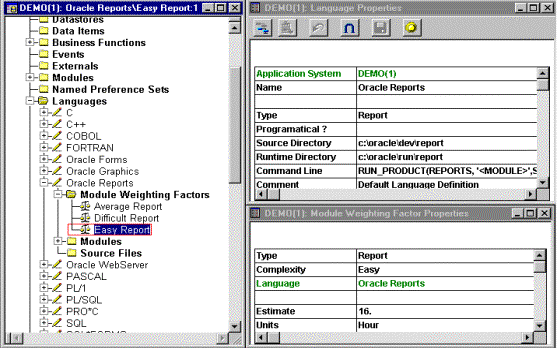
‘EASY’, ‘AVERAGE’ and ‘DIFFICULT’ . The
definition for weighting is as seen in Figure 4. Notice that I estimated that it would take up to 16 hours (i.e.
two working days) to complete even an easy report for my staff. Basically what I have done is accounted for
the lack of experience of the development team in building reports. But realistically, this could be seen as
more than two working days since it is very hard to get more than six actual
hours of work out of a person in an eight hour day.
Figure 4
Once
your analyst have actually created modules from the Business Functions, you can
then put this into use. So, know lets
see just what can be done at a module level within Designer/2000ä. First, a module is an object that defines a
type of coded functionality and will become your Forms, Reports, PL/SQL
etc. When a new module is created, some
of its properties can be filled in based on the language settings we discussed
earlier. A portion of a module’s
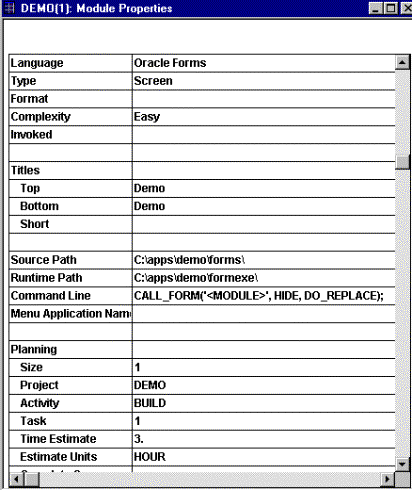
property sheet is shown in figure 5, and you can see where the language
settings carried over the path and command line information as well as the time
estimate information. This is not set
in stone, when working with your analyst, it may be determined that a module
will actually take more or less time based on post-generation coding or use of
designs from similar modules. So, once
one module is completed, the next one should go pretty quickly.
Figure 5
Once all your modules have been
created, you can develop a simple SQL*Plus report to calculate the number of
hours it will take to do each type of module as well as a totals, see table 1
for an example of the SQL that could be used.
I personally have used this to show management how many man hours it may
take to complete a project. Note that
the SQL is coded against the repository meta-model views. A complete listing and definition of the
views can be found in the on-line help.
|
SELECT SUBSTR(app.name,1,10) app, SUBSTR(lang.name,1,15) language,
mod.module_type, mod.complexity, COUNT(*), SUM(wgt.estimate) hours
FROM ci_modules mod, ci_application_systems app,
ci_languages lang, ci_weighting_factors wgt
WHERE app.name=UPPER('&application')
AND mod.application_system_owned_by = app.id
AND mod.completion_flag != 'Y'
AND wgt.language_reference = mod.language_reference
AND wgt.complexity = mod.complexity
AND mod.language_reference = lang.id
AND wgt.module_type = mod.module_type
GROUP BY app.name, lang.name, mod.module_type,
mod.complexity, wgt.id
ORDER BY app.name, lang.name, mod.module_type, wgt.id
|
Table 1
You
may have already noticed that the planning section of the module properties
also has some other places you can track your project with. First, there is the module size, now this could be a physical size estimate,
or possibly a logical size as compared to the other modules. This could also be the number of function
points you give the module if you do Function Point Analysis. Once again, I urge you to be creative in
using the tool to your advantage. You
will also want to note the project code for the module. This way, you can have your custom reports
only pull information for the project you specify. And what about the activity code you say? Well, this could require a little more
micro-management to get your team members to update this, or you may want to
track it yourself. Here, you could
identify where in the development cycle the module is (i.e. Design, Build,
Testing, etc.) I have used this to link
the module to a specific deliverable or task code on a project plan.
If
you scroll on down on the module property sheet, you will once again see the
text areas. The important ones for a
project manger to track and ensure their completion are the Module
Generation History and Release Notes. First, module generation will show how often the module has been
created into actual Form or Report modules.
I also use it to log my Post-Generation Changes. This is VERY important to the future success
of maintaining the module. Anything
that is done to the module after generation should be logged here so it can be
duplicated if the module is changed.
Second, the release notes is where you can have your developers log
specific items about the module for pre-production reading by users and other
developers. (i.e. ‘…this module can only be called from the Company screen and
never by the Menu. This release
corrects problems found in…’ )
Are
my employees working?
Now
lets say your developers have told you they have been working on the modules in
the CASE tool for the last few weeks, but all you have seen is lots of
Solitaire games running. Unfortunately,
it does happen. In the past, it has
been based on their word alone if they were doing anything. Now look under the Edit menu item and
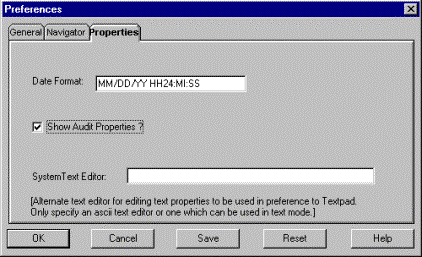
select Preferences, we can attempt to resolve some of this. In the preferences dialogue box, pick the
Properties tab item. Set the date
format to something that includes date and time: DD/MM/YY HH24:MI:SS. Then check the ‘Show Audit Properties’ check
box. See figure 6 for an example.
Figure 6
Now
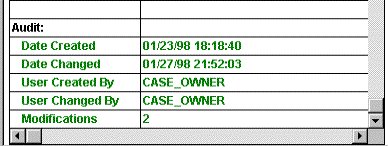
if you go to your different objects within the Repository Object Navigator and
scroll to the bottom of the property sheet, you will see the audit information which
includes creation and change dates and userids as well as a count on the number
of changes as seen in figure 7. This
makes it important then that each developer have their own userid rather than
one common userid. And once again, you
could write a custom report to print out this activity. You can also look in the Module Generation
History section, if you are at that stage, to see what modules have been
generated lately.
Figure 7
Can
I Log Errors and Track Problems?
Now
lets say that for some strange reason, there actually were some problems either
found by your developers, testers or worse the users. You would probably like to track those problems somehow. If you look back at figure 3, you will see
the item problems at the bottom of the tree list. Exactly what can you track, lets look. First, I normally give some type of unique identifier to my problem codes. Then I categorize them using the TYPE property.
For instance, you could log training, product availability, OracleÒ bugs
and development problems. You can link
them not only to a specific module, but also to business units. This could be where you would log what
business units the problem is affecting.
You can link it to other problems.
This could be useful in tracking what problems and fixes caused other
problems to occur.
You will notice in figure 8 that
you can actually identify the dates of
occurrence and resolution. What
I like best is the ability log what opportunities of enhancement fixing the
error will create. This may seem a bit
corny at first, but what it does is make the problem into a positive thing when
it is fixed. This will also help get
the boss off your back because he will think it was a good thing that it
happened. Also be aware that it is not
obvious from the navigator. You may
also want to create a custom report to list unresolved problems since there is
no such functionality available. And it
has been my experience that this can cause it to be very hard to ensure that
all problems are corrected if you have a very long log.
Figure 8
Built-in
Reports.
The
Designer/2000ä
tool also comes with a set many reports for your use. Most of these reports will be primarily for developers but will
also make good attachments for some of your delivered documents. Some of the commonly used reports by
developers are the definition reports for things such as entities, functions,
domains, modules and tables. There are
also several reports that appeal more to project managers since they print out
documentation items and even function point analysis. The most important thing to know about these reports is that the
original source code is provided so you can copy them for new reports or update
them directly to meet your needs (especially if you would like more information
or a different layout).
Check-Out
& Check-In.
Large projects
are sometimes too large for one team to work on and still meet time
requirements. So, you may decide to
farm out some of the work to other parts of the company or possibly even
contract it out. If these other
organizations cannot work onsite, then it may be more feasible to allow them to
use what is called check-out. This
allows you to identify a subset of the application that can be worked on at
another site, in another repository.
For example, remember earlier I discussed having developers that were weak
on their Oracle Reports experience. And
lets say you showed your time estimates to the upper management and they decide
to contract experienced reports people to cut down on the time required. So, if your table definitions are completed,
you can highlight the modules the contractors will be working on and under the File
menu select Check-Out. This will create
a CASE Loader data file in which they can load into their repository to work on
the modules. When completed they can
check the working copies back out of their repository and deliver the new CASE
Loader data file with the generated reports.
This way you can have an updated repository along with the completed
reports. The other thing you will
notice, is that objects that are checked out cannot be modified until they are
checked back in or unlocked. This is a
VERY primitive method of control, but it can work.
Conclusion.
If I have not
stressed it enough already, a project manager should not be scared of this
particular development tool. If
anything, they should want to jump right in and learn how they too can use it. Remember that Oracle’s CASE tool is not just
for data modeling and application generation, but also documentation. And if you ensure that documentation is
completed where necessary, then the tool fulfills its Rapid Application
Development role to it’s maximum potential.
Once you have mastered the basics of extending the tool via custom
reports, API utilities, etc. you will begin to come up with new and exciting
ways in which to expand the tool to meet your needs completely. A word of caution though, while you can never
have too much documentation about your application, there may not be enough
resources to document everything that Designer/2000 allows.
Appendix
A. – A Look into the future.
(Designer/2000 2.0)