Utilizing Discoverer and other tools for repository
reporting.
ABSTRACT: Oracle's CASE tool comes with a wealth of predefined reports and diagrammers. These can be used independently or together to extract information from the CASE repository for use as user and technical documentation. However, these reports are typically very generic and only provide static information (i.e. not real-time). Direct access to the repository in most cases is not feasible nor is it desired for non-technical personnel. I will demonstrate the use of other tools to provide customized and/or online reporting of repository information. We will cover the more complex tools like Discoverer and Oracle Reports as well as some of the simpler methods like Query-Builder, SQL*Navigator, etc. As an addendum, a simple review of the Designer data model will also occur.
Overview
As analyst, developers and even managers of projects that utilize the Oracle Designerä CASE tool, we realize that there are two distinct advantages to using the tool. First, a CASE tool allows for the storage and capture of information gathered during the analysis, design, build and maintenance phases of your software development lifecycle. Second, the best CASE tools also provide multiple types of output that include diagrams, code generators and printed reports.
However, while the data input is all up to your creativity, the output is normally restricted to the CASE tool's development staff. And we cannot expect any software company to provide every imaginable combination of reporting output. Furthermore, traditional reporting methods are not setup to provide on-line access to the information contained within the CASE tool by. Normally it is restricted to paper output or static PDF or HTML output. Many of your reporting needs also reflect the requirement to interact with the business user to ensure that you have designed what they need.
This paper will detail how to go about reporting on information contained within the repository. First we will see how find out how data can be retrieved. Next we will cover some of the complex methods in which reporting can be done to provide customized output as well as on-line access that prevents accidental user corruption of the data. Finally, we cover some simple solutions that can be easily used by development staff to find the information they may require. Note that while the examples provided are based on Oracle Designerä 2.1.2, the methodology should work for previous versions, except were noted.
The Oracle Designer Data Model
Oracle Designerä is an application like any application you may build. This said, you have the ability to develop some form of reporting strategy above and beyond what is provided. To do this, you will need to know where and how to get the data. If you are brave, you can attempt to build reports directly against the repository tables. But understanding how to get the data out can be a daunting task. The better choice is to utilize the repository views. Not only are the views easy to understand, but they are also well documented via HTML files (HTTP://ORACLE_HOME/Cdoc70/modelel_defsindexframe.htm) and Microsoft help files (ORACLE_HOME\Cdoc70\Help\Des2api.hlp). And best of all, your software provides an application that you can load into Designer to assist in development of your own reports.
Think of the views in the same way in which you see data elements within the Repository Object Navigator "RON". For example, the top level is your application. An application will contain one or more table definitions. And a table is made up of one or more columns. The views work in the same manor as seen in the following data diagram, which by the way was created in Designer using that application provided with the software, I previously mentioned.
It is normally best to drive your reports from the CI_APPLICATION_SYSTEMS view. The help provides excellent documentation on how to join these views together in your queries. One thing to note, the foreign key columns in the view will have "natural" names. For example, application to table link is as follows:
CI_APPLICATION_SYSTEMS.ID = CI_TABLE_DEFINITIONS.APPLICATION_SYSTEM_OWNED_BY
Oracle Reports ä
Oracle Reportsä will most likely be the easiest method in which to build and implement repository reports. This is due to several factors. First, the capability of your development staff to build an Oracle Reportä is likely to exist if you are utilizing Oracle Designerä. Second, it is fairly simple to add your custom reports to the repository reports interface. And third, since we can load a copy of the data model for Oracle Designerä, then reports can be generated.
There are several ways that you can approach this too. First, the repository reports that are delivered may meet most of your requirements, but require minor variations. Oracle has graciously provided us with the source code to these reports, just in case you are not 100% satisfied with the output (or occasional bug). If you look in your ORACLE_HOME\Repadm20\SRW\ directory, you will find the source code for all delivered reports. Before modifying one of these, it is best to make a backup copy first.
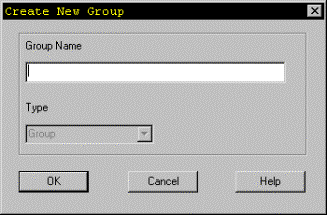
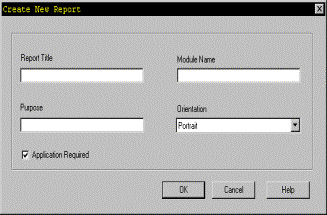
Second, as I mentioned, you can also build custom reports. You can either generate these from Designer or you can hand code them. A few things to consider…who is going to use the report and how are they going to execute them. You can of course implement them in a normal client-server fashion, or via the reports server. But now, with release 2.x of Designer, you can add them to the list of repository reports by using the ->Edit menu option's commands. You will have then have the opportunity to define your own report group, add the report and any necessary parameters (i.e. Application System, etc.)
However, Oracle Reportsä may not provide the flexibility that you require. And if you implement it through the repository reports manager, you then must allow for the user to log into the repository directly. This could be a hazard because it puts your repository data at risk.
Oracle Discoverer ä
So why Oracle Discoverer? We are always looking for ways in which to better involve the user community. One way is to provide easy to access to the repository data for review by the users. As mentioned, this can be done via Oracle Reportsä, but this will not give the user as much ability to perform adhoc reporting and viewing of data. Oracle Discoverer is very powerful at this. It was originally designed to provide an adhoc reporting tool for datawarehouse users. And has since become widely used for adhoc reporting against production systems. It does this by storing meta-data about your data. Thus, you can define what types of information the users can see how they can join pieces together and how it should be displayed. Discoverer also will not allow users to join tables or views where a join condition does not exist.
With version 3.0.8, you can also extract the definitions directly from the Oracle Designerä repository. This is very important to know, because your reporting will be done against the repository views. If you extract the information from the Designer repository, you will get title, prompt and relationship definitions. If you extract the information from the Oracle data dictionary, YOU will have to manually enter all title, prompt and relationship information. This can be long and tedious if you load the entire repository.
To load the definitions directly from Designer, you will need to follow the following steps:
1. Install the End User Layer from the drop down menu. This will require DBA privileges due to table creation. Also table space must be chosen at this time. (SQL scripts are viewable to see what/how this is created)
2. Once completed, you can define business areas, grant access, create workbooks, etc. to get the users started.
Some reports may become simple list reports in which the users can basically control the values output and possibly drill down to more detailed reports. Others could become complex matrix reports showing inter-relationships between repository objects (i.e. Function / Entity and Module / Table usages.)
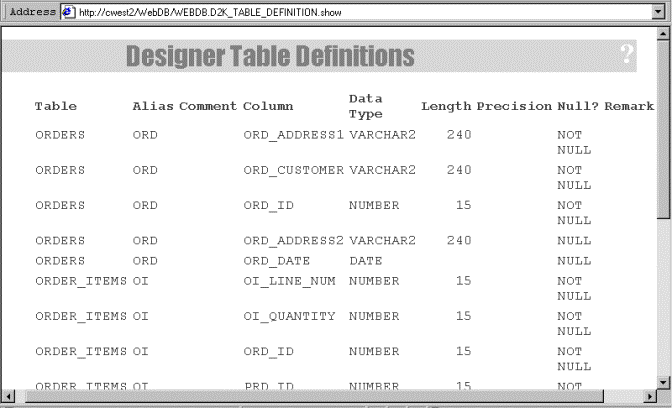
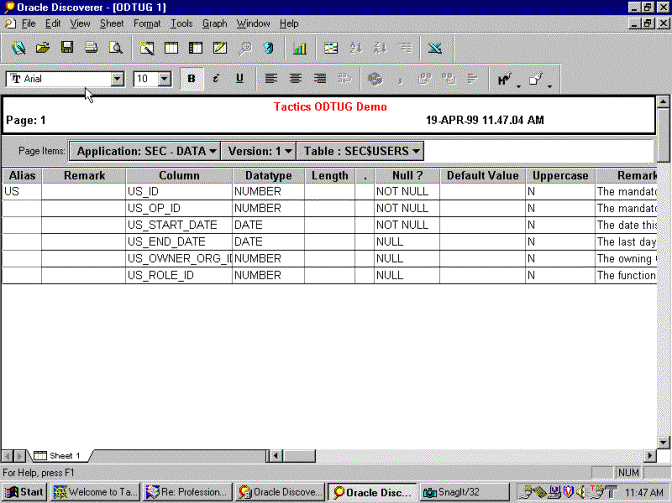
There are several things to consider about implementation of this. One, there will need to be some sort of user account made available to the system where your end-user-layer exists. This user will also need select access to the repository views that are defined within Discoverer. This can be accomplished via Discoverer since security and privileges are controlled with the Administrator Edition. This does help to solve the data corruption risks that we discussed earlier. Two, you should not consider this option if you do not already own Oracle Discoverer. Remember that we want something cheap too. It would also be possible to use similar tools like Cognos Impromtu or Business Objects in a similar fashion. Three, batch run reports can be considered if your reports are complex…thus reducing impact on developers. And finally, Oracle Discoverer does provide the additional advantage of exporting a report definition into Oracle Reports format.
Positives for Discoverer. Users can develop prototype workbooks from the repository while development is ongoing. This should reduce development time. These workbooks can be converted into Oracle ReportsÔ if need be. With version 3.3W Discoverer workbooks can be web enabled for viewing. This could assist with large development projects with large levels of developers and/or users. Reports can also be scheduled to run in batch mode.
Oracle WebDB ä
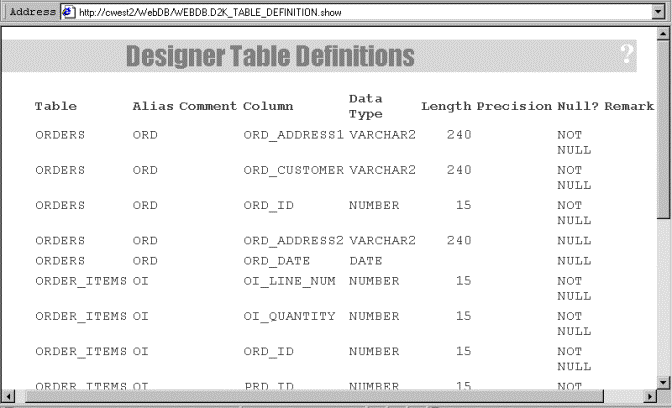
But what if you want we based reporting? Oracle Reportsä does have the reports server option, and the latest release of Oracle Discoverer will also be providing a web interface. But lets look at something cheap and easy. One of Oracle's newest and hottest development tools is Oracle WebDBä. It actually utilizes Oracle Application Server'sä SDK to dynamically build reports via PLSQL. It is rather easy to implement and provides a lite client interface using your own intranet.
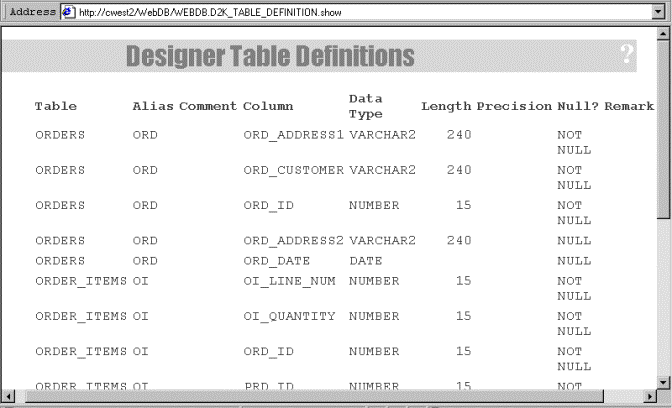
Development does require a different mentality though. It is best to consider all of the pieces, parts and utilities needed prior to building the reports. For example, you will want to define a list of values definition for selecting an application to report against. The interface is very intuitive and easy to use. Its only real disadvantages is the lack of adhoc query capabilities and output styles are limited to the capabilities of HTML (unless you are a WEB / OAS guru). The following report is similar in content to the sample report shown for Oracle Discovererä. It took me about an hour to learn how to use WebDB and build this report.
Quick And Easy Solutions
The solutions discussed so far are all complex to some degree. Either because of the setup requirements, the effort to develop or one of many other reasons. But sometimes you just need some quick lists of information. Now of course SQL*Plus is still available, but wouldn't that be a boring thing to talk about… So lets look a two tools that I have utilized that provide some point a click capability (Query Builder and SQL*Navigator).
Oracle Query Builder ä
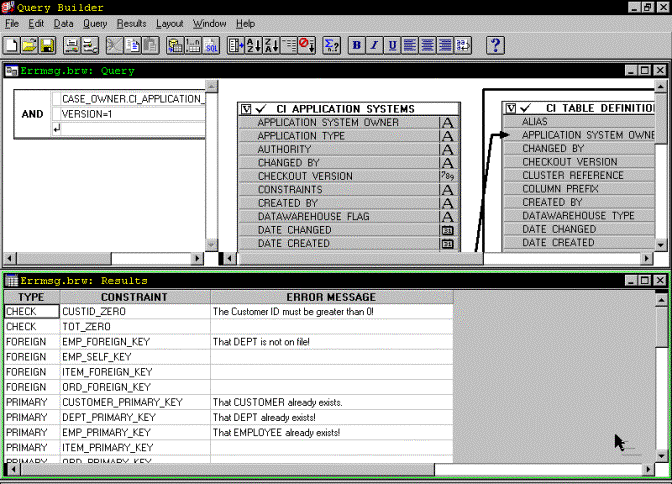
Oracle Query Builderä is now delivered as a part of Oracle Reportsä 3.0. I originally came across it thought back when Oracle Discoverer/2000 first came out (not Oracle Discoverer). You can easily point and click your way to defining reports of about the same quality you can code in SQL*Plus. Advantages? Well, you do get a graphical view of the query, it is easy to change the formatting, and it is easy to export the output to other tools like Excel or even just text.
Quest Software SQL*Navigator ä
SQL*Navigatorä is actually a VERY robust programmer's or DBA's editor, focusing on database objects. Since it has become a favorite of mine too, I found it easy to take advantage of its reporting capabilities. This allows me to easily look up information in the repository while also building code for my application. The advantage being able to report on repository information and perform other development activities within one tool can be a real advantage over starting multiple tools up.
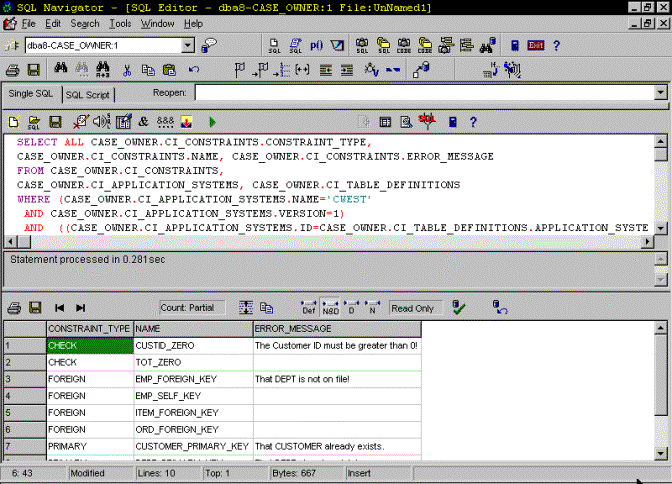
WARNING: Both Oracle Query Builderä and SQL*Navigatorä do allow for update capabilities. So be careful not to turn this on. You don't want to corrupt your repository or void your warranty.
Conclusions
I hope that you have gained some insight to the flexibility you do have with regards to reporting on information with the Oracle Designerä repository. You aren't stuck with the Oracle provided reports after all. And the reporting can be as simple as point and click lists of information to as complicated as well defined, properly secured adhoc reports. The important thing is to utilize the data you store in the Oracle Designerä repository for more than generation, but what CASE tools are meant for in the long run…documentation.
About The Authors
Chester "CHET" West is a senior Oracle developer Here he leads the development of Analysis and Design methodologies as the Product Development Manager. Chet has more than 12 years of computing experience; has been published several times; and has spoken at previous ODTUG, IOUG and SEOUC conferences and user groups.
John Love is an Oracle consultant Here he also performs
duties as a consulting group manager for the Carolina region and is a the
leader within Oracle for
Oracle
Reports development,
Oracle Discoverer training and
implementation, and datawarehouse development.
John has more than ## 9 years of computing experience.