Thanks for inspiration topics:
PhD Matthew Suderman, McGill University of Canada
Modified by:
VisualFX
University of
Algarve, Portugal

Initialize an empty
OpenGL window
First of all, in order to compile your OpenGL program, you need to include
some important libraries:
à OpenGL library
#include < GL/gl.h
>
à OpenGL library (supports mipmapping, matrix
manipulation, polygon tesselation, quadrics, NURBS and error handling)
#include
< GL/glu.h >
à OpenGL library ( I prefer to use this one in
MS VC++ and Linux )
(platform independent)
#include
< GL/glut.h >
à Old OpenGL library (don’t use this anymore.. is outdated)
#include
< GL/glaux.h>
In case you don’t have gl.h and glu.h, you can
use only glut.h.
Note that GL/glut.h refers to a file named glut.h
that can be found in the path /GL/ from your default include directory.
à Standard C header files
#include
< stdio.h >
#include
< stdlib.h >
à Support fot math functions like sin(), cos(),
definition of PI
#include
< math.h >
Create
some defines:
à Define the size of the window (400x400)
#define
WIDTH 400
#define
HEIGHT 400
à Define the colors that will be used for the background. Normally the RGBA mode is used in graphics. The values range between 0 and 1
(decimal
values). The alpha value determines how opaque the colour is. (0=completely
transparent .. 1=completely opaque).
This parameter lets us create transparent
surfaces like glass.
#define
RED 0
#define
GREEN 0
#define
BLUE 0
#define
ALPHA 1
à Define some key codes. For example lets define the ESC key.
#define KEY_ESC 27
à Define the functions prototypes so that you can implement them after the main function.(explained ahead)
void initOpenGL();
void init_scene();
void window_reshape(GLsizei width, GLsizei height);
void render_scene();
void window_display();
void window_key(unsigned char key, int x, int y);
Functions implementation for the program (generally present
in any OpenGL application):
à main
This is a function present in any C program. The main function is responsible for:
1. Initializing OpenGL, GLU and GLUT
2. Creating a window using GLUT
3. Initializing any data structures needed to draw the scene
4. Telling GLUT which functions will handle window events
5. Telling GLUT to start waiting for events
int main (int argc, char **argv)
{
The GLUT library can receive commands from the command line (**argv). For example, the –geometry option is used to specify the initial
size of the window.
This function initializes the GLUT library before calling any other GLUT function.
glutInit(&argc, argv);
Our display colours will
be specified as red, green and blue component magnitudes (GLUT_RGBA).
glutInitDisplayMode (GLUT_RGBA);
Define the initial
height and width of the window to
create.
glutInitWindowSize(WIDTH, HEIGHT);
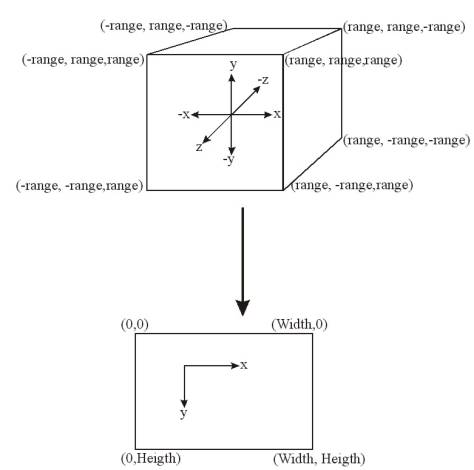
The initial position of the window will be on the top left corner of the screen.
glutInitWindowPosition(0,0);
Finally, create a
window, with a caption you like (ex: BlackWindow)
glutCreateWindow(“BlackWindow”);
initGL is a user-defined function that initializes OpenGL, and describes scene background and lighting as well as the material and textures of
scene objects.
initOpenGL();
init_scene
is also user-defined. In it you prepare scene objects for rendering.
init_scene();
window_display (user-defined) will be called each time the
window needs redrawing.
glutDisplayFunc(&window_display);
window_reshape (user-defined) will be called each time the
windows is resized.
glutReshapeFunc(&window_reshape);
window_key (user-defined) will be called whenever the
user presses a key. (the screen will be redrawn also.
glutKeyboardFunc(&window_key);
Finally, start the window event
loop, waiting for key presses, window resizing, and window redrawing.
glutMainLoop();
return 0;
}
initOpenGL
For now, the only initializing we do is to tell OpenGL that we want the background colour to have the RGBA value (RED, BLUE, GREEN,
ALPHA). The function glClearColor() tells OpenGL what colour to put in
the colour buffer when glClear() is called.
void initOpenGL()
{
glClearColor(RED, GREEN, BLUE, ALPHA); }
init_scene
At this point, our
program is simple enough that we don't need init_scene() to do anything.
void init_scene()
{
}
window_reshape
Because of the call in main() to glutReshapeFunc() with window_reshape as the parameter, GLUT will call
this function every time the window is resized.
Before a point reaches the screen,
it passes through three transformations: modelview, projection and viewport.
The modelview transformation transforms world coordinate points to view
reference coordinates; in other words, it determines the location of scene
objects in relationship to the location of the view reference point. The
projection transformation projects the resulting view reference coordinates
inside a view volume onto a plane. Then, finally the viewport transformation
transforms projected points to screen coordinates.
We may want to modify our viewport
and projection transformations in reponse to a window resize. For example, we
might want the entire scene to fit inside the window at all times. As a result,
we may need to change the size of the viewport based on the new size of the
window. However, if our changes to the viewport dimensions also changes the
viewport width-height ratio we will find that the width-height ratio of the
objects drawn in the viewport will also change accordingly. For example,
increasing just the width of the viewport will transform squares into
rectangles. To compensate, we will need to change the width-height ratio of the
projection view volume to match that of the viewport.
void window_reshape(GLsizei width, GLsizei height)
{
In this program, the
scene fills the entire window. A call to glViewport(x,y,h,w) defines the viewport to be the rectangle with width w
and height h whose bottom left corner is (x,y) in the window.
glViewport(0, 0, width, height);
However, we also want to
preserve the width-height ratio of the scene so we modify the projection matrix
to represent a new view volume. We are using a perspective projection. Unlike
the viewport transformation, before making any changes to the perspective and
modelview transformations, we must tell OpenGL which projection we are
modifying.
glMatrixMode(GL_PROJECTION);
We reset the projection
transformation by setting it to the identity matrix.
glLoadIdentity();
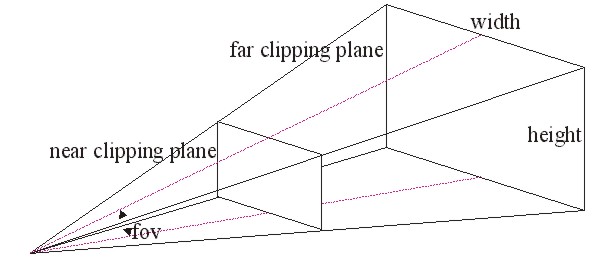
Then, we call gluPerspective(fovy, ratio, near, far) to give us a perspective projection in which the field of view angle is fovy in the x-z plane, the width-height ratio is ratio, the distance of the closest clipping plane to the center of projection (COP) is equal to near, and the distance of the far clipping plane to the COP is far.
gluPerspective(45, (GLdouble)width/(GLdouble)height, 1, 10);
Finally, we tell OpenGL that subsequent transformations will apply to the modelview transformation. In other words, unless otherwise specified, all transformations in this program apply to the modelview.
glMatrixMode(GL_MODELVIEW);}
window_display
Because of the call in main() to glutDisplayFunc() with window_display as the parameter, GLUT will call
this function every time the scene needs to be redrawn (e.g. after the
perspective projection transformation has been modified).
void window_display()
{
First we erase what has
been drawn on the screen by clearing the colour buffer. Remember that our call
to glClearColor() in initGL() earlier told OpenGL to clear to the colour
defined by (RED, GREEN, BLUE).
glClear(GL_COLOR_BUFFER_BIT);
Then we reset the
modelview transformation by setting it to the identity matrix. Theoretically,
it is possible and even efficient to reuse the modelview transformation used in
the previous call to window_display(). This may not, however,
be advisable because transformations require floating point operations that
have round-off errors. If the modelview matrix is reused then these errors may
compound causing the scene to be rendered incorrectly.
glLoadIdentity();
Next we define the
center of projection (COP), the view reference point (VRP) and the view up
vector (VUP) by calling gluLookAt(copx,
copy, copz, vrpx, vrpy, vrpz, vupx, vupy, vupz).
gluLookAt(0, 0, 5, 0, 0, 0, 0, 1, 0);
We render the scene. In
this case, render_scene() doesn’t do anything.
render_scene();
Finally, we tell OpenGL
that the scene just rendered can be drawn on the screen.
glFlush();
}
render_scene
For now we won’t rendar
any objects in our scene, so leave it empty.
void render_scene()
{
}
window_key
Because of the call in main() to glutKeyboardFunc() with window_key as the parameter, GLUT will call
this function every time a key is pressed. If the user presses the ESC key,
exit the program.
void window_key(unsigned char key, int x, int y)
{
switch (key) { case KEY_ESC: exit(1); break; default: printf ("Pressing %d doesn't do anything.\n", key);break;
} }