How to use
HideItX to keep your programs in the background:
Several of the
projects use programs with DOS-windows. These windows can get quite annoying if
you want to use your computer for something and don’t want DOS to fill up in
your taskbar. HideItX is a freeware-program designed to hide any window
(including DOS) in the background of your computer. It is quite useful if you
often use the computer to other things or if you don’t want your
kids/wife/friends/someone who also use the computer to mess with your
DC-programs.
However, DO
NOT USE THIS TO RUN THE PROGRAMS ON OTHER PEOPLES COMPUTERS WITHOUT ASKING
FIRST!
As an
example I here have proth_sieve, a sieving client that runs in a DOS-window.
Here I’ll show how to make it start up invisibly at boot.
Get HideItX:
Very
straightforward. Go here to
download the program and then unzip it.
Make a shortcut:
Now create
a new shortcut to HideItX.exe. For now, it doesn’t matter where you place it.
Edit the
shortcut:
Right-click
on the shortcut and choose “Properties”.
Choose the
second x
In the box
“Destination”, add “-starthide C:\WhereProth_sieveIs\proth_sieve.exe” to the
end of the destination
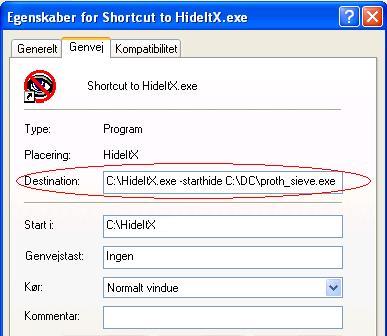
How it looks in my (Danish) Windows XP.
Make HideItX
start at boot:
Simply move
the shortcut to the startup-folder in your Start-menu to make HideItX start
proth_sieve at boot.
That’s all.
Now proth_sieve should start invisibly with Windows. You can always press
ctrl+alt+delete to check if proth_sieve.exe is running.