STEP BY STEP
SEND YOUR QUESTIONS TO [email protected].
HOME
Suppose you want
to find the word
Springs
On the following
page.
Click (LEFT button)on Edit on the Menu Bar using the mouse (where
there is File, Edit, Favorites, Tools, Help)
ALTERNATELY: Or
you can hold “Alt” key and then press “E” key.
There will a drop down menu as seen bellow:
You can “Select All Cntrl+A” OR “Find on This page Cntl+F”
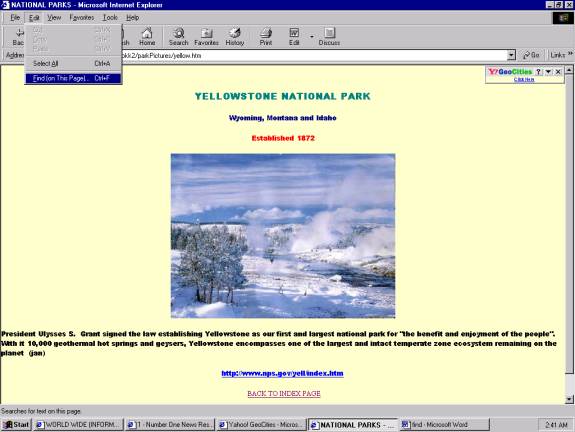
Click (RIGHT) on “Find on This page Cntl+F” on the Menu Bar
using the mouse.
ALTERNATELY: Or
you can hold “Alt” key and then press “F” key.
There will a Block will pop us on top of the page,
as seen bellow
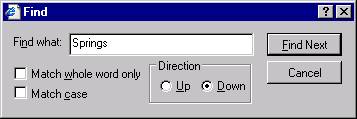
Type Springs in the white space after “Find
what” and click (RIGHT) on “Find Next”. Springs will be highlighted as show in
the screenshot below. Keep on clicking
until it is end of the page. If you
want to reverse the direction click on “Up” radio button
and then you can search from bottom to top.
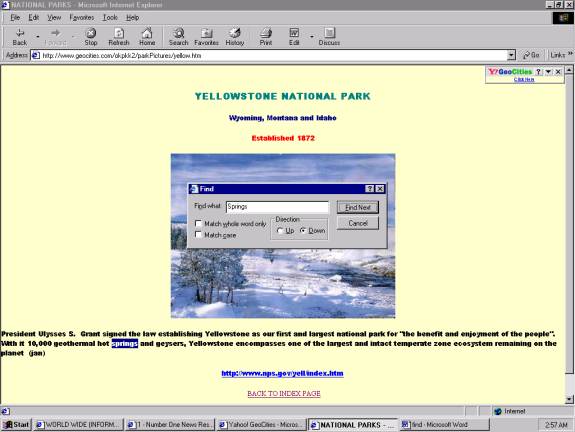
ALTERNATELY: Or
you can use “Alt” key and then press “n” key, combinations
of Tab key, Enter and Left arrow key and Right arrow key to get the same result.
SEND YOUR QUESTIONS TO [email protected].
HOME