Comments and feedback welcome to Webmaster


Today computers are widely used within business for a variety of tasks. The following are examples.

  • Preparing documents (letters, reports, etc) using a word processing package.

  • Creating budgets and other financial documents using spreadsheet facilities',

  • Storing information on a variety of topics, e.g. details of customer accounts, in a database;

  • Drawing pictures and diagrams using a drawing package;

  • Producing leaflets, flyers and reports, etc, using a desk-top publishing package.

Any computer system operating within an office consists of two main components:

  1. Hardware. This is the physical components of the computer such as the monitor, printer, keyboard, etc.

  2. Software. These are the programs that allow us to complete meaningful tasks with the computer. For example ClarisWorks is an integrated software package that allows us to word process, desk-top publish, create databases and spreadsheets. Any computer program is software.

These applications use widely available general (or generic) software. It is also possible to buy software that is produced for a particular type of business, e.g. a small newsagent, or activity, e.g. computer aided design. Large businesses often have software written specially for them.

Types of personal computer

Personal computers come in a range of sizes. Some examples are:

  • Desktop: Usually in four parts - the base unit(hard disc), monitor, mouse and keyboard.

  • Laptop: A single unit about the size of a briefcase.

  • Notebook: Self-contained computers the size of an A4 pad.


1.  Desk-top Personal Computer

2.  Tower Personal Computer

3.  Lap-top computer.

The desk-top personal computer is the most common computer used in the electronic office. A tower P.C. is most often found in the home. There is normally very little difference in the processing power of the desk-top and tower computers.

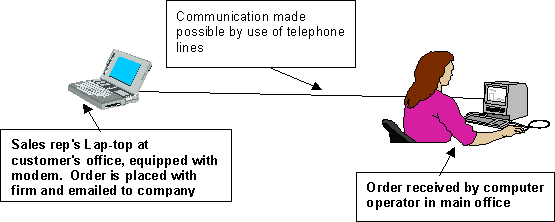
The lap-top computer is now becoming more popular due to its portable nature. Lap-tops are used mainly by people on the move such as sales representatives. Orders can be directly placed with the firm by using a modem and the telephone network.
 

The use of a computer is a continual cycle of input, process and output. The input requires work by the computer user. The process and output are very much completed by the computer and the devices connected to them such as the printer or monitor (screen).

In order to get information into a computer we need to use input devices. In the office environment there are two main methods of input used:

  • Keyboard

  • Mouse

However with developments in information technology being so rapid there are other methods of input being used also:

  • Scanner for pictures, documents etc.

  • Digital Cameras. Used especially by estate agents in producing pictures of houses for sale.


Data that is input must therefore be processed. This is the task of the computer's hard disk which acts upon instructions from the user. Computers do not think for themselves, they merely process information.

Once data is processed it must be output. This can be done in a variety of methods. However the vast majority of cases computer output is via a printer or monitor.

One of the main tasks completed by a computer today is one of communication. Computers can communicate indirectly by printing letters and other documents for other computer users to act upon.


Computers can also communicate directly with each other. In order for this to happen computers have to be connected together using cables. Computers that are connected together form a network. If the computers connected together are all within the same room, or even the same building this is known as a local area network, or LAN. If the computers are connected to a main computer system at their head office in another part of the country, continent or even world the network is known as a wide area network, or WAN.


Local area networks use dedicated cables to communicate with each other. Wide area networks, on the other hand use the telephone network to communicate. In order for signals to be able to be transferred along the telephone lines a modem must be used. A modem converts signals output by the computer to a form that can be transported via the telephone network. Once the signals reach their destination the modem then converts the signals back into a form understood by the computer. The modem acts as an interpreter.

What is a modem?

A modem is a piece of hardware which converts a computer's digital signals to analogue signals which can then be transported along the telephone network and vice versa.

What is the purpose of a modem?

A modem allows computers to communicate with each other by transferring data along the telephone network from computer to computer. An example of this is the use of electronic mail or using the Internet.


Input, Output and Storage of Data.

Hardware

Common Methods of Computer Input in the Office

Input Device

Uses

Keyboard

  1. Keying in text in the preparation of letters and memoranda (memos).
  2. Keying in records in a database.

Mouse

  1. Clicking on icons to open a program or select options within a program. (An icon is a small picture that represents a computer program or option within a word processing program)
  2. Pulling down menus and selecting options within a menu within a program.
  3. Drawing frames and arrows when desk-top publishing (DTP).
  4. Re-sizing graphics in desk-top publishing.
  5. Highlighting text to change its format. (This may be making text bigger, smaller, bold, etc.)

Scanner

  1. Acquiring images for use in the production of posters, brochures, etc. (Images may include pictures, cartoon drawings, photographs, logos, etc.
  2. Scanners can, if equipped with specialist software, can read pages of typed text and reproduce those typed pages as a word processed document. Those documents can be altered, reproduced or stored according to the requirements of the company. The name of the specialised software that can recognise characters on a printed page if Optical Character Readers (O.C.R.)

Digital Camera

A digital camera is used to take photographs for use in producing literature for the firm. An example of which is an estate agents who take photographs of the houses for sale. These photographs are then transferred on to the documents for publication.

(The difference between a digital camera and an ordinary camera is that a camera develops on to a film. A digital camera processes images as a computer file that can be read by computer.)

Voice Input/Microphone

This is a major and current development in I.T. Instead of keying in text, which is a time-consuming process the computer can recognise  spoken words and can produce these in a word processing package.

There are obviously some difficulties as people have different accents. The use of homophones e.g. their/there/they're or where/were/we're/wear also poses difficulties. However the use of this software is set to become extensive in the near future.


Common Methods of Computer Output in the Office

Output Device

Uses

Printer

The most common output device is the printer. The printer that is most commonly used is the laser printer. It is also the most expensive. A colour ink-jet printer is used to produce coloured photographs and coloured text. A dot-matrix printer is used to produce draft copies. However the dot-matrix is noisy and produces low quality output. As a result the dot-matrix is really in use in the office.

Monitor

The monitor is the screen and is used so that the user can see what he/she is producing. The monitor is also called the VDU, or Visual Display Unit.


Software

The following software packages are commonly used in the office to complete tasks such as:

  • Preparing documents;
  • Creating budgets and other financial documents;
  • Storing information on a variety of topics, e.g. details of customer accounts;
  • Drawing pictures and diagrams;
  • Producing leaflets, flyers and reports, etc.;


Software Packages Commonly Used In the Office


Word Processing


e.g. ClarisWorks word processing;  Microsoft Word. 

Word processing is the most commonly used software package. It is used in the preparation for most communications such as letters or memos to either customers (external communication) or staff (internal communication).
The Word processor has many advantages over a conventional typewriter. Theses include:
1. Letters can be stored and reproduced when necessary.
2. Multiple copies of the same letter can be produced with the customer's details on each letter.
3. Computers can produced coloured documents, using different fonts and styles.
4. If a mistake is made in the letter, it can be easily corrected without having to reproduce the entire document.

A normal word processor contains the following features which allows the user to produce high quality communications easily and efficiently.

  • The use of different fonts, (type faces or writing styles).

  • The ability to reduce or enlarge the text.

  • Centre text and/or justify the margins

  • The ability to change the spacing between the lines of text.

  • Use of coloured text.

Most word processing packages now allow users to import graphics from a graphics package. This may include the logo of the firm.
WP packages allow mail merges to be made. This allows the production of a standard letter to be sent to each customer. Each letter prints the name and address of the customer. This saves much time.
A search and replace facility allows one word to be replaced with another anywhere it appears in a given document. The document does not have to be searched by the user. Again this saves time.


Graphics Package
e.g. ClarisWorks Paint/Draw


Microsoft Paint The graphics package is used in the office environment to produce logos draw diagrams etc.

Graphics software can be used to:

  • Draw lines.

  • Draw shapes.

Create text.

Lines can be drawn in a variety of widths and can be continuous or broken in various ways (e.g. dashes, dots). They can be free-hand, curved or straight. Shapes can be rectangular, circular, oval or free-hand. They can be empty or filled with a pattern. A wide variety of fonts (typefaces) can be used in a large range of sizes. These can be presented in a number of styles, e.g. underlined, italic, shaded. Graphics software also gives you the chance to use colour in different ways.

One of the most important advantages of graphics software is the ability to change the shape of

  • A block of text.

  • A graphic object.

Usually, the text produced by a computer will fit between two parallel lines. With a graphics package, it is possible to alter these lines so that they move either closer or wider apart. They do not even have to be straight but could form a wave or circular shape.

Parts of the drawing can also be changed in a number of ways.

Re-sized, changing the size,,
Re-shaped, changing the shape by altering the height by a greater or smaller amount than the length.,
Rotated so that it is turned over partly or completely.,
Cropped by deleting part of the drawing.

Desk-Top Publishing e.g. ClarisWorks Draw; Microsoft Publisher 

Desk-Top Publishing is the combination of text and graphics used in the production of posters, brochures, etc. 

Common DTP software allows the user to:
Produce newsletters with columns, cartoons, digital pictures, scanned images
Put frames around text in the production of application forms
Move/re-size text boxes and graphics around the page to meet the user's needs.

Spreadsheets

A spreadsheet can be likened to a large account book which is used to store figures such as sales figures, examination results of pupils or points in a league table.
As well as storing figures spreadsheets can also calculate totals, averages and put in rank order.
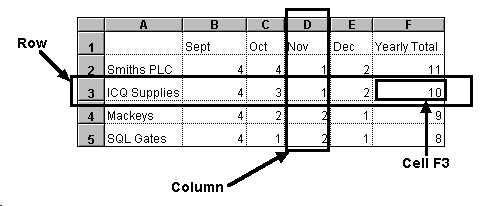
A spreadsheet consists of rows, columns and cells. The cells are identified by a unique address, e.g. E4 or C2.


To enter data into a cell move the mouse so that the pointer is over the required cell and click once on the mouse. The cell will then be highlighted.

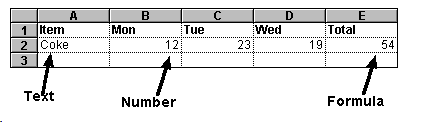
Cells can store three types of data:

Numbers
Text
Formulae

Numbers: Figures 0 to 9. Numbers stored can also include dates, times, prices, percentages, temperatures, etc.

Text: This is usually row or column headings. For example in a football league table the text would include the names of teams, games played, won, drawn, etc.

Formulae: Formula(e) is the results of calculations carried out on numbers:

The number of cans of coke sold on Mon, Tue and Wed was calculated by using the following formula: =sum(B2+C2+D2)


Why Use Spreadsheets?

Spreadsheets are used by:

accountants to calculate the incomes, taxes,etc.
teachers to calculate class averages and rank orders.
people who are in charge of publishing league tables.

Spreadsheets can also help people predict ‘what if’ situations. For example:

In a league table ‘what if’ the team in fourth place won three more matches?
In a class ‘what if’ John who came sixth overall had scored ten percent more in his mathematics?


Databases
What is a database?
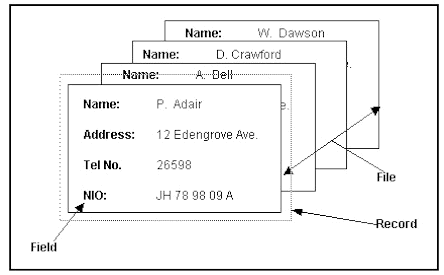
A database is an organised collection of information or data. A database consists of fields, records and files.


Why should an office use a database to store records?
Information stored can be searched much more efficiently.
If passwords are used and if regular back-ups of the information are made then the information is more secure than manual records.
Before records were stored on computer they were stored on paper in large filing cabinets. Filing cabinets are still used, even in the most highly computerised offices. However the number of filing cabinets used is decreasing. This has resulted in offices becoming less cluttered making the working environment more pleasant.

Disadvantages to storing records on database
If there is a power-cut then access to records is denied.
Computers can crash. If staff are not fully competant users then data can be lost.
Infromation stored on computer must be accurate, up-to-date and used only for the purpose with which it is intended, according to the Data Protection Act 1984.

What are databases in an office can be used for?
Databases can be and are used for a variety of tasks in an office where records need to be kept.
For example:
Staff details can be kept on database, storing details such as name, address, tel no, National Insurance Number, employment history, etc.
Customer records can be kept. Details stored might include contact details of all customers that have traded with a company. This is useful when mailing lists have to be generated informing customers of special offers or times when the premises will be closed.

Questions


1. What is the difference between Hardware and Software?

2. Give two examples of hardware and two examples of software commonly found in an electronic office.

3. For each of the pieces of hardware and software mentioned above state the operations they perform in the electronic office.

4. Why are lap-top computers now widely used in business?

5. Copy and complete the following table, stating whether they are used for input, output, processing or backing storage.

Hardware Device

Input/Output/Process or backing storage

Laser Printer


Mouse


Keyboard


Hard Disk


CD-ROM


Monitor


VDU


Floppy Disk


6. A secretary is responsible for word processing letters and memos for both internal and external communication. What method of backing storage is used and why?


7. A company has databases and spreadsheets containing details of staffing and customer accounts. Every week they make a back-up of their records. What method of backing storage do they use and why?


8. Many computers have now the ability to store information on compact disks. What two main benefits do CDs bring to the electronic office?


9. Name three tasks software are required to perform in the electronic office.


10. What is desk-top publishing and how does it differ from word processing?


Hosted by www.Geocities.ws

1