

REMEMBER THAT WORKING WITH THE [ CGI, SSI, cold fusion, perl , asp ] WILL needs, a UNIX EVNVORONMENT.
This is the top of this page, here you will find variety of information the subjects are basically about programming languages.
This page contains:
1.THERE ARE MANY SCHOOLS OFFERING SERVICES "WHICH ONE IS THE ONE?"
2.how ssi must be handled.
3.vi and UNIX editor managements.
4.selective links to free share ware and sites for web designing.
4.5.HOW TO USE .....CSS....IN THE HTML BODY BUILT + how to add meta tags. nicely
THE INTRODUCTION.......
SOME SCHOOLS YOU MUST CHECK THEM OUT SO YOU BE ABLE TO FIGURE OUT FOR YOUR OWN GOOD WHAT IS IMPORTANT TO BE DONE.
all the wonderful dreams you will see by clicking here, are a trap for your own harm, think carefully and do the right thing, use your brain and consider learning by your own effort first ......
www.chubbinstitute.com
this is need to be more looked at it.
LOGGING ON TO A PERL LANGUAGE REFERENCE WILL DEFINITELY BE A NICE IDEA. LEARN IT AND USE IT.
LOOKING AT THE BOTTOM OF THIS PAGE, SEE ALL FREE GIVEN SOFTWARE LINKS...
1.CHECK UNIX AND SSI IN THIS DOCUMENT"APACHI REQUIRED".
2.CHECK PERL IN PERL DOCUMENTS
3.CHECK CGI LINKS IN CGI DEOCUMENTS"UNIX KNOWLEDGE TO HANDLE MANY CGI DIRECTORY NEEDED, SEVER SIDE INCLUDES. AND COMMON GATEWAY INTERFACE ARE SOMETHING NEEDS TO BE KNOWN........"
You will use server side includes="ssi"
as you like to have most of the page in a static mode, so you ease your job a quite bit, you don't need to serve the whole page. ALL THE WORK REQUIRE YOU INSTAL APACHI 1.2 OR LATER.

What are SSI?
SSI (Server Side Includes) are directives that are placed in HTML pages, and evaluated on the server while the pages are being served. They let you add dynamically generated content to an existing HTML page, without having to serve the entire page via a CGI program, or other dynamic technology.
The decision of when to use SSI, and when to have your page entirely generated by some program, is usually a matter of how much of the page is static, and how much needs to be recalculated every time the page is served. SSI is a great way to add small pieces of information, such as the current time. But if a majority of your page is being generated at the time that it is served, you need to look for some other solution.
Configuring your server to permit SSI
To permit SSI on your server, you must have the following directive either in your httpd.conf file, or in a .htaccess file:
Options +Includes
This tells Apache that you want to permit files to be parsed for SSI directives.
Not just any file is parsed for SSI directives. You have to tell Apache which files should be parsed. There are two ways to do this. You can tell Apache to parse any file with a particular file extension, such as .shtml, with the following directives:
AddType text/html .shtml
AddHandler server-parsed .shtml
One disadvantage to this approach is that if you wanted to add SSI directives to an existing page, you would have to change the name of that page, and all links to that page, in order to give it a .shtml extension, so that those directives would be executed.
The other method is to use the XBitHack directive:
XBitHack on
XBitHack tells Apache to parse files for SSI directives if they have the execute bit set. So, to add SSI directives to an existing page, rather than having to change the file name, you would just need to make the file executable using chmod.
chmod +x pagename.html
A brief comment about what not to do. You'll occasionally see people recommending that you just tell Apache to parse all .html files for SSI, so that you don't have to mess with .shtml file names. These folks have perhaps not heard about XBitHack. The thing to keep in mind is that, by doing this, you're requiring that Apache read through every single file that it sends out to clients, even if they don't contain any SSI directives. This can slow things down quite a bit, and is not a good idea.
Of course, on Windows, there is no such thing as an execute bit to set, so that limits your options a little.
In its default configuration, Apache does not send the last modified date or content length HTTP headers on SSI pages, because these values are difficult to calculate for dynamic content. This can prevent your document from being cached, and result in slower perceived client performance. There are two ways to solve this:
Use the XBitHack Full configuration. This tells Apache to determine the last modified date by looking only at the date of the originally requested file, ignoring the modification date of any included files.
Use the directives provided by mod_expires to set an explicit expiration time on your files, thereby letting browsers and proxies know that it is acceptable to cache them.
COMBINING THE CGI AND THE SSI ...HOW..
Executing commands
I expect that I'll have an article some time in the coming months about using SSI with small CGI programs. For now, here's something else that you can do with the exec element. You can actually have SSI execute a command using the shell (/bin/sh, to be precise - or the DOS shell, if you're on Win32). The following, for example, will give you a directory listing.
<pre>
<!--#exec cmd="ls" -->
</pre>
or, on Windows
<pre>
<!--#exec cmd="dir" -->
</pre>
You might notice some strange formatting with this directive on Windows, because the output from dir contains the string "<dir>'' in it, which confuses browsers.
Note that this feature is exceedingly dangerous, as it will execute whatever code happens to be embedded in the exec tag. If you have any situation where users can edit content on your web pages, such as with a ``guestbook'', for example, make sure that you have this feature disabled. You can allow SSI, but not the exec feature, with the Includes NO EXEC argument to the Options directive.
Advanced SSI techniques
In addition to spitting out content, Apache SSI gives you the option of setting variables, and using those variables in comparisons and conditionals.
Caveat
Most of the features discussed in this article are only available to you if you are running Apache 1.2 or later. Of course, if you are not running Apache 1.2 or later, you need to upgrade immediately, if not sooner. Go on. Do it now. We'll wait.
Conclusion
SSI is certainly not a replacement for CGI, or other technologies used for generating dynamic web pages. But it is a great way to add small amounts of dynamic content to pages, without doing a lot of extra work.
http://www.carleton.ca/~dmcfet/html/ssi3.html //SSI ONLY....//
http://pratt.edu/~cg520/ SEE NICE JOBS DONE BY STUDENTS FROM NEW YORK......
http://pratt.edu/~cg520/
importnat link go there, try to visit the school site is really cool pleasel
How Much for that Site?
While it's entirely possible to create a site for the cost of a happy meal, if you want your site to attract users and crush the competition; if you want a slick, unique, bells-and-whistles site; or if you want to actually sell products online, you may need to pay the hefty fees of a professional Web designer.
The cost of a professionally designed Web site is getting steeper all the time. These days, big-name Web design firms won't touch sites for less than US$200,000 (yes, that's five zeros), and even small design shops start the bidding at $10,000. You can even drop a cool $15,000 simply to figure out what kind of site your business needs.
While you may not need or want to spend 15K before you even get started, there are costs above and beyond the core site-building costs that you need to work into your budget.
In the movie business, it's standard practice for the money spent making a movie to be matched, dollar for dollar, by the amount forked over to promote the movie. On the Web, your marketing-cost to site-building-cost ratio can be even more pronounced.
As the Web continues to grow in exponential leaps and bounds, the Web landscape is becoming increasingly crowded. As a result, the hunt for the wily user has become fiercely competitive -- which means you have to do a lot moree than just register your site with the usual search engines to get the traffic you need to stay in e-business. Now you need to lay out some serious dough to get the word out, either by way of traditional advertising (radio, TV, print, bus/cab/sandwich boards/billboards) or via the Web itself, by using banner ads, purchased keywords, or even by buying search results.
Beyond the cost of advertising, you also must budget for the monthly costs of running a Web site: the maintenance (updates, improvements, and fixes) and monthly site hosting fees or, if you're running your site off of your own servers, the cost of employing someone to watch over the server to make sure things run smoothly.
All in all, a Web site can present
CGI, which stands for common gateway interface, is not a programming language but a protocol � a set of rules for how a Web server talks to a program.
HOW HTML WAS MADE TO BE....
A plain HTML document is static, which means it exists in a constant state; it's a text file that doesn't change. A CGI program, on the other hand, is executed in real time so that it can output dynamic information. For example, let's say that you want to hook up your Unix database to the World Wide Web to allow people from all over the world to query it. Basically, you need to create a CGI program that the Web daemon will execute to transmit information to the database engine, receive the results back again, and display them to the client. This is an example of a gateway, and this is where CGI got its origins.
The programs that deal with Web pages are usually written in Perl because it's well suited for that kind of thing. For simplicity's sake, we're just going to deal with Perl in this tutorial, but many other languages can be used as well
now I'm going to regurgitate the lessons I learned. If you know all about CGIs and Perl, this article will be beneath you, but if you've never walked the CGI walk and aren't afraid to try, well, you're in the right place. You'll find that CGI scripts can be pretty fun because you can make your pages do all kinds of things HTML can't handle on its own.
Before you start messing with this stuff, you need to have an Internet service provider that will allow you to run CGI scripts. You should really have telnet access to your account, too. For the purposes of this tutorial, your Web server needs to be running some flavor of Unix.
Once you've got what it takes, it's time to learn what's what. Let's roll.
now I'm going to regurgitate the lessons I learned. If you know all about CGIs and Perl, this article will be beneath you, but if you've never walked the CGI walk and aren't afraid to try, well, you're in the right place. You'll find that CGI scripts can be pretty fun because you can make your pages do all kinds of things HTML can't handle on its own.
Before you start messing with this stuff, you need to have an Internet service provider that will allow you to run CGI scripts. You should really have telnet access to your account, too. For the purposes of this tutorial, your Web server needs to be running some flavor of Unix.
Once you've got what it takes, it's time to learn what's what. Let's roll.
As you know, there are a lot of things you can do with your Web page using HTML: display pages, show graphics, create mailto links that send email to people. But at a certain point, you want your site to handle tasks that are beyond the browser's capabilities, like having a shopping cart remember what a shopper has selected, displaying a page counter, making a chat room, or figuring out which browser a visitor is using so you can serve different pages to different browsers.
Something to start with:::
Site full of cgi things�..
http://www.scriptarchive.com/guestbook.html
PLEASE:- go ahead, check this better on webmonkey
http://hotwired.lycos.com/webmonkey/99/26/index4a_page3.html?tw=programming
example of how this cgi thing works as follow you see few files to work together:
http://hotwired.lycos.com/webmonkey/99/26/index4a_page3.ht
ml?tw=programming
this special link is used to view how to use the vi command in unix while you telnet.
You may use it as you must �..tweek �..djust the page variables in the pl��.perl files, so your script will work.
Unix is constantly used during you work in cgi!!!
Ex:
monkey:/usr/diva/> vi commands.html
You can move a vi prompt one of two ways: Use the arrow keys or use four letter keys in the keyboard. I recommend learning how to use the letter keys: It's faster, and it doesn't rely on a "properly" set terminal like the arrow keys do. So, using the arrow keys, we can move the cursor in four different directions:
to move down: press j
to move up: press k
to move to the left: press h
to move to the right: press l
deleting in unix�..
First, I'd move back up to that line, typing k until I got there. You can delete text one character at a time simply by pressing x. The character that gets deleted will be the one the cursor highlights.
If that seems too tedious, you can type dw, and delete the text a word at a time. Note that vi counts the spaces in between words as words too, so I'd have to type dw nine times to delete the line.
Or you can just wipe out the entire line of text. To do that, just type dd. Since this is the fastest way to do it, I'm going to type:
dd
Replacing a character:::::: to correct spelling�..
I've decided that the next thing I want to do is change the misspelled word "tect" into "text." I'd move up two lines (k again), and then to the right (l all the way) until the cursor was on the character c in "tect" in the following sentence:
O means to go into insert tect mode one character to the right
I'd then type r (this tells the editor I want to replace the highlighted character), and then x (to make "text"). If I wanted to change the letter c to s, I'd type r, then s. If I wanted to change it to - well, you get the picture: Type r and then the replacing character.
WHILE YOU STILL IN VI.... Undoing Mistakes
REMEMBER UNIX IS NEEDED FOR YOUR RESUME. SO DO WHAT YOU HAVE TO DO..........
So let's say you haven't quite got the hang of inserting text and you've just typed something very wrong. Will you have to delete all the text and start over?
Nope - if you catch your errors quickly (like, right after you make them), you can always undo them. To undo any inserted text, hit the Escape key, then type u. It will undo the last action you did.
If you're already in edit mode, just type u to undo your last action
THIS IS EXTREMELY IMPORTANT
IMPORTANT�..
Undo how?�
Introduction to vi
Undoing Mistakes
So let's say you haven't quite got the hang of inserting text and you've just typed something very wrong. Will you have to delete all the text and start over?
Introduction to vi
Undoing Mistakes
So let's say you haven't quite got the hang of inserting text and you've just typed something very wrong. Will you have to delete all the text and start over?
Nope - if you catch your errors quickly (like, right after you make them), you can always undo them. To undo any inserted text, hit the Escape key, then type u. It will undo the last action you did.
If you're already in edit mode, just type u to undo your last action
Nope - if you catch your errors quickly (like, right after you make them), you can always undo them. To undo any inserted text, hit the Escape key, then type u. It will undo the last action you did.
If you're already in edit mode, just type u to undo your last action
Readme Files:
Guestbook:
-
Copyright and Header
-
Overview
-
guestbook.pl
-
guestbook.html
-
addguest.html
-
guestlog.html
-
Bug Fixes
-
History
Guestbook can be downloaded in several different formats, or you can even have it mailed to you as a uuencoded file. Click on one of the links below to the appropriately compressed file and download options will appear.
Guestbook file format: .zip (8.3kb), .tar.gz (9.3kb), .tar.Z (14.3kb), .tar (40.9kb)
The above distributions contain the following files you may wish to view:
guestbook.pl - The perl script that processes and adds entries to the guestbook.
README - Includes installation instructions and a detailed description of use.
addguest.html - The form which visitors fill out to add to the guestbook.
guestbook.html - The guestbook file contains the users' entries.
guestlog.html - A short log of all entries. Unnecessary if log option off.
Why using ftp is better to be ascii-� is to take shorter time then�.
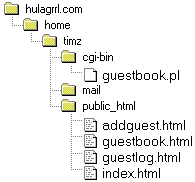
I put the HTML files in my public HTML directory, where all my Web pages live. Then I copied the script, guestbook.pl, into my cgi-bin directory. If you can't find that directory, you can try renaming your Perl script with a .cgi extension and putting it in the same place as your HTML pages. Some servers can deal with this setup, some can't. Your mileage may vary. Also, when you copy scripts in your FTP program, do so in ASCII mode instead of binary or auto mode; otherwise you could have line-break problems.
Here's what my file structure looked like:
Useful Applications and Sites
Here is a quick list of solid freeware and shareware applications that can be useful when throwing together a Web site. There are also some commercial products that are available on a free trial basis, which will usually give you enough time if you're dealing with a short-term project. You can often pick up trial versions of some of the heavy hitters (Photoshop, Illustrator, Dreamweaver, Premiere, FrontPage, etc.), though these are really just for the purposes of demonstration and sometimes have key features crippled or missing.
If you do end up using any of these shareware products on a regular basis, please be sure to pay the registration fee. Many of these programs are top-notch, often out-performing their commercial counterparts or at least stripping away much of the unnecessary bulk in those larger programs. For example, I've been using Tex-Edit Plus for just about all of my word processing needs ever since I found it; meanwhile Microsoft Word sits in a seedy section of my hard drive, too old and bloated to move, begging for euthanasia.
Shareware Macintosh Applications
Tex-Edit Plus ($10): A clean, powerful, and flexible text editor, it's meatier than dumb ol' SimpleText and speedier than a full-featured word processor. It's AppleScript-able, too.
BBEdit Lite (free): BBEdit is really the best HTML editor for the Mac, but you'll have to shell out $119 for the real deal. Still, BBEdit Lite is no slouch, and you can't beat the price.
PageSpinner ($25): This is an HTML editor with plenty of features to simplify the Web -building process.
GraphicConverter ($35): It's no Photoshop, but it can work with a wide variety of image formats and do some rudimentary image-editing stuff. It's especially good at preparing images for the Web.
Fetch (free for educators/nonprofits, otherwise $25): The only FTP client for the Mac that I've ever used and ever heard of anyone using. It's simple and flexible and fast.
GifBuilder (free): A great little program for making GIF animations. Easy as falling off a dead horse.
QuickEditor ($35): A powerful program for editing video and preparing it for the Web.
SoundMachine ($10): This application is mainly for playing an assortment of audio files, but it also has some basic editing features that could come in handy if you don't want to spring for some pricey audio suite.
ColorFinder (free): I've needed this thing forever. Using a Photoshop-esque Eyedropper tool, you can grab any color on your desktop, in any program. It'll then spit out the appropriate hexadecimal code for your HTML. Find something alluring about that murky red color in Quake? Grab it, and it's yours.
Web-o-Tron Layout-o-Matic ($10): This is an incredibly weird and neat-o template generator. It's one of those programs in which the interface is so interesting-looking that you have no idea how it works. According to legend, the Layout-o-Matic was created in 15 nanoseconds by the Web-o-Tron, an electronic brain designed by a biochemist 60 years ago.
Mapedit (free 30-day trial period, then $25): This can help you with the potentially tricky business of making an image map.
NiftyTelnet (free): Need to telnet? Who doesn't! Well, I don't, actually, but some people seem to get off on it, and this application can get you onto that remote system out in the great beyond.
Shareware Windows Applications
I wasn't able to dig up a free/cheap text editor for Windows that was any better than Note Pad and/or WordPad. So I say, why buy the cow when you can keep milking it for free?
HomeSite (free 30-day trial, then $79): OK, if you simply have to get an HTML editor, you can't beat HomeSite. I'm a Total Mac Dork, and even I have used this program and been perfectly happy with it. You'll have to shell out some relatively big bucks after a month, but if you're going to be doing any kind of Web-building work on a regular basis, it'll be money well spent.
GIF Construction Set ($20): Want obnoxious, animated ad banners on your site? Sure, we all do. The GIF Construction Set will make this a painless process.
QuickEditor ($35): To quote myself from earlier in this article: "A powerful program for editing video and preparing it for the Web."
Color Picker (free): This will help you convert colors to hexadecimal numbers and/or vice versa.
Mapedit (free 30-day trial period, then $25): As I said in the Mac section (please pay attention here, folks): This can help you with the potentially tricky business of making an image map.
CuteFTP (free 30-day trial, then $34.95): Pretty much no matter how you slice it, you're going to have to FTP something somewhere. This program makes it easy and fun. That's right: fun! You'll be FTPing files even when you don't have to, just to have more fun!
CRT (free 30-day trial, then $30): A useful and customizable telnet program, also very popular, if that sort of thing matters to you.
LView Pro (free 21-day trial, then $40): This is a basic image editor/converter that can perform many of the necessary tasks if you're living in a Photoshop-free environment.
Freedback.com: This site will generate a form to your exacting specifications, then deal with all the CGI script headaches for you - for free.
Dr. Watson: An online HTML-checker, Dr. Watson will scour your code for mistakes or proprietary tags, helping to speed along the proofing stage.
Matt's Script Archive: Invaluable resource for handy and stealable CGI scripts, including the ever-popular guestbook, hit counter, message board, and cookies.
WebAlias: Free URL redirection service, one of several currently out there.
USE CSS, NOW
I GUESS THE DIFFERENCE BETWEEN.
ASP, SSI, CGI, MUST BE A CLEAR EDGE TO ALL OF USE,
THOUGH. THE FACT IS THAT
AS WE USED JS, FILES TO ENCAPSULATE OUR JAVA SCRIPT
FILES, WE ARE DOING THE SAME WITH
CSS, CASCADE SHEET STYLE.
HTML MAY CONTAINS INTERNAL OR EXTERNAL CSS, AND SO WE
WILL REFER TO IT BY USING , HERF TAG....
IMPORTANT WITHING HTML
WITH IMAGES, USE <ALT = " " ATTRIBUTE>
,,,,,,SO THE USER WILL KNOW WHAT IS COMING UP..
WITH HERF......USE TARGET="MAIN" +
TITLE=" "
ATTRIBUTES USED TO REFER TO WHAT YOU WILL SEE, AND TO
OPEN THE PAGES IN A NEW WINDOWS, THIS =: FILE NEW ->
WINDOW....
NOW WITH CGI..
<STYLE>
P{color:black; font-size: 12pt; lin-height: 16pt;
margin-top: 0pt; margin-bottom: 0pt; font-family:
times new roman, serif}
//observe how you set the default fonts in your site
for yoursefl.....
H1 { font-size: 14pt; margin-bottom: 0pt; color:black;
font-family: arial, serif }
</style>
</head>
to make it external.
<link rel="stylesheet" type="text/css"
herf="moc.css">
<head>
There are still more to know
ttp://www.webenalysis.com/colortable.asplearn how to pick the color you need for a safe site.
http://www.webenalysis.com/cold-fusion-functions.aspa list of cold fusion commands.
http://www.webenalysis.com/meta-tag-generator.asp
creating meta tags to your site must be done within specific boundaries. as 60-800-150
are the maximum to use to form, title, keyword, description,
is so starange that title would be up to 60 letters, ensure your entries are within normal by this link.
please try to memorize this list just like if it was your name:
thank you ..
|
please try to memorize this list just like if it was your name: thank you ..
|
|||||||||||||||||||||||||||||||||||||||||||||||||||||||||||||||||||||||||||||||||||||||||||||||||||||||||||||||||||||||||||||||||||||||||||||||||||||||||||||||||||||||||||||||||||||||||||||||||||||||||||||||||||||||||||||||||||||||||||||||||||||||||||||||||||||||||||||||||||||||||||||||||||||||||||||||||||||||||||||||||||||||||||||||||||||||||||||||||||||||||||||||||||||||||||||||||||||||||||||||||||||||||||||||||||||||||||||||||||||||||||||||||||||||||||||||||
TRYING TO USE THE FREE WEB SITES SERVICE
AS :// GEOCITIES.COM
AND ....50MEGS.COM
I FOUND OUT THAT THEY AREN'T EASY YET, THEY MADE SURE NOT TO ALLOW YOU AS A FREE USER TO USE ANY CGI FILES OR PHP, ASP BY BLOCKING THEIR MIME EXTENSION OFF THE ALLOWED LIST BY YOU. Current Folder: http://elkayal.50megs.com/
.
$3.99/month 100MB
$3.99 p/m 100Mb money back guarantee. All accounts come with support for ASP, PHP, CGI, POP3, MySQL FrontPage 2000. the best value for money on the Net. That is really a promise.
one2host.com
*.
Free Web Host at Your Web Address $19.95
Free hosted Web site with easy-to-use Web templates, Web-based e-mail at your Web address (i.e. domain name) and lots of services - all free with the purchase of a Web address for $19.95.
www.domainnamesanity.com
-was so funny to discover that using the personal sever provided freely by win 98 CD, will contains cg-bin to hold your -pl "files" though I am still working on the fact how to set the chmod attribute of the different files provided by a script -pagkage.