

As your guide, please look for the Japanese characters you see below when u log-in to Yahoo Chat Japan.
USING BROWSER�F After you log-in, click this character =>  for all "Room Lists".
Then, under  (Yahoo Category), click =>
 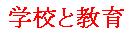 for "School & Education Category", then at the upper-right part
of your screen click =>  for "User's Room Lists". A page or sometimes few pages
for Chatroom's Titles will appear, look for the Chatroom Title�F *EIGOde CHAT�I*by U&I =>
click the Chatroom Title to Enter.
USING MESSENGER: After you log-in, in your messenger window click this character =>  for "Chatroom Lists",
under Category => 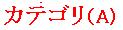 click => for "School & Education Category", then
click => for "User's Room Lists".
click => for "School & Education Category", then
click => for "User's Room Lists".
Under User's Room Lists, look for Room Title�F *EIGOde CHAT�I*by U&I =>
click the title then click =>  to Enter.
To acquire an ID in Yahoo Japan, please click here�F

For English translations/guidance in acquiring an ID in Yahoo please click here�F

To log-in to Yahoo Chat Japan, please click here�F

To download the latest version of Yahoo Japan Messenger, please click here�F
