A worlwide collection of networks that links millions of businesses, government agencies,
educational institution and individuals
Internet, Intranet & Extranet
Connecting To The Internet
Internet Service Provider
Internet Protocol Address
| Catogories | Internet | Intranet | Extranet |
| Definition | The largest and most well known computer network, linking millions of computers all over the world. | A network that belongs to an enterprise and is a accessible only by that enterprise's employees or authorized users. | A private network that connects more than one organiztions that use internet technologies to allow supplier, customers and bussiners partner limited access to their network. |
| Type Of Users | Any individual with dial-up access or LAN | Authorized employees only | authorized groups from collaborating companies. |
| Usages | Provide information for public (Access all kinds of information) | Provide information for organization employees (telephone directories, Employees informations, e-mail) | Provide information to suppliers, customers and bussiness partners (Access data, check status place order, send email) |
| Security | Loose- security control is lower | Higher- security control are higher | High- Security control are high |
| Type Of Access | Unlimited, public : no restrictions | Private and restricted | Private and outside authorized partners |
| Information | General, public and advertisement | Specific, corporate and propretary | Shared in authorized collaborating groups |
Connecting To The Internet
| DSL ( Digital Subscriber Line) | Provides high-speed internet connections using regular copper telephone lines. |
| Fiber to the Premises (FTTP) | Uses fiber-optic cable to provide high-speed internet access to home and bussiness users. |
| Fixed Wireless | Provides high-speed internet connection using a dish-shaped antenna on your house or bussiness to communicate with a tower location via radio signals. |
| Cellular Radio Network | Offers high-speed internet connection to devices with built-in compatible technology or computers with wireless modems |
| Cable Interrnets Services | Provides high-speed internet access through the cable television network via a cable modem. |
| Wifi (Wireless Fidelity) | Network users radio signals to provide high-speed internet connections to compatible or properly equipped wireless computers and devices. |
| Satellite Internet Service | Provides high-speed internet connection via satellite to a satellite dish that communicates with a satellite modem. |
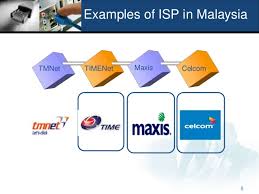
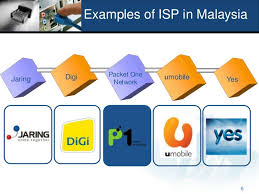
Internet Service Provider
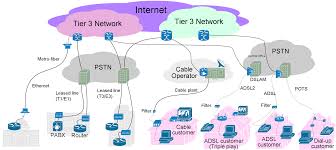
What is an Internet Service Provider (ISP)?
- A service (an access) provider is a business that provides individuals and organizations access to the Internet free or for a fee.
- A business or other organization that provides Internet access to others, typically for a fee.
What is an Internet Service Provider (ISP)?
-An Internet Service Providers are categorized as regional or national ISPs.
-A regional ISP usually provides Internet access to a specific geographic area.
-A national ISP is a business that provides Internet access in cities and towns nationwide.
-Other than Internet connection, ISPs may also provide related services like Web site hosting & development, e-mail hosting, domain name registration etc.
-Providing and maintaining a connection to the Internet.
-Support the hardware and software needed for the connection service.
-To protect their site and network from external threats such as viruses, hacker attacks and other illegal activities.
-To provide 24-hour customer service and technical support.
- A service (an access) provider is a business that provides individuals and organizations access to the Internet free or for a fee.
- A business or other organization that provides Internet access to others, typically for a fee.
What is an Internet Service Provider (ISP)?
-An Internet Service Providers are categorized as regional or national ISPs.
-A regional ISP usually provides Internet access to a specific geographic area.
-A national ISP is a business that provides Internet access in cities and towns nationwide.
-Other than Internet connection, ISPs may also provide related services like Web site hosting & development, e-mail hosting, domain name registration etc.
-Providing and maintaining a connection to the Internet.
-Support the hardware and software needed for the connection service.
-To protect their site and network from external threats such as viruses, hacker attacks and other illegal activities.
-To provide 24-hour customer service and technical support.
Internet Protocol Address
What is an IP Address?
- An IP address (Internet Protocol address) is a number that uniquely identifies each computer or device connected to the Internet. OR
- A numeric internet address used to uniquely identify a computer on the Internet.
Why does an IP Address exist?
- It exists as the Internet relies on an addressing system much like the postal service to send data and information to a computer at a specific destination.
What does an IP Address consist of?
- The IP address consists of four groups of numbers, each separated by a period. The number in each group is between 0 and 255.
- In other words, IP address are 32-bit numbers, written in dotted decimal notation. Each 4 bytes is written in decimal format between 0 to 255.
How does an IP Address look like?
- A typical IP address looks like this:
216.27.61.137
- To make it easier for us humans to remember, IP address is expressed in decimal format as a "dotted decimal number" like the one above.
In general, the first portion of each IP address identifies the network and the last portion identifies the specific computer.
- But remember, computers communicate in binary form. Look at the same IP address in binary:
11011000.00011011.00111101.10001001
- If you add all the positions together, you get 32, which is why IP address is considered 32-bit numbers.
- Since IP address is difficult to remember and use. Thus, the Internet supports the use of a text name that represents one or more IP addresses.
- Currently, two versions of IP addresses exist: IPv4 and IPv6.
Today’s IP address, IPv4 (Internet Protocol Version 4) – have 4 parts separated by periods (.), and

- The newer, IPv6 (Internet Protocol Version 6) – a new version of IP address, have 8 parts separated by colons (:) OR
- New IP addressing scheme that may increase the number of available IP addresses

- IPv4 (Internet Protocol Version 4) – uses 32-bit addresses, so allows for 232 possible unique addresses.
- IPv6 (Internet Protocol Version 6) – a new version of IP, uses 128-bit addresses so allows for 2128 possible unique addresses.
- The transition from IPv4 to IPv6 is necessary because of the vast amount number of devices connecting to the Internet today.
IPv4 (Internet Protocol Version 4)
- Has two part that identify specific computer, one part to identify the network where that computer resides and a second part to pinpoint the specific computer or host within that network.

IPv6 (Internet Protocol Version 6)
- Has three parts: a global prefix to identify the network, a subnet to identify the location within the network, and the interface ID to identify the specific computer or host.

What is a Domain Name?
- A domain name is the text version of an IP address.
- As with an IP address, the components of a domain name are separated by periods.

The IP address and domain name for the Google Web site
- Every domain name contains a top-level domain (TLD), which is the last section of the domain name.
- A generic TLD (gTLD), identifies the type of organization associated with the domain.

- In the domain name www.google.com, the top-level domain is .com
- The organization that assigns and controls top-level domains is the Internet Corporation for Assigned Names and Numbers (ICANN pronounced EYE-can).
- The domain name system (DNS) is the method that the Internet uses to store domain names and their corresponding IP addresses.
- When you specify a domain name, a DNS server translates the domain name to its associated IP address so that data and information can be routed to the correct computer.
- A DNS server is an Internet server that usually is associated with an Internet service provider.
- An IP address (Internet Protocol address) is a number that uniquely identifies each computer or device connected to the Internet. OR
- A numeric internet address used to uniquely identify a computer on the Internet.
Why does an IP Address exist?
- It exists as the Internet relies on an addressing system much like the postal service to send data and information to a computer at a specific destination.
What does an IP Address consist of?
- The IP address consists of four groups of numbers, each separated by a period. The number in each group is between 0 and 255.
- In other words, IP address are 32-bit numbers, written in dotted decimal notation. Each 4 bytes is written in decimal format between 0 to 255.
How does an IP Address look like?
- A typical IP address looks like this:
216.27.61.137
- To make it easier for us humans to remember, IP address is expressed in decimal format as a "dotted decimal number" like the one above.
In general, the first portion of each IP address identifies the network and the last portion identifies the specific computer.
- But remember, computers communicate in binary form. Look at the same IP address in binary:
11011000.00011011.00111101.10001001
- If you add all the positions together, you get 32, which is why IP address is considered 32-bit numbers.
- Since IP address is difficult to remember and use. Thus, the Internet supports the use of a text name that represents one or more IP addresses.
- Currently, two versions of IP addresses exist: IPv4 and IPv6.
Today’s IP address, IPv4 (Internet Protocol Version 4) – have 4 parts separated by periods (.), and
- The newer, IPv6 (Internet Protocol Version 6) – a new version of IP address, have 8 parts separated by colons (:) OR
- New IP addressing scheme that may increase the number of available IP addresses
- IPv4 (Internet Protocol Version 4) – uses 32-bit addresses, so allows for 232 possible unique addresses.
- IPv6 (Internet Protocol Version 6) – a new version of IP, uses 128-bit addresses so allows for 2128 possible unique addresses.
- The transition from IPv4 to IPv6 is necessary because of the vast amount number of devices connecting to the Internet today.
IPv4 (Internet Protocol Version 4)
- Has two part that identify specific computer, one part to identify the network where that computer resides and a second part to pinpoint the specific computer or host within that network.
IPv6 (Internet Protocol Version 6)
- Has three parts: a global prefix to identify the network, a subnet to identify the location within the network, and the interface ID to identify the specific computer or host.
What is a Domain Name?
- A domain name is the text version of an IP address.
- As with an IP address, the components of a domain name are separated by periods.
The IP address and domain name for the Google Web site
- Every domain name contains a top-level domain (TLD), which is the last section of the domain name.
- A generic TLD (gTLD), identifies the type of organization associated with the domain.
- In the domain name www.google.com, the top-level domain is .com
- The organization that assigns and controls top-level domains is the Internet Corporation for Assigned Names and Numbers (ICANN pronounced EYE-can).
- The domain name system (DNS) is the method that the Internet uses to store domain names and their corresponding IP addresses.
- When you specify a domain name, a DNS server translates the domain name to its associated IP address so that data and information can be routed to the correct computer.
- A DNS server is an Internet server that usually is associated with an Internet service provider.