Internet Programming
Coursework
A company called “AMD
Computer Systems” is a direct supplier of
computer systems and related products. It provides services for government
organizations, educational institutions and individual users. It allows the
customers to fully customize their own new PC from start to finish. Then it
will fully build the chosen system & load all of the latest drivers and
software needed. The customers should simply login into the company’s web site
and select the components they would like in their PC.
During the course you will be
asked to implement different parts of the “AMD” company web site and its
functionalities.
Assignment 1: [Thursday
16/11/2006]
Build the company web pages as described
below using HTML.
All company web pages have the
company logo image and its name written in green color, size 7 and “Comic Sans
MS” font face at the top. A horizontal ruler will separate the top part from
the rest of the page content. See the figure below showing the top part of any
web page in the company’s site. (Note the company logo image file is provided
with the assignment files and is called “AMD-logo.jpg”).

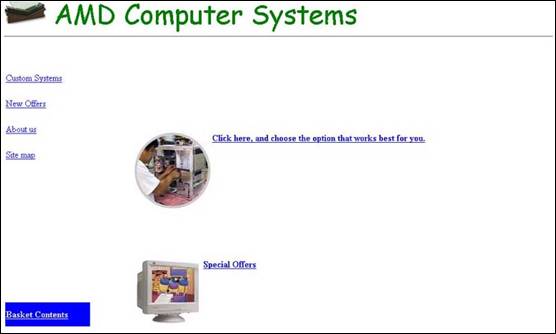
- The Main web site page:
- The main page content is designed in a table of two
columns and two rows that has hidden borders.
- The left column in the first row is narrow and it
contains hyperlinks to other pages of the web site, which are listed
below:
§
Custom Systems
§
New Offers
§
About us
§
Site map
Note:
all these hyper links open the new web pages on the same window except “Custom
Systems” which opens a new window.
§
The left column in the second row has a blue background
color and the words “Basket Contents” underlined and in white color.
§
The two rows of the right column of the table are merged
together. It contains two images (“monitor.jpeg” and
“custom_pc_icon.jpg”) with two header 4 hyperlinks to
the “custom workshop page” and the “New offers page”.
§
Add the appropriate
§
See the figure below for a view of this page.
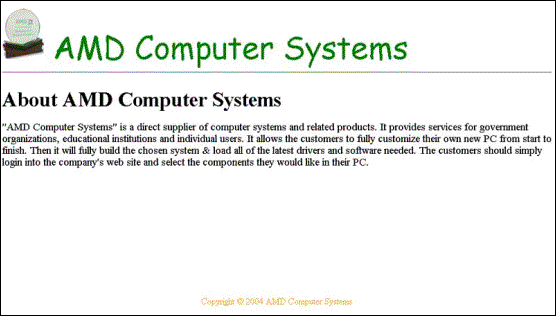
- Company information page:
This
page contains a header of size 1 with the title “About AMD Computer Systems”.
Then a paragraph about the company will follow the title. Finally the text “Copyright
© 2004 AMD Computer Systems” is written at the bottom center of the page in
orange color and font size 2. See the figure below
for a view of this page.
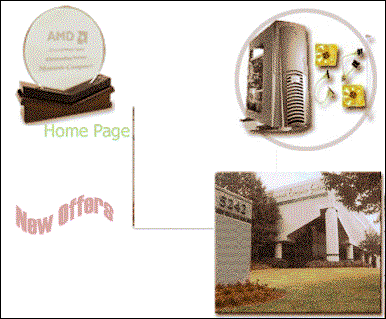
- Site map page:
This page contains the
image called “map.gif” at the center of the page. The
image is divided into hot areas that are hyperlinks to the main parts of the
web site (Custom Systems, New Offers, About us and
home page). See the figure below for a view of this page.
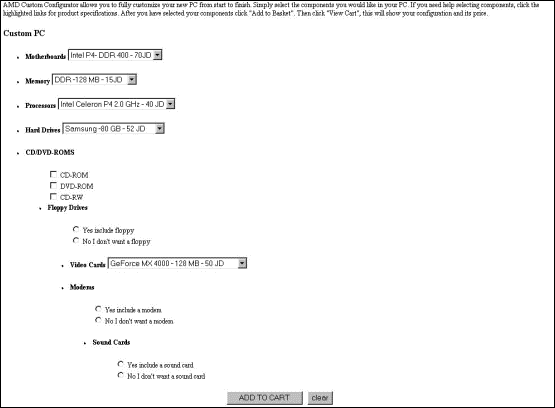
- Custom systems page:
This
page starts with a paragraph describing to the user how to use the custom
system. Then a header 2 follows with the text “Custom PC”.
Then
a form that contains the following elements shown in the table below (Note the
elements are shown in an unordered list):
|
Element |
Options of the element |
Element type |
|
Motherboards |
§
Intel P4- DDR 400
- 70JD §
AMD- XP - 30JD |
Select |
|
Memory |
§
DDR -128 MB - 15JD §
DDR - 512 MB - 50 JD §
DDR - 1 GB- 170 JD |
Select |
|
Processors |
§
Celeron P4 2.0 GHz - 40 JD §
Intel Celeron P4 2.7 GHz - 80 JD |
Select |
|
Hard Drives |
§
Samsung -80 GB - 52 JD §
IDE Maxtor- 120 GB - 55 JD |
Select |
|
CD/DVD-ROMS |
§
CD-ROM §
DVD-ROM §
CD-RW |
Check box |
|
Floppy Drives |
§
Yes include floppy §
No I don't want a floppy |
Radio button |
|
Video Cards |
§
GeForce MX
4000 - 128 MB - 50 JD §
ATI Radeon 9600 XT- 128 MB -
145 JD |
Select |
|
Modems |
§
Yes include a modem §
No I don't want a modem |
Radio button |
|
Sound Card |
§
Yes include a sound card §
No I don't want a sound card |
Radio button |
|
Add to cart (at the center) |
|
Submit Button |
|
Clear (at the center) |
|
Reset Button |
See
the figure below for a view of this page.
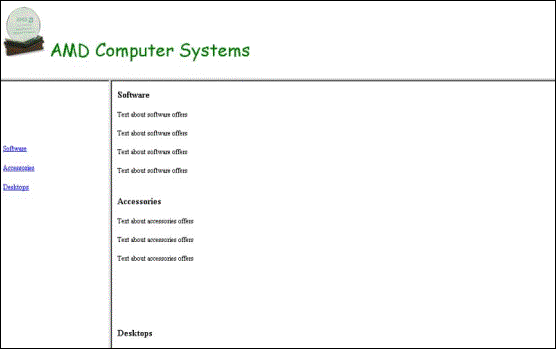
- New offers page:
This
page contains a vertical frame where the left frame contains hyperlinks to
internal positions in the right frame web page. The hyperlinks are: software,
accessories and desktops. The right frame displays one html file that contains
three sections: software, accessories and desktops marked by internal marks.
Each section has a header 2 that describe the section title and some text of
your choice. Below is a picture showing how this page looks like.
General Note: The images needed in this assignment are available in a folder called Ass1-images