This what I have learned using Linux Samba and SWAT on my home network. A 4 port hub running Linux and Windows.
Notepad Linux Mandrake 9.2, Kernel, KDE 3.1
BlackPC Windows XP Pro + Linux Mandrake 9.2, Kernel , KDE 3.1
Debs Windows ME
Chans Windows ME
All share Internet, Printer, Scanner
etc.
I acknowledge all the assistance of people and websites online in the preparation of these howtos
Bill Rosoman, Hamilton
New Zealand. [email protected]
(just remove nospam)

I have taken all care but take no responsibility for how things may work with your particular setup!
January 2004
I have a Dell Inspirion 2650 Notepad and a Home Brew Desktop running Intel CPUs etc.
OK lets begin the fun!
Configure Samba (this is the Linux
thingy to talk to windows computers)
I assume it was installed when
you installed Linux, which
should have happened.
Here is a copy of my smb.conf file
(works for me!) Samba
Config (just
click the back button when finished)
I found that using SWAT was better
initially as it is easier to follow than just diving into
/etc/samba/smb.conf using an editor
like Kate or Kedit.
Heres how.
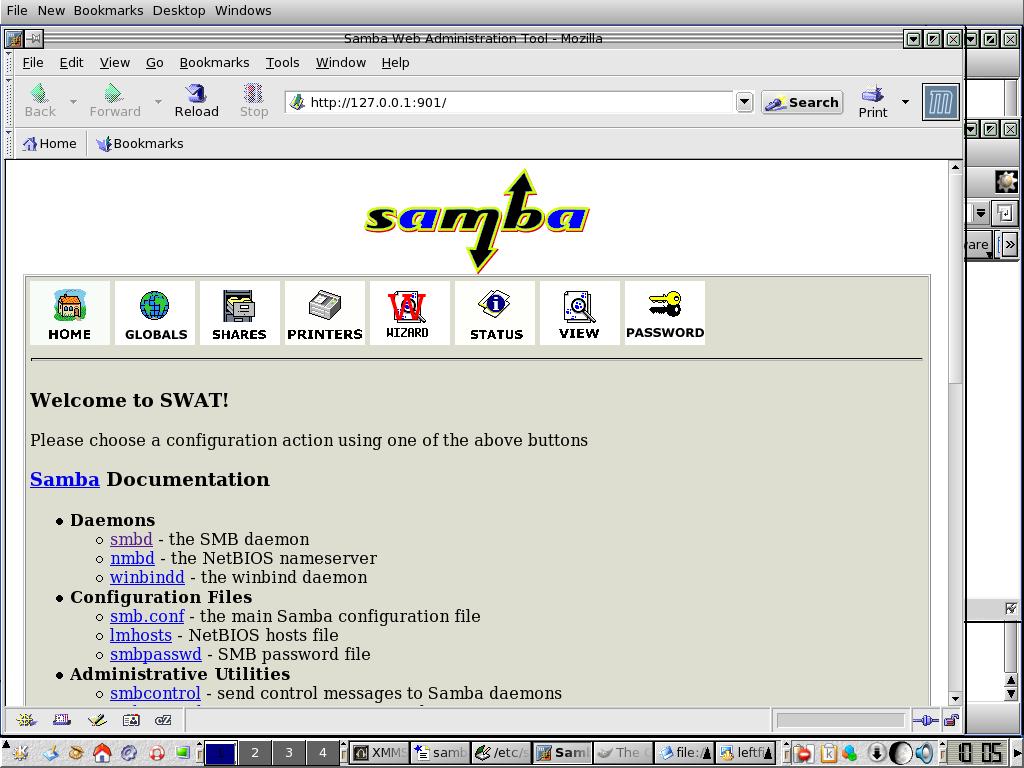
Open http://127.0.0.1:901/
in your favourite Web Browser, perhaps
Mozilla.
 Log
in as Root
Log
in as Root
You should now see this;
The SWAT Config Thingy.
Now select Global Option and edit some
of the details, (some will already be done
so should not need altering)
You can also setup Shares and the Printer here.
.
.
.
.
.
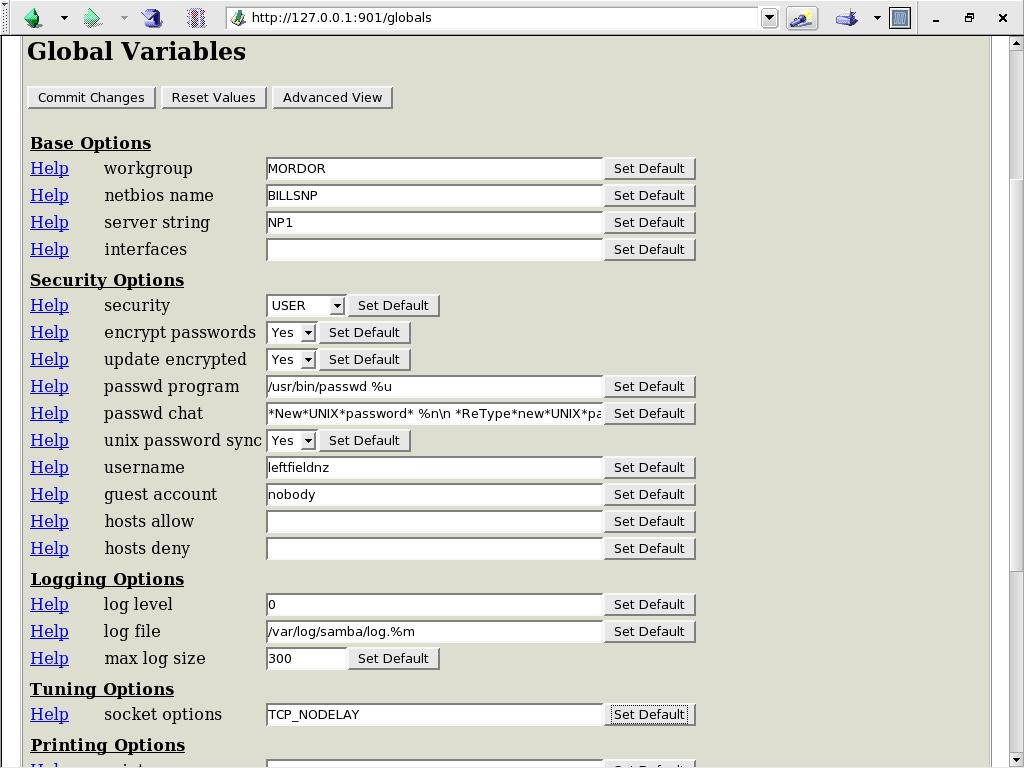
It should look something like this,
but with your info instead
of mine for things like;
Workgroup
Netbios Name
Server String
Username
Most of the rest should be the
defaults!
If you are using as a printer sharer
there will be some differences, I am not.
When you have finished Click on Commit
Changes at the top of the page so they are saved.
Now you can have a look using a text
editor.
Open a Shell @ Start > Terminals >
Konsole or whatever Shell you like.
Type in SU (super User) and enter the
Root password.
Type in
Kedit /etc/samba/smb.conf
or your favourite Editor.
This should open the config file and
show the changes just made in SWAT.
Check them and use this from now on for
any fine tuning.
Now next step
In the shell issue the commands;
samba stop
samba start
Then
adduser
username
smbpasswd -a
username
Enter twice the password for that user
and that is done.
Now
chmod 2777
/etc/samba/smb.conf
To alter the permissions
Testpram
/etc/samba/smb.conf
To check the config file
Now open Home and go to say Documents
and Right Click and select Share
Under Local Net Sharing, Select Shared
Under Permissions,
Select all except the ones under Special.
Do the same with other folders in Home
you wish to share
From the shell
kedit
/etc/hosts
You should see a line
127.0.0.1 localhost
we need to add a host on a new line
192.168.0.1 mordor.localdomain
mordor
were the IP address is your servers
one and mordor or what ever your workgroup is called are entered.
Exit and save
Try this command from shell
route
this will give you info on the hostname
etc this what I get;
[root@mordor
leftfieldnz]# ifconfig
eth0 Link encap:Ethernet HWaddr
00:08:74:E1:80:B1
inet addr:192.168.0.6
Bcast:192.168.0.255 Mask:255.255.255.0
UP BROADCAST RUNNING
MULTICAST MTU:1500 Metric:1
RX packets:6626 errors:0
dropped:0 overruns:0 frame:0
TX packets:10572 errors:0
dropped:0 overruns:0 carrier:0
collisions:0
RX bytes:2663039 (2.5 Mb) TX
bytes:959767 (937.2 Kb)
lo Link encap:Local Loopback
inet addr:127.0.0.1
Mask:255.0.0.0
UP LOOPBACK RUNNING
MTU:16436 Metric:1
RX packets:2078 errors:0
dropped:0 overruns:0 frame:0
TX packets:2078 errors:0
dropped:0 overruns:0 carrier:0
collisions:0
RX bytes:253539 (247.5 Kb)
TX bytes:253539 (247.5 Kb)
[root@mordor leftfieldnz]# route
Kernel IP routing table
Destination Gateway Genmask
Flags Metric Ref Use Iface
192.168.0.0 *
255.255.255.0 U 0 0 0 eth0
127.0.0.0 *
255.0.0.0 U 0 0 0 lo
default mordor.localdom 0.0.0.0
UG 0 0 0 eth0
could also try;
hostname
Now make sure another computer on the
network is plugged in the network and
turned on and logged in.
Try from the shell;
ifconfig
this will give you IP address
My Notepad is 192.168.0.6
The Main Server is 192.168.0.1
Try
ping 192.168.0.1 if this is your Server
IP address
If you get a good return then the
network is up and running
Press CTRL+Z to kill the Ping command
If nothing works try from the shell
linuxconf
Well I hope by now things are rocking.
Found that you can only have 8 letters
for a share name in smb.conf
You will need to fine tune a bit.
Now I found after installing Gnome on my system I had Nautilus a nice network viewer
From the shell and logged in as SU
Enter
Nautilus
When it fires up type this in the
Location
smb:
This should bring up your Host name in
my case Mordor
Double click on that and you should see
all the computers on the network
Now select a Computer > Folder > File and Edit > Copy Etc.
Click HOME on Nautilus and then the Folder you wish them to go to and then Edit > Paste Etc.
Comments
Try smbstatus to see what is happening with SAMBA
Can access network OK.
Can only read Linux Computer from
Windows XP (not 98 or ME) so far, enter Root and Password when prompted from the
Windows Network Environment.
Can copy files OK
from a Windows PC and from Linux
At least it is going but still fine
tuning to go.
If all else fails have a beer and
reboot the machine and see what happens.
Best of Luck!