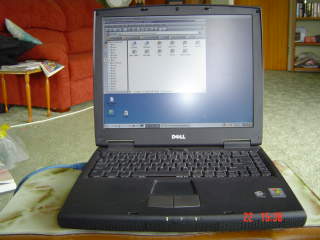
 Linux Mandrake 9.2
running
KDE 3.1
on a
Dell Inspiron 2650
Linux Mandrake 9.2
running
KDE 3.1
on a
Dell Inspiron 2650
.
.
.
.
Here is how I have set up
Linux on my inspiron 2650. Please note that you are responsible
for your own actions and just because something worked for me does
not mean that it will definitely work for you. This page is written
with the assumption that the reader is an intermediate level Linux
user.
|
Component Type |
Installed Type |
Running on Linux |
Comments |
|---|---|---|---|
|
Processor |
Intel Pentium 4 1.7GHZ-M |
yes |
|
|
Display |
14.1" XGA TFT |
yes |
Running at 1024x768 |
|
RAM |
256 MB |
yes |
|
|
Video Card |
16MB DDR NVIDIA GeForce2 Go 100 AGP 4x |
yes |
|
|
Hard Disk |
20GB |
yes |
Hitachi DK23DA-20 |
|
Floppy Drive |
3.5'' in modular bay |
yes |
|
|
Touchpad |
Builtin |
yes |
works out of the box (PS/2) |
|
Modem |
Builtin AC'97 |
not had to use |
|
|
NIC |
3Com 3c905-TX/TX-M [Tornado] |
yes |
Detected automatically |
|
Fixed Optical Drive |
Toshiba DVD |
yes |
Plays DVDs perfectly |
|
Sound |
Builtin, i810 driver |
yes |
|
|
USB |
Builtin Intel |
yes |
Camera , Memory Stick |
|
PCMCIA (PC card) |
Builtin |
yes |
Not used |
Installation
I did not want to keep windows XP on this so I made the following partitions (Used Partition Magic from DOS Disks)
I have Linux/XP on my Desktop for some things I can not yet do in Linux:
My System looks like this;
[root@localhost leftfieldnz]# fdisk -l

Disk /dev/ide/host0/bus0/target0/lun0/disc: 20.0 GB, 20003880960 bytes
255 heads, 63 sectors/track, 2432 cylinders
Units = cylinders of 16065 * 512 = 8225280 bytes

                                Device Boot    Start       End    Blocks   Id 	 System
/dev/ide/host0/bus0/target0/lun0/part1             1         4     32098+  de  	Dell Utility
/dev/ide/host0/bus0/target0/lun0/part2   *         5       734   5863725   83  	Linux
/dev/ide/host0/bus0/target0/lun0/part3           735      2432  13639185   f    Win95 Ext'd (LBA)
/dev/ide/host0/bus0/target0/lun0/part5           735      2432  13639153+  b  	Win95 FAT32

Installation of Linux was simple enough, everything was detected automatically, except the list below.


Learnt that the sound is muted and needs to be turned up


Aumix from the Start > Multimedia > Sound > Aumix, location


Adjust the volme then save and exit.

Found that Kmix from Start > Multimedia > Sound > Kmix, location is the Icon in the System Tray,

 To quickly adjust volume.

Do not use the same password for User and Root!
Digital Camera
USB Memory Stick
Modem
1. Digital Camera
Open a shell and log on as Super User su
Make a mounting point /mnt/cam directory mkdir /mnt/cam
Change the Permissions
chmod 2777 /mnt/cam
and then mount it using
mount /dev/sda /mnt/cam
When finished Unmount using
umount /dev/sda /mnt/cam
from there you can read files straight from the filesystem on the camera.
I Wish still working on it

2. USB Memory Stick
Open a Shell and log on as SU (Super User)
Edit fstab in Kate or your favourite editor Kedit maybe
kate /etc/fstab
Add the new line
/dev/sda /mnt/stick auto noauto,users,rw,umask=000 0 0
Save the file
CTRL+S
Exit Kate
Make a mounting point /mnt/cam directory
mkdir /mnt/stick
Change the Permissions
chmod 2777 /mnt/stick
You may have to create a shortcut on the Desktop,
Right click on Desktop and Create a Short to a Hard Drive,
Select Device sda
OK
Then you may have to Right click and Mount the Stick.
Actions > Mount
Now Double Left Click on Stick Icon and the Files Should appear!!!!
When you have finished and before unplugging the Stick.
Right click on Stick Hard drive
Actions > Umount
If you use a shell the commands are;
mount /dev/sda mnt/stick
cd stick
ls to view files
cp to copy
umount /dev/sda mnt/stick
3. Modem
Linux sees it but does not allocate resources so can not mount it.
Software
I have non-mandrake software on my box, including:
Star Office 7 - Very Very nice Office Application (Using it to write this HTML page)
To Do List
Sort out Camera, Modem
Conclusion
Overall I am pleased with my laptop and it offers me a great range of abilities that windows would not. I have no regrets about being 100% Linux. My thanks to the Linux kernel mailing list archives and the dell Linux laptop group on yahoo for the snippets of information that I compiled to form this document and my laptop configuration.
I have in the past tried Linux but it certainly is maturing fast, IE it actually works out of the box now. My other motive is that M$ will have DMR (Digital management Rights) and IMR implemented in new versions of Windoze and I do want to be told by Bill Gates what I can watch and listen too and who I have to keep paying money to. It is also the fact that Linux was up and away playing music, Open Office installed and online in half an hour, were as I have just formatted and done a friends PC using XP Pro and took 12 hours to install, update and get running properly! Another bonus is all the software is free and no bloody serial numbers and activation crap (well it sort of was free in Windoze!!!).
Bill Rosoman January 2004