SX64 keyboard hacking
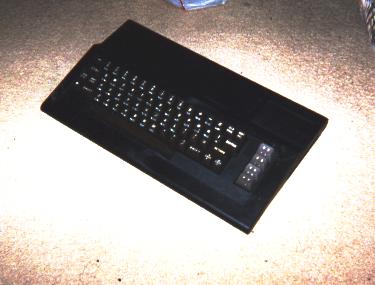
My hacked C64 keyboard now in the incarnation of an SX64 compatible keyboard. Note the cool black "Slimline" case.
I managed to take apart and reassemble an SX64 keyboard and I found to my surprise, that you can actually hack a normal C64 keyboard to the SX. Both keyboards are very similar - with one exception.
The main issue is that the SX has some pins on its D25 port dedicated to the Shiftlock and powering it's light. But when you hack a C64 keyboard to the SX, you don't need these pins, as the C64 keyboard's shiftlock enforces the two pins that trigger Left-Shift and leave it on permanently anyway. Plus the C64 has no light for shift/lock.
Cool.
To do this hack, you will need a C64 keyboard (Preferably hacked from a broken machine, or a machine you are gutting for parts. Don't wreck a working commie - unless it's a revision E board!). You will also need a C64 case. You can use the case that you have with your C64 keyboard, but just take the old mother board out, OK? If you want to be cool like me, you can get your hands on an unused black Slimline case. Those old enough to remember, will know that these Slimline cases were once touted as replacement cases for the bread-box C64s. They look very similar to the C64c cases, although the one I have is jet black. In fact, black keyboard with black-case looks really cool - matching the dark colours of the SX64. If anybody wants a Slimline case, a friend of mine has about 10 of these UNOPENED sitting in the back of his shed, mostly black in color. I grabbed one before he ditched the lot.
Here's an ASCII pinout of the C64 keyboard pins:-
() - A
() - B
() - C
() - D
() - E
() - F
() - G
() - H
() - 0
() - 1
() - 2
() - 3
() - 4
() - 5
() - 6
() - 7
(*) - this pinhole is empty
() - 8
(*) - this pinhole is blocked with plastic
() - I
Now all you need to do is cut the wires from the C64 plug and solder them into a new female D25 plug (at your electronics parts shop)
Note, that not all pins on the D25 have a wire connected to them. I have marked these empty pins with an asterisk "*". Excepting 2 unused pins, these empty pins are actually where the shift/lock light power and grounding comes from. All other connected pins are shown by their letter/number in reference to the above C64 keyboard pinout. Don't make a mistake by soldering to the Shiftlock power pins, cause I don't want to imagine what would happen if you did that.
Here's a view of the D25 plug from the REAR END. That is, this is the view of the D25 from the side you will be soldering to. I have done it this way to ease the job of soldering the pins for you (No thanks is necessary). Also note that the SX keyboard (unlike normal PC parallel ports) is installed upside-down as in the diagram below:
           __________________________
          / * * * * * A B C D E F G  \
         / H 0 1 2 3 4 5 6 7 * I * 8  \
         ------------------------------
You can actually hack the RF and LH holes a bit more if you are using a slimline case, to allow room for the D25 so you can screw it in.
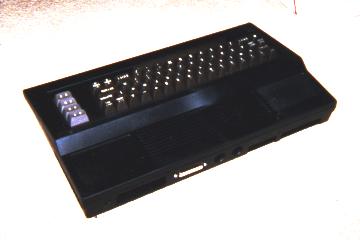
Here's the rear view. Notice the D25 pin socket on the rear end.
Now, in order to connect your new SX64 keyboard to the SX, you'll need an ordinary D25 parallel cable. Just remember to buy one that doesn't have those bulky screw-in pins on the side of the plug. The SX64 keyboard plug in section isn't wide enough to cope with these pins. If you try to put it in anyway, you'll find that it won't go in.
Of course, you can always build your own D25 parallel cable too, and this may be the better option. If you decide to do this, I would take the cautious approach and make the cable itself quite short. I assume that the longer the cable is, the less responsive the keyboard (longer distance for keyboard signals to travel).
A word of warning: Avoid adding wear to the keyboard cable plug inside the SX64 unit. These plugs actually fall loose after too much wear. I have already attempted to fix an SX keyboard which had this issue inside the keyboard, and no doubt it can happen on the inside of the SX64 as well.
So now you have a keyboard for your SX (which also doubles as a keyboard for a tower 64. This whole hacked-keyboard approach probably makes the SX less portable now (try hooking the new keyboard into the case!), but who's complaining? The portability of the SX is laughable anyway, and a real C64 keyboard is much more comfortable to use than the SX64's keyboard (and a lot more responsive too).
Don't forget to get around to opening your SX64 one of these days and heatsinking the chips inside. The SX64 has a bad heatsinking problem. SIDs and PLAs have been known to fry easily in the SX64. The world needs more SIDs, so please look after the ones we still have!
