Korff's UI mod
A modification the Vert mod
Last update: 11/20/03
Pictures will be updated soon, as they are badly out of date.
TO INSTALL
Download the korff112003.zip file.
Open the file. A zip file program, Winzip, can be downloaded to open it.
Extract the contents into your eq directory\uifiles\korff (create the folder)
Start Everquest, log in your character and enter the game.
Type /load korff 1 or use the "Load UI Skin" button in the Options menu
Reposition the windows to your taste.
You may have to adjust the transparancy of the compass to make it display correctly. (50%-75% works well)
KNOWN BUGS
-The LFG button in the Window Selector does not work at this time. Please type /lfg to bring up the window (do not type /lfg on or /lfg off, just /lfg).
-The buff display in the pet window does not work.
HISTORY
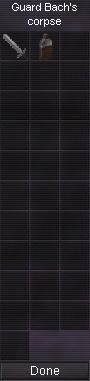
-11/20/03 Fixed all UI errors (no more red text), updated find button in actions window, implemented 3d target ring, added con color coding to target window (working on it for pet window), added Link All button to loot window.
-9/11/03 Fixed EQUI.xml errors causing some windows (Most notably the LDoN Adventure windows) not to show up.
-9/9/03 Fixed for patch ... no new additions, just fixed.
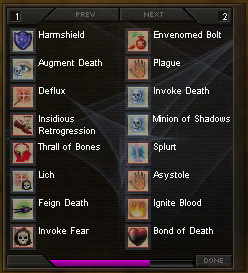
-8/26/03 Fixed alignment of the pet window with pet controls in the master zip. Added spellbook icon to spell gems. Corected code issues causing error messages upon loading (this code was in the target and group windows). The optional patches of the pet window have not had their alignment fixed yet, however.
-3/12/03 Fixed bank and journal issues. Download link has been taken down as it is obsolete. Don't fret, it's still fixed in the master zip
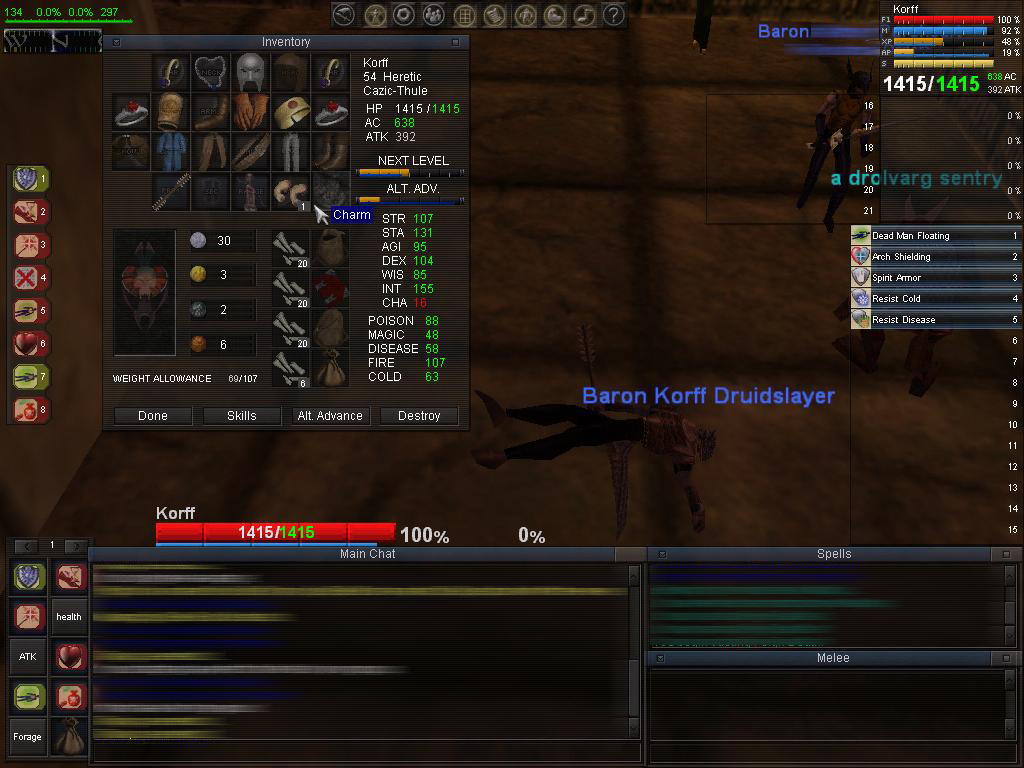
-2/28/03 Updated for the Ykesha patch - Inventory now has Tint/Face buttons, window selector has more items, other misc updates.
-2/15/03 Added Charm Slot to Inventory Window - Using icon from Default UI until I get a better one
-2/14/03 Added special patch: 800*600 Large Bar Window With Pet Control buttons
-2/14/03 Added special patch: Large Bar Window With Pet Control Buttons
-2/14/03 Added special patch: Buff/Bard windows with vertical scroll bars
-2/14/03 Added special patch: 800*600 version of large bar window
-2/6/03 Updated for Patch
-1/14/03 Bard window should work correctly now
-1/14/03 Brightened compass. It will no longer be as dark as it appears to be in the screenshot.
-1/14/03 Added maps. Use the menu (alt+m), enlarge the window, and click area tab. The first time you load a tab it will take several seconds. You computer is NOT frozen!
-1/13/03 I have been informed that my bard song window does not function correcty. I will work to solve this issue as soon as possible.
-1/13/03 Added Loc Guide and Necro spell information. Type /feedback to bring up the window.
-1/12/03 Corrected Loot window to show slot #30 correctly
-1/12/03 Initial entry
Here's a screenshot:
Loot window, Spellbook:
Download Korff's UI
Special patches available! To install, unzip into the directory you installed Korff's UI into, and say YES to overwrite files.
Large Bar Window designed for 800*600 resolution

Download
Large Bar Window With Pet Control buttons designed for 800*600 resolution

Download
Buff/Bard windows with vertical scroll bars and title bars (Resizable)
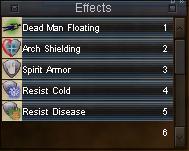
Note that you may have to slightly adjust the horizontal width of the windows to maks them display their contents correctly.
Download
More will be coming soon!