Pixel Border
This is a very convenient trick that makes you a pixel border for text. For PSP7, don't know if it'll work for other versions.
1. Make the background color the same color that you want the border to be.
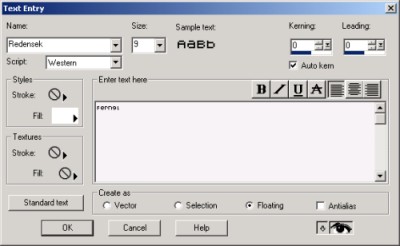
2. Make text that's kinda small and make sure the antialias box is unchecked. Also it need to be a floating selection.
3. Don't deselect the text. Go to Selections->Modify->Expand. A screen should popup with a white box with a number in it.
4. The number is how many pixels thick you want to make the border. I ususally use 1 but you can use whatever size you want.
5. Now the selection should be a bit bigger. Copy and paste it onto a new background that the border would stick out on.

Now you're done!
