White
Paper - Building your own mini-ISP
by Marcio Saito, VP of Technology - Cyclades
Corporation |
| Home
> White Paper |
|
Introduction
This white paper explains the basic hardware and software pieces
necessary to provide dialup and dedicated Internet access services.
Our focus in on small Internet Service Providers (ISPs) and our
objective is to put the Cyclades products in the context of an
ISP network and provide pointers to other basic hardware and software
information.
|
| |
|
Basic ISP Network
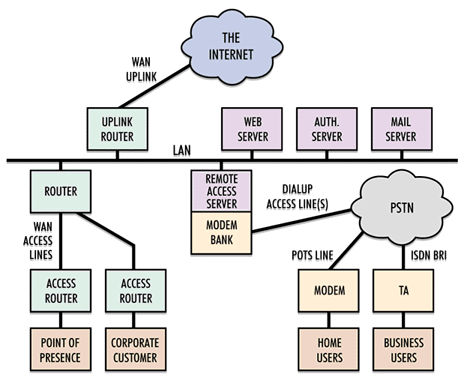
|
| |
|
The Internet and the WAN Up-link
Of course, to provide Internet access services, an ISP network
needs to be connected to the Internet. The connection is through
one or more WAN up-links to Internet backbone providers or a higher-level
ISP.
Small ISPs usually start with a single Backbone provider and
WAN up-link. As the number of users grows, there is the need for
communication line and provider backups.
The WAN up-link should be a permanent connection (typically a
leased line with PPP or Frame Relay) and be dimensioned to support
the external traffic generated by the local users.
Dimensioning the bandwidth of the up-link is more an art than
a science.
The only way to absolutely guarantee that there will be no bandwidth
bottleneck for Internet access would be simply to multiply the
maximum throughput a user can generate by the number of access
lines.
But that is not practical because Internet traffic is of burst
nature and not all the users generate continuous traffic all the
time. For example, a Net surfer generates traffic only while a
new WEB page is being downloaded. While the user is actually reading
the information (which is usually most of the time) the line is
idle.
You have also to consider the outbound traffic (external users
accessing internal WEB server, for example).
So, dimensioning the up-link connection requires analysis of
the user profile in your case and the number of people accessing
your servers from the Internet. Here are some basic references
for you to start with.
Very small ISPs serving remote areas with only a small number
of dialup users (let's say, 16 access lines) and without high-traffic
local WEB servers can live with a switched 56kbps line.
Most small-to-medium ISPs will need one or more fractional T1
or T1 lines to provide the bandwidth and redundancy necessary
to support professional Internet services.
Medium-to-large ISPs might need higher-speeds up-link connections,
from multiple T1 lines and multiple higher-level providers to
T3 and faster lines.
|
| |
The Uplink Router
The Up-link router needs to support the physical interface (typically
serial for connection to an external DSU/CSU or direct T1/FT1
interface) and the data-link protocol (typically PPP or Frame
Relay). It also has to be fast enough to support the throughput
generated by the users without imposing a performance bottleneck.
The Cyclades-PR3000 is a mid-range router that can provide a
very attractive solution. Because of its flexibility and modularity,
it can support any physical interface ranging from dialup connections
to serial with external DSU/CSU to direct connection to the T1
line. Because it has 3 WAN slots, it can grow with your needs,
support backup and alternative connections and also consolidate
up-link access Router and Remote Access Server functions all in
one box.
The Cyclades-Pathrouter is a good option for small ISPs who are
looking for a cost-effective solution for single T1, Fractional
T1 or 56kbps up-links. It has 2 serial ports that can be connected
to external DSU/CSUs and/or support backup links.
|
| |
The PSTN and the dialup access lines
The primary service provided by most ISPs is dialup access to
the Internet. Home or business users dial in and get access to
mail, WEB browsing and other Internet applications.
A typical home user will be using a PC with Windows Operating
System and will be connected through an analog modem (V.34 or
V.90) and analog phone line. Power users might use terminal adapters
and ISDN lines.
The type and number of access lines is a function of the number
of users and their profile. When dimensioning the number of lines,
the objective is to have the minimum number that can still provide
adequate access to all your customers.
A factor to consider is the pattern of use during the day. Home
users tend to connect in the evening through the night and perform
more file transfers. Business users tend to generate traffic spread
during the day. You need to consider worst case scenarios in order
to prevent users from getting busy signals.
As a basic reference, ISPs usually reserve 1 access line for
each 10 customers. For a small number of access lines (the practical
maximum number of analog phone lines you can get coming to the
building), an ISP can use regular analog phone lines connected
to analog modems and then to the Remote Access Server. Notice
that ISPs using analog phone lines in the server side cannot support
the new V.90/56kbps modem standard. When the number of lines grows,
the Phone Company will install ISDN PRI or channelized T1 lines
to bring the dialup calls directly to your building in digital
form. Each ISDN PRI line is equivalent to 23 phone lines (23 data
channels plus one control channel).
|
| |
|
The Remote Access Server
The Remote Access Server is the equipment that answers to the
calls and provides PPP connectivity to the remote dialup clients.
If you are using regular analog phone lines in the ISP side,
those lines will be connected to a modem bank. Rack-mountable
or professional modem banks are recommended for reliability. You
would use V.34 modems to provide the fastest possible service
(V.90 modems will work in V.34 mode if installed with analog phone
lines in the ISP side).
In this case, the modems are typically connected via RS-232 serial
interfaces to the Terminal Server.
The terminal server can be a stand-alone box with dedicated hardware
and software. The Cyclades-PR3000/TS is a good example of product
that can perform this function. The PR3000 has also the advantage
of being modular and supporting both remote access server and
routing functionality in one box.
Some people prefer to build their own server-based terminal server.
In this case, a PC server running Linux/Unix or NT acts as a terminal
server. To connect the modem bank to the server, you need multiple
RS-232 serial ports in the PC. Cyclades offers a complete range
of multi-port serial cards, including the Cyclom-Y family of RISC
based serial cards (cost-effective, for small-to-medium installations
up to 32 ports) and the Cyclades-Z family of high-end solutions
(high-performance, for medium to large or high-throughput installations
up to 64 ports per PCI slot).
If the dialup calls are coming through an ISDN PRI line, the
Remote Access Server has to connect directly to it and usually
it includes the digital modems (which can support V.90/56kbps)
and the PPP terminal server in one box. Those remote access servers
integrate a lot of functionality (they replace the terminal server,
cabling and modems in a traditional configuration) and, because
of that, are usually the most expensive piece of equipment in
a small ISP network.
The Cyclades-PR4000 is a Remote Access Server that supports connection
to Ethernet (10 and 10/100BT), 2 T1/E1 PRI lines and up to 64
internal digital modems and is one of the most cost-effective
and powerful solutions in its category. It also has a WAN slot
and built-in router functionality that allows it to be a POP-in-a-box
(see POPs later in this document).
|
| |
The ISP Local Area Network
The ISP backbone will typically be an Ethernet LAN that connects
all the major components in the network. To implement that, the
ISP will need an Ethernet 10BT hub (for small networks) or switch
(for better performance in larger networks).
10BT interfaces are good enough for the WAN equipment, but you
may want to use 100BT for the server connections, specially if
you have a lot of traffic.
The routers, remote access servers and other servers need to
support Ethernet connectivity.
|
| |
Point-of-Presence (POP)
As an ISP grows, it needs to be present in other geographical
areas to be able to provide dialup access using local phone numbers.
They need to establish Points-of-Presence (POP) at the locations
the customers are.
A POP is basically the same network as the one described here
for the central ISP site, with the exception that some of the
servers (authentication, WEB, mail) don't need necessarily to
be present (a POP can use the services from the central site).
So, you can see a POP as a small ISP network that has the central
ISP site as a "up-link provider".
As previously said, the Cyclades-PR4000 and Cyclades-PR3000/TS
can perform remote access server and router functions (POP-in-a-box).
|
| |
Dedicated Access Services
Besides providing dialup access to home and business users, the
ISP can also provide dedicated connectivity to small and medium
business.
Those customers will typically be connected to the ISP site through
a dedicated 56kbps or fractional T1 link using PPP or Frame Relay
and an access router at their location.
|
| |
The Routers for POP and Dedicated
Service Access
To connect POPs and corporate customers with dedicated service,
the ISP needs routers at the central site. Ideally, they can support
multiple remote sites simultaneously with different types of connection.
The Cyclades-PR3000, with its ability to support a variety of
physical interfaces and several simultaneous WAN links (up to
8, with the SSE-8) is the best fit for a central site router.
In the POP or corporate customer site, there is a need of an
access router that connects the LAN to the router in the central
site through the WAN access line.
The Cyclades-Pathrouter is usually the solution that provides
the most cost-effective solution for access routing at the remote
site.
|
| |
The Authentication Server
Dialup service requires a user database to control user access
and a way to do accounting and billing.
The Remote Access Server can support a small local database,
but we strongly recommended a centralized authentication server
in the network.
A centralized server, besides allowing for growth by supporting
multiple Remote Access Servers, can provide accounting and billing
functions as well as allowing better control over the access lines
(preventing a given user to use several dialup lines simultaneously,
for example).
The authentication server is usually a Linux/Unix or NT PC system
(dedicated to authentication or shared with some other server
function) and authentication server software. There are commercial
products as well as good servers that can be downloaded from the
Internet.
Two of the most popular free authentication server software packages
are:
The remote access server must support the authentication protocol
used by the authentication server. The Cyclades-PR3000/TS and
Cyclades-PR4000 are compatible with any authentication server
that supports RADIUS (which is the most common and recommended)
or TACACS authentication protocols.
|
| |
The WEB Server
The ISP needs WEB Servers to host its own WEB site as well as
to be able to provide WEB hosting services to the corporate users.
A WEB Server will typically be a Linux/Unix or NT PC system (dedicated
or shared with other server functions) with WEB server software.
The most popular WEB servers are:
Another option is WEB server appliances, equipment with dedicated
hardware and software to support WEB hosting (so that you don't
need to install software). Several companies also sell PCs pre-configured
as WEB servers.
|
| |
The Mail Server
Mail Servers are another basic service provided by almost all
ISPs.
Mail server software runs in a Linux/Unix or NT PC server (dedicated
or shared with other servers) and is responsible for routing/storing
e-mail traffic. To allow users to read e-mail from outside the
ISP network, you would need also a POP server.
Examples of mail servers:
|
| |
Other software modules and equipment
to consider
Besides the basic equipment and software, there are several other
pieces of technology to consider when setting an ISP to provide
more than just dialup access.
- Additional server software such as FTP server, DNS server,
telnet server, News server, mailing lists servers, etc. Those
pieces of software are usually part of most of the Operating
System distributions (Linux/FreeBSD) or the "Internet Packages"
(Microsoft, SCO, Sun, etc).
- WEB caching. For networks with a large number of users, optimizes
the use of the up-link bandwidth by storing frequently accessed
WEB pages locally. There are software-based WEB cashing (software
that runs in Unix/Linux or NT) and WEB caching appliances (specialized
hardware/software products).
- Firewall. Software or hardware with the function of isolating
the LAN from the external world and minimizes the chances of
unauthorized access to your network and data from outside.
- Additional billing and accounting software. There are add-on
software packages that allow you to extend the basic functionality
provided by the RADIUS servers.
- WEB publishing software. Needed to offer WEB design services.
- Network Management tools. Allow easier management of large
networks.
"No break" power systems to avoid service interruption
and data corruption.
|
| Home
> White Paper |
|
|