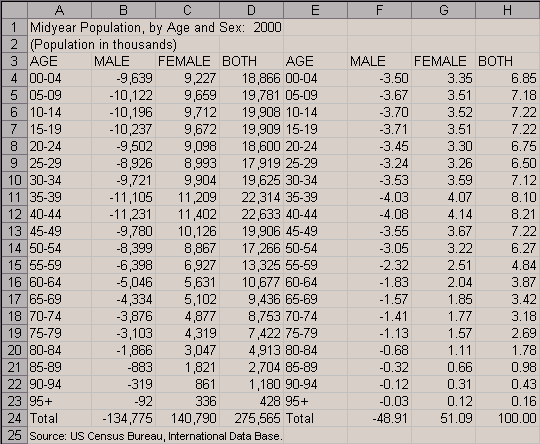
Prepare a table of population data in a spreadsheet. You need a
column of age cohorts as well as those of male and female
population. Note that you need to have male population data in
negative numbers. Two different tables are displayed below. To
the left is the one in absolute numbers, and the other in
percentages. The percentages are calculated independently for
male and female by dividing the number of people belonging to each
age cohort by the total number of entire population. In order to
calculate the percentages, you may find it convenient to use
absolute references
-- that is, in order to calculate percentagge of male population
of ages 0 to 4 (i.e., cell F4), type in
=-B4/$D$24*100
For more detail of the Excel syntax, search absolute reference in
Excel help.
|