
| Client/Server Technology for Internet Connectivity requires : : |
|
Web browser software, otherwise known as web client software, is executed on client hardware for the purpose of accessing previously developed web pages available on Internet-attached web servers. These web servers run specialized web server software that supports HTTP (HyperText Trasport Protocol) in order to manage the multiple web client requests for web pages. These web pages are collections of text, graphics, sound, and video elements and are programmed using web publishing software that may run on either client or server platforms. The web pages are programmed using text formatted with HTML (HyperText Markup Language). Because HTML is text-based, any text editor could be used to generate the HTML code, which would then be interpreted by the HTTP server software. When a web client running web browser software requests a web page or constituent element from a web server by clicking on a hyperlink, a TCP/IP message is sent to the web server identified in the URL (Uniform resource Locator).Included in this message is the identity of the requested web page file noted with an HTML extension, and a version indicator identifying which version of HTML the requesting client understands. In response, the web server retrieves the requested file and transfers it to the web client. Figure 1-1 below distinguishes between web browsers, web servers and web publishers. |
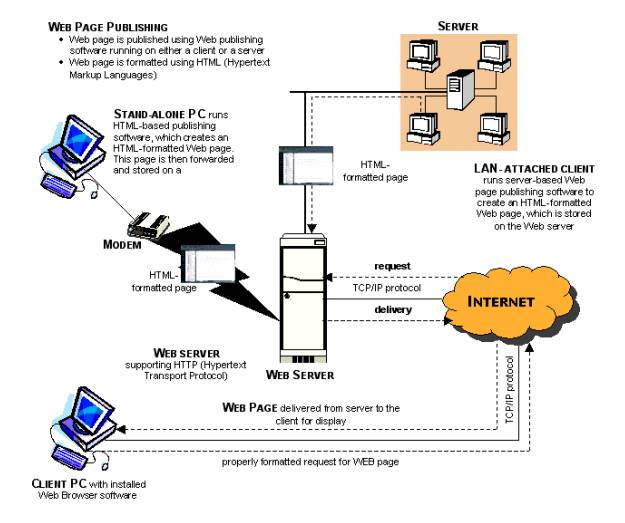
:: Figure 1-1 :: Web Clients, Web Servers, and Web Publishers
|
For example of Yahoo! Geocities :: Yahoo! GeoCities now supports the FrontPage 2000 Server Extensions. Publish directly from FrontPage to Yahoo! GeoCities site and take advantage of the features enabled by the FrontPage Server Extensions. With Microsoft Office 2000, users can also publish their Word 2000 documents, Excel 2000 spreadsheets, and PowerPoint 2000 presentations directly to their Yahoo! GeoCities sites. After creating web site with FrontPage the user can easily publish it to Yahoo! GeoCities by clicking the Publish button, and then entering his/her Yahoo! ID and password. Furthermore, GeoCiteis do not allow user to use the FTP feature in FrontPage 2000 with Yahoo! GeoCities account. Because making any changes, such as deleting, renaming, or transferring of files, using FTP may create irreparable damage to FrontPage extensions. If the user wish to use FrontPage 2000 to edit their sites, they will need to use HTTP (Hypertext Transfer Protocol) publishing method to upload their site. To use HTTP to publish web site from within FrontPage 2000, follow these steps: - In the File menu, click Publish Web - Click Options. Specify whether you want to publish only pages that have changed or all pages - In the "Specify the location to publish your web to" box, type your URL:http://fp.geocities.com/your_Yahoo_ID - Click Publish |

: : Home : : Favorite : : Resume : : Pictures : : Calendar::