AOL
Compression
This page is for AOL Users.
Have you ever noticed how pictures seem
to look blurry, fuzzy, or distorted on AOL, while the same picture will load
crisp and clear on Internet Explorer? This is most likely due to the fact that
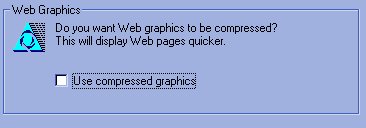
you have, under preferences clicked "Use Compressed Graphics". Of
course, having this clicked will make a website and images load quicker. However,
when you're on a gallery site such as this, or anything else where pictures
are an important part of the website you would like to be able to see them clearly.
I highly recomend to not use compressed images if you are viewing this site
from AOL. It will make the pictures blurry and loose the entire point to the
site. To check to see if you have graphics compressed, or to uncompress them,
follow these steps: