

How to make a Textured Stylish Text
Making stylish text is possible with Photoshop. I made another file to
let the novice to learn an easy method of creating textured text. Here
it is.
1. Open Photoshop application (whatever version you have installed). Now
open a new document by pressing Ctrl+N. Open dialog box will appear. Now
you enter the document (Dimensions: Width=300, height=100 and Mode=RGB)
details as shown below.
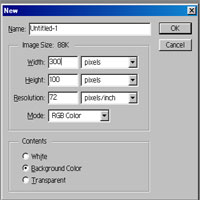
fig-1
2. Create a new layer by pressing Shilft+Ctrl+N.
3. Choose type tool and click on the Layer 1 so that "Type Tool"
dialog box appears and type any text as per your idea (but, i wrote mickey)
and click on ok.
4. Now select Filter >> Distort >> Diffuse Glow. It will display
a message like "This type layer must be rendered before proceeding
its text will no longer be editable. Render the layer". No problem
now. Just click "Ok" button. Diffuse Glow dialog box appears,
then type the values as: Grainness=7, Glowamount=7 and Clearamount=10.
Click on ok. You will see given below image.

fig-2
5. Press Ctrl+U to open Hue/Saturation. Select Colorize (make check).
Enter the values as shown in the fig-3 and click on ok.
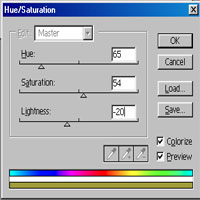
fig-3
6. Now you will see given below image.

fig-4
7. Now, select Layer 1. Then choose black color as foreground color and
fill it by choosing Edit >> Fill.
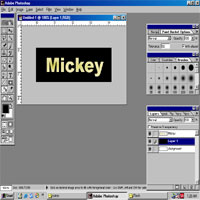
fig-5
8. Now, it's over. The final image is infront of you.

fig-6
That's all my dear friends.
"Fundamentals are the Route
to the Destination" - BHMK
Go Home