

:: Simple Star Burst - a nice
effect ::
1. Open a new document. Dimensions as follows;
Width=200 pixels
Height=200 pixels
Mode=RGB Color
Contents=Background Color.
2. Choose Rectangular Marquee Tool and draw as below showned way (fig-2
showned below).
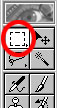
fig-1
3. To make continuous Rectangular Marquee selection hold "Shift
Key" and drag the
mouse. Completely draw rectangle selections as shown below with Rectangle
Marquee Tool. Figure showned below.
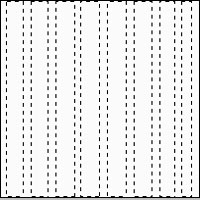
fig-2
4. Change the Foreground Color="#FE0404". Goto Edit >>
Fill, Click Ok.
5. Goto Filter >> Distort >> Ripple. Amount=348 and Size="Medium".
Click Ok.
6. Goto Filter >> Distort >> Polar Coordinates. Choose "Rectangular
to Polar" and
click Ok. Deselect it by pressing Ctrl+D. That's it final image is in-front
of you.
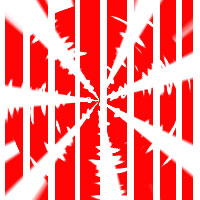
fig-3
That's all my dear friends. Hope You Enjoyed It!!!
Send mail to me (in the Compose, write "About Tutorial" in "Subject"
Column).
"Fundamentals are the Route
to the Destination" - BHMK
Go Home