

:: Created Soft-light effect ::
1. Open an image. I opened below image (fig-1).

fig-1
2. Duplicate the layer. Drag that Background layer (named Layer in the
Layers Pallette) on-to the Create New Layer as
shown below.
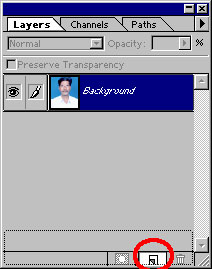
fig-2
3. Select the Original Layer ( Layer named with "Background" on the "Layers Pallette").
4. Goto Filter >> Blur >> Gaussian Blur. Change Radius=8 pixels and click Ok.
5. Select the Duplicate Layer (Layer named with "Background copy"
(fig-3) on the "Layers Pallette"). Change it's Blending Mode
to "Soft Light".
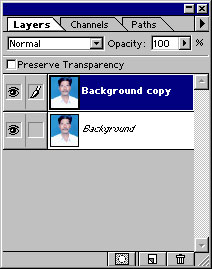
fig-3
That's it. See the result.

fig-4
That's all my dear friends. Hope You Enjoyed It!!!
Send mail to me (from your mail-id, in the Compose, write "About
Tutorial" in the "Subject" Column).
"Fundamentals are the Route
to the Destination" - BHMK
Go Home